

Introduction
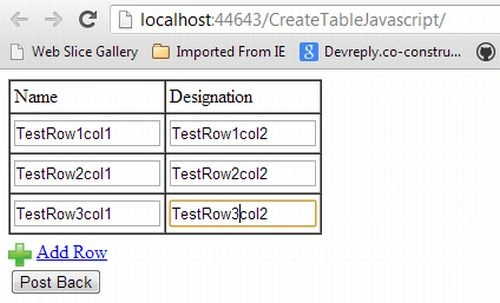
In this article, you will see how to add a row to a table with HTML TextBox using JavaScript and maintain the TextBox value after post-back.
Create a JavaScript function to add a row in a table
- //Default value
- var rows = 1;
- function addRow(tableID, options) {
- //Get table by tableid
- var table = document.getElementById(tableID);
- //Get no of rows in the table
- var rowCount = table.rows.length;
- var arr;
- if (options != "") {
- arr = options.split("[oP]");
- if (arr.length > 0)
- rows = arr.length;
- }
- for (var i = 0; i < rows; i++) {
- //Create a row in table
- var row = table.insertRow(rowCount);
- //Create first column in added row
- var cell0 = row.insertCell(0);
- //Get the text box values for maintain state
- var values
- if (options != "" && arr.length > i)
- values = arr[i].split("[vaL]");
- //Create first element
- element1.type = "text";
- element1.setAttribute("id", "Test1TextBox" + rowCount);
- element1.setAttribute("name", "Test1TextBox");
- element1.setAttribute("MaxLength", "120");
- element1.setAttribute("size", "44");
- element1.setAttribute("style", "width:120px");
- if (options != "" && arr.length > i)
- element1.setAttribute("value", values[0]);
- //Added first element in column 1
- cell0.appendChild(element1);
- //Create the second column in added row
- var element2 = (/MSIE (6|7|8)/).test(navigator.userAgent) ? document.createElement('<input name="Test2TextBox">') : document.createElement("input");
- element2.type = "text";
- element2.setAttribute("id", "Test2TextBox" + rowCount);
- element2.setAttribute("name", "Test2TextBox");
- element2.setAttribute("MaxLength", "120");
- element2.setAttribute("size", "44");
- element2.setAttribute("style", "width:120px");
- if (options != "" && arr.length > i)
- element2.setAttribute("value", values[1]);
- //Added second element in column 2
- cell1.appendChild(element2);
- rowCount++;
- }
hemant manePosted Jun 8, 2015, 2:57 AM
this code is not working it gives me error!!!!!!!!!!