
Introduction
- @Override
- protected void onCreate(Bundle savedInstanceState)
- {
- super.onCreate(savedInstanceState);
- requestWindowFeature(Window.FEATURE_NO_TITLE);
- setContentView(R.layout.activity_main);
- }
- }
Hide Title Bar using Android Manifest.xml file
To hide the Title Bar using the Android Manifest.xml file you need to set the Android theme to NoTitleBar like this:
- android:theme="@android:style/Theme.NoTitleBar">
Android Manifest.xml file
- <?xml version="1.0" encoding="utf-8"?>
- <manifest xmlns:android="http://schemas.android.com/apk/res/android"
- package="com.hidetitlebar"
- android:versionCode="1"
- android:versionName="1.0" >
- <uses-sdk
- android:minSdkVersion="7"
- android:targetSdkVersion="16" />
- <application
- android:allowBackup="true"
- android:icon="@drawable/ic_launcher"
- android:label="@string/app_name"
- android:theme="@style/AppTheme" >
- <activity
- android:name="com.hidetitlebar.MainActivity"
- android:label="@string/app_name"
- android:theme="@android:style/Theme.NoTitleBar">
- <intent-filter>
- <action android:name="android.intent.action.MAIN" />
- <category android:name="android.intent.category.LAUNCHER" />
- </intent-filter>
- </activity>
- </application>
- </manifest>
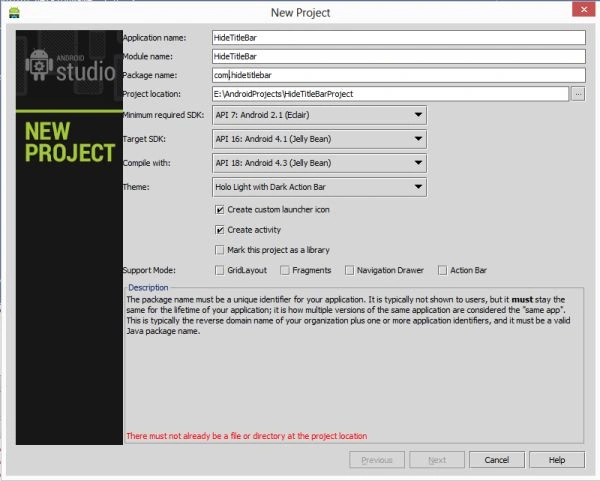
Step 1
Create a project like this:
 Step 2
Create an XML file with the following:
Step 2
Create an XML file with the following:
- <RelativeLayout xmlns:android="http://schemas.android.com/apk/res/android"
- xmlns:tools="http://schemas.android.com/tools"
- android:layout_width="match_parent"
- android:layout_height="match_parent"
- android:paddingBottom="@dimen/activity_vertical_margin"
- android:paddingLeft="@dimen/activity_horizontal_margin"
- android:paddingRight="@dimen/activity_horizontal_margin"
- android:paddingTop="@dimen/activity_vertical_margin"
- tools:context=".MainActivity"
- android:background="#d155">
- <TextView
- android:layout_width="wrap_content"
- android:layout_height="wrap_content"
- android:text="Hide Title Bar"
- android:textSize="40dp"
- android:layout_centerInParent="true"/>
- </RelativeLayout>
Step 3
Create a Java class file with the following.
In this, you will hide the Title Bar by calling the requestWindowFeature(Window.FEATURE_NO_TITLE) method of an Activity. But you need to call this before the setContentView( ) method of an Activity.
- package com.hidetitlebar;
- import android.os.Bundle;
- import android.app.Activity;
- import android.view.Menu;
- import android.view.Window;
- import android.view.WindowManager;
- public class MainActivity extends Activity {
- @Override
- protected void onCreate(Bundle savedInstanceState) {
- super.onCreate(savedInstanceState);
- requestWindowFeature(Window.FEATURE_NO_TITLE);
- // WindowManager.LayoutParams.FLAG_FULLSCREEN);//int flag, int mask
- setContentView(R.layout.activity_main);
- }
- }
Step 4
Android Manifest.xml file
- <?xml version="1.0" encoding="utf-8"?>
- <manifest xmlns:android="http://schemas.android.com/apk/res/android"
- package="com.hidetitlebar"
- android:versionCode="1"
- android:versionName="1.0" >
- <uses-sdk
- android:minSdkVersion="7"
- android:targetSdkVersion="16" />
- <application
- android:allowBackup="true"
- android:icon="@drawable/ic_launcher"
- android:label="@string/app_name"
- android:theme="@style/AppTheme" >
- <activity
- android:name="com.hidetitlebar.MainActivity"
- android:label="@string/app_name"
- >
- <intent-filter>
- <action android:name="android.intent.action.MAIN" />
- <category android:name="android.intent.category.LAUNCHER" />
- </intent-filter>
- </activity>
- </application>
- </manifest>
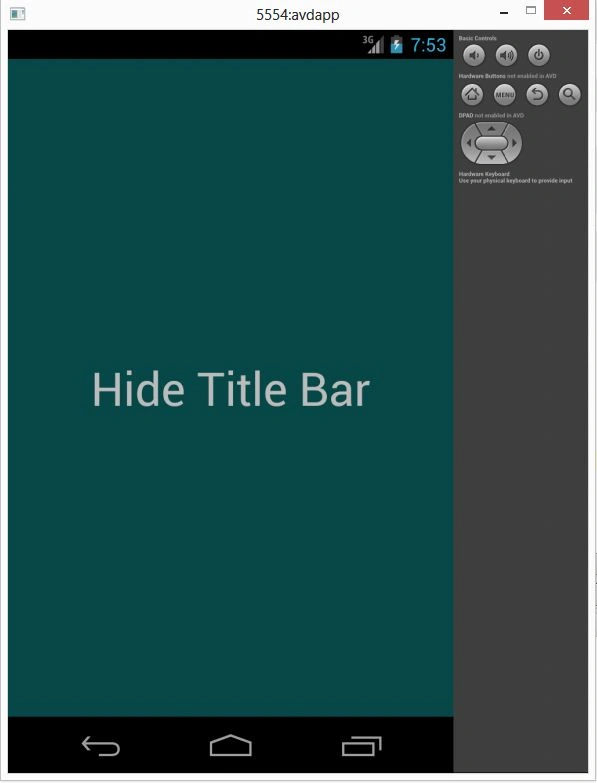
Step 5
Join the conversation! Your thoughts help the community grow.