

Introduction
With the modernization of the SharePoint Framework (SPFx), Microsoft is transitioning from the traditional Gulp-based build system to a more powerful and standardized toolchain powered by Heft and Rig . This upgrade significantly improves build performance, maintainability, and future compatibility.
What Is Heft?
Heft is a command-line, configuration-driven build orchestrator developed by Microsoft as part of the RushStack ecosystem.
Key Characteristics of Heft
Heft is NOT GUI-based
Heft does not provide any graphical interface, visual build designer, or UI tools. It runs entirely from the command line.Heft is CLI + Config based
Heft uses:Command-line commands (heft build)
JSON-based configuration files ( heft.json, rig.json)
No gulpfile.js needed
Standardized and maintained by Microsoft
Runs build steps in parallel for better performance
Provides consistent build behavior across projects
Heft replaces custom scripting with a clean, maintainable, and future-proof build pipeline.
What Is a Rig?
A Rig is a pre-configured build pipeline package that Heft loads to run your project's build system.
For SPFx, the rig used is:
@microsoft/spfx-rig
It contains all predefined SPFx build rules such as:
TypeScript compilation
Webpack bundling
SCSS build
Localization compilation
Manifest generation
Packaging and deployment pipeline
Purpose of a Rig
Standardize build logic
Remove the need for custom Gulp tasks
Provide faster and cleaner updates
Minimize configuration effort for developers
Why SPFx Moved from Gulp to Heft + Rig
| Gulp (Old System) | Heft + Rig (New System) |
|---|---|
| Custom gulpfile.js required | No custom scripts needed |
| Plugin conflicts common | Rig handles all integrations |
| Manual orchestration | Automated + standardized |
| Slower builds | Faster via caching & parallel execution |
| Hard upgrades | Easy version upgrades via rig |
This modernization brings SPFx closer to modern engineering practices used inside Microsoft teams.
How Heft Works with a Rig
The relationship can be summarized as:
Heft = Engine
Rig = Blueprint / Pipeline Definition
Heft loads the rig and executes the build exactly as defined by Microsoft.
Step-by-Step: Heft-Based SPFx Build Flow
Step 1: Create an SPFx Project
When you create a new SPFx project (v1.20+), it is Heft-based by default .
yo @microsoft/sharepoint No 'gulp.js' is created.
Step 2: Heft-Based Project Structure
Key configuration files:
config/
  heft.json
  rig.json
  serve.json
src/
package.json
heft.json - Defines build actions
rig.json- Points to SPFx rig
package.json- Maps npm scripts to Heft
Step 3: Rig Configuration
SPFx loads its build pipeline from the rig.
{
  "rigPackageName": "@microsoft/spfx-rig",
  "rigProfile": "default"
}
This tells Heft to use Microsoft’s predefined SPFx build rules.
Step 4: Heft Loads the SPFx Rig
Internally:
Heft starts
Reads rig.json
Loads @microsoft/spfx-rig
Registers all SPFx build plugins (TS, Webpack, SCSS, localization, packaging)
Step 5: Run Build Commands
All commands are CLI-based:
npm run build
npm run bundle -- --production
npm run package-solution -- --production
Heft orchestrates everything—no custom tasks required.
Step 6: TypeScript Compilation
Uses incremental TypeScript compilation
Configuration from 'config/typescript.json'
Faster than Gulp-based compilation
Step 7: Webpack Bundling
Uses Webpack 5
Bundles web parts and extensions
Outputs files to the dist folder
Step 8: SCSS and Localization
SCSS compiled automatically
Localization files processed
Language bundles generated without manual setup
Step 9: Local Development
npm run serve Builds solution
Starts local workbench
Watches file changes
Rebuilds incrementally
Step 10: Package and Deploy
npm run package-solution -- --production Output
sharepoint/solution/*.sppkg Upload the package to the App Catalog for deployment.
Architecture Diagram
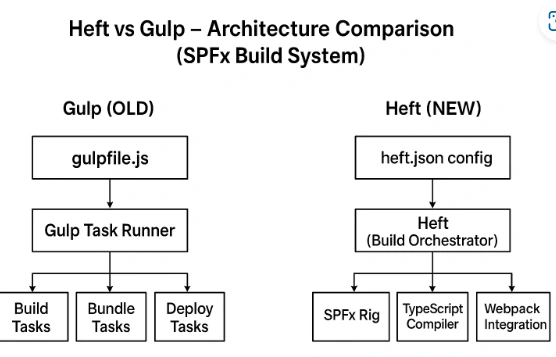
Heft & Rig (New SPFx Architecture)
heft.json / rig.json- Heft (CLI + Config-based engine)- Loads SPFx Rig (predefined build system)- TypeScript/Webpack/SCSS/Manifest/Packaging
Developer Experience Before and After
Before (Gulp)
Manually write gulpfile.js
Maintain dozens of plugins
Fix frequent version conflicts
Difficult to upgrade SPFx versions
Now (Heft + Rig)
No gulpfile
No manual tasks
Faster builds
Easy updates with rig packages
Predictable, stable build behavior
Conclusion
Heft is a modern, CLI-based build orchestrator that offers a clean, standardized way of building SPFx projects. It is not GUI-based i.e all operations run through command-line tools and configuration files. Rigs act as pre-built templates that define how Heft should run.
Together, Heft + Rig replace Gulp and provide a stable, future-proof foundation for SharePoint Framework development.
Join the conversation! Your thoughts help the community grow.