

Introduction
In Java, a map interface is an interface that consists of only unique elements. The map interface in Java consists of values that are based on key/value pairs. We can look at any value in Java using the specific key. A HashMap is a part of the map interface in Java.
HashMap Class in Java
- HashMap consists of the values that are based on the key.
- It consists of only unique elements.
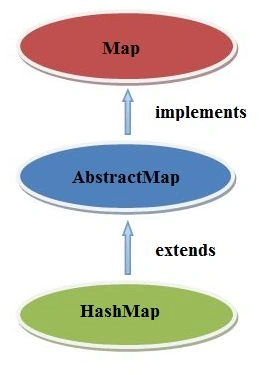
- The map interface is implemented and AbstractMap class is extended by HashMap.
- A HashMap has no order.
- It may consist of multiple null values but only one null key.
Ranking of HashMap in Java
Example Using the NetBeans IDE
Step 1
Open the NetBeans IDE.

Step 2
Create a new project.

Step 3
Choose "Java" --> "Java Application".

Step 4
Provide the project with a name.

Step 5
Write the following code.
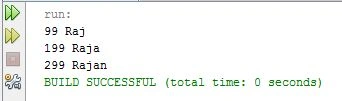
- package demo;
- import java.util.*;
- public class Demo
- {
- public static void main(String args[])
- {
- HashMap hs_mp=new HashMap();
- hs_mp.put(99,"Raj");
- hs_mp.put(199,"Raja");
- hs_mp.put(299,"Rajan");
- Set set=hs_mp.entrySet();
- Iterator itr=set.iterator();
- while(itr.hasNext())
- {
- Map.Entry mp=(Map.Entry)itr.next();
- System.out.println(mp.getKey()+" "+mp.getValue());
- }
- }
- }
Step 6
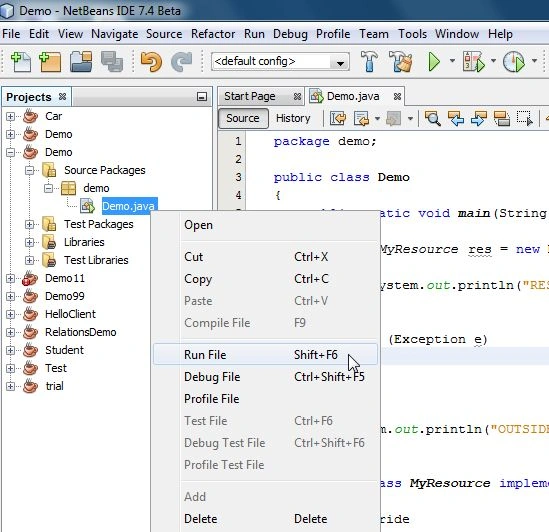
Run the code.
(This process of working with NetBeans will be used in all the following examples.)
Output
Methods of HashMap Class in Java
- Map.clear( )
All the mappings from the map are removed by this method.Syntax
public void clear()ExampleOutput- package demo;
- import java.util.*;
- public class Demo
- {
- public staticvoid main(String args[])
- {
- HashMap map =new HashMap();
- map.put(99,"Raj");
- map.put(199,"Raja");
- map.put(299,"Rajan");
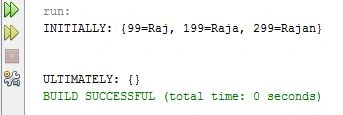
- System.out.println("INITIALLY: " + map);
- map.clear();
- System.out.println("\n");
- System.out.println("ULTIMATELY: " + map);
- }
- }
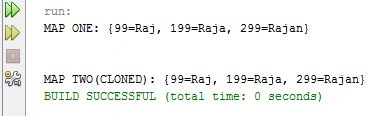
- Map.clone( )
A shallow copy of the map instance is returned by this method.Syntax
public Object clone()ExampleOutput- package demo;
- import java.util.*;
- public class Demo
- {
- public staticvoid main(String args[])
- {
- HashMap map1 =new HashMap();
- HashMap map2 =new HashMap();
- map1.put(99,"Raj");
- map1.put(199,"Raja");
- map1.put(299,"Rajan");
- map2=(HashMap)map1.clone();
- System.out.println("MAP ONE: " + map1);
- System.out.println("\n");
- System.out.println("MAP TWO(CLONED): " + map2);
- }
- }
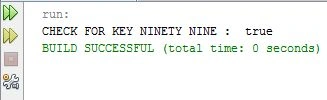
- Map.containsKey(Object key)In the identity HashMap, it is used to check that the given object reference is key.Syntax
public boolean containsKey(Object key)It will return true if the given condition is satisfied.ExampleOutput- package demo;
- import java.util.*;
- public class Demo
- {
- public staticvoid main(String args[])
- {
- HashMap map =new HashMap();
- map.put(99,"Raj");
- map.put(199,"Raja");
- map.put(299,"Rajan");
- System.out.println("CHECK FOR KEY NINETY NINE : " + map.containsKey(99));
- }
- }
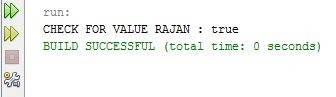
- Map.containsValue(Object value)The identity HashMap is used to check that the given object is a value.Syntax
public boolean containsValue(Object value)Will return true if the map consists of one or more keys.ExampleOutput- package demo;
- import java.util.*;
- public class Demo
- {
- public staticvoid main(String args[])
- {
- HashMap map =new HashMap();
- map.put(99,"Raj");
- map.put(199,"Raja");
- map.put(299,"Rajan");
- System.out.println("CHECK FOR VALUE RAJAN : " +
- map.containsValue("Rajan"));
- }
- }
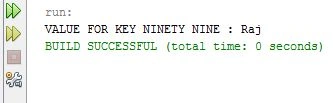
- Map.get(Object key)A value is returned to which the given key is mapped. A null is returned if there is no mapping.Syntax
public A get(Object key)ExampleOutput- package demo;
- import java.util.*;
- public class Demo
- {
- public staticvoid main(String args[])
- {
- HashMap map =new HashMap();
- map.put(99,"Raj");
- map.put(199,"Raja");
- map.put(299,"Rajan");
- String val=(String)map.get(99);
- System.out.println("VALUE FOR KEY NINETY NINE : " + val);
- }
- }
-
Map.isEmpty( )It is checked by this method that the map consists of no key-value mappings.Syntax
public boolean isEmpty()It will return true if the given condition is satisfied.Example- package demo;
- import java.util.*;
- public class Demo
- {
- public staticvoid main(String args[])
- {
- HashMap map =new HashMap();
- map.put(7,"John");
- map.put(8,"Johny");
- map.put(9,"Jonty");
- boolean val=map.isEmpty();
- System.out.println("EMPTY: " + val);
- }
- }
Output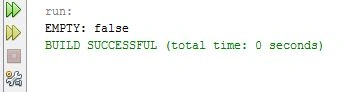
-
Map.putAll( )It is used to copy mappings from one map to the other.Syntax
public void putAll(Map m)ExampleOutput- package demo;
- import java.util.*;
- public class Demo
- {
- public staticvoid main(String args[])
- {
- HashMap map1 =new HashMap();
- HashMap map2 =new HashMap();
- map1.put(7,"John");
- map1.put(8,"Johny");
- map1.put(9,"Jonty");
- System.out.println("MAP 1 : "+ map1);
- map2.putAll(map1);
- System.out.println("\n");
- System.out.println("MAP 2 : "+ map2);
- }
- }
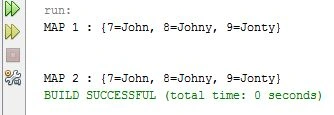
-
Map.remove( )Mapping is removed for the specific key in the given map.Syntax
public A remove(Object key)ExampleOutput- package demo;
- import java.util.*;
- public class Demo
- {
- public staticvoid main(String args[])
- {
- HashMap map =new HashMap();
- map.put(7,"John");
- map.put(8,"Johny");
- map.put(9,"Jonty");
- System.out.println("BEFORE: "+ map);
- System.out.println("\n");
- map.remove(8);
- System.out.println("AFTER: "+ map);
- }
- }
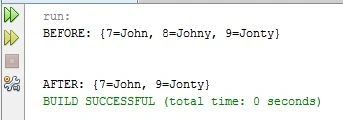
-
Map.values( )It will return all the values of the map.Syntax
public Collection values()ExampleOutput- package demo;
- import java.util.*;
- public class Demo
- {
- public staticvoid main(String args[])
- {
- HashMap map =new HashMap();
- map.put(7,"John");
- map.put(8,"Johny");
- map.put(9,"Jonty");
- System.out.println("VALUES: "+ map.values());
- }
- }
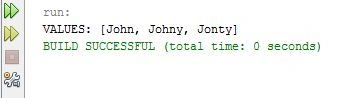
Constructors Supported by HasMap
- HashMap( )A default HashMap is created by this constructor.
- HashMap(m)HashMap is initialized by this constructor.
- HashMap( int capacity)Capacity is initialized by this constructor.
- HashMap(int capacity, float fillRatio)Capacity and the fill ratio are initialized by this constructor.
Summary
This article explains the HashMap class and its various methods in Java.
Gopi ChandPosted Jun 15, 2015, 5:02 AM
Well explained..good effort