

What is a handler?
A Handler allows you to send and process messages and runnable objects associated with a thread's Message queue. A handler instance is associated with a single thread and that thread's message queue. When you create a new handler, it is bound to the thread/ message queue of the thread that is creating it. It will deliver messages and runnables to that message queue and executes them as they come out of the message queue. We need only one handler object per Activity, and there is no need to manually register it.
Your background thread can communicate with the handler, which will do all of its work on the Activity's UI thread. In this article, you will learn how to use Handler in Android.
Uses of Handler
- To schedule messages and runnables to be executed at some point in the future.
- To enqueue an action to be performed on a different than your own.
What is a message?
Message contains a description and an arbitrary data object that can be sent to a handler. While the construction of a message is public, the best way to get one of these is to call Message.obtains() or one of the Handler.obtainMessage() method which will pull them from a pool of recycled objects.
How to send message objects?
- sendMessage() put the message in the queue immediately.
- sendMessageAtFrontOfQueue() puts the messages in the queue immediately and places the message at the front of all the messages. So your message will have the highest priority than other messages.
- sendMessageAtTime() Put the message in the queue at the started time.
- sendMessageDelayed() put the messages in the queue after a delay, expressed in milliseconds.
- sendEmptyMessage() send an empty message to the queue
- <RelativeLayout xmlns:android="http://schemas.android.com/apk/res/android"
- xmlns:tools="http://schemas.android.com/tools" android:layout_width="fill_parent"
- android:layout_height="fill_parent" android:paddingLeft="@dimen/activity_horizontal_margin"
- android:paddingRight="@dimen/activity_horizontal_margin"
- android:background="#BBDD23"
- android:paddingTop="@dimen/activity_vertical_margin"
- android:paddingBottom="@dimen/activity_vertical_margin" tools:context=".MainActivity">
- <ProgressBar
- style="?android:attr/progressBarStyleHorizontal"
- android:layout_width="match_parent"
- android:layout_gravity="center_vertical"
- android:max="100"
- android:layout_height="wrap_content"
- android:id="@+id/progressBar"
- android:layout_centerVertical="true"
- android:layout_alignParentLeft="true"
- android:layout_alignParentStart="true" />
- <TextView
- android:layout_width="wrap_content"
- android:id="@+id/textView"
- android:layout_below="@+id/progressBar"
- android:layout_centerHorizontal="true"
- android:layout_height="wrap_content" />
- </RelativeLayout>
Now I create a Runnable class named MyThread and in that I have a for loop and this loop will send the progress to handler. see the code below,
- class MyThread implements Runnable
- {
- @Override
- public void run()
- {
- for (int i = 0; i < 100; i++)
- {
- Message message = Message.obtain();
- message.arg1 = i;
- handler.sendMessage(message);
- try {
- Thread.sleep(100);
- } catch (InterruptedException e)
- {
- e.printStackTrace();
- }
- }
- }
- }
Now in the mainActivity class I have the following code to update the UI with progress which i receive from the Thread,
- protected void onCreate(Bundle savedInstanceState)
- {
- super.onCreate(savedInstanceState);
- setContentView(R.layout.activity_main);
- progressBar = (ProgressBar) findViewById(R.id.progressBar);
- textView = (TextView) findViewById(R.id.textView);
- thread = new Thread(new MyThread());
- thread.start();
- handler = new Handler()
- {
- @Override
- public void handleMessage(Message msg)
- {
- progressBar.setProgress(msg.arg1);
- textView.setText("Progress :" + msg.arg1);
- }
- };
- }
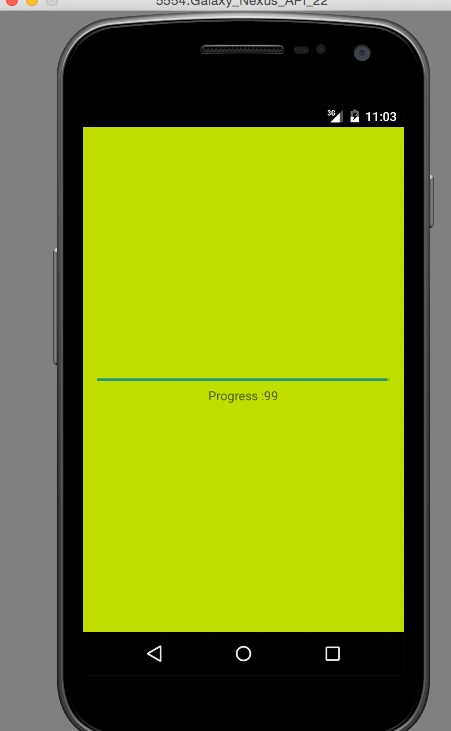
This handle message function will get the progress which sends from the thread and it will update these values to the progress bar and the textview.
Please see the screen shot also.
References
Read more articles on Android
Vignesh ManiPosted Apr 14, 2016, 8:21 AM
Nice
Vilas GitePosted Apr 13, 2016, 5:40 AM
Really useful
Rahul Kumar SaxenaPosted Apr 12, 2016, 2:06 PM
Good Show
Mohammed IbrahimPosted Apr 12, 2016, 2:03 PM
nice
Debasis SahaPosted Apr 12, 2016, 1:24 PM
Good One..
Kuppurasu NagarajPosted Apr 12, 2016, 12:25 PM
Nice Sharing..