

Introduction
When the garbage collector runs it can clean up your managed resources. The garbage collector does not know how to free unmanaged resources (such as file handles, network connections and database connections).
The following are two mechanisms to automate the freeing of unmanaged resources:
- Declaring a destructor (or Finalizer) as a member of your class.
- Implementing the System.IDisposable interface in your class.
Destructors are called before an object is destroyed by the garbage collector.
Example
- public class MyClass
- {
- public static int a;
- ~MyClass()
- {
- }
- }
When a C++ object is destroyed, its destructor runs immediately and automatically. However, because of the way the GC works, when using C#, there is no way to know when an object's destructor will actually execute. Another problem with C# destructors is that the implementation of a destructor delays the final removal of an object from memory. An object that does not have a destructor is removed from memory in one pass of the GC but objects that have destructors require two passes to be destroyed. The first pass calls the destructor without removing the object and the second pass actually deletes the object. If you use destructors frequently and use them to execute lengthy clean-up tasks, the impact on performance can be noticeable.
IDisposable
When a class implements it, normally tells you that the class has unmanaged resources that should be released in a deterministic manner.
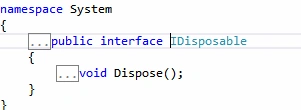
Notice that it has only one method, Dispose, and it is within this method's implementation that the dirty work is done. Thus, you should completely clean up your object and release all resources inside Dispose. Even though the client code, rather than the system, calls Dispose automatically, it's the client code's way of saying, “I'm done with this object and don't intend to use it ever again.”
IDisposable is defined in the system namespace in the Core .NET assembly mscorlib, in other words any class in the base class library or the wider framework or any third-party code can implement IDisposable and you need to know if you are using an instance of a class that disposable, so you can use it properly.
Implementation of IDisposable interface
- class Resource : IDisposable
- {
- private bool disposed = false;
- public void Dispose()
- {
- Dispose(true);
- GC.SuppressFinalize(this);
- }
- private void Dispose(bool disposing)
- {
- if (!disposed)
- {
- if (disposing)
- {
- // can clean up other managed objects
- }
- // clean up unmanaged resources
- disposed = true;
- }
- }
- ~Resource()
- {
- Dispose(false);
- }
- }
- class Program
- {
- static void Main()
- {
- Resource resource = null;
- try
- {
- resource = new Resource();
- // use resource
- }
- finally
- {
- if (resource != null)
- {
- resource.Dispose();
- }
- }
- }
- }
After making sure that this object is cleaned up only once, checking the disposed variable, the Dispose (bool) method checks to see whether it was called by either user code or the GC. The difference is significant because you don't ever want the GC thread to try cleaning up other managed objects. You see, it is possible that the GC has already cleaned up those objects and you would cause an error, an ObjectDisposedException, by trying to access an object that no longer exists. Regardless of whether this object is being called via user code or the GC, you always need to clean up unmanaged resources, such as OS handles and GDI objects.
Notice that the second statement of Dispose, with no parameters, calls SuppressFinalization. This ensures that the GC won't try to call the finalizer. That wouldn't make sense because we just cleaned up the object. It is also more efficient because it helps avoid a second pass of the GC for finalization. The Program class instantiates an object of type DisposableClass. By performing actions in a try/finally block, the program guarantees that the Dispose method will always be called, thus releasing resources immediately when they are no longer needed.
Using Statement
The following code accomplishes the exact same thing as the try/finally block in the preceding code.
- using (Resource r = new Resource())
- {
- // use resource
- }
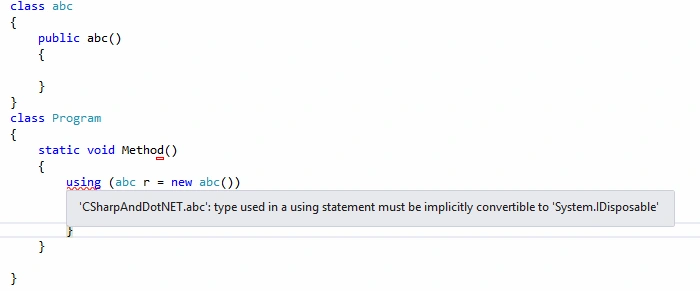
Example: Using statement with out IDisposable object
Conclusion
In this article you learned how to handle unmanaged resources using finalizer, IDisposable() and using statements. I hope you like this article. Thanks for reading.
Tom MohanPosted Mar 29, 2015, 10:51 PM
Thanks Vithal Wadje for your valuable support
Vithal WadjePosted Mar 29, 2015, 12:55 PM
another outstanding article
Tom MohanPosted Mar 29, 2015, 11:06 AM
Thanks for your feedback Santhakumar Munuswamy
Tom MohanPosted Mar 29, 2015, 11:03 AM
Thanks Rahul Saxena
Santhakumar MunuswamyPosted Mar 29, 2015, 2:54 AM
Thanks for nice and useful
Rahul Kumar SaxenaPosted Mar 29, 2015, 12:18 AM
Good Work Tom Mohan...
Tom MohanPosted Mar 28, 2015, 9:33 PM
Thanks Pankaj Kumar Choudhary
Pankaj Kumar ChoudharyPosted Mar 28, 2015, 9:00 PM
really helpful topic @T. Mohan sir........