

Default.aspx:
<%@ Page Language="C#" AutoEventWireup="true" CodeFile="GridViewMutipleDeleteCheckBox.aspx.cs"
Inherits="GridViewMutipleDeleteCheckBox" %>
<!DOCTYPE html PUBLIC "-//W3C//DTD XHTML 1.0 Transitional//EN" "http://www.w3.org/TR/xhtml1/DTD/xhtml1-transitional.dtd">
<html xmlns="http://www.w3.org/1999/xhtml">
<head runat="server">
<title></title>
<script type="text/javascript" language="javascript">
function ConfirmOnDelete(item)
{
if (confirm("Would you like to delete selected item(s)?")==true)
return true;
else
return false;
}
</script>
</head>
<body>
<form id="form1" runat="server">
<div>
<asp:GridView ID="GridView1" runat="server" AutoGenerateColumns=false
onrowdatabound="GridView1_RowDataBound">
<Columns>
<asp:TemplateField>
<HeaderTemplate>
<asp:Button ID="ButtonDelete" runat="server" Text="Delete" OnClick=ButtonDelete_Click/>
</HeaderTemplate>
<ItemTemplate>
<asp:CheckBox ID="CheckBox1" runat="server" />
</ItemTemplate>
</asp:TemplateField>
<asp:BoundField DataField="EmpId" HeaderText="Emp Id" ReadOnly="True" />
<asp:BoundField DataField="EmpName" HeaderText="Title" />
<asp:BoundField DataField="Address" HeaderText="Emp Name" />
<asp:BoundField DataField="Phone" HeaderText="Address" />
<asp:BoundField DataField="Salary" HeaderText="Phone" />
<asp:BoundField DataField="Country" HeaderText="Country" />
</Columns>
</asp:GridView>
</div>
</form>
</body>
</html>
using System;
using System.Collections.Generic;
using System.Linq;
using System.Web;
using System.Web.UI;
using System.Web.UI.WebControls;
using System.Data;
using System.Data.SqlClient;
using System.Collections.Specialized;
using System.Text;
public partial class GridViewMutipleDeleteCheckBox : System.Web.UI.Page
{
SqlConnection con = new SqlConnection();
SqlCommand cmd = new SqlCommand();
string connectionString = "Data Source=testserver;Initial Catalog=Testdatabase; uid=sa;pwd=wintellect";
protected void Page_Load(object sender, EventArgs e)
{
if (!Page.IsPostBack)
BindGridView();
}
private void BindGridView()
{
con = new SqlConnection(connectionString);
cmd.Connection = con;
cmd.CommandText = "Select * from Puru_test_Emp";
con.Open();
GridView1.DataSource = cmd.ExecuteReader();
GridView1.DataBind();
con.Close();
}
private void DeleteRecords(StringCollection sc)
{
con = new SqlConnection(connectionString);
StringBuilder sb = new StringBuilder(string.Empty);
foreach (string item in sc)
{
const string sqlStatement = "DELETE FROM Puru_test_Emp WHERE EmpId";
sb.AppendFormat("{0}='{1}'; ", sqlStatement, item);
}
try
{
con.Open();
SqlCommand cmd = new SqlCommand(sb.ToString(), con);
cmd.CommandType = CommandType.Text;
cmd.ExecuteNonQuery();
}
catch (System.Data.SqlClient.SqlException ex)
{
string msg = "Deletion Error:";
msg += ex.Message;
throw new Exception(msg);
}
finally
{
con.Close();
}
}
protected void ButtonDelete_Click(object sender, EventArgs e)
{
StringCollection sc = new StringCollection();
string id = string.Empty;
for (int i = 0; i < GridView1.Rows.Count; i++)
{
CheckBox cb = (CheckBox)GridView1.Rows[i].Cells[0].FindControl("CheckBox1");
if (cb != null)
{
if (cb.Checked)
{
id = GridView1.Rows[i].Cells[1].Text;
sc.Add(id);
}
}
}
DeleteRecords(sc);
BindGridView();
}
protected void GridView1_RowDataBound(object sender, GridViewRowEventArgs e)
{
if (e.Row.RowType == DataControlRowType.Header)
{
Button b = (Button)e.Row.FindControl("ButtonDelete");
b.Attributes.Add("onclick", "return ConfirmOnDelete();");
}
}
}
Ourput: Press f5 (Debug) and see the result as follows:
Suppose you want to delete last three records (Emp Id 5, 6, 7), first select records and click on delete button like as follows:
After delete you will see the remaining result as follows: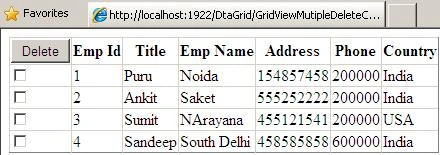
MANOHAR DPosted Apr 27, 2013, 3:51 AM
THANKS BRO U R GIVEN ME GREAT CODE
satheesh balakrishnanPosted May 12, 2011, 5:42 AM
Simple and useful.....
AmitPosted Feb 7, 2011, 5:53 AM
Hi, Nice article first of all. I need to show the confirmation box only when any checkbox in Grid is checked and delete is clicked.In this case ,if user clicks delete without clicking any checkbox,the confirmation msg is displayed.How can we avoid this? Thanks
Satyapriya NayakPosted Dec 21, 2010, 1:02 PM
Sir,Iam a fan of all your nice article.