

In .NET, GDI+ functionality resides in the System.Drawing.dll. Before you start using GDI+ classes, you must add reference to the System.Drawing.dll and import System.Drawing namespace. In this sample, I use class GraphicsPath, which is defined in the System.Drawing.Drawing2D namespace.
Creating this project is simple. Create a Windows application and add reference to the System.Drawing.dll using Project->Add Reference menu item. See Figure 1.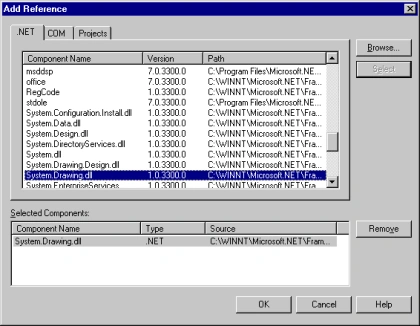
Figure 1. Adding reference to System.Drawing.dll
After that add these two lines.
using
System.Drawing;using System.Drawing.Drawing2D;
Note: If you create a Windows application using VS.NET, you only need write only one line.
using System.Drawing.Drawing2D;
After that add a Form_Paint event handler using the Properties Window. See Figure 2.

Figure 2. Adding Form_Paint event handler.
And write the following code on the Form_Paint event handler.
private void Form1_Paint(object sender, System.Windows.Forms.PaintEventArgs e){
Graphics g = e.Graphics ;
Rectangle rect = this.ClientRectangle;
// Rectangle rect = new Rectangle(50, 30, 100, 100);
// paints a gradiant background to the whole window
LinearGradientBrush lBrush = new LinearGradientBrush(rect, Color.Red, Color.Yellow,
LinearGradientMode.BackwardDiagonal);
g.FillRectangle(lBrush, rect);
// draws an arc
Pen pn = new Pen( Color.Blue );
rect = new Rectangle(50, 50, 200, 100);
g.DrawArc( pn, rect, 12, 84 );
// Rectangle rect = new Rectangle(50, 50, 200, 100);
// draws a line with a blue violet pen
Pen pn2 = new Pen( Color.BlueViolet );
Point pt1 = new Point( 30, 30);
Point pt2 = new Point( 110, 100);
g.DrawLine( pn2, pt1, pt2 );
// illustrates how to draw graphic test
g.DrawString("Welcome to the Graphics World", this.Font, new SolidBrush(Color.Azure ), 10,10);
// draws an ellipse in the bottom corner of the screen
Pen pn3 = new Pen( Color.Aqua , 5 );
rect = new Rectangle(ClientRectangle.Right - 60, ClientRectangle.Bottom - 60, 50, 50);
g.DrawEllipse( pn3, rect );
// draw a graphic path with bezier curves
GraphicsPath path = new GraphicsPath(new Point[] {
new Point(40, 140), new Point(275, 200),
new Point(105, 225), new Point(190, ClientRectangle.Bottom),
new Point(50, ClientRectangle.Bottom), new Point(20, 180), },
new byte[] {
(byte)PathPointType.Start,
(byte)PathPointType.Bezier,
(byte)PathPointType.Bezier,
(byte)PathPointType.Bezier,
(byte)PathPointType.Line,
(byte)PathPointType.Line,
});
PathGradientBrush pgb = new PathGradientBrush(path);
pgb.SurroundColors = new Color[] { Color.Green,Color.Yellow,Color.Red, Color.Blue,
Color.Orange, Color.White, };
g.FillPath(pgb, path);
}
Compile and run the project. The output looks like Figure 3.

Figure 3.
fazal rehmanPosted Oct 13, 2007, 2:16 AM
i want to drow shapes with mouse in my application
Lakshmi Kanth BeditedPosted Sep 12, 2007, 7:15 PMEdited Sep 12, 2007, 7:16 PM
Hi, I have developed an GDI interface to show lines and polygons. I want to show screentips for lines/polygons when user hovers mouse on the line/polygon. Can you give me an idea how to implement this functionality with .net graphics. Thanks, Kanth.
Goran MiticPosted Jul 8, 2007, 5:07 AM
Hello, I an fairly new to C#, and I have a question. User can input the dimensions of rectangle, and rectangle is drawn on tab page, but if input is too big, it goes off tab page. How can I resize? Thank you, Goran
Xuyen Nguyen KimPosted May 7, 2007, 2:09 PM
hi !! i want draw a hexagon on form c#.net but i don't know it,so i hope evrybody help me !!!please guide to me step by step and the most detail !!!!hurry up please !!!because i need urgent !!!!!thanks so much !!!!!!!!!!!!!!
a zPosted Apr 1, 2007, 6:15 PM
I done it by console application, it was so nice. But I did it using eventhandler of buttons, when I press the button it gives this draw.