

Introduction
- The integration of Android Studio with Gradle enhances the build process because it (Android Studio) is deeply integrated with the new Gradle based build support.
- For making a simple, declarative, domain-specific language Gradleware has worked together with Google to create declarative DSL.
- A single Build System that is Gradle maintains a build from the IDE and command line as well. This means that the build is executed from the IDE and the command line is the same at each instance of time, in other words, it powers the command line as well.
- Product flavors and Build variants can easily be managed by this Gradle-based build system because it will just change in the code for three to four lines that will help control and manage the latest release of the builds.
- Android signing Configuration: The Gradle Android DSL provides a very simple way to customize keystores and signing configurations on various build types.
- Binary Bundles for libraries (.aar): Gradle supports the new .aar binary bundle format for library projects.
- Test Server API: supports Hosted Testing; Android Studio with Gradle based Builds Integrated with Jenkins-based build servers and services from AppThwack, TestDroid and Manymo mean that the build can support complex, massively-parallel integration testing scenarios as well.
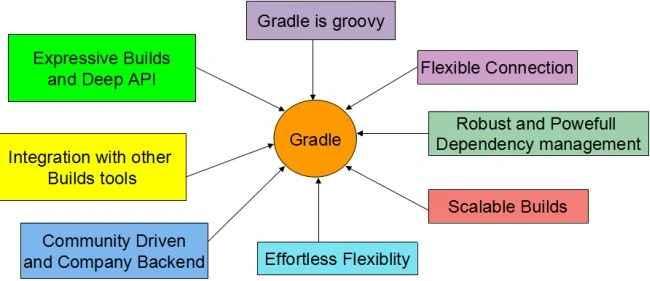
All these preceding mentioned points can be understood using the image shown below and you can quickly conceptualize from here.
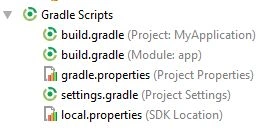
 However, Gradle Builds can be seen from the IDE as all the folders related to the builds lies below the folders of the application.
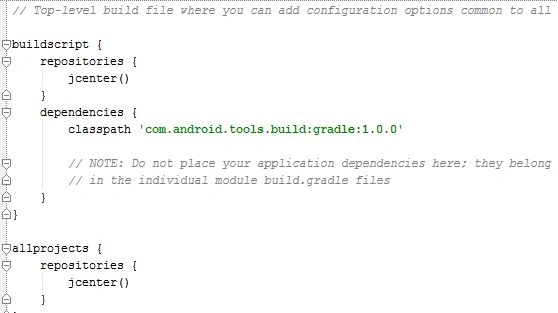
 However, by default, the project-level Gradle file uses a build script to define the Gradle repositories and dependencies. Now the example given below shows the default generated file that declares that the build script uses the JCenter repository and a classpath dependency artifact that contains the Android plugin for Gradle version 1.0.1.
 Module Build File
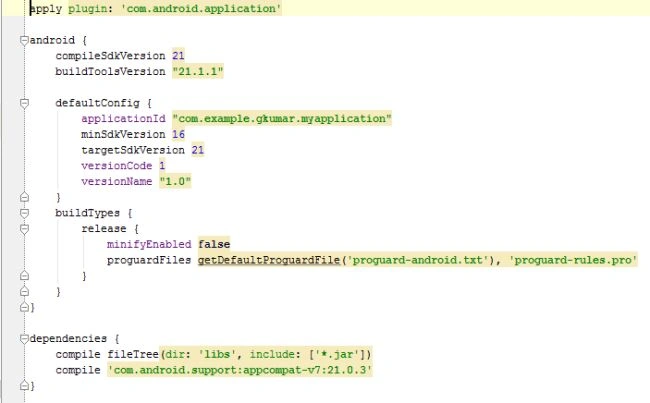
Although this file describes itself all the versions and dependencies and other Configurations likewise as illustrated in the figure below.
Android settings
Module Build File
Although this file describes itself all the versions and dependencies and other Configurations likewise as illustrated in the figure below.
Android settings
Project Build File
- compileSdkVersion
- buildToolsVersion
- DefaultConfig and ProductFlavorsManifest properties such as applicationId, minSdkVersion, targetSdkVersion, and test information.
- BuildTypes
This shows Build properties such as debuggable, ProGuard enabling, debug signing, version name suffix, and testinformation
- Dependencies
Sam HobbsPosted Dec 26, 2014, 8:28 PM
Gradle is a strange name. Sounds like griddle.