

Introduction
I was investigating using Google Maps in a web-application a while back and couldn't find a clear example that showed how to do it with MVC. Hopefully, this article fills that gap! Technologies used include MS C# MVC 4, jQuery, and of course, the Google Maps API.
Background
There were some "gotchas" I encountered while putting this together. The first (at least for me) is that, using a jQuery selector to link my div that would contain the Google map didn't work. I had to specifically use the JavaScript document.getelementById call. The second was sizing. Using the default size (which was teeny weenie) wasn't cutting it for me, so I increased width/height. Turns out, the Google Map didn't like that too much. After a bit of digging, I found a post that said to create a quick in-page style that set the max-width to "none" ... then it worked.
Using the code
Create a new MVC 4 project - this will include by default, appropriate links to jQuery and other supporting files you will need to run this tutorial.
All of the work, we are doing, is in the "Index view" - so go to that file and clean out any HTML etc., you don't need.
Add in a script ref to the Google Maps API at the top of the file.
- <script src="http://maps.google.com/maps/api/js?sensor=true" type="text/javascript"></script>
- <style> #map_canvas img{max-width:none} </style>
- <style>
- .infoDiv {
- height: 200px;
- width: 300px;
- -webkit-user-select: none;
- background-color: white;
- } </style>
If you look in the View folder, you will see a folder called "Shared" - in here is "_Layout.cshtml". This is the parent wrapper for the Index View page. At the bottom, you will notice these two lines.
- @Scripts.Render("~/bundles/jquery")
- @RenderSection("scripts", required: false)
Let's go back to our view index page and add a section wrapper.
- @section scripts {
- <section class="scripts">
- <script type="text/javascript">
- // our code will go in here...
- </script>
- <!-- This code tells the browser to execute the "Initialize" method
- only when the complete document model has been loaded. -->
- $(document).ready(function () {
- Initialize();
- });
Initialize is the main method that does all of the work.
- function Initialize() {
- google.maps.visualRefresh = true;
- var Liverpool = new google.maps.LatLng(53.408841, -2.981397);
- var mapOptions = {
- zoom: 14,
- center: Liverpool,
- mapTypeId: google.maps.MapTypeId.G_NORMAL_MAP
- };
- var map = new google.maps.Map(document.getElementById("map_canvas"), mapOptions);
- var myLatlng = new google.maps.LatLng(53.40091, -2.994464);
- var marker = new google.maps.Marker({
- position: myLatlng,
- map: map,
- title: 'Tate Gallery'
- });
- marker.setIcon('http://maps.google.com/mapfiles/ms/icons/green-dot.png')
- var data = [
- { "Id": 1, "PlaceName": "Liverpool Museum",
- "OpeningHours":"9-5, M-F","GeoLong": "53.410146",
- "GeoLat": "-2.979919" },
- { "Id": 2, "PlaceName": "Merseyside Maritime Museum ",
- "OpeningHours": "9-1,2-5, M-F", "GeoLong":
- "53.401217", "GeoLat": "-2.993052" },
- { "Id": 3, "PlaceName": "Walker Art Gallery",
- "OpeningHours": "9-7, M-F", "GeoLong":
- "53.409839", "GeoLat": "-2.979447" },
- { "Id": 4, "PlaceName": "National Conservation Centre",
- "OpeningHours": "10-6, M-F", "GeoLong":
- "53.407511", "GeoLat": "-2.984683" }
- ];
- $.each(data, function (i, item) {
- var marker = new google.maps.Marker({
- 'position': new google.maps.LatLng(item.GeoLong, item.GeoLat),
- 'map': map,
- 'title': item.PlaceName
- });
- marker.setIcon('http://maps.google.com/mapfiles/ms/icons/blue-dot.png')
- var infowindow = new google.maps.InfoWindow({
- content: "<div class='infoDiv'><h2>" +
- item.PlaceName + "</h2>" + "<div><h4>Opening hours: " +
- item.OpeningHours + "</h4></div></div>"
- });
Finally, hook up an OnClick listener to the map so it pops up an info-window when the marker-pin is clicked!
- google.maps.event.addListener(marker, 'click', function () {
- infowindow.open(map, marker);
- });
- })
- }
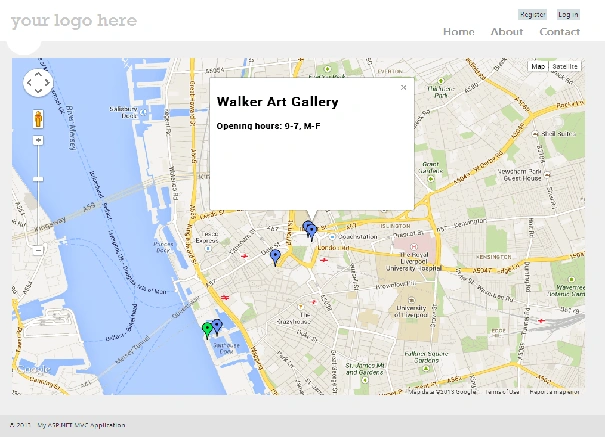
Happy Mapping!
Prajesh TalpadePosted Nov 18, 2020, 12:07 AM
The Project is not working. Giving error cannot load Map properly.
Rene Davis RamirezPosted Apr 20, 2018, 11:09 AM
This is exactly what I was trying to do in a very complex project.
Priya TiwariPosted Apr 11, 2018, 7:24 AM
HI, I am not able to implement this code. I keep getting an error saying "Google Maps API error: MissingKeyMapError https://developers.google.com/maps/documentation/javascript/error-messages#missing-key-map-error".
nadier elPosted Jan 4, 2018, 1:39 AM
The article is identical to a one in CodeProject wrote in 2013 even with the same snapshots: https://www.codeproject.com/Articles/629913/Google-Maps-in-MVC-with-Custom-InfoWindow
Parth MashrooPosted Jan 29, 2017, 10:40 AM
What if i want to show a map on page load during edit screen where i have address but need to display a map and street view of that map ?
Vineet KumarPosted Jan 13, 2017, 1:31 AM
Nice. Really helpful information
Anu VPosted Jan 13, 2017, 1:11 AM
Nice article thanks for sharing...
Nigel FernandesPosted Jan 12, 2017, 1:15 AM
Thanks for sharing will be useful ...
Munesh SharmaPosted Dec 21, 2016, 4:31 AM
Thank you for this article ,it is very useful for me
Shridhar SharmaPosted Dec 20, 2016, 1:08 PM
This was how exactly my team did in one of our project. can you list out some other available map APIs other than that of google. just to try out :)
Afzaal Ahmad ZeeshanPosted Dec 20, 2016, 7:07 AM
Kindly change the name to ASP.NET MVC, MVC itself is a framework, a pattern for development. This will cause a confusion only. :)
Ravi PatelPosted Dec 20, 2016, 5:45 AM
Well explained thanks for sharing
Manav PandyaPosted Dec 20, 2016, 4:40 AM
But my question is how to predefine one place by default Allen O'neill
Manav PandyaPosted Dec 20, 2016, 4:37 AM
Thanks for sharing this one
Manav PandyaPosted Dec 20, 2016, 4:37 AM
Yeh thats wht im looking forward Allen O'neill