

In my previous article, I have explained how to fetch the access token to consume graph APIs in web applications.
When we retrieve a user from Office 365 it returns the default properties such as - user id, business phone, display name, job title, mail, userprincipalname, mobilephone, and office location.
Use Microsoft Graph Explorer to retrieve the default properties of the below request.
Request
GET https://graph.microsoft.com/v1.0/{userid | userprincipalname}
GET https://graph.microsoft.com/v1.0/{userid | userprincipalname}
It retrieves the properties of the current signer in user.
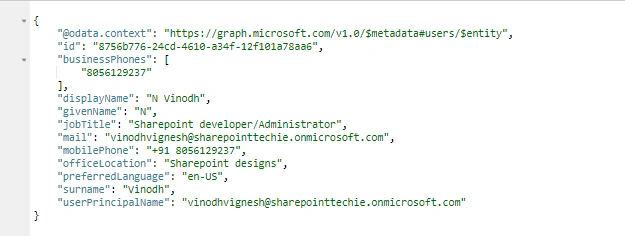
Now, I am going to retrieve the user information from the SharePoint site.
Open the SharePoint site.
Create a user.html file under siteAssets.
Step1
Create the function requesttoken() to fetch the access token and use it in the headers.
Create the function requesttoken() to fetch the access token and use it in the headers.
Code
The below response is the outcome of the above code:
- // refer jquery
- < script src = "https://ajax.googleapis.com/ajax/libs/jquery/1.11.1/jquery.min.js" > < /script> < script type = "text/javascript" >
- var token; // create global variable holds the access token
- $(document).ready(function() {
- requestToken(); // call the requesttoken function on page load
- });
- function requestToken() {
- $.ajax({
- "async": true,
- "crossDomain": true,
- "url": "https://cors-anywhere.herokuapp.com/https://login.microsoftonline.com/sharepointtechie.onmicrosoft.com/oauth2/v2.0/token", // Pass your tenant name instead of sharepointtechie
- "method": "POST",
- "headers": {
- "content-type": "application/x-www-form-urlencoded"
- },
- "data": {
- "grant_type": "client_credentials",
- "client_id ": "8baf0301-27df-44b1-b4fe-7911b9a918de", //Provide your app id
- "client_secret": "DxSF1K+JKl7LWJK8+3Ibg4il5JM4qUvdwOtShsYNvEA=", //Provide your secret
- "scope ": "https://graph.microsoft.com/.default"
- },
- success: function(response) {
- console.log(response);
- token = response.access_token;
- getUserInformation();
- },
- error: function(error) {
- console.log(JSON.stringify(error));
- }
- })
- }

Now, create a function getUserProperties() and retreive the user properties from Microsoft Graph API.
Code
- function getUserInformation() {
- $.ajax({
- method: 'GET',
- url: "https://graph.microsoft.com/v1.0/users/{userid | userprincipalname}",
- headers: {
- 'Authorization': 'Bearer ' + token,
- 'Content-Type': 'application/json'
- },
- }).success(function(response) {
- console.log(response);
- }).error(function(error) {});
- }
After passing the user principalname, the code looks like below.
The below response is the outcome of the above code.
- function getUserInformation() {
- $.ajax({
- method: 'GET',
- url: "https://graph.microsoft.com/v1.0/users/[email protected]",
- headers: {
- 'Authorization': 'Bearer ' + token,
- 'Content-Type': 'application/json'
- },
- }).success(function(response) {
- console.log(response);
- }).error(function(error) {});
- }
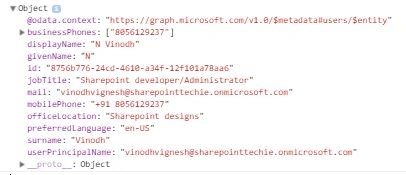
So, let's append the code into HTML.
Code
HTML
- function getUser() {
- $.ajax({
- method: 'GET',
- url: "https://graph.microsoft.com/v1.0/users/[email protected]",
- headers: {
- 'Authorization': 'Bearer ' + token,
- 'Content-Type': 'application/json'
- },
- }).success(function(response) {
- console.log(response);
- var Name = response.displayName;
- var Title = response.jobTitle;
- var email = response.mail;
- var office = response.officeLocation;
- var mobile = response.mobilePhone;
- var business = response.businessPhones[0];
- $('#one').append(Name);
- $('#two').append(Title);
- $('#three').append(email);
- $('#four').append(office);
- $('#five').append(mobile);
- $('#six').append(business);
- }).error(function(error) {});
- }
- Name:<p id="one"></p>
- Job Title:<p id="two"></p>
- Email:<p id="three"></p>
- Office:<p id="four"></p>
- Mobile:<p id="five"></p>
- Business Phone:<p id="six"></p>

Suhas YerramsettyPosted Mar 25, 2019, 4:37 PM
How do you send the current logged in user id or principle name dynamically in the GET url?
Devang MistryPosted Feb 25, 2019, 11:43 AM
Does not work
chetan chauhanPosted Aug 1, 2018, 2:56 AM
I am getting error: "The identity of the calling application could not be established". Do you have any idea?
Sravan KumarPosted Mar 19, 2018, 7:16 AM
Nice Article.. Thanks