

The philosophy of React is very simple. UI is most predictable when it’s the pure function of state. React solves this problem. UI = f (state)
And Redux is the data/state management library. Redux attempts to make state mutations predictable by imposing certain restrictions on how and when the state updates can happen.
This week, I am learning Redux and here, just sharing few of my learnings. We use Redux for JavaScript apps. Redux helps us write the applications which behave consistently, run in different environments (client, server, and native), and are very easy to test. We can use Redux apps with React, Angular, OR jQuery. Also, Redux works especially well with libraries like React because it lets you describe the UI as a function of state, and Redux emits state updates in response to actions.
Redux asks you to -
- Describe application states as plain objects and arrays.
- Describe changes in the system as plain objects.
- Describe the logic for handling changes as pure functions.
Redux works with three simple principles
- Store
Single source of truth - The state of your whole application is stored in an object tree within a single. - Action
State is read-only - The only way to mutate the state is to dispatch an action, an object describing what happened - Reducer
Changes are made with pure functions - To specify how the state tree is transformed by actions, you write
How to Install Redux
- Just write- // npm install --save redux //
Most likely, you'll also need the React bindings and the developer tools.
- // npm install --save react-redux npm
- install --save-dev redux-devtools //
STORE- Action - Reducer - VIEW
- Just write- // npm install --save redux //
Redux has many elegantly designed features, and compared to Fluxxor, you can write a lot less repetitive code and logic. Out of all features, I like Redux’s Action the most. After reading the source code for Action, I realized there are a lot of functional programming concepts in the code.
Sharing the example code of Redux+ React App.
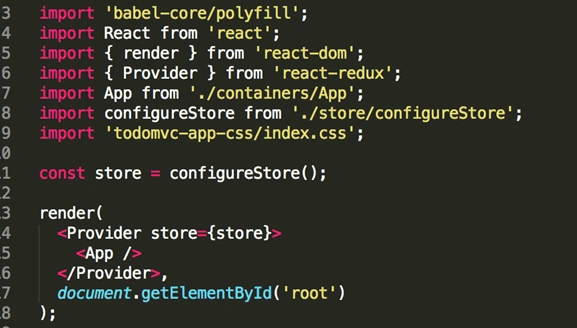
In the code above, we can see that the App component app is wrapped inside the Provider component, and this Provider component uses a prop to point us to the app’s state,
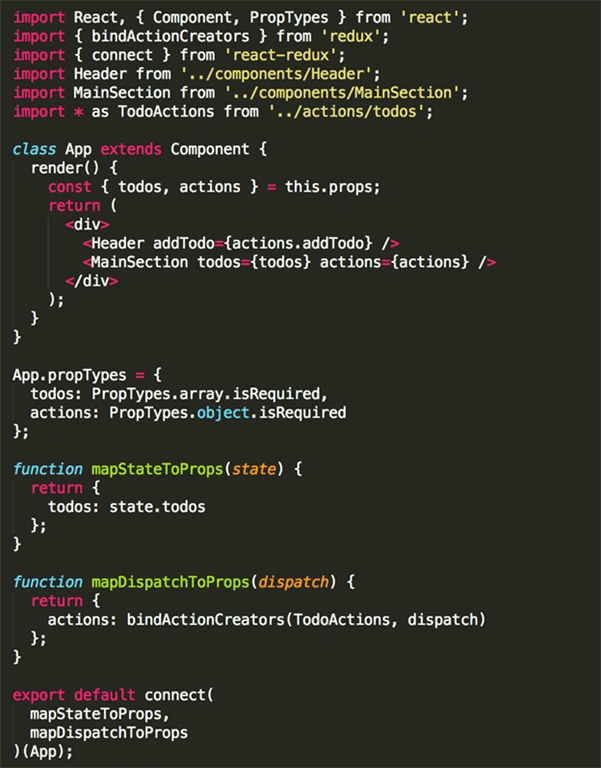
- { todos: state.todos };
- // actions/todos.js
- export function addTodo(text) {
- return { type: types.ADD_TODO, text };
- }
Join the conversation! Your thoughts help the community grow.