

Introduction
As Artificial Intelligence continues to develop, a major challenge remains - how can we ensure that AI responses are accurate, reliable, and based on real-world data?
In this case, Retrieval-Augmented Generation (RAG) comes into play.
The RAG consists of:
You may use your documents, PDFs, and knowledge base to store your data
Content search (retrieval of relevant content)
Generation of artificial intelligence (LLMs)
You will learn the following in this article:
RAG explained in simple terms
Create your first RAG pipeline using C# 14 and ASP.NET Core
Build a basic API for AI Knowledge Assistants
Become familiar with best practices for production systems
What is RAG?
A RAG pattern consists of:
The user asks a question
Relevant documents are searched by the system
The system sends the context and question to the AI
A grounded answer is generated by AI
In the absence of RAG:
Artificial intelligence guesses (hallucinations❌)
In RAG:
Answers based on your data (accurate✅)
RAG Architecture Overview

Step 1: Create ASP.NET Core Project (.NET 9 / C# 14)
dotnet new webapi -n RAGDemo
cd RAGDemo
Project Structure (Clean & Simple)
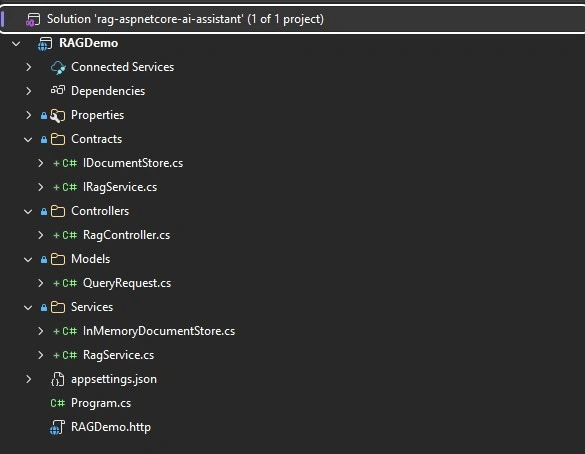
Step 2: Define Request Model
namespace RAGDemo.Models;

public class QueryRequest
{
    public string Question { get; set; } = string.Empty;
}
Step 3: Create Simple Document Store (Mock Retrieval)
Your knowledge base is simulated in this way.
namespace RAGDemo.Contracts;

public interface IDocumentStore
{
    List<string> Search(string query);
}
using RAGDemo.Contracts;
namespace RAGDemo.Services;
public class InMemoryDocumentStore : IDocumentStore
{
private readonly List<string> _documents =
[
"In C# 14, new modern language features are introduced.",
"Scalable APIs are built with ASP.NET Core.",
"By adding context from documents, RAG improves AI.",
"In order to convert text into vectors, embeddings are used."
];
public List<string> Search(string query)
{
return _documents
.Select(doc => new
{
Document = doc,
Score = CalculateScore(doc, query)
})
.OrderByDescending(x => x.Score)
.Where(x => x.Score > 0) // only relevant docs
.Take(3)
.Select(x => x.Document)
.ToList();
}
private int CalculateScore(string doc, string query)
{
var score = 0;
var queryWords = query
.ToLower()
.Split(' ', StringSplitOptions.RemoveEmptyEntries);
foreach (var word in queryWords)
{
if (doc.ToLower().Contains(word))
{
score++;
}
}
return score;
}
}Step 4: Create RAG Service
It's here that the magic happens.
namespace RAGDemo.Contracts;

public interface IRagService
{
    Task<string> AskAsync(string question);
}
using RAGDemo.Contracts;
namespace RAGDemo.Services;
public class RagService : IRagService
{
private readonly IDocumentStore _documentStore;
public RagService(IDocumentStore documentStore)
{
_documentStore = documentStore;
}
public async Task<string> AskAsync(string question)
{
var docs = _documentStore.Search(question);
if (docs == null || docs.Count == 0)
{
return "No relevant information found.";
}
var context = string.Join(Environment.NewLine, docs);
var prompt = $"""
Based on the context below, answer the question:
Context:
{context}
Question:
{question}
""";
var answer = docs.First();
return await Task.FromResult(answer);
}
}
Step 4: Create API Controller
using Microsoft.AspNetCore.Mvc;
using RAGDemo.Contracts;
using RAGDemo.Models;

namespace RAGDemo.Controllers;

[ApiController]
[Route("api/[controller]")]
public class RagController : ControllerBase
{
    private readonly IRagService _ragService;

    public RagController(IRagService ragService)
    {
        _ragService = ragService;
    }

    [HttpPost("ask")]
    public async Task<IActionResult> Ask([FromBody] QueryRequest request)
    {
        var answer = await _ragService.AskAsync(request.Question);
        return Ok(new { answer });
    }
}
Step 5: Register Services (Program.cs)
using Microsoft.AspNetCore.Diagnostics.HealthChecks;
using System.Text.Json;
using RAGDemo.Contracts;
using RAGDemo.Services;

var builder = WebApplication.CreateBuilder(args);

builder.Services.AddControllers();

builder.Services.AddSingleton<IDocumentStore, InMemoryDocumentStore>();
builder.Services.AddScoped<IRagService, RagService>();
builder.Services.AddHealthChecks();

var app = builder.Build();

app.MapControllers();

app.MapHealthChecks("/health", new HealthCheckOptions
{
    ResponseWriter = async (context, report) =>
    {
        context.Response.ContentType = "application/json";

        var result = JsonSerializer.Serialize(new
        {
            status = report.Status.ToString()
        });

        await context.Response.WriteAsync(result);
    }
});

app.Run();
Step 6: RAGDemo.http
@RAGDemo_HostAddress = http://localhost:5083
@ContentType = application/json

### Health Check (Optional - if you add one)
GET {{RAGDemo_HostAddress}}/health
Accept: application/json

###

### Test 1: C# 14 Question (Expected Correct Match)
POST {{RAGDemo_HostAddress}}/api/rag/ask
Content-Type: {{ContentType}}

{
  "question": "What is new in C# 14?"
}

###

### Test 2: ASP.NET Core Question
POST {{RAGDemo_HostAddress}}/api/rag/ask
Content-Type: {{ContentType}}

{
  "question": "Explain ASP.NET Core in simple terms"
}

###

### Test 3: RAG Concept Question
POST {{RAGDemo_HostAddress}}/api/rag/ask
Content-Type: {{ContentType}}

{
  "question": "How does RAG improve AI?"
}

###

### Test 4: Embeddings Question
POST {{RAGDemo_HostAddress}}/api/rag/ask
Content-Type: {{ContentType}}

{
  "question": "What are embeddings?"
}

###

### Test 5: Unknown Question (Edge Case)
POST {{RAGDemo_HostAddress}}/api/rag/ask
Content-Type: {{ContentType}}

{
  "question": "What is Kubernetes?"
}

###

### Test 6: With Authorization (Future - Keycloak/JWT)
POST {{RAGDemo_HostAddress}}/api/rag/ask
Content-Type: {{ContentType}}
Authorization: Bearer YOUR_ACCESS_TOKEN

{
  "question": "How does RAG improve AI accuracy?"
}

###
Step 7: Test the API
Endpoint:
POST: http://localhost:5083/health
Response:
{
  "status": "Healthy"
}
Endpoint:
POST: http://localhost:5083/api/rag/ask
Request:
{
  "question": "What is new in C# 14?"
}
Response:
{

  "answer": "In C# 14, new modern language features are introduced."

}
Endpoint:
POST: http://localhost:5083/api/rag/ask
Request:
{
  "question": "Explain ASP.NET Core in simple terms"
}
Response:
{
  "answer": "Scalable APIs are built with ASP.NET Core."
}
Endpoint:
POST: http://localhost:5083/api/rag/ask
Request:
{
  "question": "How does RAG improve AI?"
}
Response:
{
  "answer": "By adding context from documents, RAG improves AI."
}
Endpoint:
POST: http://localhost:5083/api/rag/ask
Request:
{
  "question": "What are embeddings?"
}
Response:
{
  "answer": "In C# 14, new modern language features are introduced."
}
Step 8: Replace Simulation with Real AI (Optional)
The following can be integrated:
· OpenAI API
Azure OpenAI
Local models
Here is an example (simplified):
// pseudo-code
var response = await httpClient.PostAsync("openai-endpoint", content);
Best Practices for RAG in C#
✅ 1. Separate Responsibilities
Retrieval logic → separate service
Prompt building → dedicated layer
LLM integration → isolated
✅ 2. Use Clean Architecture
Domain → Models
Application → RAG logic
Infrastructure → AI + DB
✅ 3. Avoid Large Context
Limit to top 3–5 documents
Too much context = worse answers
✅ 4. Improve Retrieval
Move from keyword search → embeddings
Use vector databases
✅ 5. Add Source Tracking
Always return:
{
  "answer": "...",
  "sources": ["doc1", "doc2"]
}
✅ 6. Secure Your API
JWT authentication
Role-based access
Tenant isolation (important for SaaS)
What You Built
You now have:
✅ A working RAG API in ASP.NET Core
✅ A basic retrieval system
✅ A context-aware AI response flow
What’s Next?
In the next article, you’ll learn:
“What Is RAG and Why It Matters for .NET Developers”
Next, we'll discuss:
Embeddings
Vector databases
Production architecture
Multi-tenant SaaS AI systems
Final Thoughts
RAG is not just a trend it’s the foundation of modern AI systems.
By combining:
C# 14
ASP.NET Core
Clean Architecture
AI + Retrieval
You can build enterprise-grade intelligent applications. You be able to find the codebase for this article on Ziggy Rafiq repository link here https://github.com/ziggyrafiq/rag-aspnetcore-ai-assistant
Happy Coding.
Join the conversation! Your thoughts help the community grow.