

This article is for beginners who want to learn and develop iOS apps in Objective C. This article explains creating Class, Instance/Object, and Accessors in Objective C.
Objective C is a programming language used to develop iOS/Mac applications. It is one of the first object-oriented programming languages.
So, let's get familiar with Objective C by implementing a simple example.
Prerequisites
- MacOS
- Xcode
Open XCode and create a new project by selecting macOS -> Command Line Terminal as shown in the below image. We will be displaying the output in the Xcode console.
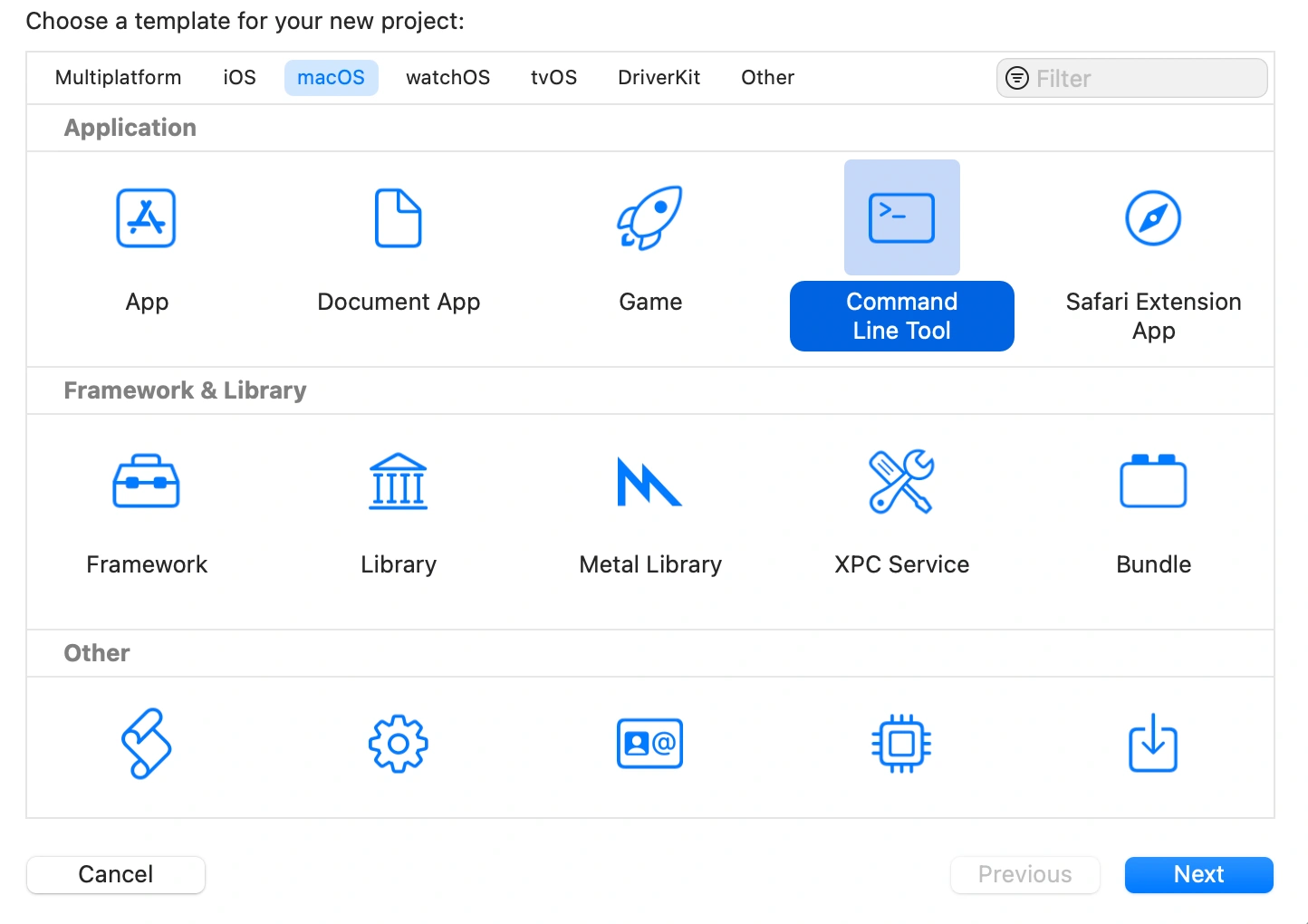
Click on Next. Name your project and select the language as Objective C.
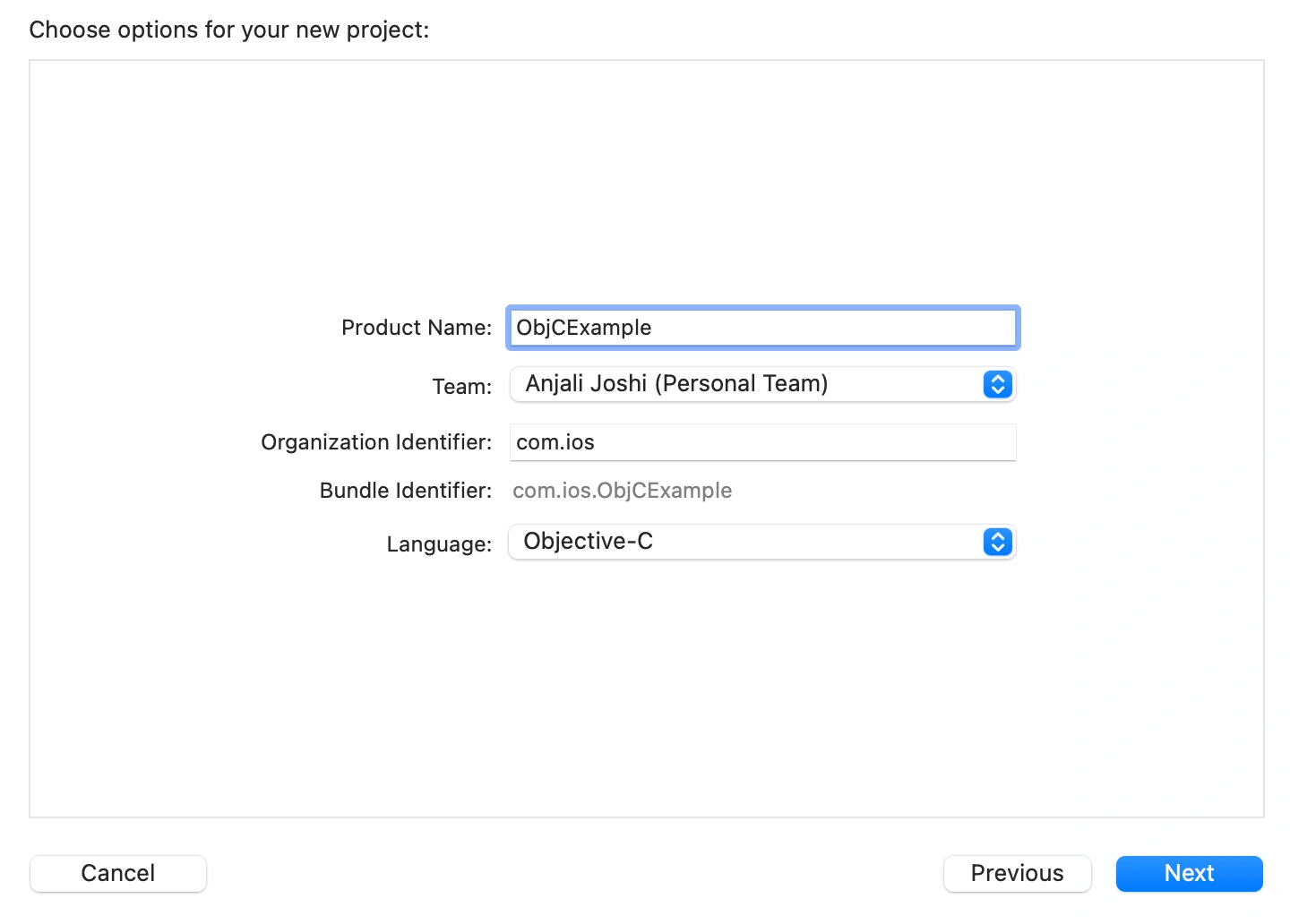
- Select the desired location and save your project.
- Now, in the Project Navigator, you will see a 'main' file. This file is similar to the main function in C programming. The code execution starts from here.
- To add new files, right-click on your Project and select New File.
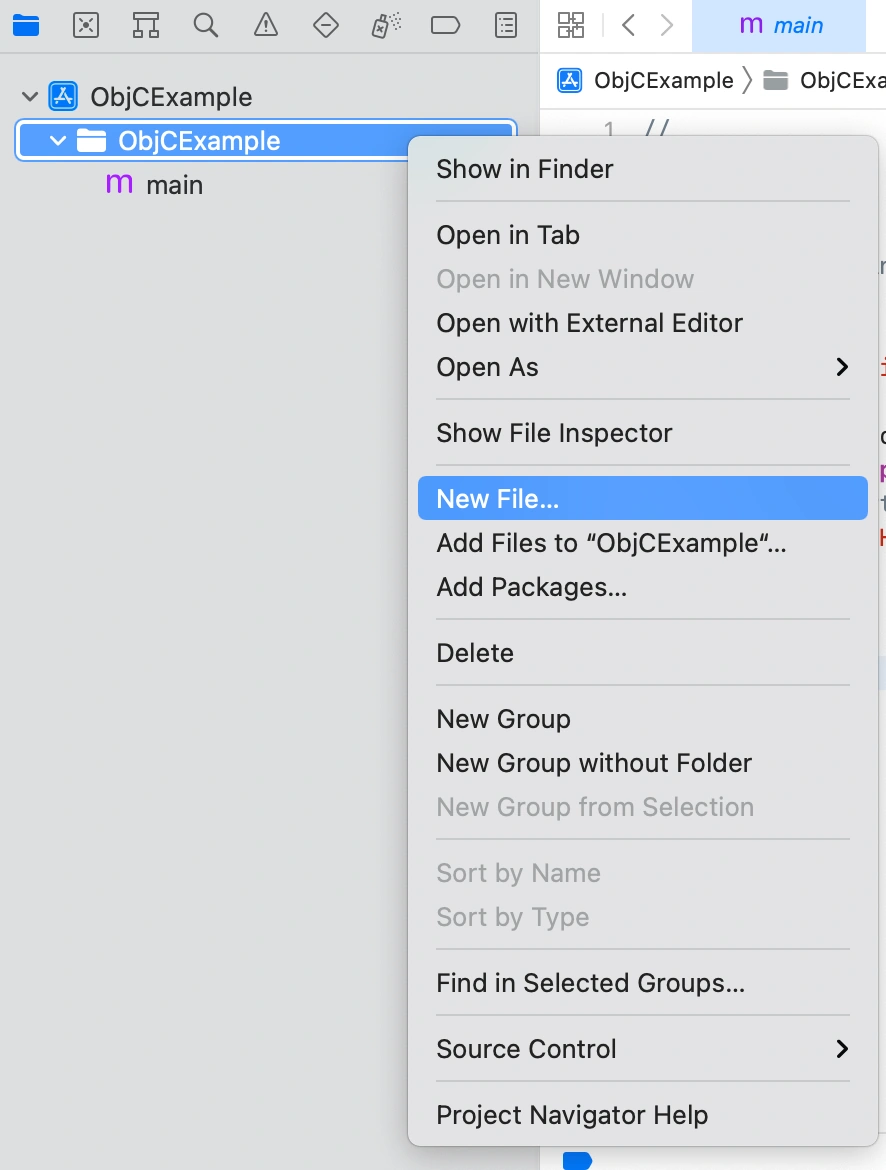
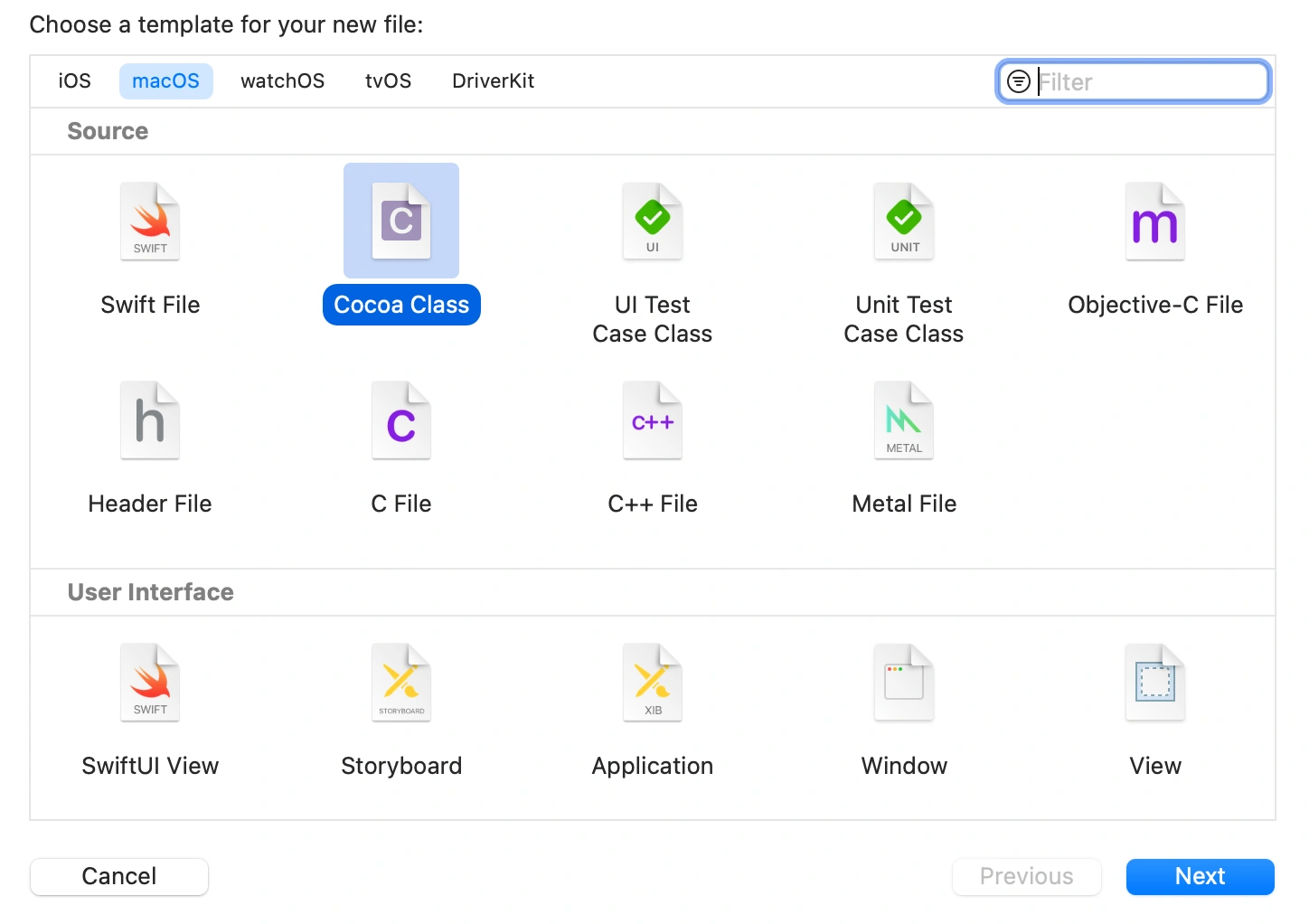
Select Cocoa Class -> Next -> Enter the Class Name as 'Product' -> Next -> Create. Also, make sure the subclass was selected as NSObject while entering Class Name.
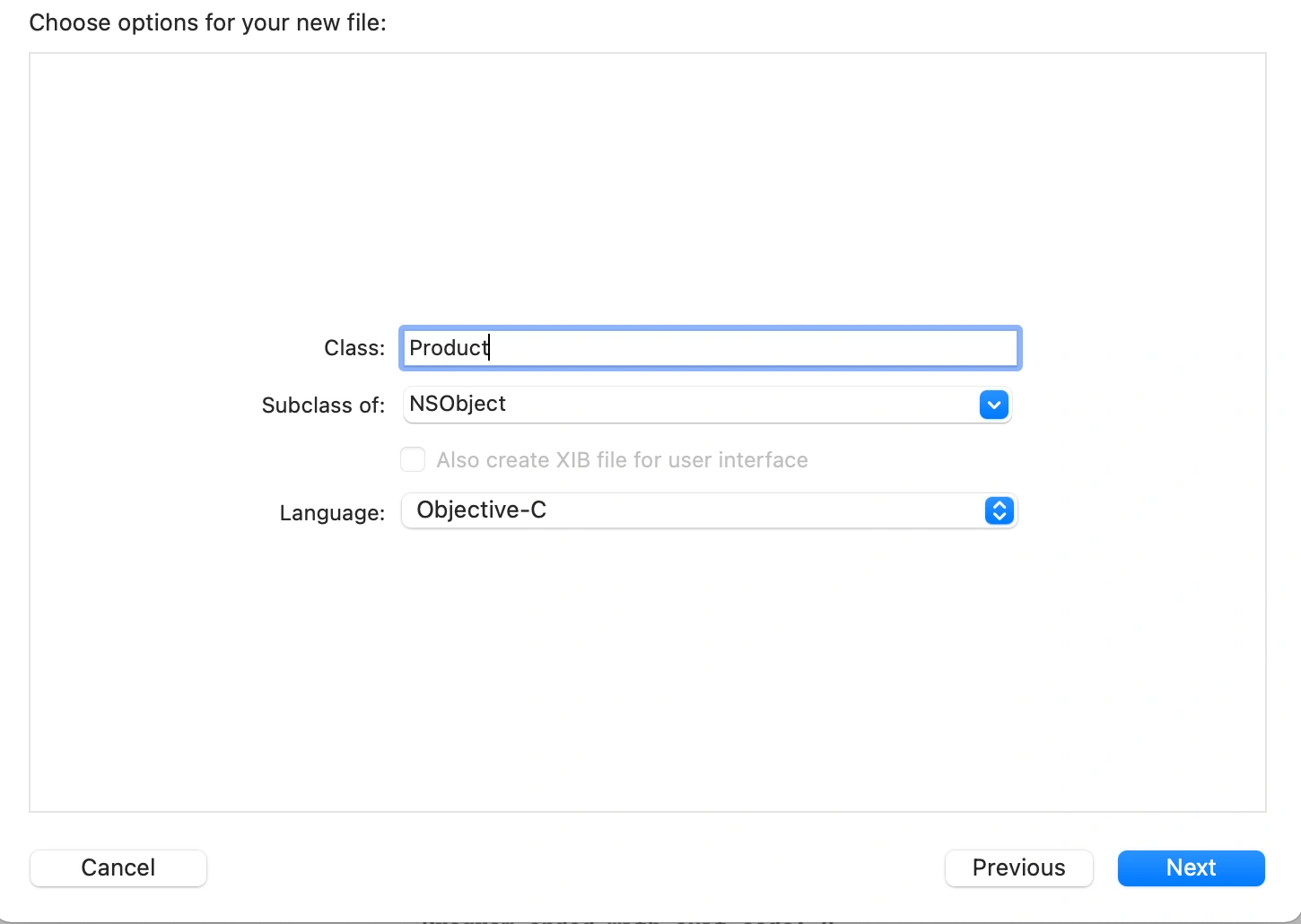
- Now, you can see 2 new files added in your Project Navigator with the extensions .h and .m
- The file with .h extension is the Header file and the other one with .m extension is the Implementation file. In the Header file, we declare properties and functions whereas in the .m file we define them.
Now, open Product.h file and let's declare some properties inside the @interface block as shown below.
#import <Foundation/Foundation.h>

NS_ASSUME_NONNULL_BEGIN

@interface Product : NSObject
{
//Declaring properties
    int _productID;
    NSString *_productName;
    int _quantity;
    float _price;
}

//Declaring getters and setters for the above properties
-(int)prodID; //getter
-(void)setProductID:(int)prodID; //setter

-(NSString *)prodName;
-(void)setProductName:(NSString *)prodName;

-(int)qty;
-(void)setQuantity:(int)qty;

-(float)price;
-(void)setPrice:(float)price;

@end

NS_ASSUME_NONNULL_END
- The next step will be to create accessors i.e getters and setters for the properties.
- Getters are used to retrieve the value of the property and are denoted as follows: -(type)name;
- Setters are used to change the value of the property and are denoted as follows: -(return type)setName:(type)NewName;
Once done, open Product.m file. Here we will be assigning the value of NewName to that of the original property name and also retrieving the property values.
#import "Product.h"

@implementation Product

-(void)setProductID:(int)productID
{
    _productID = productID; // assigning the value of NewName to the original property
}

-(int)prodID
{
    return  _productID;     // retrieving the value of the property
}

-(void)setProductName:(NSString *)prodName
{
    _productName = prodName;
}

-(NSString *)prodName
{
    return  _productName;
}

-(void)setQuantity:(int)qty
{
    _quantity = qty;
}

-(int)qty
{
    return _quantity;
}

-(void)setPrice:(float)price
{
    _price = price;
}

-(float)price
{
    return  _price;
}

@end
Now, open the main file. Here we will be creating instance(object) of the Product class. You can create an instance in Objective C in 3 different ways:
NOTE
Add the line #import "Product.h" in main.m file. By adding this line, it will detect the properties mentioned in the Product.h file.
 Product *product = [Product alloc];  //allocating memory
 product = [Product init]; //Initializing the instance of Product class
OR
Product *product = [[Product alloc]init]; //Allocating and initializing an instance of Product class.
OR
Product *product = [Product new]; //Allocating and initializing an instance of Product class using 'new' keyword.
The keyword 'alloc' is used to allocate some memory to the instance of Product class. The 'init' keyword is used to initialize the instance of the Product class. The 'new' keyword has both the functionalities allocating as well as initializing in it.
Once we create and initialize the instance variable, next step is to assign the values to the properties.
//Set the values of the properties
  [product setProductID:101];
  [product setProductName:@"Notebook"];
  [product setQuantity:2];
  [product setPrice:20.00];
Once the values are set, add NSLog to print the values on the console.
//Printing the values on the console
   NSLog(@"Product ID: %d", [product prodID]);
   NSLog(@"Product Name: %@", [product prodName]);
   NSLog(@"Quantity: %d", [product qty]);
   NSLog(@"Price: %f", [product price]);
Now run the project. You must get the output on the console as shown below:
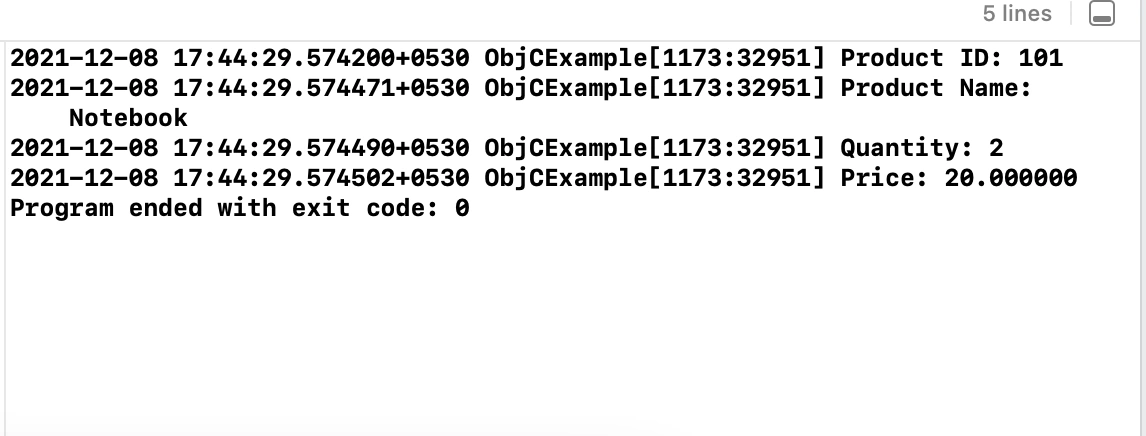
Similarly, you can create as many instances of Product class and set their values. Below is the entire main file for your reference.
#import < Foundation / Foundation.h > #import "Product.h"
int main(int argc,
    const char * argv[]) {
    @autoreleasepool {
        //        Product *product = [Product alloc];  //allocating memory
        //        product = [Product init]; //Initializing the instance of Product class
        // OR
        //        Product *product = [[Product alloc]init]; //Allocating and initializing an instance of Product class.
        // OR
        Product * product = [Product new]; //Allocating and initializing an instance of Product class.
        //Set the values of the properties
        [product setProductID: 101];
        [product setProductName: @ "Notebook"];
        [product setQuantity: 2];
        [product setPrice: 20.00];
        //Printing the values on the console
        NSLog(@ "Product ID: %d", [product prodID]);
        NSLog(@ "Product Name: %@", [product prodName]);
        NSLog(@ "Quantity: %d", [product qty]);
        NSLog(@ "Price: %f", [product price]);
        //Creating a new instance
        Product * product2 = [Product new];
        [product2 setProductID: 1002];
        [product2 setProductName: @ "PencilBox"];
        [product2 setQuantity: 5];
        [product2 setPrice: 100.00];
        NSLog(@ "Product ID: %d", [product2 prodID]);
        NSLog(@ "Product Name: %@", [product2 prodName]);
        NSLog(@ "Quantity: %d", [product2 qty]);
        NSLog(@ "Price: %f", [product2 price]);
    }
    return 0;
}
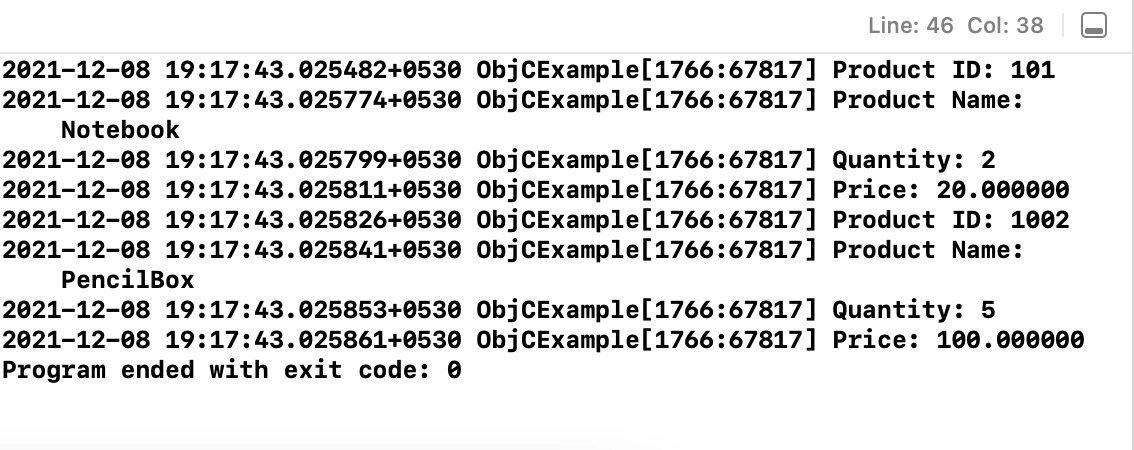
Output
Another Simple Approach For Accessors Using @property
- Apart from the above implementation, there is another and simple approach for accessors. You can follow any of them.
- So let's implement using @property as well.
Open Product.h file and paste the following code.
//Accessors using @property
@property int productID,qty;
@property NSString *prodName;
@property float price;
The @property generates the getters and setters that we had implemented in the above approach.
Now, go to main.m file and make the following changes as shown below,
//Set the values of the properties
[product setProductID:101];
[product setProdName:@"Notebook"];
[product setQty:2];
[product setPrice:20.00];

//Printing the values on the console
NSLog(@"Product ID: %d", [product productID]);
NSLog(@"Product Name: %@", [product prodName]);
NSLog(@"Quantity: %d", [product qty]);
NSLog(@"Price: %f", [product price]);
- In the above approach, Xcode used the names of getters and setters that we had declared and defined whereas here as @property automatically creates getters and setters, XCode IntelliSense will detect the names that we have declared with @property.
- Run the project and you must get the same output that we received in the last approach.
Below are the Product.h and main.m files implemented using @property for your reference,
#import <Foundation/Foundation.h>
NS_ASSUME_NONNULL_BEGIN
@interface Product : NSObject
{
    int _productID;
    NSString *_productName;
    int _quantity;
    float _price;
}
//Accessors using @property
@property int productID,qty;
@property NSString *prodName;
@property float price;
@end
NS_ASSUME_NONNULL_END
#import < Foundation / Foundation.h > #import "Product.h"
int main(int argc,
    const char * argv[]) {
    @autoreleasepool {
        //        Product *product = [Product alloc];  //allocating memory
        //        product = [Product init]; //Initializing the instance of Product class
        // OR
        //        Product *product = [[Product alloc]init]; //Allocating and initializing an instance of Product class.
        // OR
        Product * product = [Product new]; //Allocating and initializing an instance of Product class.
        //Set the values of the properties
        [product setProductID: 101];
        [product setProdName: @ "Notebook"];
        [product setQty: 2];
        [product setPrice: 20.00];
        //Printing the values on the console
        NSLog(@ "Product ID: %d", [product productID]);
        NSLog(@ "Product Name: %@", [product prodName]);
        NSLog(@ "Quantity: %d", [product qty]);
        NSLog(@ "Price: %f", [product price]);
        //Creating a new instance
        Product * product2 = [Product new];
        [product2 setProductID: 1002];
        [product2 setProdName: @ "PencilBox"];
        [product2 setQty: 5];
        [product2 setPrice: 100.00];
        NSLog(@ "Product ID: %d", [product2 productID]);
        NSLog(@ "Product Name: %@", [product2 prodName]);
        NSLog(@ "Quantity: %d", [product2 qty]);
        NSLog(@ "Price: %f", [product2 price]);
    }
    return 0;
}
Join the conversation! Your thoughts help the community grow.