

Introduction
Microsoft Semantic Kernel is an Open Source lightweight SDK for consuming Large Language Models (LLMs) in normal programming languages like C# and Python. We can use OpenAI, Azure OpenAI, and Hugging Face language models in our existing apps to extend our app's capabilities without needing to train or fine-tune a model from scratch. Using this way, Semantic Kernel simulates a brain in our apps. With the help of Semantic Kernel, you can develop AI Apps easily, which combines both worlds together to create a brand new experience for users using your development skills and expertise.
How does Microsoft Semantic Kernel work?
Most of the AI systems have two main modules, which are as follows.
- Model: Semantic Kernel works as an AI orchestration Layer that connects Large Language Models (LLM) and Memory using a bunch of connectors and plugins.
- Memory: Memories play an important role in any Contextual-based prompts system. So using special plugins, we can retrieve and store our context in Vector databases. We can store our contexts in Redis, Quadrant, SQLite, and Pinecone databases. For more options, you can see available memory connectors to Vector databases on Learn Microsoft.
As a developer, you can consume them individually or combine them together.
For instance, you can design a plugin with pre-configure prompts using Semantic Kernel SDK, which uses both OpenAI and Azure OpenAI to get amazing power and can store contexts in the Qdrant database.
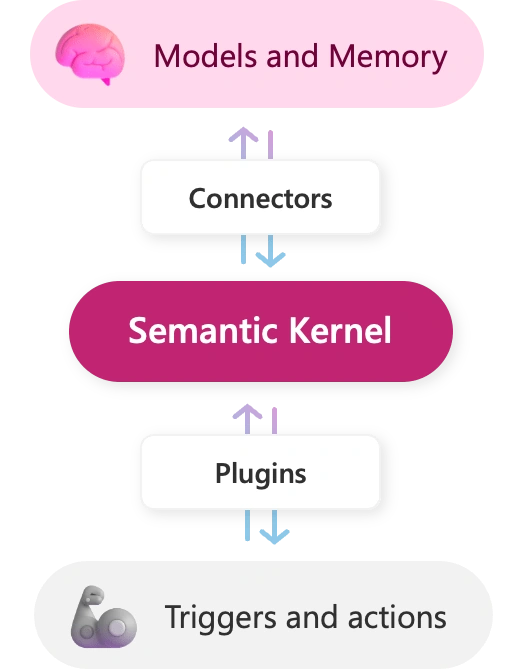
Reference: Microsoft Semantic Kernel
Key benefits
- Easy to Integrated: Semantic Kernel is designed to be integrated into any type of application so you can integrate and test easily LLMs
- Easy to Extend: Semantic Kernel can be connected with different data sources and services so that other services can utilize natural language processing and also utilizing live business data.
- Better prompting: Semantic Kernels is designed with templated prompts, so you can quickly design semantic functions to unlock LLMs AI potential.
- Novel-But familiar: You can write Native code to engineer your prompts so you get the best to design it.
How to integrate?
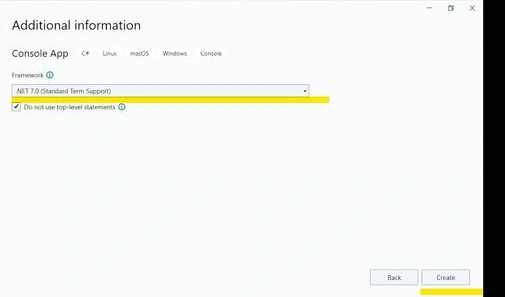
Open VisualStudio and select Console App, then enter the project name. After selecting the project name, select Framework. In my case, I have selected .NET 7. Click on the Create button to create the project.
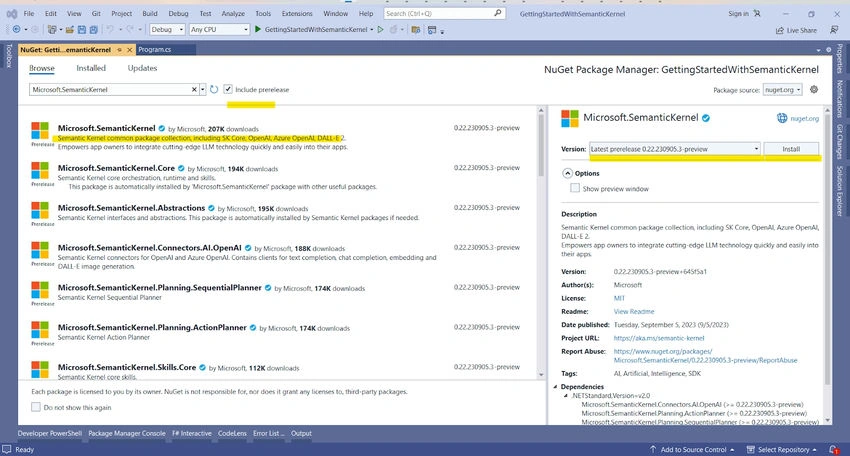
After creating a project, Open Nuget Package Manager and search Microsoft.SemanticKernel, don't forget to check Prelease because currently, the Prelease version is available.
Import necessary Packages
using Microsoft.SemanticKernel;
Initialize semantic kernel and use .WithAzureChatCompletionService function to use Azure Open AI model.
IKernel kernel = new KernelBuilder()
				.WithAzureChatCompletionService("ChatpGPT", "https://....openai.azure.com/", "...API KEY...")
				.Build();
Create a Semantic function with a simple prompt "List the two planets closest to '{{$input}}', excluding moons, using bullet points"
var func = kernel.CreateSemanticFunction(
				"List the two planets closest to '{{$input}}', excluding moons, using bullet points.");
Invoke the the create semantic function to get the prompt result.
var result = await func.InvokeAsync("Jupiter");
Console.WriteLine(result);
In the end, our code looks like this.
static async Task Main(string[] args)
{
	Console.WriteLine("======== Using Chat GPT model for text completion ========");

	IKernel kernel = new KernelBuilder()
		.WithAzureChatCompletionService("ChatpGPT", "https://....openai.azure.com/", "...API KEY...")
		.Build();

	var func = kernel.CreateSemanticFunction(
		"List the two planets closest to '{{$input}}', excluding moons, using bullet points.");

	var result = await func.InvokeAsync("Jupiter");
	Console.WriteLine(result);
}
Run the console app, and see the results.
Output:
/*
        Output:
           - Saturn
           - Uranus
*/
Summary
In this article, we have introduced the Microsoft Semantic Kernel, an open-source lightweight SDK for integrating Large Language Models (LLMs) AI into existing .NET Apps. We have also discussed the available connectors for the Vector database for storing memory and prompts contexts. In the end, we discussed the benefits of Semantic Kernel and wrote a simple example program in the .NET 7 Console App, which consumes the Azure OpenAI model.
To learn more about Microsoft Semantic Kernel, please visit Microsoft Learn Website
Join the conversation! Your thoughts help the community grow.