

Introduction
Language models are computer programs that can process natural language inputs and outputs, such as text or speech. They are widely used in various applications, such as chatbots, document analysis, code generation, and question-answering. However, developing and deploying language model applications can be challenging and complex, especially when they need to access and interact with external sources of data.
That's where LangChain comes in. LangChain is a framework for developing applications powered by language models. It enables applications that are data-aware and agentic, meaning that they can connect to other sources of data and interact with their environment. LangChain also provides modular components and use-case-specific chains to simplify the creation of such applications.
In this article, we will introduce LangChain and its features, explain how it works, and show some examples of applications that can be built with it. We will also compare LangChain with other frameworks and discuss its advantages and limitations. By the end of this article, you will have a better understanding of what LangChain is and how you can use it for your language model applications. Let's get started!
Installation In Python
To install LangChain, you need to have Python version 3.8.1 or higher but lower than 4.0. You can use pip to install the package from the command line. Here is an example of how to install LangChain using pip.
pip install langchain
Let's create a program using Langchain with OpenAI-
To use LangChain with OpenAI, you must have an OpenAI API key. You can get them from the OpenAI website https://platform.openai.com/account/api-keys. Once you have them, you can use the following steps to create a basic program with LangChain and OpenAI.
pip install openai
After successfully setup the environment, you can write the program -
from langchain.llms import OpenAI
from langchain.chat_models import ChatOpenAI
from langchain.llms import OpenAI
llm = OpenAI(openai_api_key="...",temperature=0.7)
output=llm.predict("Why Lion is the king of forest?")
print(output)
Modules in LangChain
LangChain has six modules that provide standard, extendable interfaces and external integrations for working with language models.
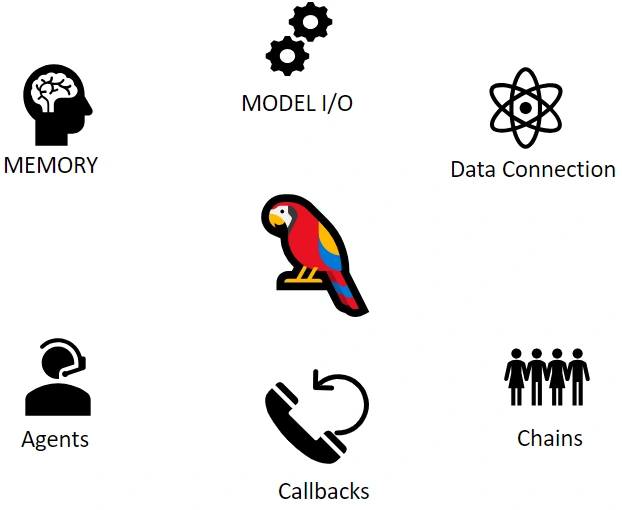
Model I/O Module
Imagine you have a toolbox full of different types of language skills and understanding. The Model I/O module in LangChain acts like that toolbox. It lets you pick the right tool for the job, whether it's a language model that can write essays, answer questions, or even translate languages. You can talk to these tools using prompts (questions or instructions), and they give you back outputs (text or information) based on what you asked for. This module is like having a conversation with a super-smart assistant that knows a lot of languages. Model I/O has three main building blocks for completing the interface Prompts, Language Models, and Output Parser.
from langchain.prompts import PromptTemplate
prompt = PromptTemplate.from_template("Is the {name}, natioanl bird of India?")
chain = LLMChain (llm=llm, prompt=prompt)
birds = ["hen","crow","cow"]
for item in birds:
    result =chain.run(item)
    print(result)
Data Connection Module
This module is like having a magical door that connects your application to the outside world. Imagine you can open this door and peek into databases and websites or even ask other software for information. With the Data Connection module, you can fetch data from these external sources, like a librarian getting books for you. You can ask for specific data, filter out what you don't need, or even update information, just like adjusting the library catalog. This code will first create a document loader object, which will load the documents from the specified file path.
import langchain as lc
# Create a document loader
document_loader = lc.DocumentLoader("./data/documents.json")
# Load the documents
documents = document_loader.load()
# Print the first document
print(documents[0])
Here is another example code that shows how to use a document transformer to convert documents into Q&A format.
import langchain as lc
# Create a document transformer
document_transformer = lc.DocumentTransformer()
# Transform the documents
documents = document_transformer.transform(documents)
# Print the first document in Q&A format
print(documents[0])
Chains Module
Consider this module a set of building blocks you can arrange in a sequence. Each block can do something different, like talking to models, fetching data, or remembering things. You can arrange these blocks in a line to create a step-by-step plan, just like a recipe in a cookbook. This module lets you build complex plans for your application, like telling it what to do when certain conditions are met.
import langchain as lc
# Create a chain
chain = lc.Chain()
# Add a step to the chain
chain.add_step(lc.PromptTemplate(prompt="What is the capital of France?"))
# Add another step to the chain
chain.add_step(lc.LLMChain(model="Bard", prompt_template=chain.current_step()))
# Run the chain
response = chain.run()
# Print the response
print(response)
This code will first create a chain object. It will then add two steps to the chain: a prompt template step and an LLM chain step. The prompt template step will generate a prompt asking for the capital of France. The LLM chain step will query the Bard language model to answer the prompt. The code will then run the chain and print the response.
Agents Module
Imagine you have a friend who knows a lot about the world outside of your application. This friend can use web browsers, email, and chat tools. The Agents module is like bringing that friend into your application. It lets your application talk to the outside world using these tools. You can ask your application to send emails, chat with users, or even browse the web for information.
import langchain as lc
# Create an agent
agent = lc.Agent(model="Bard")
# Add a tool to the agent
agent.add_tool(lc.LLMChain(model="Bard", max_tokens=100))
# Run the agent
response = agent.run("Write a poem about a cat")
# Print the response
print(response)
Memory Module
Sometimes, your application needs a place to remember things between its actions. The Memory module is like a notepad where your application can jot down important information. It can store things like user preferences, past conversations, or even the results of calculations. This way, even if your application takes a break and comes back later, it still remembers what it was doing.
import langchain as lc
# Create a memory
memory = lc.ConversationBufferMemory()
# Add a user message to the memory
memory.add_user_message("Hi!")
# Add an AI message to the memory
memory.add_ai_message("How are you?")
# Get the chat history from the memory
chat_history = memory.get_chat_history()
# Print the chat history
print(chat_history)
Callbacks Module
Imagine you're watching a magic show, and the magician tells you each step before performing the trick. The Callbacks module is like that show's director's commentary. It lets you see what's happening at each step of your application's plan. This helps understand how your application works and fix any hiccups. It's like having a behind-the-scenes view of your application's actions.
import langchain as lc
# Create a callback manager
callback_manager = lc.CallbackManager()
# Add a callback handler
callback_manager.add_handler(lc.StdOutCallbackHandler())
# Run the callback manager
callback_manager.run()
This code will first create a callback manager object. It will then add a standard output callback handler to the manager. The callback manager will then run and print all of the callbacks that have been registered.
Here are some of the built-in callback handlers in Langchain:
- StdOutCallbackHandler: Prints all of the callbacks to the standard output.
- ClearMLCallbackHandler: Tracks the progress of a training run and logs the results to ClearML.
- FileCallbackHandler: Writes all of the callbacks to a file.
- LoggingCallbackHandler: Logs all of the callbacks to a logging system.
Integrations in LangChain
Some of the integrations available in Langchain include:
- Document loaders: These integrations allow you to load data from a variety of sources, such as files, databases, and APIs.
- Document transformers: These integrations allow you to transform data into a format that is compatible with LLMs.
- LLMs: These integrations allow you to query LLMs to get answers to questions, generate text, translate languages, and more.
- Memory: These integrations allow you to store and retrieve information from memory, which can be used to improve the performance of your applications.
- Vector stores: These integrations allow you to store and retrieve vector representations of data, which can be used for tasks such as similarity search and recommendation.
- Tools: These integrations provide additional functionality for your applications, such as logging, debugging, and visualization.
- Text embedding models: Text embedding models are used to represent text as vectors. This makes it possible to perform operations on text, such as similarity search and recommendation, that would be difficult or impossible to do with raw text.
You can find more information about the integrations available in Langchain in the Langchain documentation- Click Here
Summary
Langchain is an open-source framework for building applications using Large Language Models (LLMs). It provides several features that make it easy to build powerful and scalable applications, including-
- A variety of integrations with other tools and services, such as document loaders, document transformers, LLMs, memory, vector stores, and tools.
- Several pre-trained text embedding models, as well as the ability to train your models.
- A flexible and extensible architecture that makes it easy to customize Langchain to your specific needs and requirements.
Langchain can be used to build a variety of applications, such as chatbots, question-answering systems, summarization systems, and more.
FAQ's
Q. What are the benefits of using Langchain?
A. It is powerful and can be used to build powerful and scalable applications that use LLMs.
- It is easy to use, even for developers who are not familiar with LLMs.
- It is a flexible framework that can be used to build a variety of applications.
- It is an extensible framework that allows you to customize it to your specific needs and requirements.
- It is powerful and can be used to build powerful and scalable applications that use LLMs.
Q. Are LLM and LangChain both the same?
A. No, LLM and Langchain are not the same.
- LLM stands for Large Language Model. It is a statistical model that is trained on a massive dataset of text and code. LLMs can be used to generate text, translate languages, write different kinds of creative content, and answer your questions in an informative way.
- Langchain is an open-source framework for building applications using LLMs. It provides several features that make it easy to build powerful and scalable applications, including.
In other words, LLM is a type of machine learning model, while Langchain is a framework that can be used to build applications using LLMs.
Q. Does LangChain support GPU?
A. Yes, LangChain does support GPU. LangChain is a framework for developing applications powered by language models. You can use LangChain to create applications that can run on GPU devices, such as NVIDIA or AMD, and leverage the power of large language models, such as LLaMa-2, GPT-3, or Anthropic.
Q. What is a prompt template in LangChain?
A. A prompt template in LangChain is a way of creating prompts for language models based on some input variables and a fixed template string. A prompt is what you give to a language model to generate some output, such as text, code, or an image. A prompt template allows you to customize the prompt according to your needs and preferences. For example, you can use a prompt template to ask a language model to write a poem about a topic or to generate a graphic art based on a description. LangChain provides tools to create and work with prompt templates and also offers some pre-defined templates for common tasks.
Q. What is LLM in LangChain?
A. LLM in LangChain is an acronym for Large Language Model, which is a type of language model that can process and generate large amounts of text data. LangChain is a platform that allows you to build and deploy applications using large language models from various providers, such as OpenAI, Cohere, and Hugging Face. LangChain provides a standard interface for interacting with different LLMs, as well as tools for creating and managing prompts, chains, agents, and modules. You can use LangChain to create applications for various tasks and domains, such as writing, coding, graphic art, etc.
Q-.Where is the Output Parser?
A. The output parser is a component of LangChain that helps you structure the output of a language model into a more useful format. For example, if you want to get a list of items from a text, you can use an output parser to split the text by commas and return a list. LangChain provides several output parsers for common tasks, such as PydanticOutputParser, JSONOutputParser, CommaSeparatedListOutputParser, etc. You can also create your own custom output parser by implementing the methods get_format_instructions and parse. You can use the output parser with any LLM chain by passing it as an argument to the chain constructor or the predict_and_parse method.
Umesh SohaliyaPosted Apr 5, 2024, 12:00 PM
Python corner?