

Introduction
Elasticsearch is a scalable open-source full-text searching tool and also analytics engine. It is used to save, search, and analyze huge data faster and also in real-time.
First of all, Elasticsearch is a Rest Service. We can communicate with any Elasticsearch Service, using four verbs or functions.
- Get
- Post
- Put
- Delete
We all know that.
- Get is used to search.
- Post is used to add or insert.
- Put is used for updation.
- Delete is used to remove.
As Elasticsearch is some kind of NoSQL like MongoDB, we can store the data persistently in the form of JSON.
Let's understand how to use Elasticsearch step by step.
- Download and development environment.
- How to create Rest Services, using Elasticsearch.
- Configuration part.
- How to test Rest Services developed in Elasticsearch.
Also, we will understand how we can consume this rest API with any other Application developed in C#.
Download and Environment Setup
First, download Elasticsearch from this URL.
Unzip to location e.g. E:\elasticsearch.
Go to the file location from command prompt e.g. E:\elasticsearch\elasticsearch-2.4.0\bin and start Elasticsearch.(E:\elasticsearch\elasticsearch-2.4.0\bin> Elasticsearch and press enter),
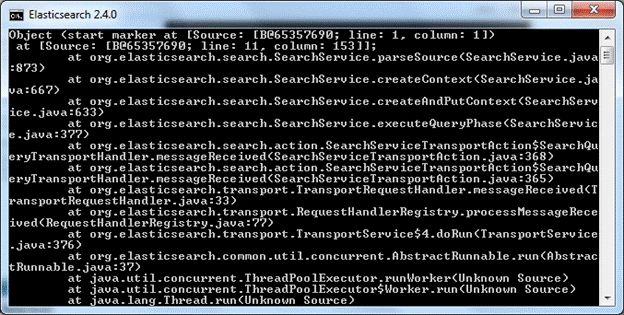
Now, open the Browser and open localhost:9200.
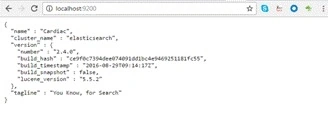
If you are receiving the above JSON as a response, then Elasticsearch Server starts properly.
Now, we will start setting up the development environment on the local machine. It’s too easy as you have to just download the plugin for Chrome Sense. After successful installation is done, you will get the icon, given below, for sense.

Select that icon to start sense.
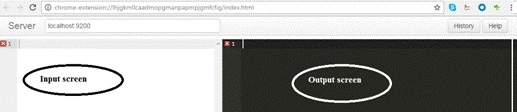
Start Development
Insert data First Enter the below JSON.
POST /test/test/
{
   "color": "blue",
   "price": 30
}
Press the Green button to execute.
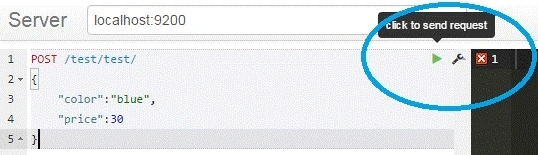
You will get an output.
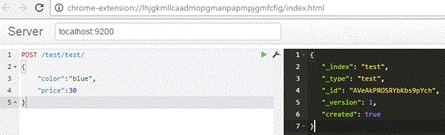
{
    "_index": "test",
    "_type": "test",
    "_id": "AVeAkPROSRYbKbs9pYch",
    "_version": 1,
    "created": true
}
To understand the terms like index and type in details, please go through the link, given below, from Elasticsearch Website.
Select or search data.
GET /test/test/_search.
Searching conditional data
This Service will give you the first value.
GET /test/test/1.
This will return the records, which match the condition mentioned in the query.
GET /test/test/_search
{
   "size": 3,
   "query": {
      "match": {
         "color": "red"
      }
   }
}
Aggregation
This is used when we need sum, min, max, or any other arithmetic operation results.
"aggregations": {
    "group_by_state": {
elasticsearch-gui
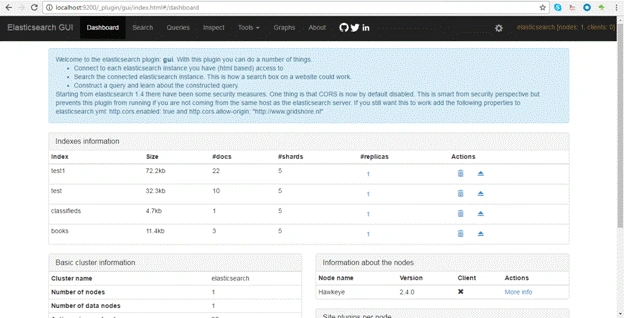
This gives you a user interface, where you can get detailed dashboard information about Elasticsearch with the list of indexes, you can also remove size as well.
Use the command, given below, from the command prompt to add or install on your machine bin/plugin install Jethro/elasticsearch-gui
Next, you can browse to your Elasticsearch instance - http://localhost:9200/_plugin/gui/index.html.
Elasticsearch integrates with C#
Here, we will create one sample Application in C#, where we can call Elasticsearch Services through the Elasticsearch client and use Elasticsearch as a database.
For this sample, I am using the Unit Test project.
Create unit test project UnitTestElasticsearchSample, create test class ElastisearchTest.
Right-click on the project from Solution Explorer.
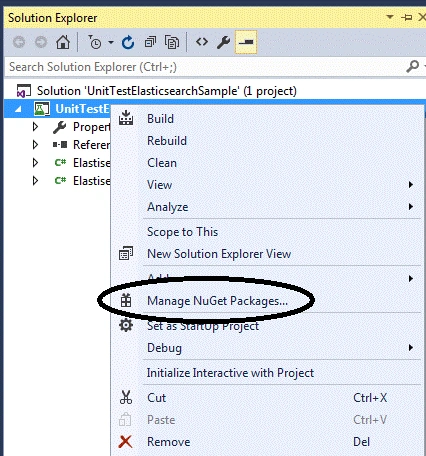
Select Manage NuGet Packages.

.NET client is created to consume Elasticsearch Services. There are a couple of more .NET clients, which are also available and one can use them as well.
You can select next and install. After successful installation, you will get the screenshot, as shown below.
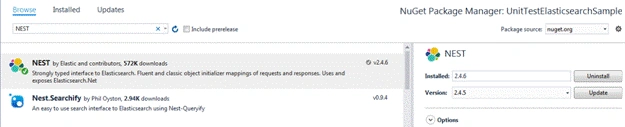
In Solution Explorer, expand the references and you will get "get added".
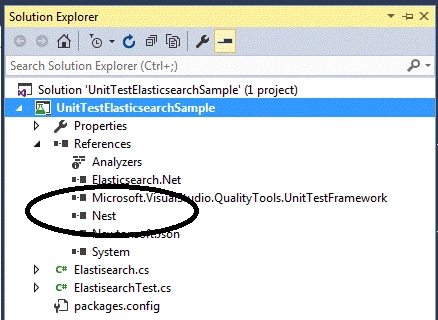
Now, we will start the actual development.
Create one sample model City.
using System;
using System.Collections.Generic;
using System.Linq;
using System.Text;
using System.Threading.Tasks;
namespace UnitTestElasticsearchSample.model
{
    public class City
    {
        public int ID
        {
            get;
            set;
        }
        public int Name
        {
            get;
            set;
        }
        public int State
        {
            get;
            set;
        }
        public int Country
        {
            get;
            set;
        }
        public int Population
        {
            get;
            set;
        }
    }
}
using Nest;
using System;
using System.Collections.Generic;
using System.Linq;
using UnitTestElasticsearchSample.model;
namespace UnitTestElasticsearchSample
{
    public class Elasticsearch
    {
        ElasticClient client = null;
        public Elasticsearch()
        {
            var uri = new Uri("http://localhost:9200");
            var settings = new ConnectionSettings(uri);
            client = new ElasticClient(settings);
            settings.DefaultIndex("city");
        }
        public List<City> GetResult()
        {
            if (client.IndexExists("city").Exists)
            {
                var response = client.Search<City>();
                return response.Documents.ToList();
            }
            return null;
        }
        public List<City> GetResult(string condition)
        {
            if (client.IndexExists("city").Exists)
            {
                var query = condition;

                return client.SearchAsync<City>(s => s
                    .From(0)
                    .Take(10)
                    .Query(qry => qry
                        .Bool(b => b
                            .Must(m => m
                                .QueryString(qs => qs
                                    .DefaultField("_all")
                                    .Query(query)))))).Result.Documents.ToList();
            }
            return null;
        }
        public void AddNewIndex(City model)
        {
            client.IndexAsync<City>(model, null);
        }
    }
}
Write the test case to insert the records in Elasticsearch[TestMethod].
public void AddNewIndexTest()
{
    Elasticsearch objSearch = new Elasticsearch();

    objSearch.AddNewIndex(new model.City(1, "delhi", "delhi", "India", "9.879 million"));
    objSearch.AddNewIndex(new model.City(2, "mumbai", "Maharashtra", "India", "11.98 million"));
    objSearch.AddNewIndex(new model.City(3, "chenai", "Tamil Nadu", "India", "4.334 million"));
    objSearch.AddNewIndex(new model.City(4, "kolkata", "W. Bengal", "India", "4.573 million"));
    objSearch.AddNewIndex(new model.City(4, "Banglore", "Karnataka", "India", "4.302 million"));
    objSearch.AddNewIndex(new model.City(4, "Pune", "Maharashtra", "India", "2.538 million"));
}
Execute this test case
Thus, all these records are added one by one.
[TestMethod]
public void GetResultTest()
{
    Elasticsearch objSearch = new Elasticsearch();
    var result = objSearch.GetResult();
    Assert.IsTrue(result.FirstOrDefault<model.City>(x => x.Name == "delhi") != null);
    Assert.IsTrue(result.FirstOrDefault<model.City>(x => x.Name == "mumbai") != null);
    Assert.IsTrue(result.FirstOrDefault<model.City>(x => x.Name == "chenai") != null);
}
This way, one can add more functionality to interact with Elasticsearch and add test cases as well. Please find the attached sample project for reference. If you are facing any issue, please contact. Thanks for reading.
Keep coding.
lavi guptaPosted Aug 6, 2021, 12:40 PM
Hi Amit i am facing this issue when trying to run command in command prompt- > Exception in thread "main" java.lang.RuntimeException: starting java failed with [1]output: # # There is insufficient memory for the Java Runtime Environment to continue. # Native memory allocation (mmap) failed to map 116981760 bytes for G1 virtual space # An error report file with more information is saved as: # logs/hs_err_pid34248.log error: OpenJDK 64-Bit Server VM warning: INFO: os::commit_memory(0x0000018080000000, 116981760, 0) failed; error='The paging file is too small for this operation to complete' (DOS error/errno=1455) at org.elasticsearch.tools.launchers.JvmOption.flagsFinal(JvmOption.java:119) at org.elasticsearch.tools.launchers.JvmOption.findFinalOptions(JvmOption.java:81) at org.elasticsearch.tools.launchers.JvmErgonomics.choose(JvmErgonomics.java:38) at org.elasticsearch.tools.launchers.JvmOptionsParser.jvmOptions(JvmOptionsParser.java:135) at org.elasticsearch.tools.launchers.JvmOptionsParser.main(JvmOptionsParser.java:86)
Raju YanamPosted May 27, 2020, 1:12 AM
Microsoft.VisualStudio.QyalityTools.UnitTestFrameWork.dll IS THERE IN REFERENCES but i got below error please help me
Raju YanamPosted May 27, 2020, 1:08 AM
Microsoft.VisualStudio.TestTools.UnitTesting.AssestFailedException occurred in Microsoft.VisualStudio.QyalityTools.UnitTestFrameWork.dll but was not handle in user code
Hemant PimpalePosted Aug 9, 2019, 2:09 AM
All the records get added. But where? And how can I read those from GetResultTest()?
Rahul ChoudharyPosted Sep 24, 2018, 1:56 AM
But how do I start the project ? It is showing the following error: "A project with an Output type of Class Library cannot be started directly In order to debug this project, add an executable project to this solution which references the library project. Set the executable project as the startup project."
Priti KumariPosted Aug 30, 2018, 2:19 AM
Amit Prabhu Is there any way to capture azure elastic search alert using c# code
Shivlee AggarwalPosted Jun 6, 2018, 5:48 PM
Very nice article sir. Thanks for sharing, its really helpful.
vamshi krishnaPosted May 9, 2018, 5:18 AM
Hi Amit i need to pass the condition to get all the city name start with 'k' how can write the query
Bhaskar MittapalliPosted Apr 3, 2018, 1:38 PM
Hi Amit in which db I need to insert the records. After inserting the data it will create index ..? What is purpose of this test ?
Hemik GajjarPosted Feb 6, 2018, 5:57 AM
Hi Amit, I am new in easticsearch. I have downloaded your example but when i run test cases GetResultTest is fail because result getting null (not getting any record). can you pls guide?
Satish JhaPosted Jan 2, 2018, 9:24 AM
HI Amit, condition is'nt working with date column..plz suggest
Vignesh ManiPosted Oct 5, 2016, 4:43 AM
Nice one
Pankaj Kumar ChoudharyPosted Oct 5, 2016, 1:45 AM
Nice article Amit Sir , can you please explain in which type of scenarios elasticsearch is useful or in which type of project we can use it.
Muthuramalingam DuraipandiPosted Oct 4, 2016, 9:30 AM
Nice