

Imagine you have an AI assistant (like a chatbot) that could do more than just chat – say, order a pizza, fetch data from a database, or schedule appointments. That’s the promise of the Model Context Protocol (MCP), a new standard for connecting AI “agents” to real-world tools and services. In simple terms, MCP is like a universal translator that lets AI models call external APIs or run programs. It’s exciting, but right now using MCP tools can feel like piecing together a complicated puzzle.

Pain Points in the MCP World
- Scattered Discovery: Right now, if you’re an AI developer or a curious hacker, finding MCP tools is a headache. You might search GitHub repos, read random blog posts, or join Discord chats to find one. It’s fragmented and hard to know which tools are trustworthy. Imagine having to flip through dozens of cookbooks to find one recipe and not knowing if the recipe is safe or tested. That’s how MCP servers (tools) currently feel.
- Complex Setup: Even after you find an MCP server (like a tool for Stripe or a database), getting it running often means cloning its code repo, wrestling with conflicting libraries, and hosting it yourself. This is friction – too much glue code for things that should be simple. It’s like needing a degree in plumbing just to fix a leaky faucet. Docker’s goal is to make it as easy as a few clicks or commands.
- Security & Credential Concerns: Many existing MCP tools run with full permissions on your machine, and you pass API keys or tokens in plain text. That’s scary! It’s the digital equivalent of leaving your house keys under the welcome mat. Enterprises especially worry about secrets being leaked or actions not being logged.
- No Standard Policies or Auditing: Big companies ask for features like “who used which tool and when?” or “can we block certain operations?” Most current tools lack these enterprise-ready controls.
Docker realized these are classic growing pains. They remember how, years ago, the internet was a Wild West for software before Docker Hub became the “app store” for containers. Now Docker wants to do the same for AI tools and MCP.
Docker’s Solution: MCP Catalog and Toolkit
To tackle these problems, Docker launched two things: the MCP Catalog and the MCP Toolkit.
Docker MCP Catalog: Think of this as an official directory or store for verified AI tools. It’s integrated right into Docker Hub (the popular place for container images). On day one, it already includes over 100 trusted tools from big names (Stripe, Elastic, Neo4j, and more). Each entry is a Docker container (sandboxed and versioned) so you can use it securely. This is like having an App Store where every app (MCP tool) is checked and ready to install. Now you won’t have to hunt randomly for a tool – you can browse a curated collection on Docker’s site. As Docker puts it, it’s “a trusted hub for discovering and accessing verified MCP servers”.
URL: https://hub.docker.com/catalogs/mcp

Docker MCP Toolkit: This is the magic box of helpful utilities that makes those tools actually easy to use. It includes a special Docker extension and a new command-line interface (docker mcp). Together, they handle the heavy lifting: launching tools in containers, managing credentials, and acting as a “gateway” that connects AI clients (like chatbots or code editors) to those tools. In practice, that means your AI can call a tool without you manually coding the link. The Toolkit brings Docker’s famous simplicity to the world of AI tooling. Features include one-click launching of servers, secure credential storage, and a default gateway server that wires everything together
URL: https://open.docker.com/extensions/marketplace?extensionId=docker/labs-ai-tools-for-devs
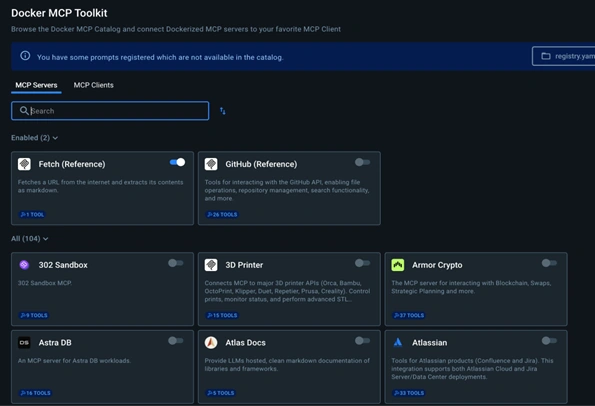
Here’s what this means in real terms.
- Central Discovery: You can browse the MCP Catalog on Docker Hub for what you need. Need a payments tool? There’s a Stripe MCP server container. Want to query a vector database? It’s there. All containers, so “works on my machine” is basically guaranteed. No more cloning random repos or fearing a tool will break.
- One-Click Setup: The MCP Toolkit (via docker mcp commands) can launch these tools instantly. Imagine typing a simple command to start the Stripe server and have it running in seconds, instead of building it from source. It’s like snapping your fingers and having the tool ready.
- Easy Client Connections: Docker MCP lets AI apps (clients) connect with just one command. Clients like Docker’s own AI Agent, Claude (a popular chatbot by Anthropic), VS Code, or Cursor (a coding assistant) can all hook into MCP tools with minimal hassle. In fact, Docker advertises “one-click integration” for popular clients. It’s like pairing your phone to Bluetooth speakers – almost automatic.
- Secure by Design: Because tools run in containers, they’re isolated. Secrets (API keys, tokens) are stored in Docker’s secret manager instead of being scattered as plain-text files. You also get audit logs and access policies (coming soon) so enterprises can meet compliance needs.
- Enterprise Features: The Catalog supports publisher verification and versioning, and integrates with things like Docker’s registry access controls. This was built with big teams in mind.
In short, Docker’s MCP Catalog and Toolkit aim to bring to AI tools the same order and trust that Docker brought to software images. As Docker’s CEO Mark Cavage and others explained, this solves problems familiar to anyone who’s seen a new tech wave: you need centralized discovery, containers everywhere, seamless auth, and built-in security. Docker did that for apps back in the day, and they’re doing it again for AI.
Who Benefits?
- AI Developers & Agents: If you’re building the next AI-powered app or chatbot, Docker MCP means you get a curated toolbox. You can quickly find and run tools (APIs, databases, utilities) your agent needs, without writing tedious integration code. For example, one developer builds a shopping assistant; instead of hand-coding an email or payment system link, they find an MCP tool for it in Docker Hub and connect instantly. Docker handles the plumbing, so you focus on your agent’s logic.
- Tool Creators: If you build an MCP-compatible service, Docker’s catalog is like a built-in marketing and distribution channel. It guarantees your tool can be easily discovered by millions of developers on Docker Hub. Docker will also ensure it’s compatible with major AI clients (Claude, OpenAI, VS Code, etc.). This is a huge boost – no more wondering if customers will find your repo on GitHub.
- Enterprise Teams: Large organizations care about standardization and compliance. Docker MCP provides centralized credential management, security controls (like who can use which tool), and integration with existing Docker workflows. In practice, an enterprise can say “our agent ecosystem uses the Docker MCP Catalog under our corporate account, so we trust each tool and we have audit trails.” This is a game-changer for scaling AI deployments in companies.
Putting it All Together
Think of Docker MCP like this: It’s as if AI tools had their own smartphone app store and operating system. The MCP Catalog is the App Store, filled with vetted apps (tools) ready to install. The MCP Toolkit (and CLI) is the phone’s OS that makes those apps work smoothly and securely. Just as you wouldn’t manually compile every app before using it, you don’t want to manually configure every AI tool. Docker MCP streamlines this.
In practical terms, if you’ve ever struggled with messy AI integrations, you’ll recognize the relief this brings. It turns a complicated setup process into a few friendly commands, and it replaces uncertainty with a trusted ecosystem. As Docker’s announcement highlights, this is about “bringing discovery, simplicity, and trust to the [MCP] ecosystem”. The bottom line: whether you’re the AI developer, the tool provider, or the security officer, the MCP Catalog and Toolkit give you real-world solutions to pain points you face today.
Chelsea Residences By DamacPosted May 5, 2025, 8:01 AM
It is very helpful
Mahesh ChandPosted May 4, 2025, 5:54 PM
This is amazing!