

As we know, C# 6.0 was introduced with Visual Studio 2015. There are several features introduced in several versions of C#, like LINQ was introduced with C# 3.0. Dynamic features were introduced with C# 4.0. Async and Await were introduced with C# 5.0 etc.
In C# 6.0, the most emphasis was given to syntactical improvements rather than new features to add on. These features will help us to write the code faster and in a simple way.
Thus, I am going to explain and after that I hope you will understand about delegate and love to use delegate. You can find this article on my blog site.
Objective
You can download Visual Studio 2015 or if you have Visual Studio 2013, you need to download Roslyn Package from here. Roslyn is the .NET compiler, which is an open source and integrated with Visual Studio 2015.
Several new syntactical improvements with C# 6.0 were introduced and are as follows:
- Using static
- Auto property initializers
- Index initializers
- String interpolation
- Expression bodied members
- Getter only auto properties
- Exception filters
- Null conditional operators
- Declaration expressions
Using Static
- using static System.Console;
Before C# 6.0
- using System;
- namespace CSharp6FeaturesDemo {
- class Program {
- static void Main(string[] args) {
- Console.WriteLine("This is demo for C# 6.0 New Features");
- }
- }
- }
In C# 6.0
- using static CSharp6FeaturesDemo.MyClass;
- namespace CSharp6FeaturesDemo {
- class Program {
- static void Main(string[] args) {
- WriteLine("This is demo for C# 6.0 New Features");
- Hello();
- ReadLine();
- }
- }
- static class MyClass {
- public static void Hello() {
- WriteLine("This is static class");
- }
- }
- }
We can also give the references of the other classes to access their members.
- Hello();
- static class MyClass {
- public static void Hello() {
- WriteLine("This is static class");
- }
- }
- using static CSharp6FeaturesDemo.MyClass;

Auto Property Initializer
To access the internal members, we use the properties. Properties have their getter and setter. Before C# 6.0, we could not directly define the value of the property. To do this, we basically used the local member variables but C# 6.0 provides the flexibility to initialize the value.
With C# 6.0, we can directly assign the value of the property at the time of defining the new property.
Before C# 6.0
Earlier, we generally used constructor to initialize the value of the Property. See the following example, as you can see that we have created multiple properties and to initialize the value, constructor will help.
- using System;
- using static System.Console;
- namespace CSharp6FeaturesDemo {
- public class Program {
- static void Main(string[] args) {
- Employee emp = new Employee();
- Console.WriteLine("Employee Id is " + emp.EmployeeId);
- Console.WriteLine("Employee Full Name is " + emp.FullName);
- Console.ReadLine();
- }
- }
- public class Employee {
- public Guid EmployeeId {
- get;
- set;
- }
- public string FirstName {
- get;
- set;
- }
- public string LastName {
- get;
- set;
- }
- public string FullName {
- get;
- set;
- }
- public Employee() {
- EmployeeId = Guid.NewGuid();
- FirstName = "Mukesh";
- LastName = "Kumar";
- FullName = string.Format("{0} {1}", FirstName, LastName);
- }
- }
- }
C# 6.0 is very smooth and we don't need to worry about how and where we will initialize the value of the property. You can directly assign the value of the property after = sign. It will not give you any type of exception and run smoothly. In the example given below, we can see that EmployeeId is generating new GUID. It is clearly visible that FirstName and LastName are initialized with their values.
- using System;
- using static System.Console;
- namespace CSharp6FeaturesDemo {
- public class Program {
- static void Main(string[] args) {
- Employee emp = new Employee();
- WriteLine("Employee Id is " + emp.EmployeeId);
- WriteLine("Employee Full Name is " + emp.FullName);
- ReadLine();
- }
- }
- public class Employee {
- public Guid EmployeeId {
- get;
- set;
- } = Guid.NewGuid();
- public string FirstName {
- get;
- set;
- } = "Mukesh";
- public string LastName {
- get;
- set;
- } = "Kumar";
- public string FullName {
- get {
- return string.Format("{0} {1}", FirstName, LastName);
- }
- }
- }
- }

Index Initializer
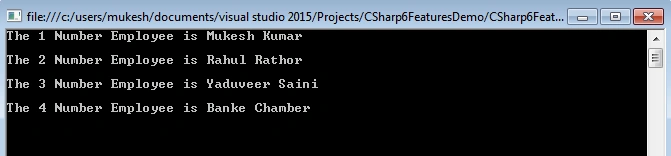
C# 6.0 provides a new way to initialize the collection. You can create the index based collections like dictionaries, hashtables etc. As we know, the dictionary is the key-value pair and we need to assign the values for their corresponding keys. We have a different way to create the key/value pair prior to C# 6.0. How we used the key/value pair for a dictionary object in C# prior to C# 6.0 is displayed, with the help of the following example-
Before C# 6.0
- using System;
- using System.Collections.Generic;
- namespace CSharp6FeaturesDemo {
- public class Program {
- static void Main(string[] args) {
- Dictionary < int, string > myDictionary = new Dictionary < int, string > () {
- {
- 1,
- "Mukesh Kumar"
- }, {
- 2,
- "Rahul Rathor"
- }, {
- 3,
- "Yaduveer Saini"
- }, {
- 4,
- "Banke Chamber"
- }
- };
- foreach(var item in myDictionary) {
- Console.WriteLine("The " + item.Key + " Number Employee is " + item.Value + "\n");
- }
- Console.ReadLine();
- }
- }
- }
With C# 6.0, we logically define that the value for an index 1 is "Mukesh Kumar" and so on. You can see the following example which clears your all doubts:
- using System;
- using System.Collections.Generic;
- using static System.Console;
- namespace CSharp6FeaturesDemo {
- public class Program {
- static void Main(string[] args) {
- Dictionary < int, string > myDictionary = new Dictionary < int, string > () {
- [1] = "Mukesh Kumar", [2] = "Rahul Rathor", [3] = "Yaduveer Saini", [4] = "Banke Chamber"
- };
- foreach(var item in myDictionary) {
- WriteLine("The " + item.Key + " Number Employee is " + item.Value + "\n");
- }
- ReadLine();
- }
- }
- }
String Interpolation
For concatenation, we generally use String.Format, where we pass the array of the index and then pass the parameters value for it. It is very confusing when you are working with the multiple members. C# 6.0 has introduced a very great feature, where you don't need to pass the array index, but you can directly pass your variable. Make sure to use the $ sign before starting. Following is the simple example of getting the full name to use the first name and last name. Here, we are using the string.Format and afterwards, we need to specify the index array for the parameters value.
Before C# 6.0
- using System;
- using System.Collections.Generic;
- namespace CSharp6FeaturesDemo {
- public class Program {
- static void Main(string[] args) {
- string firstName = "Mukesh";
- string lastName = "Kumar";
- Console.WriteLine("The Full Name of Employee " + string.Format("{0} {1}", firstName, lastName));
- Console.ReadLine();
- }
- }
- }
- using System;
- using System.Collections.Generic;
- using static System.Console;
- namespace CSharp6FeaturesDemo {
- public class Program {
- static void Main(string[] args) {
- string firstName = "Mukesh";
- string lastName = "Kumar";
- WriteLine($ "The Full Name of Employee {firstName} {lastName}");
- ReadLine();
- }
- }
- }

Expression Bodied Members
Lambda expressions are very useful when you are working with LINQ query. In C# 6.0, you can use lambda expressions with the properties and functions to increase your productivity and write clean code.
Using lambda expressions, you can define the method in one line [Use only for simple and short logical methods or properties]. I believe, when you are working with the large Application and you need to get a single value, based on the condition we can use the expression bodied members. We can directly create a function and also get the output, based on their parameter values.
Before C# 6.0
Earlier, we generally created a separate method to complete any simple task. It might be one line or more than one line. It was very complex and time consuming. See the following example, where two methods GetFullName and AddTwoNumber are doing the simple task like concatenating two strings and adding the two numbers. To complete this task, we need to write two separate methods.
- using System;
- using System.Collections.Generic;
- namespace CSharp6FeaturesDemo {
- public class Program {
- public static string GetFullName(string firstName, string lastName) {
- return string.Format("{0} {1}", firstName, lastName);
- }
- public static int AddTwoNumber(int firstNumber, int secondNumber) {
- return firstNumber + secondNumber;
- }
- static void Main(string[] args) {
- string firstName = "Mukesh";
- string lastName = "Kumar";
- int firstNumber = 10;
- int secondNumber = 20;
- Console.WriteLine(GetFullName(firstName, lastName));
- Console.WriteLine(AddTwoNumber(firstNumber, secondNumber));
- Console.ReadLine();
- }
- }
- }
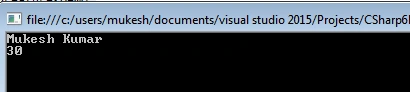
C# 6.0 is not required to create separate methods for only a single task. It can be defined and completed at that time, when it is defining.
- using System;
- using System.Collections.Generic;
- using static System.Console;
- namespace CSharp6FeaturesDemo {
- public class Program {
- public static string GetFullName(string firstName, string lastName) => firstName + " " + lastName;
- public static int AddTwoNumber(int firstNumber, int secondNumber) => firstNumber + secondNumber;
- static void Main(string[] args) {
- string firstName = "Mukesh";
- string lastName = "Kumar";
- int firstNumber = 10;
- int secondNumber = 20;
- WriteLine(GetFullName(firstName, lastName));
- WriteLine(AddTwoNumber(firstNumber, secondNumber));
- ReadLine();
- }
- }
- }
Getter Only Auto Properties
When you are working with the properties, you need to define the getter and setter both; But in C# 6.0 you can define only the getter for properties. Before C# 6.0 you need to define them both when going to create properties. Sometimes, it is not required to create the setter but we need to define it. But there is not any restriction to make such type of coding with C# 6.0. You can only define the getter for the properties and make it readonly.
See the following example where FirstName and LastName have their getter with their values.
In C# 6.0
- using System;
- using System.Collections.Generic;
- namespace CSharp6FeaturesDemo {
- public class Program {
- string FirstName {
- get;
- } = "Mukesh";
- string LastName {
- get;
- } = "Kumar";
- public string FullName = string.Empty;
- public Program() {
- FullName = FirstName + " " + LastName;
- }
- static void Main(string[] args) {
- Program prog = new Program();
- Console.WriteLine("The Full Name is " + prog.FullName);
- Console.ReadLine();
- }
- }
- }

Exception Filters
It is available with VB but when the new compiler "Roslyn" is introduced, this feature is added with it. Exception filter is used to specify the catch block on the basis of some conditional arguments. Generally, we define only one catch block and inside it, we will make different conditions for throwing the different types of exceptions.
In C# 6.0, you can check the message and show the exception message as per your conditions.
Before C# 6.0
- using System;
- using System.Collections.Generic;
- namespace CSharp6FeaturesDemo {
- public class Program {
- static void Main(string[] args) {
- int errorCode = 404;
- try {
- throw new Exception(errorCode.ToString());
- } catch (Exception ex) {
- if (ex.Message.Equals("404"))
- Console.WriteLine("This is Http Error");
- else if (ex.Message.Equals("401"))
- Console.WriteLine("This is Unathorized Error");
- else
- Console.WriteLine("This is some different exception");
- Console.ReadLine();
- }
- }
- }
- }
With C# 6.0, we can check the exception message and on the basis of the exception, it can be defined in the catch block. It can be used with multiple catch blocks and every catch block will be checked with its own conditional message.
- using System;
- using System.Collections.Generic;
- using static System.Console;
- namespace CSharp6FeaturesDemo {
- public class Program {
- static void Main(string[] args) {
- int errorCode = 404;
- try {
- throw new Exception(errorCode.ToString());
- } catch (Exception ex) when(ex.Message.Equals("404")) {
- WriteLine("This is Http Error");
- } catch (Exception ex) when(ex.Message.Equals("401")) {
- WriteLine("This is Unathorized Error");
- } catch (Exception ex) when(ex.Message.Equals("403")) {
- WriteLine("Forbidden");
- }
- ReadLine();
- }
- }
- }

You can see that on the basis of the error code, the catch block is going to execute.
Null Conditional Operators
At the time of coding, we generally check the null value to make some conditions. We check if the object is null or not and try to prevent the NullReferenceException. To do this, we need to write some extra code, which also makes the code lengthy.
With C# 6.0, you don't need to write some extra code and you can use null conditional operator, which is nothing but only a question mark [?] sign.
Before C# 6.0
- using System;
- using System.Collections.Generic;
- using System.Linq;
- namespace CSharp6FeaturesDemo {
- public class Program {
- static void Main(string[] args) {
- List < Employee > employees = new List < Employee > ();
- Program prog = new Program();
- if (employees.FirstOrDefault() != null) {
- //This code will not hit because of employees is null;
- Console.WriteLine(employees.First().Name);
- } else {
- Employee emp = new Employee();
- emp.EmployeeId = 10;
- emp.Name = "Mukesh Kumar";
- emp.Address = "New Delhi";
- employees.Add(emp);
- Console.WriteLine(employees.First().Name);
- }
- Console.ReadLine();
- }
- }
- public class Employee {
- public int EmployeeId {
- get;
- set;
- }
- public string Name {
- get;
- set;
- }
- public string Address {
- get;
- set;
- }
- }
- }
- using System;
- using System.Collections.Generic;
- using System.Linq;
- using static System.Console;
- using static System.Console;
- namespace CSharp6FeaturesDemo {
- public class Program {
- static void Main(string[] args) {
- List < Employee > employees = new List < Employee > ();
- Program prog = new Program();
- //No need to check null in if condition
- //null operator ? will check and return null if value is not there
- WriteLine(employees.FirstOrDefault() ? .Name);
- //set the default value if value is null
- WriteLine(employees.FirstOrDefault() ? .Name ? ? "My Value");
- ReadLine();
- }
- }
- public class Employee {
- public int EmployeeId {
- get;
- set;
- }
- public string Name {
- get;
- set;
- }
- public string Address {
- get;
- set;
- }
- }
- }

First value is not going to print anything and is not throwing any error also. It is because the ? sign is included with the statement, which handles the null exception. For the second statement, the default value "My Value" is going to print because the value is null.
Declaration Expressions
Using this feature, we don't need to declare the local variable globally. We can generally create it inside the expression. The scope of the variable will be inside the loop, where it is defined.
Before C# 6.0
- using System;
- using System.Collections.Generic;
- using System.Linq;
- namespace CSharp6FeaturesDemo {
- public class Program {
- static void Main(string[] args) {
- int myValue = 10;
- if (int.TryParse("20", out myValue)) {
- Console.WriteLine(myValue);
- Console.ReadLine();
- }
- }
- }
- }
- using System;
- using System.Collections.Generic;
- using System.Linq;
- using static System.Console;
- namespace CSharp6FeaturesDemo {
- public class Program {
- static void Main(string[] args) {
- if (int.TryParse("20", out
- var result)) {
- return result;
- }
- return 0; // result is out of scope
- // A new feature in C# 6.0 allows to declare variable inside TryParse method.
- //Declaration expressions was cut from C# 6.0 and wasn't shipped in the final release.
- //You currently can't do that. There is a proposal for it on GitHub for C# 7.
- }
- }
Finally, we have learned about the new features of C# 6.0. It makes our coding life easy because it provides a simple way to do a complex thing. We need to make a habit to adopt it in our daily coding. I hope this will help you to make your code better and clean.
At last, thanks for reading this article. Hope, you enjoyed it. Please give your suggestion and feedback to improve this article through the comments.
Syed ShanuPosted Jul 22, 2016, 4:04 AM
Good Start
Anu VPosted Jul 22, 2016, 12:21 AM
Nice
Karan ValechaPosted Jul 18, 2016, 11:30 AM
Awesome. Just Excellent
Ganesh SattawanPosted Jul 18, 2016, 7:43 AM
Excellent work.....
veera muthuPosted Jul 14, 2016, 12:37 AM
Great...
Mukesh KumarPosted Jul 13, 2016, 12:17 AM
Thanks to everyone.
วรพรต เอิบโชคชัยPosted Jul 12, 2016, 10:41 PM
Nice
Gowtham KPosted Jul 12, 2016, 9:52 PM
Great Article
Bhavik PatelPosted Jul 12, 2016, 9:38 PM
Nice
Vignesh ManiPosted Jul 12, 2016, 4:21 PM
Nice
Asad AliPosted Jul 12, 2016, 10:48 AM
Good article
Mahesh ChandPosted Jul 12, 2016, 6:48 AM
Very well written, Mukesh. Great job!
Mukesh KumarPosted Jul 12, 2016, 6:01 AM
Thanks Shobana and Singh Rao
Shobana JPosted Jul 12, 2016, 4:02 AM
Nice one
kalu singh raoPosted Jul 12, 2016, 3:40 AM
Nice...