

Introduction
Azure DevOps Starter is a service provided by Microsoft Azure that enables developers to quickly create and configure a DevOps pipeline for their projects. It is a free and easy-to-use tool that helps teams to get started with DevOps best practices and enables them to focus on delivering value to their customers.
Azure DevOps Starter provides a streamlined, step-by-step process for setting up a DevOps pipeline. It is designed to work with various programming languages and platforms, including .NET, Java, Node.js, Python, and Ruby.
The setup process of the DevOps pipeline
Here's an overview of the key features of Azure DevOps Starter,
- Create a new project- Azure DevOps Starter provides an easy way to create a new project. You can select the type of project you want to create, such as a web app, a mobile app, or a service, and Azure DevOps Starter will set up the basic structure for your project.
- Choose a source code repository- Azure DevOps Starter allows you to select a source code repository for your project, such as GitHub, Bitbucket, or Azure Repos. This enables you to easily manage your source code and collaborate with your team.
- Configure your build and release pipeline- Azure DevOps Starter provides preconfigured build and release pipelines that you can customize to suit your needs. You can configure your pipeline to build and test your code and then deploy it to your chosen environment.
- Monitor your pipeline- Azure DevOps Starter provides a dashboard that enables you to monitor the progress of your pipeline. You can see the status of your builds and releases and get alerts if anything goes wrong.
- Collaborate with your team- Azure DevOps Starter provides various collaboration tools that enable you to work effectively with your team. You can use the built-in chat and video conferencing tools and integration with tools like Microsoft Teams and Slack.
- Integrate with other services- Azure DevOps Starter can be integrated with various other services, such as Azure Application Insights, Azure Container Registry, and Azure Kubernetes Service. This enables you to build and deploy your applications with various Azure services.
Setting up Azure DevOps
Setting up Azure DevOps Starter is easy. Here's how to get started,
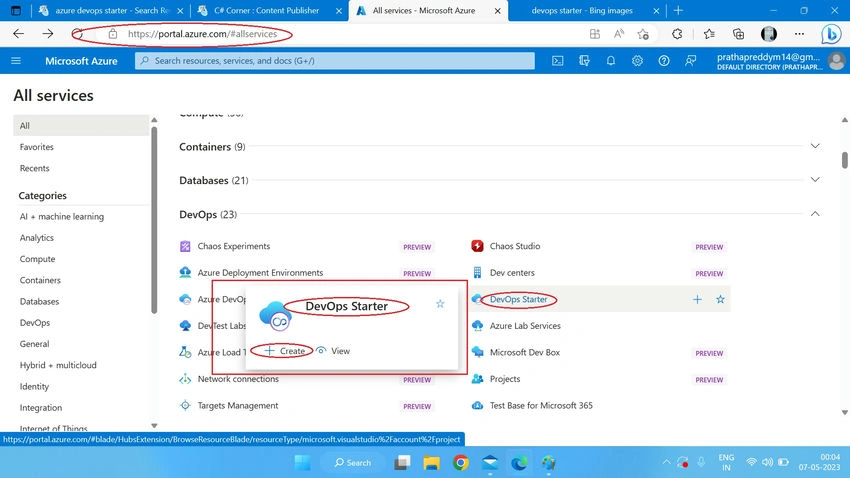
- Sign in to the Azure portal (https://portal.azure.com).
- Click on "Create a resource" and search for "DevOps Starter".
- Click on "DevOps Starter" and then click on "Create" to create a new DevOps Starter project.
- Follow the steps provided by Azure DevOps Starter to configure your project and set up your DevOps pipeline
Some additional information about Azure DevOps
- Azure DevOps Starter supports a variety of deployment targets, including Azure Web Apps, Azure Kubernetes Service (AKS), and Azure Functions. This makes it easy to deploy your applications to a variety of environments.
- Azure DevOps Starter provides templates for popular application frameworks, such as ASP.NET, Node.js, and Python. This helps developers quickly set up their projects and get started with coding.
- Azure DevOps Starter provides integration with Azure Active Directory (AAD), which enables you to manage user access to your DevOps project.
- Azure DevOps Starter integrates with popular source control systems like GitHub, Bitbucket, and Azure Repos, enabling developers to choose the source control system that works best for their team.
- Azure DevOps Starter provides an integrated dashboard that enables developers to view the status of their builds and releases, as well as monitor their applications in production.
- Azure DevOps Starter provides integration with Azure Boards, enabling teams to manage their work items and track their progress using agile project management methodologies.
- Azure DevOps Starter provides integration with Azure Test Plans, enabling teams to plan, track, and execute their testing efforts using manual and automated testing tools.
Here's some more information on the benefits, Some other key features, and pricing of Azure DevOps Starter,
Benefits
- Streamlined deployment- Azure DevOps Starter helps you get started with continuous integration and deployment (CI/CD) for your application. It provides templates and workflows that make it easy to set up your pipeline and deploy your app to Azure.
- Integrated tools- Azure DevOps Starter integrates with popular tools like GitHub, Bitbucket, and Azure Repos, as well as Azure Boards and Azure Test Plans, to provide a seamless DevOps experience.
- Cost-effective- Azure DevOps Starter is available at no extra cost and provides up to five users with unlimited private Git repositories and build minutes.
Some Other Key Features
- Templates- Azure DevOps Starter provides templates for popular application frameworks, such as ASP.NET, Node.js, and Python, which can help you get started quickly.
- Build and release pipelines- With Azure DevOps Starter; you can create automated build and release pipelines that enable you to deploy your app to Azure.
- Integrated tools- Azure DevOps Starter integrates with popular tools like GitHub, Bitbucket, and Azure Repos, as well as Azure Boards and Azure Test Plans, to provide a seamless DevOps experience.
- Dashboard- Azure DevOps Starter provides an integrated dashboard that lets you view the status of your builds and releases and monitor your applications in production.
- Agile project management- Azure DevOps Starter provides integration with Azure Boards, enabling you to manage your work items and track your progress using agile project management methodologies.
- Testing- Azure DevOps Starter provides integration with Azure Test Plans, enabling you to plan, track, and execute your testing efforts using manual and automated testing tools.
Pricing
Azure DevOps Starter is available at no extra cost and provides up to five users with unlimited private Git repositories and build minutes. If you need additional users or build minutes, you can upgrade to Azure DevOps Services, which offers a range of pricing options based on the number of users and build minutes you require.
Conclusion
Azure DevOps Starter is a powerful tool that enables developers to quickly and easily set up a DevOps pipeline for their projects. With its streamlined setup process and wide range of features, Azure DevOps Starter is an excellent choice for teams looking to get started with DevOps best practices. Azure DevOps Starter provides a powerful set of tools that can help developers quickly set up and configure a DevOps pipeline for their projects. With its wide range of features and integrations with popular services, Azure DevOps Starter is an excellent choice for teams looking to improve their development workflows and deliver value to their customers more quickly.
Konga MounikaPosted May 18, 2023, 11:26 AM
Yes,Azure DevOps Starter is an excellent choice
Konga MounikaPosted May 18, 2023, 11:25 AM
Devops will be indeed for us