

Introduction
This article explains the basics of ASP.NET MVC and explains the main advantages, version history, and environment setup and folder structures. Here, we can learn how to start first ASP.NET MVC application.
- Getting Started With ASP.NET MVC - Part Two
- Getting Started With ASP.NET MVC - Part Three
- Getting Started With ASP.NET MVC - Part Four
What is ASP.NET MVC
MVC is an architectural pattern. It separates the application into three main components. The three compounds are Model, View, and Controller. It handles specific development aspects of an application. MVC is the most frequently used industry-standard web development framework.
Model
Model is a simple class. It is the shape of the data. The model contains business logic. Controller and View can access the model. The model helps to pass the data from the controller to view and view to the controller. Using the model we are displaying data in the view page.
View
The view is a user interface. It is used to display the entire data using the model. We are using two type of view engines in view. One is the traditional view engine and another one is the Razor view engine. Traditional view engine is normal “.ASPX” page.
Razor view engine is used to develop a normal page design using HTML Helper controls. It contains “.CSHTML” extension. A syntax-wise little bit different in both view engines.
Controller
The controller is the heart of MVC and it handles the user request. It is a simple class. The controller can access the model and pass data to view with the help of a model. We can pass the data between the controller and view using View Data, Temp Data, and View Bag. The controller is intermediate between model and view.
Model-View-Controller
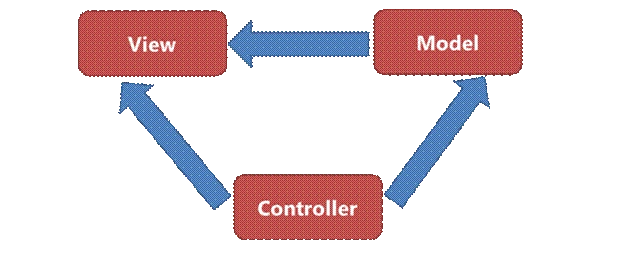
Basic Work Flow of MVC
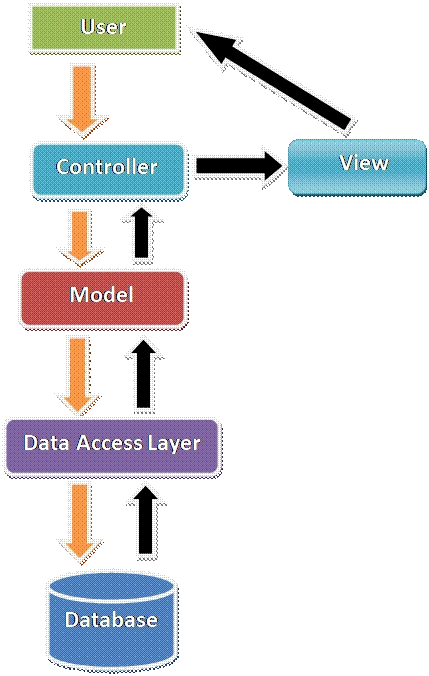
MVC workflow starts with the user’s request. Based on the request, first, it goes the controller then goes to the corresponding action method. In the action method, we are calling all layers like business logic layer and data access layer.
Once we reach action method then it goes to the Data access layer. Sometimes while requesting, the request contains some input data that binds with the model, then goes to the data access layer.
Request reaches data access layer then goes to the corresponding database. It fetches the data from a database based on the request then goes back to the reverse format. After fetching data and binding in the model it goes to the action method.
Action method returns the result to the corresponding view with the help of model . Now, the user gets the response. Action method returns results in a different format.
Advantages of MVC
- Separation Of Concern (SOC) is the main advantage. Here we are separating Mode, View, and Controller.
- We can easily maintain MVC application.
- Test Drive Development (TDD) is another main advantage. We can create an application with a unit
- We can write our own test case.
- Split the application and many developers can work at a time without affecting each other.
- MVC application is a default responsive web site and mobile template.
- We can create our own view engine.
Is MVC Replacing ASP.NET Web Forms?
No, MVC is not replacing ASP.NET web forms. It is another choice for developers to use. Many companies are still using the traditional ASP.NET web form. MVC is now used by many companies and it is very famous. It's based on the customer opinion and project structure, whether they use the traditional ASP.NET application or ASP.NET MVC.
Folder Structure of MVC
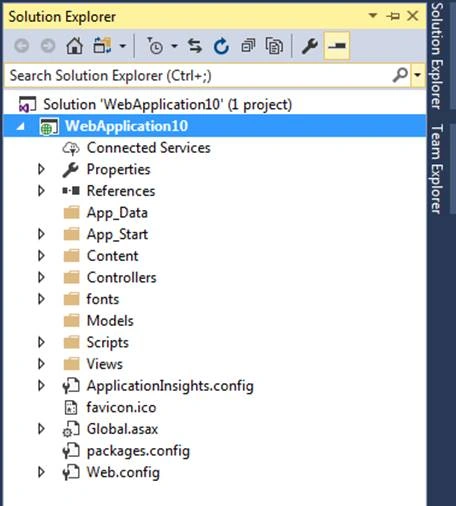
We can see the basic folder structure of MVC in the below screenshot. We can find the Model, View, and Controller in the below screenshot while opening ASP.NET MVC application, by default it contains Model, View, and Controller.
Environment Setup for ASP.NET MVC
Visual Studio 2017 is the latest version of Visual Studio. It supports all versions of ASP.NET MVC and ASP.NET MVC Core. We can install Visual Studio 2017 and create a web application using ASP.NET MVC. We can install Visual Studio 2017 with the following step by step article link.
First ASP.NET MVC Application
Step 1
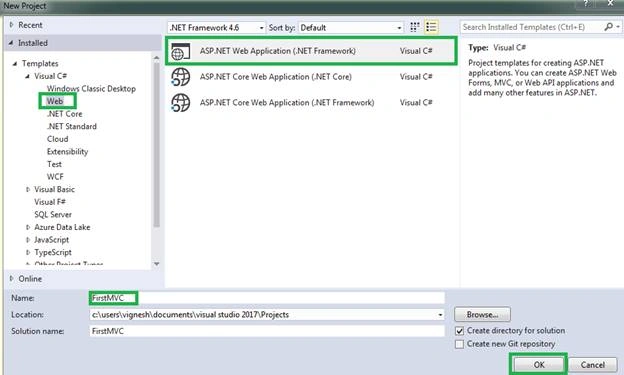
Open Visual Studio 2017, Go to File - New - Project. Select Web - ASP.NET Web Application (.NET Framework). Give the Project a name and click ok.
Step 2
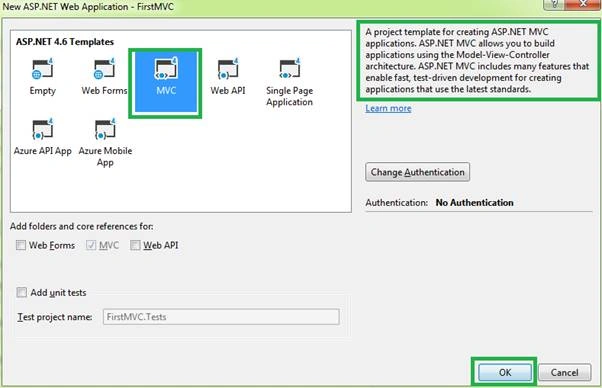
Select MVC in the template window and click ok. Once we click on MVC we can see the description on the right side as in the below screenshot.
Step 3
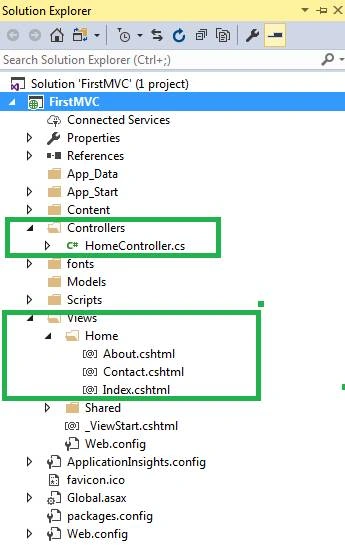
We can see that the folder structure looks like the below screenshot. We can find the Model-View-Controller architecture. The home controller is a default controller in the Controller folder. The home controller contains three action results.
- namespace FirstMVC.Controllers
- {
- public class HomeController : Controller
- {
- public ActionResult Index()
- {
- return View();
- }
- public ActionResult About()
- {
- ViewBag.Message = "Your application description page.";
- return View();
- }
- public ActionResult Contact()
- {
- ViewBag.Message = "Your contact page.";
- return View();
- }
- }
- }
Step 4
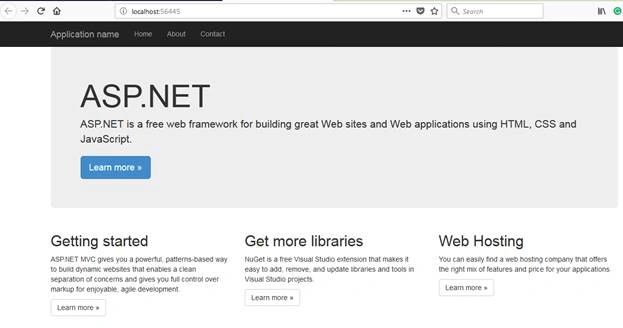
Build our ASP.NET MVC application, if build succeeeds then run the application. We can see it looks like the below screenshot.
Version History of MVC
- NET MVC 1
- Released on Mar 13, 2009
- Runs on .Net 3.5
- Visual Studio 2008
- NET MVC 2
- Released on Mar 10, 2010
- Runs on .Net 3.5, 4.0
- Visual Studio 2008 & 2010
- NET MVC 3
- Released on Jan 13, 2011
- Runs on .Net 4.0
- Visual Studio 2010
- NET MVC 4
- Released on Aug 15, 2012
- Runs on .Net 4.0, 4.5
- Visual Studio 2010 sp1 & 2012
- NET MVC 5
- Released on 17 October 2013
- Runs on .Net 4.5
- Visual Studio 2013
Conclusion
This article explained how to start ASP.NET MVC, the basic idea of MVC, the workflow of MVC, and advantages of MVC. I hope this is very helpful for new learners.
Krishna BabuPosted Sep 3, 2018, 2:14 AM
My project is banking project sir i dont no sir
Krishna BabuPosted Sep 3, 2018, 2:11 AM
Help me sir
Krishna BabuPosted Sep 3, 2018, 2:11 AM
Plz vignesh garu
Krishna BabuPosted Sep 3, 2018, 2:11 AM
Plz send me your number
Ritwik SahasrabuddhePosted Aug 17, 2018, 10:37 PM
Hello Sir,Can you provide video tutorials for AS.Net MVC with comparison of Asp.Net Web Application(if possible) otherwise just MVC!!
Ezel AmirPosted Aug 17, 2018, 2:12 AM
Excellent tutorial great job greetings from Lima Peru