

What is AngularJs?
- Angularjs is JavaScript framework with is used to add functionally into our html single page application
- Angularjs is developed by google and first version is launched in 2012.
- AngularJs is very easy to implement
- Using AngularJs we can create a responsive webpage.
There are two option use AngularJs, they are listed below.
- we can used cdn link to add AngularJs into our project
<script src = "https://ajax.googleapis.com/ajax/libs/angularjs/1.3.3/angular.min.js"></script>
this link directly write into our head section of html doc!
Example
- <!DOCTYPE html>
- <html>
- <head>
- <title></title>
- <script src="http://ajax.googleapis.com/ajax/libs/angularjs/1.4.8/angular.min.js"></script>
- </head>
- <body>
- </body>
- </html>
- Download Angular Js file and then add into our project.
we can download Angular Js file from here.
AngularJs ng-directives
- ng-app : this directive is used to define Angular Js application.
- ng-model :this directive is used to bind the value of html controls to application data.
- ng-bind :this directive is binds application data to html view.
Example
- <!DOCTYPE html>
- <html>
- <script src="http://ajax.googleapis.com/ajax/libs/angularjs/1.4.8/angular.min.js"></script>
- <body>
- <div ng-app="">
- <input type="text" ng-model="name">
- <h1>hello Mr.<span ng-bind="name"></span></h1>
- </div>
- </body>
- </html>

Angular Js Expression?
- Angular Js expression is used to bind data application data
- Expression is behave same as ng-bind
- Angular Js Expression is written into double braces {{expression}}
Example
- <!DOCTYPE html>
- <html>
- <script src="http://ajax.googleapis.com/ajax/libs/angularjs/1.4.8/angular.min.js"></script>
- <body>
- <div ng-app="">
- <input type="text" ng-model="name">
- <h1>hello Mr.{{name}}</h1>
- </div>
- </body>
- </html>

some other example of Angular Js expression.
Example
- <!DOCTYPE html>
- <html>
- <script src="http://ajax.googleapis.com/ajax/libs/angularjs/1.4.8/angular.min.js"></script>
- <body>
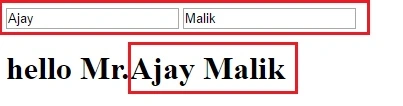
- <div ng-app="">
- <input type="text" ng-model="firstname">
- <input type="text" ng-model="lastname">
- <h1>hello Mr.{{firstname+" "+lastname}}</h1>
- </div>
- </body>
- </html>
We can directly write mathematically expression into Angular Js expression.
Example
- <!DOCTYPE html>
- <html>
- <script src="http://ajax.googleapis.com/ajax/libs/angularjs/1.4.8/angular.min.js"></script>
- <body>
- <div ng-app="">
- <h1>sum of 5 and 6 is: {{5+6}}</h1>
- </div>
- </body>
- </html>

How to change Css property using AngularJs.
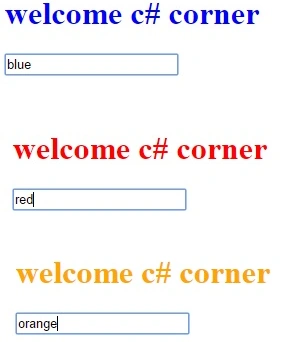
we can also change css proerty using Angularjs it is very easy
we can also change css proerty using Angularjs it is very easy
Example
- <!DOCTYPE html>
- <html>
- <script src="http://ajax.googleapis.com/ajax/libs/angularjs/1.4.8/angular.min.js"></script>
- <body>
- <div ng-app="">
- <h1 style="color:{{acol}}">welcome c# corner</h1>
- <input ng-model="acol">
- </div>
- </body>
- </html>
AngularJs numbers
AngularJs number used to hold numbers and used for mathematically operations.
- <!DOCTYPE html>
- <html>
- <script src="http://ajax.googleapis.com/ajax/libs/angularjs/1.4.8/angular.min.js"></script>
- <body>
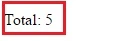
- <div ng-app="" ng-init="q=1;c=5">
- <p>Total: <span ng-bind="q * c"></span></p>
- </div>
- </body>
- </html>
AngularJS Strings
AngularJS Strings is used to store character value
AngularJS Strings is used to store character value
Example
- <!DOCTYPE html>
- <html>
- <script src="http://ajax.googleapis.com/ajax/libs/angularjs/1.4.8/angular.min.js"></script>
- <body>
- <div ng-app="" ng-init="firstName='Ajay';lastName='Malik'">
- <h2>Welcome Mr.{{ firstName + " " + lastName }}</h2>
- </div>
- </body>
- </html>

AngularJS Objects
AngularJS Objects are used to store a multiple value in single name
Example
- <!DOCTYPE html>
- <html>
- <script src="http://ajax.googleapis.com/ajax/libs/angularjs/1.4.8/angular.min.js"></script>
- <body>
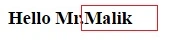
- <div ng-app="" ng-init="person={firstName:'Ajay',lastName:'Malik'}">
- <h3>Hello Mr.{{ person.lastName }}</h3>
- </div>
- </body>
- </html>
AngularJS Arrays
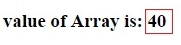
AngularJS Arrays is used to store a sequence or multiple value
Example
- <!DOCTYPE html>
- <html>
- <script src="http://ajax.googleapis.com/ajax/libs/angularjs/1.4.8/angular.min.js"></script>
- <body>
- <div ng-app="" ng-init="arr=[10,20,30,40,50]">
- <h3> value of Array is: {{arr[3]}}</h3>
- </div>
- </body>
- </html>
Anupam SinghPosted Jul 25, 2014, 8:30 AM
nice article for a start..