

ADO.NET Entity Framework is an object-relationship management (ORM) tool like Hibernate in java or N Hibernate for .net. ADO.NET Entity Framework is included with .NET Framework 3.5 Service Pack 1 and Visual Studio 2008 Service Pack 1. Please make sure you have and Visual Studio 2008 Service Pack 1 installed in your system. For more information about ADO.NET Entity Framework you can refer to Microsoft site.
One practical is worth more than a thousand words. So let us start with creating a very simple example.
Step 1: Create a database table.
Create a database in SQL Server 2005 and name it as Payroll.
On the payroll database create an Employee table as follows.
USE [Payroll]
GO
SET ANSI_NULLS ON
GO
SET QUOTED_IDENTIFIER ON
GO
CREATE TABLE [dbo].[Employee](
[EmployeeID] [int] IDENTITY(1,1) NOT NULL,
[Name] [nvarchar](50) NOT NULL,
[Title] [nvarchar](50) NOT NULL,
[BirthDate] [datetime] NOT NULL,
[MaritalStatus] [nchar](1) NOT NULL,
[Gender] [nchar](1) NOT NULL,
[HireDate] [datetime] NOT NULL,
CONSTRAINT [PK_Employee] PRIMARY KEY CLUSTERED
(
[EmployeeID] ASC
)WITH (PAD_INDEX = OFF, STATISTICS_NORECOMPUTE = OFF, IGNORE_DUP_KEY = OFF, ALLOW_ROW_LOCKS = ON, ALLOW_PAGE_LOCKS = ON) ON [PRIMARY]
) ON [PRIMARY]
Step 2: Data Layer
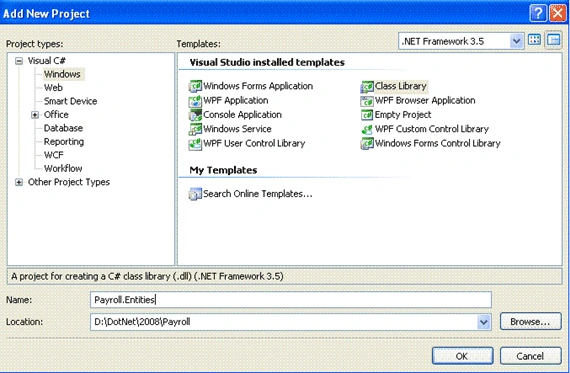
In the visual studio 2008 Make a new Blank solution and name it as Payroll. In the solution add a new class library project. Name it as Payroll.Entities as shown in following image.
Remove the class1.cs from project. Add a new item to project a select. ADO.NET Entity data Model.
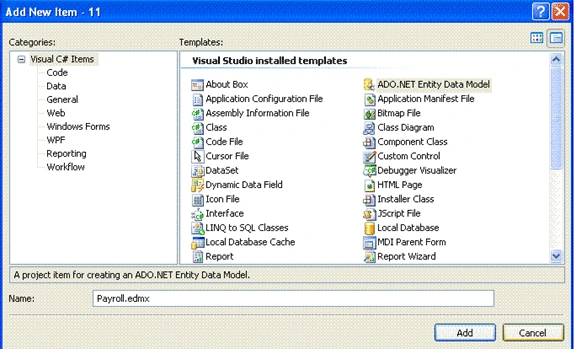
Rename it as Payroll.edmx. Click on add. Select generate from the database and click on next choose database connection and the given textbox for connection string rename it with PayrollDAO
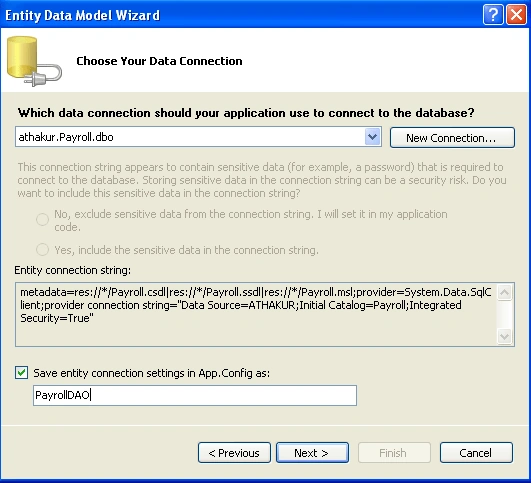
From the next screen select the employee table and click on finish. Compile the project. Now data layer is ready for you.
Step 3: Business/Service Layer
In the solution Payroll add a new class library project. Name it as Payroll.Service. Rename the class1.cs as EmployeeService.cs. Make the reference to System.Data.Entity. and also add the refrence to Payroll.Entities project we have created. Now add two methods GetEmployee and AddEmployee. Your class should look like this
using System;
using System.Collections.Generic;
using System.Linq;
using System.Text;
using Payroll.Entities;
using System.Data.Objects;
using System.Data.Objects.DataClasses;
namespace Payroll.Service
{
public class EmployeeService
{
public List<Employee> GetEmployee()
{
PayrollDAO payrollDAO = new PayrollDAO();
ObjectQuery<Employee> employeeQuery = payrollDAO.Employee;
return employeeQuery.ToList();
}
public string AddEmpoyee(Payroll.Entities.Employee e1)
{
PayrollDAO payrollDAO = new PayrollDAO();
payrollDAO.AddToEmployee(e1);
payrollDAO.SaveChanges();
return "SUCCESS";
}
}
}
Compile the project. Service layer is ready for you.
Step 4: Presentation Layer
Add a new web site with name "WebApp" to the payroll solution and set it as startup project. In the default.aspx add a gridview and button as shown in following figure
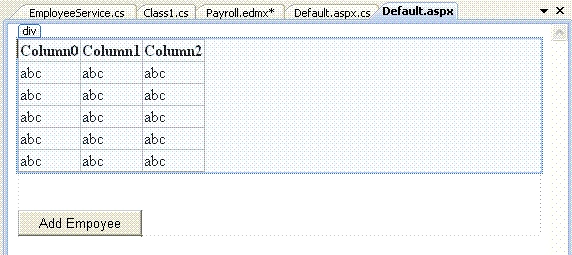
Set button text to Add Employee. Make the reference to System.Data.Entity and also add the refrence to Payroll.Service project we have created in step 3.
Add the code on page load and buttion1_click, Default.aspx.cs should look like this
using System;
using System.Collections.Generic;
using System.Linq;
using System.Web;
using System.Web.UI;
using System.Web.UI.WebControls;
using Payroll.Service;
public partial class _Default : System.Web.UI.Page
{
protected void Page_Load(object sender, EventArgs e)
{
EmployeeService es= new EmployeeService();
GridView1.DataSource = es.GetEmployee();
GridView1.DataBind();
}
protected void Button1_Click(object sender, EventArgs e)
{
EmployeeService es = new EmployeeService();
DateTime dt = new DateTime(2008, 12, 12);
Payroll.Entities.Employee e1 = Payroll.Entities.Employee.CreateEmployee(0, "Anand", "Thakur", dt, "M", "M", dt);
es.AddEmpoyee(e1);
}
}
Copy the connectionStrings from App.config of Data Layer(Payroll.Entities) project and paste in web.config of web application
<connectionStrings>
<add name="PayrollDAO" connectionString="metadata=res://*/Payroll.csdl|res://*/Payroll.ssdl|res://*/Payroll.msl;provider=System.Data.SqlClient;provider connection string="Data Source=ATHAKUR;Initial Catalog=Payroll;Integrated Security=True;MultipleActiveResultSets=True"" providerName="System.Data.EntityClient" />
</connectionStrings>
Now build and run the web application.
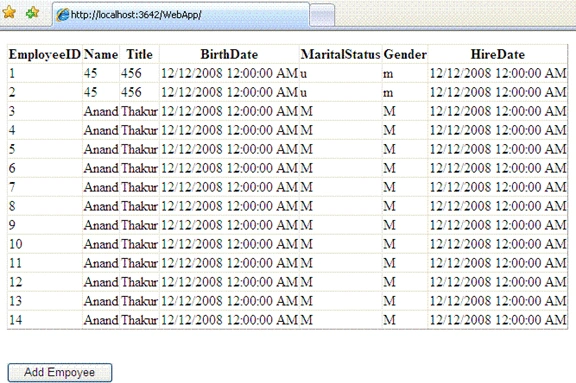
Click on add employee, new employee should be added to database.
Conclusion:
This is a very basic example with single table. In the next part, I will try to include more tables with CRUD operations.
vilas suryawanshiPosted Apr 22, 2010, 3:14 AM
Hi Anand, Very nice example, its very easy to understand EF.. And one more point, the photo which u uploaded is very cute one... is this ur child..? Regards, Vilas
DebasishPosted Jan 3, 2010, 2:56 AM
Thanks Alot!!! Mr Anand Thakur, The article is very useful for begineers like me. The way of representation is very simple to understand the basic concept of EDM. But in the "Entity Dta Model Wizard" the databese that i have created is not coming. What might be the reason. Plz let me know.
LewisPosted May 29, 2009, 1:30 PM
Hi Anand, Is Sql Server Express 2008 an OK replacement for Sql Server 2005 in this usage?
Nannette ThackereditedPosted Dec 5, 2008, 2:32 PMEdited Dec 5, 2008, 2:34 PM
This is the best tutorial I've found! And I was able to easily convert it to VB and use my own tables and just follow along with your directions and it worked the first time! This is also great for learning how to create a 3 layer project and adding the references, etc. Great job! I've been looking for this for a long time! Nannette
Ajith GopinathPosted Dec 5, 2008, 7:36 AM
Hi Anand, The way you presented ADO.Net Entitiy Frame is excellent. Any beginner to this technology can easily understand your example and it will give him/her confident for going forward. Thanks -Ajith
Naresh JakherPosted Dec 3, 2008, 4:22 AM
It's a very great article but it doesn't inform how to use stored procedure with Entity framework . I have a stored procedure that returns columns from two table, i want to bind the result set of this sp to Gridview. How can i use Ado.Net Entity model to achieve this. Any help would be appreciated. Regards, Naresh Jakher
eluimPosted Oct 7, 2008, 1:12 PM
hello, as a newbie in c# i would appreciate application examples with databinding to datagridview with CRUD operations between N:M and 1:M relations. Beside that thank you very much for your time you invest in writing these articles :)
Raghavendra PrasadeditedPosted Oct 3, 2008, 7:43 AMEdited Oct 3, 2008, 7:45 AM
Hi Anand, This is good article and explains basic understanding of the ADO.NET Entity Framework, I am waiting to see advanced concepts of the same. GOOD WORK and Thanks Raghavendra, Software Developer,London,UnitedKingdom
ts_azPosted Oct 1, 2008, 10:59 AM
You should run FX-Cop on your samples. You have some issues.
Mahesh ChandPosted Oct 1, 2008, 10:12 AM
Thanks Anand. I haven't use ADO.NET entity framework yet but looks pretty cool. I would like to see samples for about edit and delete employees. Cheers!