

What is Role Definition ID?
In SharePoint, we are all familiar with SharePoint Permission and Permission levels like Full Control, Edit, Contribute, etc. We use these permission levels to manage Site/List/item level accessibility. Sometimes we create custom permission for business requirements. These permissions are defined in SharePoint with a unique id which is called “SharePoint Role Definition ID”.
Why it is needed?
In general, role definition IDs are not needed to provide permission to a user or group in a Site, List, or List Item. We can do it with OOB by clicking some steps. But when we try to set permission by using REST Calls, we can’t use the permission level’s name. Then we need these Role Definition IDs. As an example, if we try to change a user’s/group’s permission with a rest call, it will be as follows.
<SiteAddress>/_api/web/lists/getbytitle('<ListTitle>')/items(<ListItemId>)/roleassignments/addroleassignment(principalid='<Group/User’sPrincipleID>',roleDefId=<RoleDefinitionID>)
How to get a Role Definition ID?
So, now the question that comes to mind is, how to get these permission levels assigned an ID or SharePoint Role Definition ID. For most of the common permission levels, we can get the Role Definition Id from the internet easily. Here are some out-of-the-box role definition names (Permission level) and their corresponding role definition IDs given below.
| Role Definition Name | Role Definition Id |
| Full Control | 1073741829 |
| Design | 1073741828 |
| Edit | 1073741830 |
| Contribute | 1073741827 |
| Read | 1073741826 |
| Limited Access | 1073741825 |
| View Only | 1073741924 |
But what about any custom permission level that is being created for some specific purpose in that site? Now step by step, we will walk through the process of how to get the SharePoint Custom Role Definition ID. To get the custom permission’s role definition ID we have to use rest call. And with this rest call we will also get the above out-of-the-box role definition IDs.
<SiteCollection>/_api/web/roledefinitions
Example
Let’s create custom permission in the site collection and get the role definition ID for that as an example with the following steps.
- First, go to the site settings of the site collection.
- Click on Site Permissions. For Modern sites, site permission option is available in the Settings option on the right corner of the top menu bar as shown in the below image (fig 1).
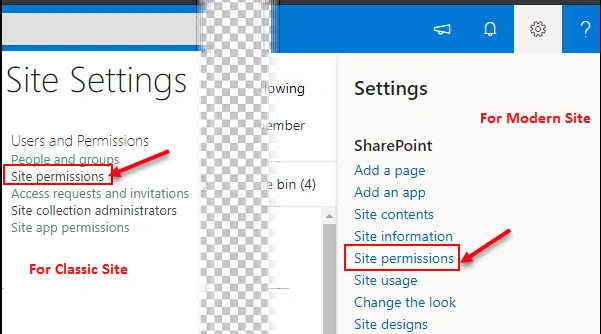
Fig 1: Site Permissions in Site Settings. - The site permission window will open.
- Click on the “Permission Levels” menu from the top menu as shown in the below image (Fig 2).
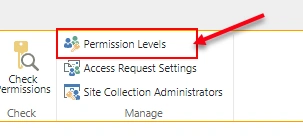
Fig 2: Permission Level Option in Site Permission Window - Permission levels window will be opened as in the following image.
- We can get all the permission levels for this site collection, both out-of-the-box and custom ones. We can also change the permission details of this role definition.
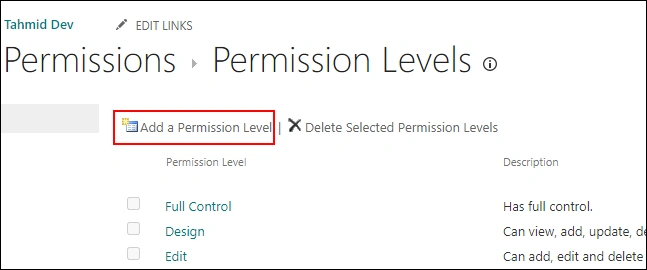
Fig 3: Permission Level Window - Now click on the “Add a permission Level” link as shown in the above image (fig 3).
- This will open a new window to create new permission level as shown in the following image (fig 4).
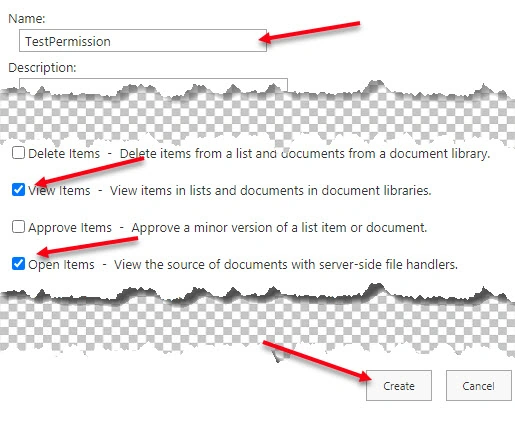
Fig 4: New Permission Level Creation Page - Now, provide your custom permission’s name in the text box.
- We can provide a description for future understanding.
- Now we have an option for selecting different types of permissions which are categorized with “List Permissions”, “Site Permissions” and “Personal Permissions”.
- We need to check the needed permission as shown in the image (fig 4).
- Click on the “Create” button.
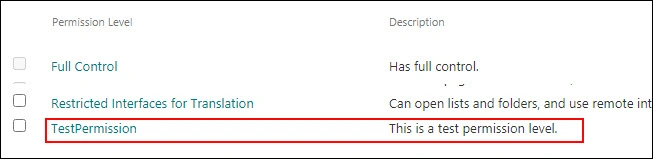
Fig 5: The Custom Permission has been created - Now our custom permission level “TestPermission” has been created as we can see in the above image.
- Now, let’s get the role definition ID of this custom permission level. To do that we have to call the rest api which we already discussed before.\
- For me, the REST API URL is as follows,
- This is a “GET” request. So we can request this URL in our web browser. We will get the response in XML format where we can get all the Role Definitions and Role Definition ID.
- For better visibility, we can use any online XML beautification tools or XML (XML to JSON Converter). Here is the result I got:
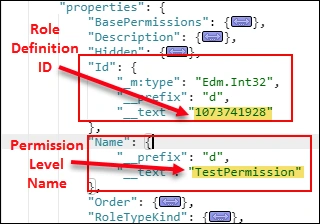
Fig 6: Response to the Rest Call - We can find our custom permission level as well as the out-of-the-box permission level’s role definition ID and other details here.
- So, for our custom permission level “TestPermission”, the role definition id is “1073741928”.
Conclusion
So this is the way to find the SharePoint Role Definition ID’s. In recent days when SharePoint 2010 Workflows are going to be retired, we had to use SharePoint 2013 workflow or Microsoft Power Automation. In these procedures, we need these Role Definition IDs to set permission with REST Call. I hope this article will help. Happy Coding.
Join the conversation! Your thoughts help the community grow.