

If you want to know how to get started with UI-Grid and how to set up a project in AngularJS and Web API, read the articles given below first.
- UI-Grid With AngularJS And WebAPI
- Export Data In Angular-UI-Grid Using WebAPI
- Filtering In UI-Grid With AngularJS And WebAPI
- Custom Scroll In AngularJS-UI-Grid With Web API
- Expandable grid in AngularJS-UI-Grid with Web API
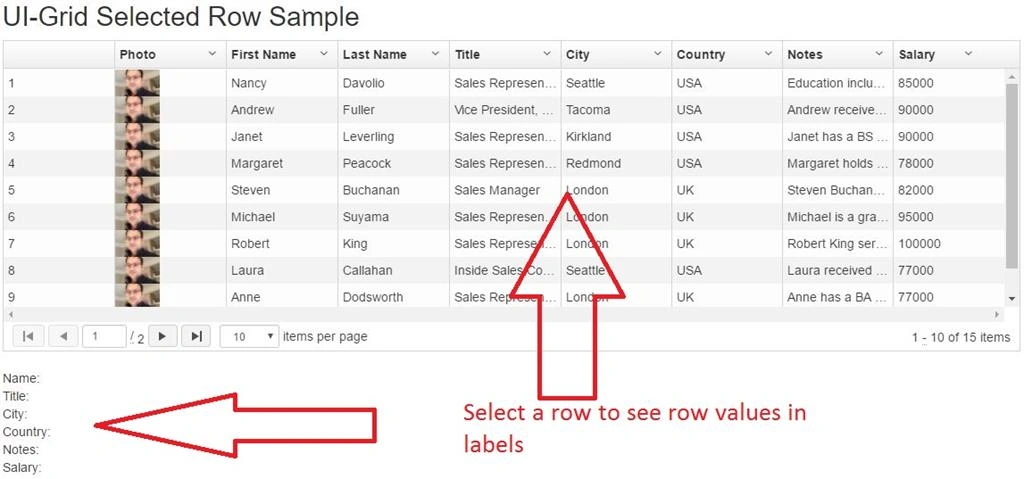
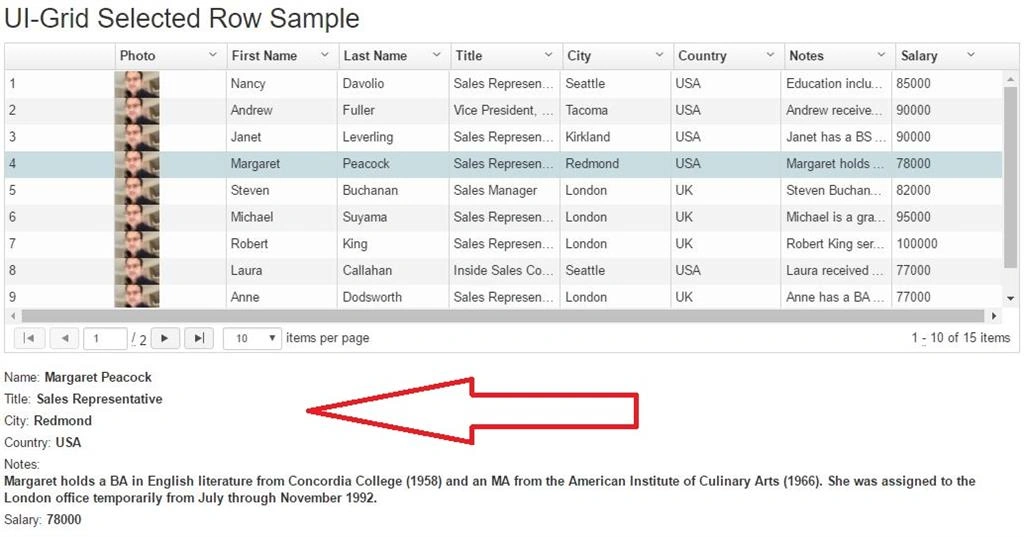
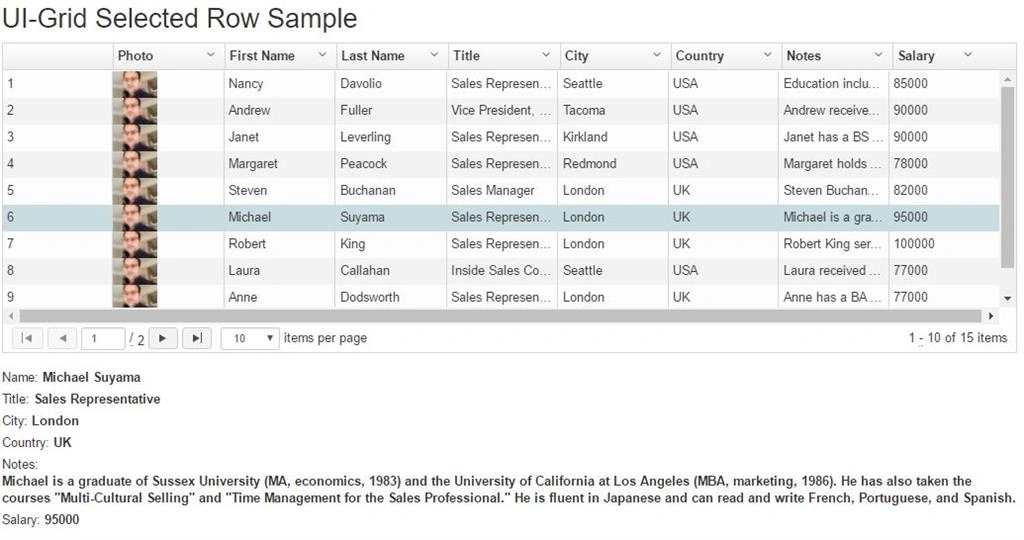
Angular-UI-Grid has selection row changed feature which gives you all column value from selected row.
Again in this sample I am using NORTHWND sample database and Employee table data.
Entity Model
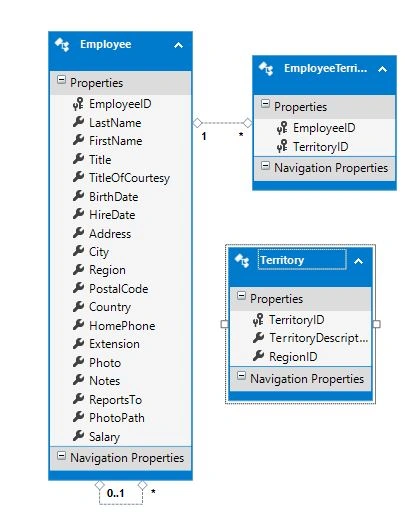
Web API
Here, my Web API class code is given below.
- using ng_ui_grid_sample.Models;
- using System.Collections.Generic;
- using System.Data.Entity;
- using System.Data.Entity.Infrastructure;
- using System.Linq;
- using System.Net;
- using System.Threading.Tasks;
- using System.Web.Http;
- using System.Web.Http.Description;
- namespace ng_ui_grid_sample.Controllers
- {
- [RoutePrefix("api/employeeapi")]
- public class EmployeesAPIController : ApiController
- {
- private NORTHWNDEntities3 db = new NORTHWNDEntities3();
- // GET: api/Employees
- [Route("get")]
- public IQueryable<Employee> GetEmployees()
- {
- return db.Employees;
- }
- // GET: api/Employees/5
- [Route("detail")]
- [ResponseType(typeof(Employee))]
- public async Task<IHttpActionResult> GetEmployees(int id)
- {
- Employee employees = await db.Employees.FindAsync(id);
- if (employees == null)
- {
- return NotFound();
- }
- return Ok(employees);
- }
- // PUT: api/Employees/5
- [ResponseType(typeof(void))]
- public async Task<IHttpActionResult> PutEmployees(int id, Employee employees)
- {
- if (!ModelState.IsValid)
- {
- return BadRequest(ModelState);
- }
- if (id != employees.EmployeeID)
- {
- return BadRequest();
- }
- db.Entry(employees).State = EntityState.Modified;
- try
- {
- await db.SaveChangesAsync();
- }
- catch (DbUpdateConcurrencyException)
- {
- if (!EmployeesExists(id))
- {
- return NotFound();
- }
- else
- {
- throw;
- }
- }
- return StatusCode(HttpStatusCode.NoContent);
- }
- // POST: api/Employees
- [ResponseType(typeof(Employee))]
- public async Task<IHttpActionResult> PostEmployees(Employee employees)
- {
- if (!ModelState.IsValid)
- {
- return BadRequest(ModelState);
- }
- db.Employees.Add(employees);
- await db.SaveChangesAsync();
- return CreatedAtRoute("DefaultApi", new { id = employees.EmployeeID }, employees);
- }
- // DELETE: api/Employees/5
- [ResponseType(typeof(Employee))]
- public async Task<IHttpActionResult> DeleteEmployees(int id)
- {
- Employee employees = await db.Employees.FindAsync(id);
- if (employees == null)
- {
- return NotFound();
- }
- db.Employees.Remove(employees);
- await db.SaveChangesAsync();
- return Ok(employees);
- }
- protected override void Dispose(bool disposing)
- {
- if (disposing)
- {
- db.Dispose();
- }
- base.Dispose(disposing);
- }
- private bool EmployeesExists(int id)
- {
- return db.Employees.Count(e => e.EmployeeID == id) > 0;
- }
- [Route("getterritoriesbyid")]
- public IEnumerable<EmployeeTerritory> GetEmployeeTerritoriesByEmployee(int id)
- {
- return (from et in db.EmployeeTerritories.AsEnumerable()
- join t in db.Territories.AsEnumerable() on et.TerritoryID equals t.TerritoryID
- where et.EmployeeID == id
- orderby et.TerritoryID
- select new EmployeeTerritory
- {
- EmployeeID = et.EmployeeID,
- TerritoryID = et.TerritoryID,
- TerritoryDescription = t.TerritoryDescription
- });
- }
- }
- }
Module
- //Module
- var employeeapp = angular.module('employeeapp', ['ui.grid', 'ui.grid.pagination',
- 'ui.grid.selection', 'ui.grid.exporter',
- 'ui.grid.grouping', 'ui.grid.expandable']);
Service
MUHAMMAD BILALPosted Sep 18, 2017, 6:04 AM
How photo is ZoomIn or Hover on mouseover in UI-Grid ???
Manav PandyaPosted Jun 13, 2017, 1:37 AM
Nice share sir .............