Here, I have described the following jQuery methods like click() and text() and how to find Id of controls.
Initial chamber
Step 1: Open Visual Studio and create an empty website, provide a suitable name such as RowDataUsingJqueryInGridView.
Step 2: In Solution Explorer you get your empty website, then add web forms.
For Web Form
RowDataUsingJqueryInGridView (your empty website). Right-click and select Add New Item, then Web Form. Name it RowDataUsingJqueryInGridView.aspx.
Design chamber
Step 3: Open the RowDataUsingJqueryInGridView.aspx file and write some code for the design of the application.
Firstly, add some CSS on this page which is used on page in header section as in the following code snippet:
- <style type="text/css">
- table tbody tr:hover {
- background-color: red;
- cursor: pointer;
- }
- </style>
Then add jQuery plugin in your head section. Here I have used jquery-1.10.2.js plugin for demonstration purpose.
Add in your page- - <script src="http://code.jquery.com/jquery-1.10.2.js"></script>
In head section of the web page.
Add HTML on your page and your page looks like the following: - <form id="form1" runat="server">
- <div>
- <table id="tstTable" class="tbl">
- <caption>Change History Table</caption>
-
- <thead>
- <tr>
- <th>Change Date</th>
- <th>Change Type</th>
- <th>Description</th>
- <th>StaffID</th>
- </tr>
- </thead>
-
- <tbody>
- <tr>
- <td>16/04/2010 07:30</td>
- <td>Edit</td>
- <td>New role</td>
- <td>00215</td>
- </tr>
- <tr>
- <td>15/02/2012 14:37</td>
- <td>Edit</td>
- <td>Out of stock</td>
- <td>85407</td>
- </tr>
- <tr>
- <td>14/03/2013 10:18</td>
- <td>Add</td>
- <td>Out of date</td>
- <td>15708</td>
- </tr>
- <tr>
- <td>17/03/2013 10:18</td>
- <td>Add</td>
- <td>Expire</td>
- <td>15648</td>
- </tr>
- <tr>
- <td>14/06/2013 10:18</td>
- <td>Add</td>
- <td>Out of date</td>
- <td>15948</td>
- </tr>
- <tr>
- <td>14/03/2013 10:18</td>
- <td>Add</td>
- <td>Out of date</td>
- <td>16748</td>
- </tr>
- </tbody>
- </table>
- </div>
-
- </form>
Now design looks like the following:
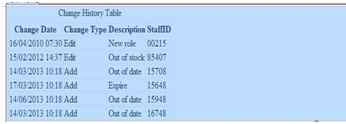 Figure 1
 Now write some script for jQuery for our purpose.
JQuery code to execute the purpose:
- <script type="text/javascript">
- $(document).ready(function () {
- $('table tbody tr').click(function () {
- alert($(this).text());
-
- });
- });
-
- </script>
Now your page looks like the following screenshot:
RowDataUsingJqueryInGridView.aspx
- <%@ Page Language="C#" AutoEventWireup="true" CodeFile="RowDataUsingJqueryInGridView.aspx.cs" Inherits="BindImageDropdown" %>
-
- <!DOCTYPE html>
-
- <html xmlns="http://www.w3.org/1999/xhtml">
- <head runat="server">
- <title>C-sharp corner article by Upendra Pratap Shahi</title>
- <style type="text/css">
- table tbody tr:hover {
- background-color: red;
- cursor: pointer;
- }
- </style>
- <script src="http://code.jquery.com/jquery-1.10.2.js"></script>
- <script type="text/javascript">
- $(document).ready(function () {
- $('table tbody tr').click(function () {
- alert($(this).text());
-
- });
- });
-
- </script>
- </head>
- <body>
- <form id="form1" runat="server">
- <div>
- <table id="tstTable" class="tbl">
- <caption>Change History Table</caption>
-
- <thead>
- <tr>
- <th>Change Date</th>
- <th>Change Type</th>
- <th>Description</th>
- <th>StaffID</th>
- </tr>
- </thead>
-
- <tbody>
- <tr>
- <td>16/04/2010 07:30</td>
- <td>Edit</td>
- <td>New role</td>
- <td>00215</td>
- </tr>
- <tr>
- <td>15/02/2012 14:37</td>
- <td>Edit</td>
- <td>Out of stock</td>
- <td>85407</td>
- </tr>
- <tr>
- <td>14/03/2013 10:18</td>
- <td>Add</td>
- <td>Out of date</td>
- <td>15708</td>
- </tr>
- <tr>
- <td>17/03/2013 10:18</td>
- <td>Add</td>
- <td>Expire</td>
- <td>15648</td>
- </tr>
- <tr>
- <td>14/06/2013 10:18</td>
- <td>Add</td>
- <td>Out of date</td>
- <td>15948</td>
- </tr>
- <tr>
- <td>14/03/2013 10:18</td>
- <td>Add</td>
- <td>Out of date</td>
- <td>16748</td>
- </tr>
- </tbody>
- </table>
- </div>
-
- </form>
- </body>
- </html>
No need to write any code here because I’ve displayed all the things from the front end.
- using System;
- using System.Collections.Generic;
- using System.Linq;
- using System.Web;
- using System.Web.UI;
- using System.Web.UI.WebControls;
-
- public partial class BindImageDropdown : System.Web.UI.Page
- {
- protected void Page_Load(object sender, EventArgs e)
- {
-
- }
-
- }
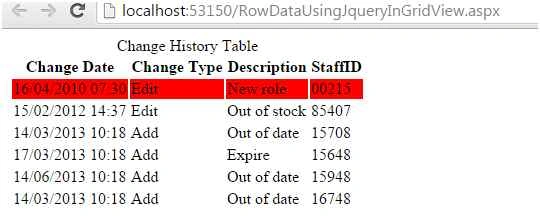 Figure 2
 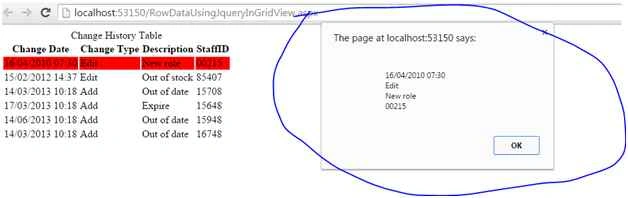 Figure 3
 I hope you liked this. Have a good day. Thank you for reading.


kalu singh raoPosted Jul 8, 2016, 4:15 AM
Good
Anu VPosted Jun 27, 2016, 6:25 AM
Nice
Abhishek KumarPosted Sep 23, 2015, 8:01 AM
sir i want to drag a grid view column into another grid view using jquery in asp.net
Humayun Kabir MamunPosted Sep 21, 2015, 2:32 AM
Nice...
Santhakumar MunuswamyPosted Sep 17, 2015, 10:20 AM
Good Article. Thanks for sharing
Pankaj Kumar ChoudharyPosted Sep 16, 2015, 10:13 PM
Nice One Sir........
RakeshPosted Sep 16, 2015, 11:15 AM
Good explanation
Sibeesh VenuPosted Sep 16, 2015, 4:07 AM
Nice Share
Harshad PansuriyaPosted Sep 15, 2015, 11:58 PM
Nice one
Karthikeyan KPosted Sep 15, 2015, 11:17 PM
Good one bro -:)
ShehzadPosted Sep 15, 2015, 10:22 PM
I have a question..."JQuery code to execute the purpose: (for alert) " How to achieve this part of code thru only "javascript code"?
Mohammed IbrahimPosted Sep 15, 2015, 8:05 PM
nice
Rajeesh MenothPosted Sep 15, 2015, 2:31 PM
Nice One