

In this article, you'll learn how to get a website visitor's IP address in ASP.NET using two different methods.
What is an IP Address?
According to Wikipedia, An Internet Protocol address (IP address) is a numerical label assigned to each device (e.g., computer, printer) participating in a computer network that uses the Internet Protocol for communication. An IP address serves two principal functions: host or network interface identification and location addressing. Its role has been characterized as follows: "A name indicates what we seek. An address indicates where it is. A route indicates how to get there.”
There are two versions of the IP address. The first version is an IPv4 that contains an IP address as a 32-bit number. The newer version is developed as IPv6, which takes a 128-bit number to store an IP Address.
There are two common ways to get the IP Address of a visitor of a website.
First Method to get IP address in ASP.NET
The first method of getting an IP Address is using “HTTP_X_FORWARDED_FOR” and “REMOTE_ADDR”. Where, “X_FORWARDED_FOR” is the HTTP header field for identifying originating IP Address of the client who is connected to Internet and “REMOTE_ADDR” returns the IP address of the remote machine.
Code to get IP Address using Method 1:
private void GetIpValue(out string ipAdd)
{
    ipAdd = Request.ServerVariables["HTTP_X_FORWARDED_FOR"];

    if (string.IsNullOrEmpty(ipAdd))
    {
        ipAdd = Request.ServerVariables["REMOTE_ADDR"];
    }
    else
    {
        lblIPAddress.Text = ipAdd;
    }
}
Second Method to get IP Address
The second method of getting an IP address is using a built-in functionality of ASP.NET. Here we use the Request property of the Page class, which gets an object of HttpRequest class for the requested page. The HttpRequest is a sealed class that enables ASP.NET to read the HTTP values sent by the client browser during a Web request. We access the UserHostAddress property of HttpRequest class to get the IP Address of the visitor.
Code to get IP Address using Method 2:
private void GetIpAddress(out string userip)
{
    userip = Request.UserHostAddress;
    if (Request.UserHostAddress != null)
    {
        Int64 macinfo = new Int64();
        string macSrc = macinfo.ToString("X");
        if (macSrc == "0")
        {
            if (userip == "127.0.0.1")
            {
                Response.Write("visited Localhost!");
            }
            else
            {
                lblIPAdd.Text = userip;
            }
        }
    }
}
Default.aspx
<!DOCTYPE html>

<html xmlns="http://www.w3.org/1999/xhtml">
<head runat="server">
    <title>Get IP Address</title>
    <link href="Files/css/bootstrap.css" rel="stylesheet" />
</head>
<body>
    <form id="form1" runat="server">
    <div>
        <h1><strong>Your IP Address : </strong></h1>
        <br/>
        <h1><strong>Method 1 : </strong><asp:Label ID="lblIPAddress" CssClass="label label-primary" runat="server" Text="Label"></asp:Label></h1>
        <br />
        <h1><strong>Method 2 : </strong><asp:Label ID="lblIPAdd" CssClass="label label-info" runat="server" Text="Label"></asp:Label></h1>
    </div>
    </form>
</body>
</html>
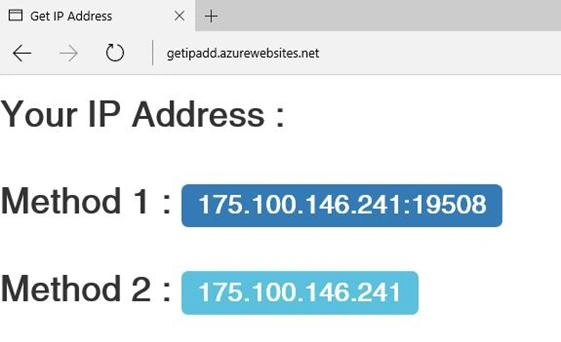
Call above methods in Page_Load event, as soon as the page loads you will get an output like this.
Conclusion
These are two methods to get the IP address of a client. In this article, we learned how to get the IP address of a website visitor using ASP.NET and C#.
You can get more about a visitors, its browser and other details. Learn more here: Get Client IP Address In ASP.NET MVC
A RavindraPosted May 23, 2023, 6:26 AM
How to call this in load page
A RavindraPosted May 23, 2023, 6:25 AM
Private void GetIpValue(out string ipAdd) { ipAdd = Request.ServerVariables["HTTP_X_FORWARDED_FOR"]; if (string.IsNullOrEmpty(ipAdd)) { ipAdd = Request.ServerVariables["REMOTE_ADDR"]; } else { lblIPAddress.Text = ipAdd; } }
Vikram RathaurPosted Oct 29, 2020, 12:37 AM
Always getting 10.10.1.1 IP using both methods
Nhan NguyenPosted Sep 25, 2020, 2:08 AM
How to call the method in page load?
Nhan NguyenPosted Sep 25, 2020, 1:25 AM
How to call those 0f 02 functions in page load?
Anup KshirsagarPosted Sep 22, 2020, 12:58 PM
Method 2 is really good, Thanks.
Gary TravisPosted Jun 9, 2020, 12:02 PM
Just a heads up that HTTP_X_FORWARDED_FOR can be controlled by the user agent, it shouldn't be trusted to always contain the true origin.
shailesh kumarPosted Sep 10, 2019, 1:43 AM
Hi,As i tried with above code to get machine ip it was working fine before, but now its not working.Need help on this.
Pankajkumar PatelPosted Aug 16, 2019, 12:56 AM
Good article
Mohd TaufeequePosted May 22, 2019, 2:11 AM
Its helpful, Its returning a Local IP address, But what if have to get the ipv4 address which we see after firing ipconfig/all command in command prompt.?
Tarang ChaurasiaPosted May 20, 2019, 2:42 PM
It is returning the Public IP address , How Can I identify the System Uniquely?
Hitesh LadePosted Jul 24, 2018, 5:29 AM
Method 1 Solved my problem Thanks.
Onur TURANPosted Feb 26, 2018, 12:43 PM
Hi, return value "::1", if (UserIpAddress == "::1") update code true.
manuel lucasPosted Jan 26, 2018, 1:41 PM
I am tired to trying get access to local IP ,i have test this code on the new windows 10 and it only shows :1 as IP address on the old version (Windows 7) its works fine please help me
KeyurPosted Apr 23, 2016, 12:17 AM
Thank you...Humayun Kabir Mamun and Vignesh Mani
Vignesh ManiPosted Apr 20, 2016, 4:08 PM
Nice
Humayun Kabir MamunPosted Apr 19, 2016, 12:47 AM
Nice...