

C# Random class provides functionality to generate random numbers in C#. The Random class can also generate other data types, including strings. In this code example, learn how to create a random number in C#.
Random class constructors have two overloaded forms. It takes either no value, or it takes a seed value. The Random class provides Random.Next(), Random.NextBytes(), and Random.NextDouble() methods. The Random.Next() method returns a random number, Random.NextBytes() returns an array of bytes filled with random numbers and Random.NextDouble() returns a random number between 0.0 and 1.0.
The Random.Next() method has three overloaded forms and allows you to set the minimum and maximum range of the random number.
The following code returns a random number.
int num = random.Next();
The following code returns a random number less than 1000.
int num = random.Next(1000);
The following code returns a random number between the min and the max range.
// Instantiate random number generator.
private readonly Random _random = new Random();

// Generates a random number within a range.
public int RandomNumber(int min, int max)
{
  return _random.Next(min, max);
}
You can even combine the two methods - RandomNumber and RandomString to generate a combination of random strings and numbers.
// Generates a random string with a given size.
public string RandomString(int size, bool lowerCase = false)
{
  var builder = new StringBuilder(size);

  // Unicode/ASCII Letters are divided into two blocks
  // (Letters 65–90 / 97–122):
  // The first group containing the uppercase letters and
  // the second group containing the lowercase.

  // char is a single Unicode character
  char offset = lowerCase ? 'a' : 'A';
  const int lettersOffset = 26; // A...Z or a..z: length=26

  for (var i = 0; i < size; i++)
  {
   var @char = (char)_random.Next(offset, offset + lettersOffset);
   builder.Append(@char);
  }

  return lowerCase ? builder.ToString().ToLower() : builder.ToString();
}
The following code generates a password of length 10 with the first 4 letters lowercase, the next 4 letters numbers, and the last 2 letters as uppercase.
// Generates a random password.
// 4-LowerCase + 4-Digits + 2-UpperCase
public string RandomPassword()
{
  var passwordBuilder = new StringBuilder();

  // 4-Letters lower case
  passwordBuilder.Append(RandomString(4, true));

  // 4-Digits between 1000 and 9999
  passwordBuilder.Append(RandomNumber(1000, 9999));

  // 2-Letters upper case
  passwordBuilder.Append(RandomString(2));
  return passwordBuilder.ToString();
}
Here is the complete code written in .NET Core 5.0. using System;
using System.T
namespace ConsoleApp7
{
  class RandomNumberSample
  {
    static void Main(string[] args)
    {
      var generator = new RandomGenerator();
      var randomNumber = generator.RandomNumber(5, 100);
      Console.WriteLine($"Random number between 5 and 100 is {randomNumber}");

      var randomString = generator.RandomString(10);
      Console.WriteLine($"Random string of 10 chars is {randomString}");

      var randomPassword = generator.RandomPassword();
      Console.WriteLine($"Random string of 6 chars is {randomPassword}");

      Console.ReadKey();
    }
  }

  public class RandomGenerator
  {
    // Instantiate random number generator.
    // It is better to keep a single Random instance
    // and keep using Next on the same instance.
    private readonly Random _random = new Random();

    // Generates a random number within a range.
    public int RandomNumber(int min, int max)
    {
      return _random.Next(min, max);
    }

    // Generates a random string with a given size.
    public string RandomString(int size, bool lowerCase = false)
    {
      var builder = new StringBuilder(size);

      // Unicode/ASCII Letters are divided into two blocks
      // (Letters 65–90 / 97–122):
      // The first group containing the uppercase letters and
      // the second group containing the lowercase.

      // char is a single Unicode character
      char offset = lowerCase ? 'a' : 'A';
      const int lettersOffset = 26; // A...Z or a..z: length = 26

      for (var i = 0; i < size; i++)
      {
        var @char = (char)_random.Next(offset, offset + lettersOffset);
        builder.Append(@char);
      }

      return lowerCase ? builder.ToString().ToLower() : builder.ToString();
    }

    // Generates a random password.
    // 4-LowerCase + 4-Digits + 2-UpperCase
    public string RandomPassword()
    {
      var passwordBuilder = new StringBuilder();

      // 4-Letters lower case
      passwordBuilder.Append(RandomString(4, true));

      // 4-Digits between 1000 and 9999
      passwordBuilder.Append(RandomNumber(1000, 9999));

      // 2-Letters upper case
      passwordBuilder.Append(RandomString(2));
      return passwordBuilder.ToString();
    }
  }
}
The output from the above code is shown in figure 1.
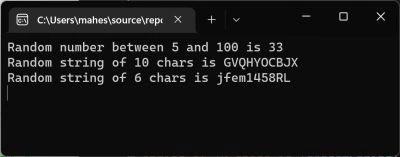
Figure 1. Console Output
Summary
This article and code example taught you how to generate random numbers and random strings in C#.
Abhishek UpadhyayPosted Sep 7, 2021, 4:04 PM
Very useful thanks for sharing
Ömer Faruk ÇalışkanPosted Aug 22, 2020, 4:00 AM
How can I make numbers in a sequence lke 45,46,47 ?
James CurranPosted May 22, 2020, 11:31 AM
Is this really from 2004? It just turned up in the "Top Article" email today.Nevertheless, it has several problems. First off, as many people have noted, the Random object should not be constantly recreated. When default-constructed (no argument), it uses the time in milliseconds as the seed. This means if any of these methods are called in rapid succession, they will get back the same values. Constructing a Random object also takes a long time, relative to getting the next value. The simple solution to this is to move the random object outside of the method and make it a static readonly member variable. static readonly Random random = new Random(); Next, since we know how big the final string will be, there's no sense in using the default size of the StringBuilder and risk it waste time doing a reallocation if the string becomes too long. StringBuilder builder = new StringBuilder(size); The key line has a number of problems on its own. The ToChar/ToInt16/Floor sequence is overkill. A simple cast to char will sufficiently handle that. In fact, we can avoid dealing for floating-point math by using Next() instead of NextDouble(). Also, a character literal can be used interchangeably with an int, so you can be a bit less cryptic by using 'A' instead of 65. But we can do more there. The amount of work that needs to be done to lower-case a string in approximately to what we've just done to create it, meaning asking for a lower-case string doubles the time this method takes. Why don't we just create a lower-case string to start if they ask for one: var offset = lowerCase ? 'a' : 'A'; Putting all that together, we get: static readonly Random random = new Random(); public string RandomString(int size, bool lowerCase =false) { StringBuilder builder = new StringBuilder(size); var offset = lowerCase ? 'a' : 'A'; for (int i = 0; i < size; i++) { var ch = (char)random.Next(offset, offset +26); builder.Append(ch); } return builder.ToString(); }
probir royPosted May 4, 2020, 8:40 AM
Your Example is helpful but the output for the password string is not of 6 digit its 10 digit password. Please check and update.
Tom JacksonPosted Feb 12, 2020, 5:03 PM
One problem, if you're trying to use the Random integer function - if you repeatedly call it in a loop, it will just give you the same number. At least it did when I filled an array with the number I got 16 times.
Dinesh GabhanePosted Nov 7, 2019, 8:29 AM
Very Nice Article
Joaquin ThijssenPosted Oct 9, 2019, 7:13 AM
Dude, your the founder of this website and you don't even know that a comment needs two slashes. nice one.
Josafat RakaPosted Sep 14, 2019, 11:20 PM
Will the data be duplicated, Sir?
Pankaj SinghPosted Jul 2, 2019, 11:46 PM
Very useful thanks for sharing
Mudzakkir TohaPosted Jun 26, 2019, 3:00 AM
Wow! Awesome!..
Rushi MehtaPosted Dec 4, 2018, 5:02 AM
Nice Article... This will help me in my project
Emily PetersonPosted Dec 3, 2018, 1:53 PM
What is the double equivalent of the int .Next(min,max)?
M SandeepPosted Aug 10, 2018, 10:10 AM
It shows your article was published in 2004...Do we have .Net Core at that time?. I feel your article should also have latest updated time.
Sumit ChaudharyPosted Mar 10, 2018, 11:37 AM
Thanks sir i need that code.
Satish Kumar VadlavalliPosted Feb 22, 2018, 2:02 AM
Nice one. and thanks for sharing
Mohanraj KaliappanPosted Oct 13, 2017, 4:22 AM
Very Useful for every one
Arvind SinghPosted Oct 10, 2017, 12:32 AM
Good example............
Ganapati PanapanaPosted Oct 8, 2017, 11:38 PM
Thanks for sir , good info!!
varun pujaraPosted Jul 14, 2017, 1:24 PM
Thank you for sharing .
Joe WilsonPosted Jan 6, 2017, 7:32 AM
Thank you for sharing this article.
BeginnerPosted Oct 30, 2016, 3:21 AM
Very Useful Article
Ramesh PalaniappanPosted Aug 18, 2016, 8:14 AM
Good one
Hanif HefazPosted Jul 22, 2016, 3:07 AM
Nice one. the one i need it
kalu singh raoPosted Jul 7, 2016, 8:38 AM
Nice...
Bhuvanesh MohankumarPosted Apr 19, 2016, 2:31 PM
Good one
GokulPosted Apr 12, 2016, 5:24 AM
thank you for sharing ....
Kashif SohailPosted Mar 13, 2016, 12:50 PM
Nice one
Sonu ChaudharyPosted Feb 25, 2016, 6:29 AM
keep sharing
Asfend YarPosted Feb 21, 2016, 9:52 AM
thanks sir
Humayun Kabir MamunPosted Feb 16, 2016, 9:07 AM
Nice...
Shailesh UkePosted Feb 16, 2016, 1:52 AM
Nice Article
Sr KarthigaPosted Feb 10, 2016, 9:15 AM
Good one sir its very intresting
Sara AnistionPosted Feb 9, 2016, 3:05 AM
nice article
Irfan AcPosted Jan 25, 2016, 1:17 AM
verygood
KaustubhPosted Jan 15, 2016, 11:28 PM
nice
Ashish SrivastavaPosted Jan 14, 2016, 5:55 AM
nice
Nanddeep NachanPosted Jan 11, 2016, 12:35 PM
Useful. Thanks for sharing!
Arul RPosted Jan 11, 2016, 9:00 AM
Nice share
Ankur MistryPosted Nov 27, 2015, 6:44 AM
Nice. thank u
mehrdad amiriPosted Nov 14, 2015, 1:37 AM
nice
Mohamed Gani MnPosted Nov 4, 2015, 7:40 AM
Nice Article
Ali AhmedPosted Nov 2, 2015, 7:21 AM
another nice article
Vikki KumarPosted Sep 24, 2015, 7:06 AM
Thanku so much sir
Vikki KumarPosted Sep 19, 2015, 12:32 AM
nice
Fenita SanaPosted Sep 14, 2015, 11:34 PM
Its very helpfull
Harshad PansuriyaPosted Sep 12, 2015, 3:30 AM
Nice One
Ajeet MishraPosted Sep 1, 2015, 4:14 AM
very usefull to create captcha.......
Sanghamitra MohantyPosted Aug 27, 2015, 10:57 AM
good one
Yashwanth MuthineniPosted Aug 22, 2015, 7:40 AM
Nice Share sir
Varun GuptaPosted Aug 3, 2015, 8:18 AM
thank you..great help
Shailesh UkePosted May 28, 2015, 7:44 AM
Nice...
Phan Ð?c Thi?nPosted Jul 12, 2014, 8:48 AM
Why when I use the loop to run some valuable function when displaying a duplicate row.Please help me
Saurabh TiwariPosted Jun 27, 2014, 6:03 AM
what if i want only first five digit as random & last five have to be auto incremented?
balamurugan vsPosted Jul 13, 2013, 7:54 AM
here you added numbers,letters.but my doubt is 'How to add the special character in the random password as the number,letters.please reply me sir.
amit kumareditedPosted Apr 11, 2012, 11:49 AMEdited Apr 11, 2012, 11:52 AM
My question is "Can a Combination of random string and random number" repeat at some time?? If no then I will use it to provide it to user in the form of username (combination of random number + random string). Please remove my confusion ASAP as i have to implement this in my project. waiting....sir...
Gabriella FoxPosted Feb 19, 2012, 3:56 PM
If i made a program that generated many random numbers. Is there a way i could sort them so i can see easily how many times it generated each number?
Sheryl KiersteadPosted Jul 19, 2011, 10:58 AM
Can you please email me at [email protected]? I need to use this class in a particular project and I need more info.
dron dronPosted Mar 27, 2011, 1:36 PM
private int GetRandom(int len) { string guid = Guid.NewGuid().ToString(); double number = 0; int counter = 0; foreach (char c in guid) { number += Convert.ToInt32(c)*Math.Pow(10, counter); } return (int)number%len; }
Lars HaggqvistPosted Mar 2, 2011, 6:51 AM
I use a slightly different method to generate random strings... private string _passwordArray = "!#$%&'()*+,-.0123456789:;<=>?@ABCDEFGHIJKLMNOPQRSTUVWXYZ[]^_abcdefghijklmnopqrstuvwxyz{|}~"; public static string Generate(int Length) { Random random = new Random(); StringBuilder password = new StringBuilder(); // fill the StringBuilder text with a random password of given length for (int i = 0; i < Length; i++) { // get an integer between 1 and the length of the password character array int index = (int)Math.Ceiling(random.NextDouble() * _passwordArray.Length); // append it to the string password.Append(_passwordArray[index]); } // return the random password return password.ToString(); } In this way, you merely have to adjust the character array to the selection of characters you want
Jinal ShahPosted Feb 22, 2011, 3:32 AM
Hi its nice to read this but i have one confusion how can i display this string in wave kind of form as we usually see in registration forms and all pls help me if you have any idea for the same. Thanks.
Jinal ShahPosted Feb 22, 2011, 3:32 AM
Hi its nice to read this but i have one confusion how can i display this string in wave kind of form as we usually see in registration forms and all pls help me if you have any idea for the same. Thanks.
BrianeditedPosted Jan 31, 2011, 6:30 PMEdited Jan 31, 2011, 6:32 PM
Your RandomNumber method is implemented poorly. [code] private int RandomNumber(int min, int max) { Random random = new Random(); return random.Next(min, max); }[/code] Doing this will seed the RNG with the same value if it is called quickly enough in the same timeframe, causing duplicate results. However, if you wrote the helper method like this: [code] Random random = new Random(); private int RandomNumber(int min, int max) { return random.Next(min, max); } [/code] it will be seeded just once and work properly!
Mizan RahmanPosted Jan 6, 2011, 2:10 PM
I think it's a fantastic work of you! But as beginner which process should i follow to learn c#. Please, give me instruction!
marshall anakoPosted Oct 10, 2010, 7:28 PM
Mahsh, Please i tried to run your first code but it kept on saying " thename Random does not exist in the currn context
marshall anakoPosted Oct 10, 2010, 7:15 PM
Mahsh, Please i tried to run your first code but it kept on saying " thename Random does not exist in the currn context
marshall anakoPosted Oct 10, 2010, 6:47 PM
I just want to kw . I tried to run the program on isual studio 2008.
kopapoooo kopsasaPosted Aug 2, 2010, 7:03 AM
how to call it ?
MeshaPosted Jun 21, 2010, 10:55 AM
Thank you s But this way the number generated by changes in each time we the implementation process, but I want to generate number looks like 20100000000001 and increasing each time by one looks like 20100000000002 and so continue every time up by one at each execution, and only change in the year again, where it think 2010 is the year and changes each year new and start all over again 20110000000001 thank you for your cooperation
Safaa DalloulPosted Jun 18, 2010, 4:33 PM
I wanna know how you can do ranom image from database when the page refreshed, hint I know how you can retrived the image from database so just i know How to do random image?? thanks so much
JoeditedPosted Jun 14, 2010, 3:02 PMEdited Jun 15, 2010, 9:06 AM
I am mainly working on C++, to make a random number you have to assign a generator for random seek (like GetTickCount() or GetCurrentTime()) then you can use the rnd function. I wonder if it is secured as in C++ Thank you
Syed Kamran HussainPosted Jun 14, 2010, 4:49 AM
Is there any way to generate Random nos. with non repeating values.....?
MeshaPosted Jun 5, 2010, 6:38 PM
sir please, i'd like to know how to generate serial number of 14 digits that can be stored in database and everytime a number is automatically added when the additional button is pressed.And that number is similar to serial numbers of telecommunication cards. thank you for your cooperation please do'nt late to answer me
MeshaPosted May 21, 2010, 8:38 AM
thank you very much
Andrew CatlinPosted Apr 20, 2010, 8:29 PM
hey i'm a student and i am trying to generate 100 random numbers by a click of a button i can generate random numbers, but i can't get it to generate 100 numbers at a time. can anyone help?
Sonam BangPosted Apr 11, 2010, 6:02 AM
In my application I have to generate Customer name randomly. What should I do to generate Name of a customer that make sense. And Number of Customers starts from 1 up to 10, so we do not want any repeatation, also. how do i display the names of the customers in data grid. Please help... Thank u
zeeshan ahmadPosted Feb 10, 2010, 1:13 PM
Dear mahesh, I have to datagridviews in C# windows application. grid1 contains some records columns like (item name, Qty). and grid2 is empty initially. what i am doing , reading first record from grid1 & inserting into Grid2. now wat i want, while reading 2nd record from grid1 & comparing(item name) it with existing records in grid2 if same record is found it should update the qty of existing record in grid2 else new row inserted into grid2. how can i do this? i hope that i make you understand with my problem. Please tell what should i do?? Thanks
Nithya MohanrajPosted Feb 1, 2010, 12:39 AM
Thanks for your detailed information. I have learnt from this
BillPosted Sep 21, 2009, 4:30 PM
Here's a bit more straightforward random String builder: protected String CreateTemporaryPassword(int intPasswordLength) { Random rndmRandom = new Random(); StringBuilder sbPassword = new StringBuilder(); while (sbPassword.Length < intPasswordLength) { int intRandomValue = 0; while (intRandomValue == 0) { intRandomValue = rndmRandom.Next(65,90); // UpperCase Letters Only if (intRandomValue == 73) intRandomValue = 0; // Don't allow "I" because it looks too much like a one (1) if (intRandomValue == 79) intRandomValue = 0; // Don't allow "O" because it looks too much like a zero (0) } sbPassword.Append((Char)intRandomValue); } return sbPassword.ToString(); }
jeet pPosted May 4, 2009, 10:12 AM
Dear Sir, thanks for the article, however my need is bit tricky, can you shed some light on this? I have a database table with primary key (int) - values are randomly generated values between -2 Billion to +2 Billion (except values between 0-100) - this table is already filled with some records - now I have a CSV to export into table that has all the records except this primary key column (I need to handle it programmatically) with following conditions in mind 1. value should be random between -20Bl to +20Bl (except 0-100) 2. performance should be good (arond 20K records in CSV) I would be more than happy if you can reply directly at [email protected] bunch of thanks Jeet
Anitha JosephPosted Apr 29, 2009, 7:45 AM
here is a simple fns which will return you a randum number private static int GetRandomNo(int MaxValue) { RandomNumberGenerator rng = RNGCryptoServiceProvider.Create(); byte[] bytes = new byte[4]; rng.GetBytes(bytes); int rndNum = BitConverter.ToInt32(bytes, 0); return Math.Abs(rndNum % MaxValue); }//Max Value is max range
pankaj insanPosted Nov 27, 2008, 4:08 AM
sir does this code generate non repeating random numbers........ int num = random.Next(); i need non repeating numbers sir............ !
Akhilesh DukareeditedPosted Aug 29, 2008, 5:51 AMEdited Sep 12, 2008, 9:51 AM
I want to generate random number without duplicate any of the numbers. How is this possible?
Akhilesh DukarePosted Aug 29, 2008, 5:50 AM
i want to generate random number without duplicate number. how its possible
Akhilesh DukarePosted Aug 29, 2008, 5:50 AM
i want to generate random number without duplicate number. how its possible
Muzikayise ButheleziPosted Jan 26, 2008, 6:05 AM
thanks mate. I have just recently made the switch from VB.NET to C#. I don't know much about C# but the goal is to become a master at it. any suggestions where I can find articles for beginners?
bhavani maniPosted Oct 23, 2007, 1:32 AM
i am having "serial number" column in datagridview after completing the end of the row i press enter key "serial number" column should increment from first row by 1(by value one)
KunalPosted Oct 10, 2007, 11:52 AM
In my application I have to generate Customer name randomly. What should I do to generate First and Last name of a customer that make sense. Random string is not going to help bcz it will create names that does not exist. And Number of Customers starts from 500 up to 1000, so we do not want any repeatation, also.
mahindra babuPosted Sep 13, 2007, 2:54 AM
when i tried with that code, its asking me to add reference libraries.. which libraries ?? where to add and how to add thos libraries in c#.net ?? plz suggest me
mahindra babuPosted Sep 13, 2007, 2:47 AM
when i tried with that code, its asking me to add reference libraries.. which libraries ?? where to add and how to add thos libraries in c#.net ?? plz suggest me
noor rifhan rabuPosted Jul 31, 2007, 10:04 PM
I want to get a string of numbers upon clicking a button. How can i get that?
Former membereditedPosted Jul 26, 2007, 10:59 AMEdited Jul 26, 2007, 11:01 AM
Here's a simpler function that uses an external Random() object & allows you to specify legal characters. private static string RandomString(int size, Random r) { string legalChars = "abcdefghijklmnopqrstuvwxzyABCDEFGHIJKLMNOPQRSTUVWXZY"; stringBuilder sb = new StringBuilder(); for (int i = 0; i < size; i++) sb.Append(legalChars.Substring(r.Next(0, legalChars.Length - 1), 1)); return sb.ToString(); }
Michael HradekPosted Jun 19, 2007, 6:25 PM
I found that placing "Random random = new Random();" outside the function returned random strings when calling "RandomString()" repeatedly. Developers commonly place this inside the function but it is better to seed outside the function. ~M
Nitin BholePosted Apr 13, 2007, 11:01 AM
how to generate serial no.using random function
Rajesh WadhwaniPosted Apr 11, 2007, 2:32 PM
Hi mahesh, Thanx for this example, i wanted to know how to generate random number in C# (for my final year project) and with my keyword your link was the first one in google, it was great. i still haven't tried the example, but i know it will work, coz programming is a part of me inside :) take care... - Rajesh (www.rajesh.sentosajaipur.com)
rabail sattiPosted Mar 10, 2007, 12:02 AM
thnxx mr mahesh,,it helped me alot. As being a student,i was stucked with random numbers generation bla bla ... thnx.