

In my last article, "Generating API Document In Nancy," I introduced how to generate an easy API document in Nancy without third party plugins, which contain less information. Today, we will learn how to use Swagger to generate a richer API document in Nancy through an open source project, Nancy.Swagger.
What is Swagger?Swagger is a powerful open source framework backed by a large ecosystem of tools that helps you design, build, document, and consume your RESTful APIs.
We can use JSON and YAML to finish it. JSON seems more convenient when we are coding, because we can use lots of JSON libraries in our projects. By the way, the syntax of YAML is also easy to understand!
How does Swagger work? We only need to provide some data to Swagger and it will render the document view which we can see. And, Nancy.Swagger plays a vital role in providing data!
Now, let's begin.
Step 1This is a previous step of this article. We need to do some preparation.
- Create a new empty solution named ApiApp, add three projects to the solution
- Web - contains the swagger-ui and other static files
- Modules - contain all Nancy modules and metadata modules
- Models - contains all the models
- Download the static files of Swagger and add them to the ApiApp project. And I made them Embedded Resource which can be output to the bin directory.
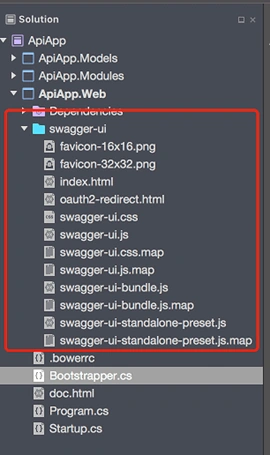
- Add a Bootstrapper class and enable the static files of Swagger in the method ConfigureConventions.
- public class Bootstrapper : DefaultNancyBootstrapper
- {
- protected override void ConfigureConventions(NancyConventions nancyConventions)
- {
- base.ConfigureConventions(nancyConventions);
- nancyConventions.StaticContentsConventions.Add(StaticContentConventionBuilder.AddDirectory("swagger-ui"));
- }
- }
- Create a new doc.html file, which will show us the API document. We need to copy the content from the downloaded index.html in swagger-ui to the doc.html.
- Add a HomeModule class to deal with the first time the document is opened. When we open our index page of our API, we will be redirected to the document page.
- public class HomeModule : NancyModule
- {
- public HomeModule()
- {
- Get("/", _ =>
- {
- return Response.AsRedirect("/swagger-ui");
- });
- Get("/swagger-ui",_=>
- {
- var url = $"{Request.Url.BasePath}/api-docs";
- return View["doc", url];
- });
- }
- }
- Edit the JavaScript code of doc.html so that we can get our own API information.
- window.onload = function() {
- // Build a system
- const ui = SwaggerUIBundle({
- url: "@Model", //replace the default url to our demo's url
- dom_id: '#swagger-ui',
- presets: [
- SwaggerUIBundle.presets.apis,
- SwaggerUIStandalonePreset
- ],
- plugins: [
- SwaggerUIBundle.plugins.DownloadUrl
- ],
- layout: "StandaloneLayout"})
- window.ui = ui;
- }
So far, we have finished the previous work of our demo.
Note
Nancy.Swagger does not include the swagger-ui, which is different compared to Swashbuckle.AspNetCore, which we use in ASP.NET Core Web API. Thus, we need to add the swagger-ui by ourselves.
Step 2Create a new module class named ProductsModule. This module contains all APIs.
- public class ProductsModule : NancyModule
- {
- public ProductsModule() : base("/products")
- {
- Get("/", _ =>
- {
- var list = new List<Product>
- {
- new Product{ Name="p1", Price=199 , IsActive = true },
- new Product{ Name="p2", Price=299 , IsActive= true }
- };
- return Negotiate.WithMediaRangeModel(new Nancy.Responses.Negotiation.MediaRange("application/json"), list);
- }, null, "GetProductList");
- Get("/{productid}", _ =>
- {
- var productId = _.productid;
- if (string.IsNullOrWhiteSpace(productId))
- return HttpStatusCode.NotFound;
- var isActive = Request.Query.isActive ?? true;
- var product = new Product
- {
- Name = "apple",
- Price = 100,
- IsActive = isActive
- };
- return Negotiate.WithMediaRangeModel(new Nancy.Responses.Negotiation.MediaRange("application/json"), product);
- }, null, "GetProductByProductId");
- Post("/", _ =>
- {
- var product = this.Bind<Product>();
- if(!Request.Headers.Any(x=>x.Key=="test"))
- return HttpStatusCode.BadRequest;
- return Negotiate
- .WithMediaRangeModel(new Nancy.Responses.Negotiation.MediaRange("application/json"), product)
- .WithMediaRangeModel(new Nancy.Responses.Negotiation.MediaRange("application/xml"), product);
- }, null, "AddProduct");
- Put("/", _ =>
- {
- var product = this.Bind<Product>();
- return Negotiate
- .WithMediaRangeModel(new Nancy.Responses.Negotiation.MediaRange("application/json"), product);
- }, null, "UpdateProductByProductId");
- Head("/",_=>
- {
- return HttpStatusCode.OK;
- },null,"HeadOfProduct");
- Delete("/{productid}", _ =>
- {
- var productId = _.productid;
- if (string.IsNullOrWhiteSpace(productId))
- return HttpStatusCode.NotFound;
- return Response.AsText("Delete product successful");
- }, null, "DeleteProductByProductId");
- }}
Before writing code on a metadata module, we need to add the header for Swagger. It's part of our document, which is basic on OpenAPI Specification. You can follow this link.
Open our Bootrstapper class and add the code given below.
- protected override void ApplicationStartup(TinyIoCContainer container, IPipelines pipelines)
- {
- SwaggerMetadataProvider.SetInfo("Nancy Swagger Example", "v1.0", "Some open api", new Contact()
- {
- EmailAddress = "[email protected]",
- Name = "Catcher Wong",
- Url = "http://www.c-sharpcorner.com/members/catcher-wong"
- }, "http://www.c-sharpcorner.com/members/catcher-wong");
- base.ApplicationStartup(container, pipelines);
- }
This code specifies the header information of our API document. After you run the code (not now!), you may see the screenshot.
Step 4In this step, we will create a metadata module to describe our API.
- public class ProductsMetadataModule : MetadataModule<PathItem>
- {
- public ProductsMetadataModule(ISwaggerModelCatalog modelCatalog)
- {
- modelCatalog.AddModels(typeof(Product), typeof(IEnumerable<Product>));
- Describe["GetProductList"] = desc => desc.AsSwagger(
- with => with.Operation(
- op => op.OperationId("GetProductList")
- //Tag means this api belongs to which group
- .Tag("Products")
- //Description of this api
- .Description("This returns a list of products")
- //Summary of this api
- .Summary("Get all products")
- //Default response of the api
- .Response(r => r.Schema<IEnumerable<Product>>(modelCatalog).Description("OK"))
- ));
- Describe["GetProductByProductId"] = desc => desc.AsSwagger(
- with => with.Operation(
- op => op.OperationId("GetProductByProductId")
- .Tag("Products2")
- .Summary("Get a product by product's id")
- .Description("This returns a product's infomation by the special id")
- //specify the parameters of this api
- .Parameter(new Parameter
- {
- Name = "productid",
- //specify the type of this parameter is path
- In = ParameterIn.Path,
- //specify this parameter is required or not
- Required = true,
- Description = "id of a product"
- })
- .Parameter(new Parameter
- {
- Name = "isactive",
- In = ParameterIn.Query,
- Description = "get the actived product",
- Required = false,
- })
- .Response(r => r.Schema<Product>(modelCatalog).Description("Here is the product"))
- .Response(404, r => r.Description("Can't find the product"))
- ));
- Describe["AddProduct"] = desc => desc.AsSwagger(
- with => with.Operation(
- op => op.OperationId("AddProduct")
- .Tag("Products")
- .Summary("Add a new product to database")
- .Description("This returns the added product's infomation")
- //Request body when using POST,PUT..
- .BodyParameter(para => para.Name("para").Schema<Product>().Description("the infomation of the adding product").Build())
- .Parameter(new Parameter()
- {
- Name = "test",
- In = ParameterIn.Header,//http header
- Description = "must be not null",
- Required = true,
- })
- //specify the request parameters can only be a JSON object
- .ConsumeMimeType("application/json")
- //specify the response result can be a JSON object or a xml object
- .ProduceMimeTypes(new List<string> { "application/json", "application/xml" })
- .Response(r => r.Schema<Product>(modelCatalog).Description("Here is the added product"))
- .Response(400, r => r.Description("Some errors occur during the processing"))
- ));
- Describe["HeadOfProduct"] = desc => desc.AsSwagger(
- with => with.Operation(
- op => op.OperationId("HeadOfProduct")
- //specify this api belongs to multi groups
- .Tags(new List<string>() { "Products", "Products2" })
- .Summary("Something is deprecated")
- .Description("This returns only http header")
- //specify this api is deprecated
- .IsDeprecated()
- .Response(r => r.Description("Nothing will return but http headers"))
- ));
- }
- }
I added some annotations on the code given above to show what they mean. For more details about them, you can visit the wiki page of Nancy.Swagger.
Now, we can run the project.
Here are some screenshots of the result
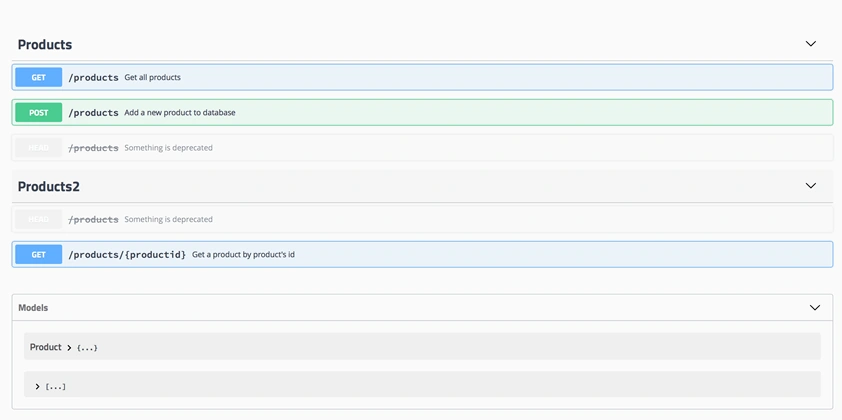
Screenshot 1
Screenshot 1 is the overview of our API document. We can find out there are two groups in our document, HTTP method of APIs, descriptions of APIs etc.
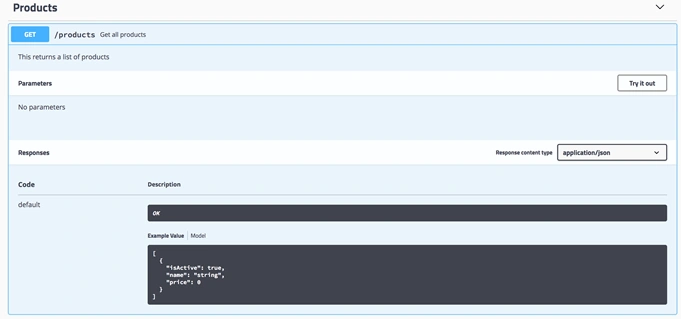
Screenshot 2
Screenshot 2 is the default view of the API GetProdcutList. We can find out the information, which we described in metadata module.
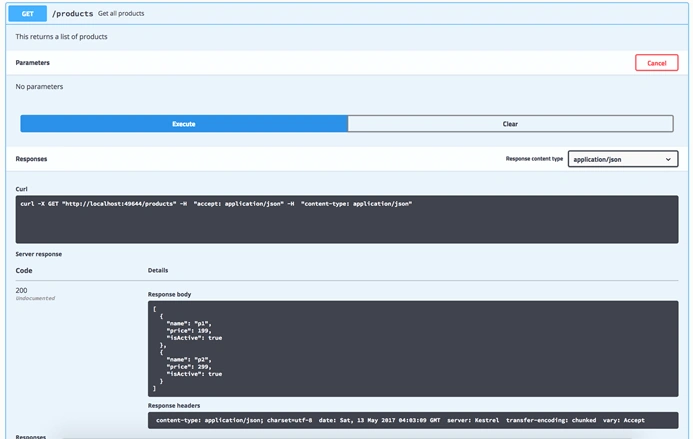
Screenshot 3
Screenshot 3 is the executed view of the API GetProdcutList. We can find out the information, which is the Server response, such as the status code and the response body.There is a CURL command, which you can find as well. When we use the terminal, we can get the same result from this request.
NoteThere is a problem to which we need to pay attention. The file path between Modules and MetadataModules.
|
Path of Modules |
Path of MetadataModules |
|
./ProductsModule |
./ProductsMetadataModule |
|
./ProductsModule |
./Metadata/ProductsMetadataModule |
|
./Modules/ProductsModule |
./Metadata/ProductsMetadataModule |
When we create the modules, we need to observe about the rules, otherwise you can not get the route information in Nancy.
Be aware of the name of our Module and the MetadataModule. For example, I already have a module named ProductsModule and I want to create a MetadataModule of this module. What should I name it? ProductMetadataModule? ProductsMetadataModule? Or others? Maybe, there is only one answer: ProductsMetadataModule! Because there are some restrictions.
We can find out the reason on DefaultMetadataModuleConventions class in the project Nancy.Metadata.Modules
SummarySwagger makes our API document beautiful and executable, and reduces our time to write the documents.
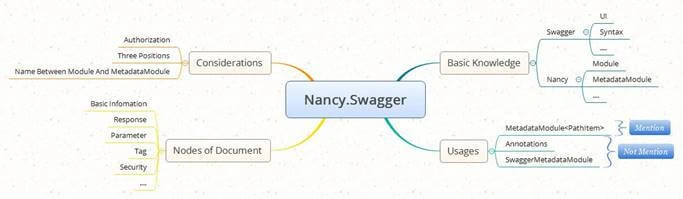
A mind map is given below to show the information about this article.
Thanks for your patient reading.
Nishith NeygandhiPosted Oct 22, 2019, 3:41 AM
I am unable to download swagger ui static files. Can you please help me from where do we have to download them ??
ValerixPosted Sep 23, 2019, 11:44 AM
Hi. I have a problem with the BodyParameter. In schema<Product> Product for me contains an enumerator (public TypeRegEnum TypeReg { get; set; } where TypeRegEnum public enum TypeRegEnum { Advance = 0, CollectionsPayments = 1, CreditNote = 2, } . In this case Swagger return this error : Could not resolve reference because of: Could not resolve pointer: /definitions/TypeRegEnum does not exist in document. can you help me? Thaks