

Introduction
This article is about a cool feature in Visual Studio that helps save the effort of a developer to generate class a structure from a JSON or XML string.
There is cases application written using the .NET Framework written by a developer that receives a JSON or XML string from a web service or from another third party application. After receiving JSON or XML string data there is a need for further processing of the received data that requires deserialization of the received JSON or XML in a .Net object. And for that a .Net class structure must be created to match the JSON or XML string data so that the JSON or XML string can be deserialized correctly.
Problem Statement
For example, a program receives the following JSON string by calling a web service or third-party program.
JSON
- {"employees":[
- {"firstName":"John", "lastName":"Doe"},
- {"firstName":"Anna", "lastName":"Smith"},
- {"firstName":"Peter", "lastName":"Jones"}
- ]}
- <employees>
- <employee>
- <firstName>John</firstName>
- <lastName>Doe</lastName>
- </employee>
- <employee>
- <firstName>Anna</firstName>
- <lastName>Smith</lastName>
- </employee>
- <employee>
- <firstName>Peter</firstName>
- <lastName>Jones</lastName>
- </employee>
- </employees>
Approach 1: Do it manually
In this approach the developer must understand JSON or XML so that he/she can understand the received JSON or XML string and its structure. Once getting the details of JSON or XML and the received JSON or XML string, the developer must convert the JSON or XML string into a meaningful class structure so desterilization can be done without a problem.
So the problem with this approach is so much work must be done by the developer, like:
- Requires knowledge of JSON or XML.
- Requires an understanding of the JSON or XML string sent by the exteranl program.
- Creates class strucutre for the JSON or XML structure that is a trial and error approch because usually the created structure doesn't work in the first go.
- If a JSON or XML string has a complex structure then its difficult and requires time to create the class structure to deserialize the JSON or XML string.
Approach 2: Automated using Visual Studio
This approach uses Visual Studio to generate a class just by copying and pasting the JSON or XML string.
The following is the procedure to generate the class:
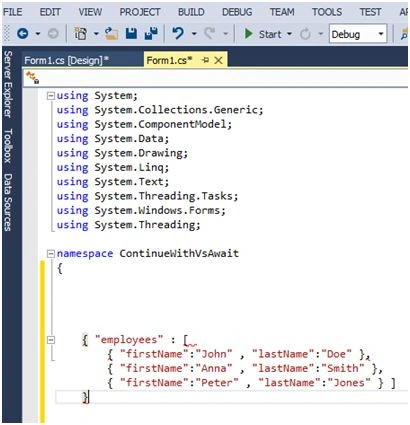
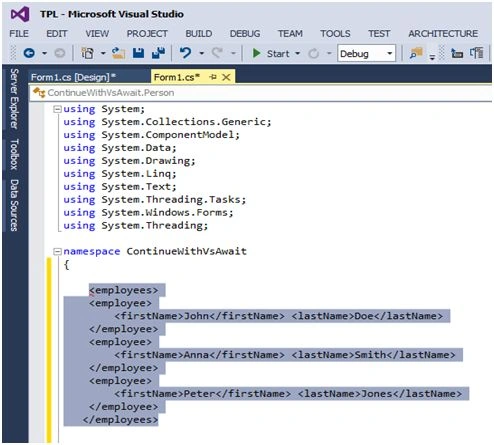
- Copy JSON or XML string
JSON
XML
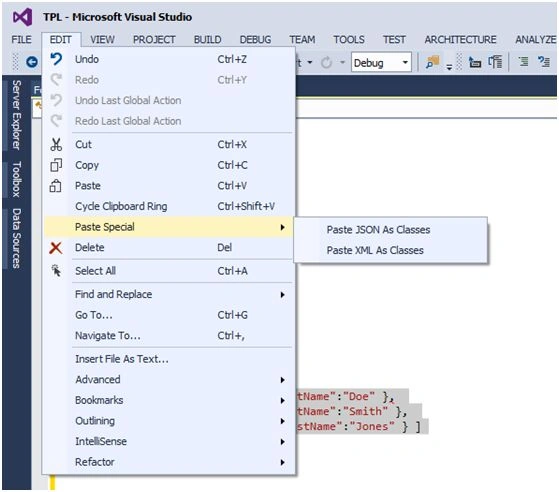
- Go to Edit > Paste Sepcial > Paste JSON As Classes or Paste XML As Classes.
- Visual Studio generates a class structure for the developer as in the following:
The following is an example of the class structure created by copying and pasting a JSON string.
- public class EmployeeList {
- public Employee[] employees {
- get;
- set;
- }
- }
- public class Employee {
- public string firstName {
- get;
- set;
- }
- public string lastName {
- get;
- set;
- }
- }
-
Below is example of class structure created by copy and pasting XML string
- /// <remarks/>
- [System.Xml.Serialization.XmlTypeAttribute(AnonymousType = true)]
- [System.Xml.Serialization.XmlRootAttribute(Namespace = "", IsNullable = false)]
- public partial class employees {
- privateemployeesEmployee[] employeeField;
- /// <remarks/>
- [System.Xml.Serialization.XmlElementAttribute("employee")]
- publicemployeesEmployee[] employee {
- get {
- returnthis.employeeField;
- }
- set {
- this.employeeField = value;
- }
- }
- }
- /// <remarks/>
- [System.Xml.Serialization.XmlTypeAttribute(AnonymousType = true)]
- public partial class employeesEmployee {
- private string firstNameField;
- private string lastNameField;
- /// <remarks/>
- public string firstName {
- get {
- returnthis.firstNameField;
- }
- set {
- this.firstNameField = value;
- }
- }
- /// <remarks/>
- public string lastName {
- get {
- returnthis.lastNameField;
- }
- set {
- this.lastNameField = value;
- }
- }
- }
The advantages of this solution are:
- No need to understand JSON or XML
- No effort require for creating the class
The Visual Studio feature for creating a class based on a string is really helpful for developers because an understanding of the JSON or XML string and the creation of the class structure requires effort and is sometimes very frustrating.
Ashwani YadavPosted Aug 22, 2018, 2:23 AM
Helpful information. Save time
jude fernsPosted Aug 15, 2017, 3:01 AM
Very helpful, saved me hours...
Gowtham RajamanickamPosted Apr 13, 2016, 7:24 AM
very good one..
André de Mattos FerrazPosted Jul 27, 2015, 3:24 PM
WTF :O !!! Good to know!!!
SharadPosted Jul 27, 2015, 6:24 AM
good one
Gowtham RajamanickamPosted Jul 27, 2015, 5:19 AM
good one
Sibeesh VenuPosted Jul 27, 2015, 12:42 AM
Nice Share. Thanks
Debasis SahaPosted Jul 27, 2015, 12:25 AM
Good One..
Neeraj KumarPosted Jul 26, 2015, 4:39 PM
Great Article
Mahesh ChandPosted Jul 26, 2015, 9:07 AM
Great. Nice tip!
James CroftPosted Jul 26, 2015, 7:23 AM
Wow this is incredible! Didn't realise you could do this. So much time wasted doing this manually! Thanks for the tip.
Rajeesh MenothPosted Jul 26, 2015, 6:22 AM
Good One
Gopi ChandPosted Jul 26, 2015, 2:38 AM
Great one
Santhakumar MunuswamyPosted Jul 26, 2015, 2:08 AM
Thanks for nice article
RakeshPosted Jul 26, 2015, 12:53 AM
Good one
Pankaj Kumar ChoudharyPosted Jul 25, 2015, 8:11 PM
Nice Explain Sir........
Sam HobbsPosted Jul 25, 2015, 6:02 PM
Visual Studio also has a command-line tool called XSD that can help with XML.