

Introduction
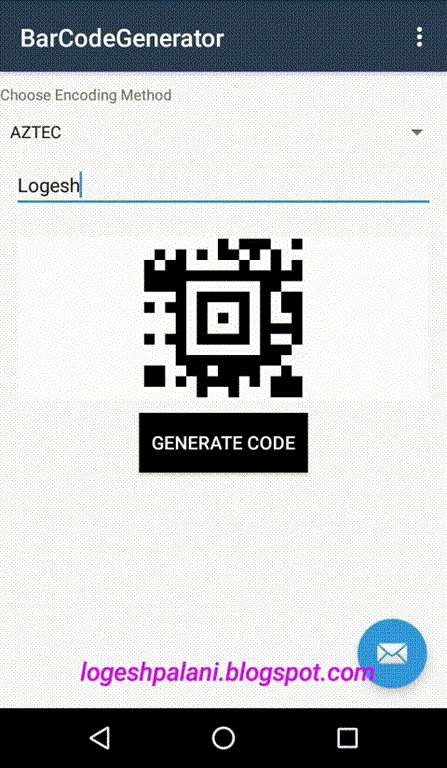
Here, the basic requirement is to generate the Barcode or QR Code. We need to get some information from the user like what message they want to convert, code format, size of the bitmap, etc. There is no default library for this so, we need to install a plugin. Just write a few lines of code to generate 1D and 2D Code. The Barcode has different formats but I will demonstrate only a few code formats - Code 39, Code 128, AZTEC, and QR Code.
Android Output
Let’s start.
Step 1
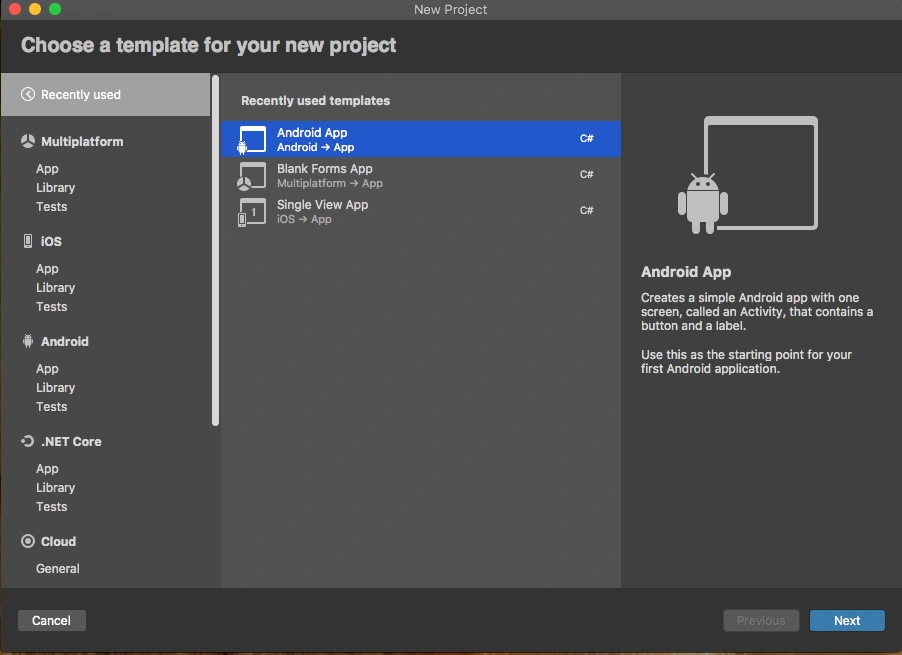
Create a Xamarin.Android application by going to Visual Studio >> New Project >> Android App. Click "Next".
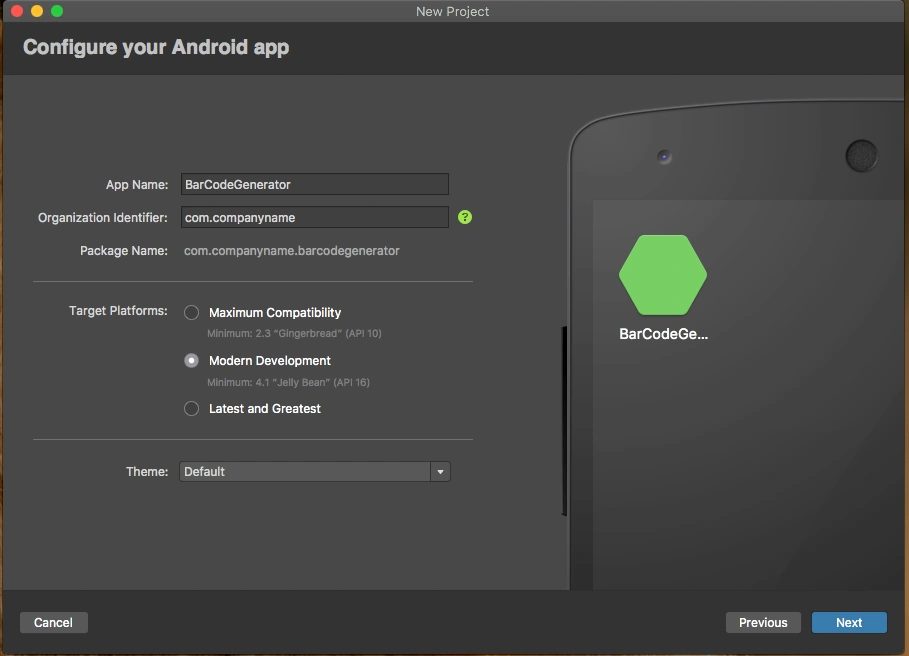
Here, let us give a project name, organization name, app compatibility, and app theme, then click "Create".
Step 2
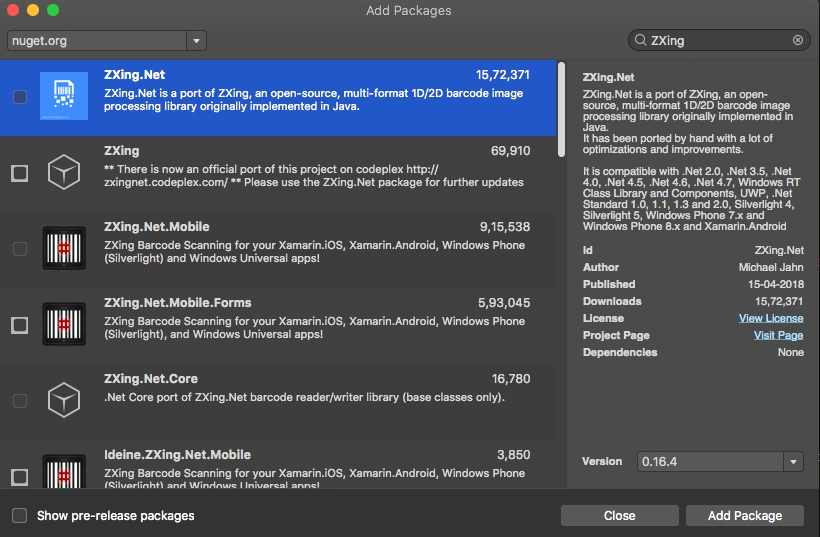
After project creation, first, we need to install a plugin. For this, go to Solution Explorer >> right-click Packages and select "Add packages". A new window will appear; at the top-right, search for ZXing.Net plugin and add this package.
Step 3
Now, let’s code. First, open content_main.xml. For that, go to Solution Explorer >> Resource >> Layout >> double click to open content_main.xml. Add the following code to this file.
- <?xml version="1.0" encoding="utf-8"?>
- <RelativeLayout
- xmlns:android="http://schemas.android.com/apk/res/android"
- xmlns:app="http://schemas.android.com/apk/res-auto"
- xmlns:tools="http://schemas.android.com/tools"
- android:layout_width="match_parent"
- android:layout_height="match_parent"
- app:layout_behavior="@string/appbar_scrolling_view_behavior"
- tools:showIn="@layout/activity_main">
- <TextView
- android:id="@+id/txtChooseStatic"
- android:layout_width="fill_parent"
- android:layout_height="wrap_content"
- android:layout_marginTop="10dp"
- android:layout_alignParentTop="true"
- android:text="Choose Encoding Method" />
- <Spinner
- android:id="@+id/spinner"
- android:layout_width="fill_parent"
- android:layout_marginTop="10dp"
- android:layout_height="wrap_content"
- android:layout_below="@+id/txtChooseStatic"
- android:prompt="@string/action_choose"/>
- <EditText
- android:id="@+id/plain_text_input"
- android:layout_height="wrap_content"
- android:layout_width="match_parent"
- android:layout_margin="10dp"
- android:layout_below="@+id/spinner"
- android:hint="Type Message to Convert"
- android:inputType="text"/>
- <ImageView
- android:layout_centerHorizontal="true"
- android:layout_marginTop="10dp"
- android:id="@+id/barcodeImage"
- android:layout_below="@+id/plain_text_input"
- android:layout_width="wrap_content"
- android:layout_height="wrap_content"/>
- <Button
- android:id="@+id/generate"
- android:background="#000000"
- android:textColor="#ffffff"
- android:layout_centerHorizontal="true"
- android:layout_width="wrap_content"
- android:padding="10dp"
- android:layout_marginTop="10dp"
- android:layout_below="@+id/barcodeImage"
- android:layout_height="wrap_content"
- android:textSize="15dp"
- android:text="Generate Code"/>
- </RelativeLayout>
Step 4
Next, open MainActivity.cs and add the following code to generate the barcode.
- using System;
- using System.IO;
- using Android.App;
- using Android.Content.PM;
- using Android.Graphics;
- using Android.OS;
- using Android.Runtime;
- using Android.Support.Design.Widget;
- using Android.Support.V4.App;
- using Android.Support.V4.Content;
- using Android.Support.V7.App;
- using Android.Views;
- using Android.Widget;
- using ZXing;
- using ZXing.Common;
- namespace BarCodeGenerator
- {
- [Activity(Label = "@string/app_name", Theme = "@style/AppTheme.NoActionBar", MainLauncher = true)]
- public class MainActivity : AppCompatActivity
- {
- private TextView txtMessage;
- private string message;
- private static int size = 660;
- private static int small_size = 264;
- private Spinner spinnerValue;
- private string CodeType;
- protected override void OnCreate(Bundle savedInstanceState)
- {
- base.OnCreate(savedInstanceState);
- Xamarin.Essentials.Platform.Init(this, savedInstanceState);
- SetContentView(Resource.Layout.activity_main);
- Android.Support.V7.Widget.Toolbar toolbar = FindViewById<Android.Support.V7.Widget.Toolbar>(Resource.Id.toolbar);
- SetSupportActionBar(toolbar);
- ImageView image = FindViewById<ImageView>(Resource.Id.barcodeImage);
- Button btnGenerate = FindViewById<Button>(Resource.Id.generate);
- txtMessage = FindViewById<TextView>(Resource.Id.plain_text_input);
- spinnerValue = FindViewById<Spinner>(Resource.Id.spinner);
- FloatingActionButton fab = FindViewById<FloatingActionButton>(Resource.Id.fab);
- var adapter = ArrayAdapter.CreateFromResource(this, Resource.Array.selected_Code, Android.Resource.Layout.SimpleSpinnerItem);
- adapter.SetDropDownViewResource(Android.Resource.Layout.SimpleSpinnerDropDownItem);
- spinnerValue.Adapter = adapter;
- spinnerValue.ItemSelected += new EventHandler<AdapterView.ItemSelectedEventArgs>(SpinnerItemSelect);
- fab.Click += FabOnClick;
- btnGenerate.Click += delegate
- {
- string[] PERMISSIONS =
- {
- "android.permission.READ_EXTERNAL_STORAGE",
- "android.permission.WRITE_EXTERNAL_STORAGE"
- };
- var permission = ContextCompat.CheckSelfPermission(this, "android.permission.WRITE_EXTERNAL_STORAGE");
- var permissionread = ContextCompat.CheckSelfPermission(this, "android.permission.READ_EXTERNAL_STORAGE");
- if (permission != Permission.Granted && permissionread != Permission.Granted)
- ActivityCompat.RequestPermissions(this, PERMISSIONS, 1);
- try
- {
- if (permission == Permission.Granted && permissionread == Permission.Granted)
- {
- BitMatrix bitmapMatrix = null;
- message = txtMessage.Text.ToString();
- switch (CodeType)
- {
- case "QR Code":
- bitmapMatrix = new MultiFormatWriter().encode(message, BarcodeFormat.QR_CODE, size, size);
- break;
- case "PDF 417":
- bitmapMatrix = new MultiFormatWriter().encode(message, BarcodeFormat.PDF_417, size, small_size);
- break;
- case "CODE 128":
- bitmapMatrix = new MultiFormatWriter().encode(message, BarcodeFormat.CODE_128, size, small_size);
- break;
- case "CODE 39":
- bitmapMatrix = new MultiFormatWriter().encode(message, BarcodeFormat.CODE_39, size, small_size);
- break;
- case "AZTEC":
- bitmapMatrix = new MultiFormatWriter().encode(message, BarcodeFormat.AZTEC, size, small_size);
- break;
- }
- var width = bitmapMatrix.Width;
- var height = bitmapMatrix.Height;
- int[] pixelsImage = new int[width * height];
- for (int i = 0; i < height; i++)
- {
- for (int j = 0; j < width; j++)
- {
- if (bitmapMatrix[j, i])
- pixelsImage[i * width + j] = (int)Convert.ToInt64(0xff000000);
- else
- pixelsImage[i * width + j] = (int)Convert.ToInt64(0xffffffff);
- }
- }
- Bitmap bitmap = Bitmap.CreateBitmap(width, height, Bitmap.Config.Argb8888);
- bitmap.SetPixels(pixelsImage, 0, width, 0, 0, width, height);
- var sdpath = Android.OS.Environment.ExternalStorageDirectory.AbsolutePath;
- var path = System.IO.Path.Combine(sdpath, "logeshbarcode.jpg");
- var stream = new FileStream(path, FileMode.Create);
- bitmap.Compress(Bitmap.CompressFormat.Jpeg, 100, stream);
- stream.Close();
- image.SetImageBitmap(bitmap);
- }
- else
- {
- Console.WriteLine("No Permission");
- }
- }
- catch (Exception ex)
- {
- Console.WriteLine($"Exception {ex} ");
- }
- };
- }
- private void SpinnerItemSelect(object sender, AdapterView.ItemSelectedEventArgs e)
- {
- Spinner spinner = (Spinner)sender;
- CodeType = (string)spinner.GetItemAtPosition(e.Position);
- }
- public override bool OnCreateOptionsMenu(IMenu menu)
- {
- MenuInflater.Inflate(Resource.Menu.menu_main, menu);
- return true;
- }
- public override bool OnOptionsItemSelected(IMenuItem item)
- {
- int id = item.ItemId;
- if (id == Resource.Id.action_settings)
- {
- return true;
- }
- return base.OnOptionsItemSelected(item);
- }
- private void FabOnClick(object sender, EventArgs eventArgs)
- {
- View view = (View)sender;
- Snackbar.Make(view, "Replace with your own action", Snackbar.LengthLong)
- .SetAction("Action", (Android.Views.View.IOnClickListener)null).Show();
- }
- public override void OnRequestPermissionsResult(int requestCode, string[] permissions, [GeneratedEnum] Android.Content.PM.Permission[] grantResults)
- {
- Xamarin.Essentials.Platform.OnRequestPermissionsResult(requestCode, permissions, grantResults);
- base.OnRequestPermissionsResult(requestCode, permissions, grantResults);
- }
- }
- }
Step 5
Finally, the application requires storage read and write permissions. For that, go to Solution Explorer >> Properties >> AndroidManifest.xml file. Check the permissions for External Storage Read and Write.
- <uses-permission android:name="android.permission.WRITE_EXTERNAL_STORAGE" />
- <uses-permission android:name="android.permission.READ_EXTERNAL_STORAGE" />
Step 6
Now, press F5 to run the application. The output will be like below.
You can get the full source code from here.
Surya Prakash PandeyPosted Dec 5, 2019, 6:35 AM
Please attach the source code bro .