

Hi there, I hope you are fine, me too. These are some very fundamental concepts of OOP and we implement function overloading every now and then in day to day work. Let me tell the story behind the article. One of my colleagues went for an interview as a .NET developer and in the interview, he was asked to implement function overloading where the number of variables and their type will be the same for all functions. So, after knowing the answer and the trick, I thought it will be nice if I share it with the community. Actually, many of you understand the concept but the implementation and scenario may not occur to you during the interview.
Fine, so let's learn the simple traditional way to implement function overloading. We will just keep the function name the same and we will change the number of arguments. Very simple. Here is the code implementation.
- using System;
- using System.Collections.Generic;
- using System.Linq;
- using System.Text;
- using System.Threading.Tasks;
- namespace ConsoleAPP
- {
- public class genericTest
- {
- public void fun(string name, string surname)
- {
- Console.WriteLine("Name:"+ name + "Surname:"+ surname);
- }
- public void fun(string name)
- {
- Console.WriteLine("Name:" + name);
- }
- }
- class Program
- {
- static void Main(string[] args)
- {
- genericTest obj = new genericTest();
- obj.fun("sourav", "kayal");
- obj.fun("sourav");
- Console.ReadLine();
- }
- }
- }
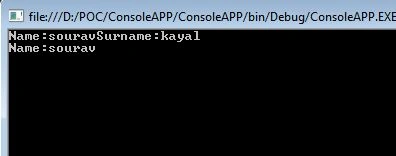
- using System;
- using System.Collections.Generic;
- using System.Linq;
- using System.Text;
- using System.Threading.Tasks;
- namespace ConsoleAPP
- {
- public class genericTest
- {
- //taking 2 string as parameters
- public void fun(string name, string surname)
- {
- Console.WriteLine(name + surname);
- }
- //Taking two type parameters and both are string in this example
- public void fun<T>(T name, T surname)
- {
- Console.WriteLine(name.ToString() + surname.ToString());
- }
- }
- class Program
- {
- static void Main(string[] args)
- {
- genericTest obj = new genericTest();
- obj.fun("sourav", "kayal");
- obj.fun<string>("sourav", "kayal");
- Console.ReadLine();
- }
- }
- }
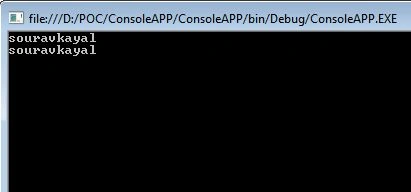
Pankaj BajajPosted May 13, 2014, 6:32 AM
good question and it's answer....Thanks sourav for sharing....Keep Sharing
Praveen Raveendran PillaiPosted May 13, 2014, 2:33 AM
Great!!!