

Hi all in this article I would like to show you how to create a forums application using MVC4 and Entity Framework.
This application mainly covers the following:
- Registering a User.
- Login.
- Create questions on the technology available.
- Add reply's to the posted questions.
There were also several things included like getting the last reply posted for the question and also not allowing the user to post questions or replies without logging in.
The database for the current application has the necessary tables and Stored Procedures as follows:
- USE [newForumDB]
- GO
- /****** Object: Table [dbo].[tblUser] Script Date: 02/14/2013 14:21:09 ******/
- SET ANSI_NULLS ON
- GO
- SET QUOTED_IDENTIFIER ON
- GO
- SET ANSI_PADDING ON
- GO
- CREATE TABLE [dbo].[tblUser](
- [UserName] [varchar](50) NOT NULL,
- [EmailID] [varchar](50) NOT NULL,
- [DisplayName] [varchar](50) NOT NULL,
- [DateJoined] [datetime] NOT NULL,
- [Password] [varchar](50) NOT NULL,
- [Photo] [image] NULL,
- CONSTRAINT [PK_tblUser] PRIMARY KEY CLUSTERED
- (
- [UserName] ASC
- )WITH (PAD_INDEX = OFF, STATISTICS_NORECOMPUTE = OFF, IGNORE_DUP_KEY = OFF, ALLOW_ROW_LOCKS = ON, ALLOW_PAGE_LOCKS = ON) ON [PRIMARY]
- ) ON [PRIMARY] TEXTIMAGE_ON [PRIMARY]
- GO
- SET ANSI_PADDING OFF
- GO
- USE [newForumDB]
- GO
- /****** Object: Table [dbo].[tblTechnology] Script Date: 02/14/2013 14:21:54 ******/
- SET ANSI_NULLS ON
- GO
- SET QUOTED_IDENTIFIER ON
- GO
- SET ANSI_PADDING ON
- GO
- CREATE TABLE [dbo].[tblTechnology](
- [TechID] [int] IDENTITY(1,1) NOT NULL,
- [TechName] [varchar](max) NOT NULL,
- [TechDesc] [varchar](100) NULL,
- PRIMARY KEY CLUSTERED
- (
- [TechID] ASC
- )WITH (PAD_INDEX = OFF, STATISTICS_NORECOMPUTE = OFF, IGNORE_DUP_KEY = OFF, ALLOW_ROW_LOCKS = ON, ALLOW_PAGE_LOCKS = ON) ON [PRIMARY]
- ) ON [PRIMARY]
- GO
- SET ANSI_PADDING OFF
- GO
- USE [newForumDB]
- GO
- /****** Object: Table [dbo].[tblQuestions] Script Date: 02/14/2013 14:22:06 ******/
- SET ANSI_NULLS ON
- GO
- SET QUOTED_IDENTIFIER ON
- GO
- SET ANSI_PADDING ON
- GO
- CREATE TABLE [dbo].[tblQuestions](
- [QuestionID] [int] IDENTITY(1,1) NOT NULL,
- [QuestionTitle] [varchar](max) NOT NULL,
- [QuestionDesc] [varchar](max) NOT NULL,
- [DatePosted] [datetime] NOT NULL,
- [UserName] [varchar](50) NOT NULL,
- [TechID] [int] NOT NULL,
- [viewCount] [int] NOT NULL,
- [ReplyCount] [int] NOT NULL,
- PRIMARY KEY CLUSTERED
- (
- [QuestionID] ASC
- )WITH (PAD_INDEX = OFF, STATISTICS_NORECOMPUTE = OFF, IGNORE_DUP_KEY = OFF, ALLOW_ROW_LOCKS = ON, ALLOW_PAGE_LOCKS = ON) ON [PRIMARY]
- ) ON [PRIMARY]
- GO
- SET ANSI_PADDING OFF
- GO
- SELECT [ReplyID]
- ,[QuestionID]
- ,[date]
- ,[TechID]
- ,[UserName]
- ,[ReplyMsg]
- FROM [newForumDB].[dbo].[tblReplies]
- GO
Stored Procedures
- USE [newForumDB]
- GO
- /****** Object: StoredProcedure [dbo].[displayallQuesTechID1] Script Date: 02/14/2013 14:23:05 ******/
- SET ANSI_NULLS ON
- GO
- SET QUOTED_IDENTIFIER ON
- GO
- CREATE procedure [dbo].[displayallQuesTechID1](@TechID int
- )as
- begin
- select FI.QuestionID,FI.QuestionTitle,FI.UserName,FI.DatePosted,FI.[date],FI.RepliedName,FI.viewCount,FI.ReplyCount
- ,FI.ReplyMsg,TT.TechID,TT.TechName from tblTechnology TT,
- (select distinct TQ.TechID,TQ.QuestionID,TQ.QuestionTitle,TQ.UserName,TQ.DatePosted,TR.[date],TR.UserName as RepliedName,TQ.viewCount,TQ.ReplyCount
- ,TR.ReplyMsg from tblQuestions TQ LEFT OUTER JOIN tblReplies TR ON TR.TechID=TQ.TechID and TR.QuestionID = TQ.QUESTIONID
- and TR.[date]in (select MAX(TR.[date]) from tblReplies TR group by TR.QuestionID)) FI where FI.TechID=TT.TechID and TT.TechID=@TechID
- end
- GO
- USE [newForumDB]
- GO
- /****** Object: StoredProcedure [dbo].[displayResults] Script Date: 02/14/2013 14:23:38 ******/
- SET ANSI_NULLS ON
- GO
- SET QUOTED_IDENTIFIER ON
- GO
- CREATE procedure [dbo].[displayResults](@QuestionID int
- )as
- begin
- select tbl.QuestionID,tbl.QuestionDesc,tbl.TechID,tbl.quesaskedby,tbl.QuestionTitle,tbl.DatePosted,tbl.ReplyID,
- tbl.date,tbl.ReplyMsg,tbl.ReplyUser from
- (select distinct q.QuestionID,q.QuestionDesc,q.TechID, q.UserName as quesaskedby,q.QuestionTitle,q.DatePosted,
- r.date,r.ReplyID,r.ReplyMsg,r.UserName as ReplyUser
- from tblQuestions q left outer join tblReplies r on r.QuestionID=q.QuestionID) tbl
- where tbl.QuestionID=@QuestionID
- end
- GO
- USE [newForumDB]
- GO
- /****** Object: StoredProcedure [dbo].[selectTechQuestions1] Script Date: 02/14/2013 14:23:47 ******/
- SET ANSI_NULLS ON
- GO
- SET QUOTED_IDENTIFIER ON
- GO
- CREATE PROCEDURE [dbo].[selectTechQuestions1]
- As
- Begin
- WITH A AS (
- SELECT top(1) WITH ties Q.TechID
- ,QuestionID
- ,QuestionTitle
- ,DatePosted
- ,Username,TechName,TechDesc,T.TechID as TechnID
- FROM tblTechnology T LEFT OUTER JOIN tblQuestions Q ON Q.TechID = T.TechID
- ORDER BY row_number() over(partition BY Q.TechID ORDER BY Dateposted DESC)
- )
- SELECT * FROM A
- OUTER apply (SELECT count(QuestionDesc) Totalposts, sum(ReplyCount) ReplyCount
- FROM tblQuestions WHERE A.TechID=tblQuestions.TechID) D
- End
- GO
Ok now let's create an MVC application.
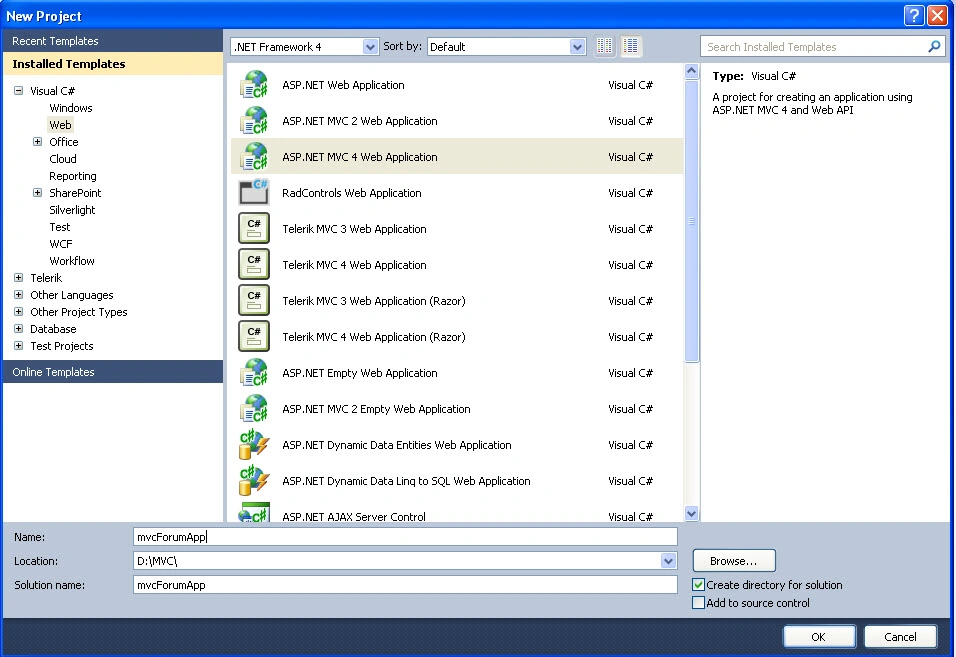
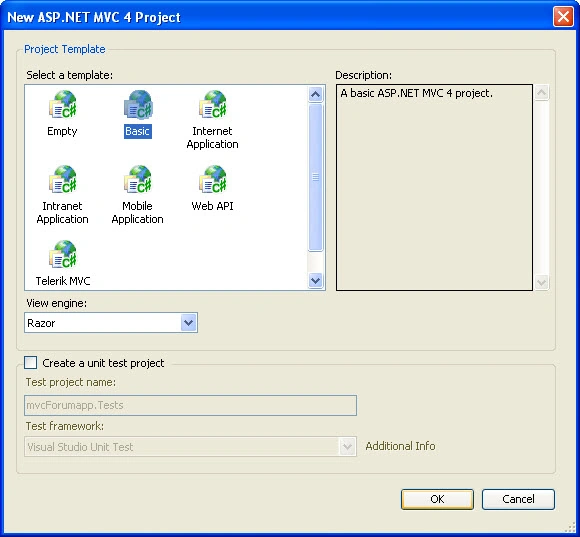
Open your "_ViewStart.cshtml" that is present in the "VIEWS->Shared" folder and replace the contents with the following:
- <!DOCTYPE html>
- <html>
- <head>
- <meta charset="utf-8" />
- <meta name="viewport" content="width=device-width" />
- <title>@ViewBag.Title</title>
- @Styles.Render("~/Content/css")
- @Scripts.Render("~/bundles/modernizr")
- <script src="@Url.Content("~/Scripts/tinymce/jquery.tinymce.js")" type="text/javascript"></script>
- </head>
- <body>
- <div id="branding">
- </div>
- <div>
- @if (Session["UserName"] != null)
- {
- <div class="logged_in" id="user_navigation" runat="server">
- <a title="Your Profile" href="">@*<img height="50" width="50" class="photo" src='<%= Url.Action( "GetPhoto", "image", new { photoId = Session["UserName"] } ) %>' />*@
- <img alt="" src="@Url.Action("GetPhoto", "User")" height="50" width="50" class="photo" />
- </a>
- <div id="user_info">
- <p>
- <span class="hide">Signed in as </span><a href="" title="Your Profile" class="ipbmenu">
- <span class="ipbmenu">@Html.Label("Name", Session["UserName"].ToString()) </span>
- </a>
- <img alt=">" src="http://www.gimptalk.com/public/style_images/master/opts_arrow.png" />
- </p>
- <ul class="boxShadow" id="user_link_menucontent" style="display: none; position: absolute;
- z-index: 9999;">
- </ul>
- <ul id="user_other">
- <li><a href="../User/Logout">Logout</a> </li>
- </ul>
- </div>
- <br />
- </div>
- @*<strong>@Html.Encode(User.Identity.Name)</strong>
- @Html.ActionLink("Log Out", "Logout", "User");*@
- }
- else
- {
- <div class="not_logged_in" id="user_navigation" runat="server">
- <a class="rounded" id="A1" title="Sign In »" href="../User/Login"><span class="left">
- Sign In »</span> <span class="services right"></span>
- <br />
- </a>
- <br />
- <span class="links">New user? <a id="register_link" title="Register Now!" href="../User/Register">
- Register Now!</a> </span>
- </div>
- }
- </div>
- <div id="primary_nav">
- <ul>
- <li class="left active" id="nav_discussion" runat="server"><a title="Go to Forums"
- href="@Url.Action("Main", "Home")">Forums</a></li><li class="left" id="nav_members"
- runat="server"><a
- title="Go to Member List" href="@Url.Action("Members", "Home")">Members</a></li>
- </ul>
- </div>
- @RenderBody()
- @Scripts.Render("~/bundles/jquery")
- @RenderSection("scripts", required: false)
- </body>
- </html>
If you would like to include your own scripts and CSS then open the "BundleConfig.cs" that is present in the "App_Start" folder and you will see CSS or scripts included that you need to add the following to:
- bundles.Add(new StyleBundle("~/Content/css").Include("~/Content/css/ipb_common.css",
- "~/Content/css/ipb_editor.css",
- "~/Content/css/ipb_help.css",
- "~/Content/css/ipb_login_register.css",
- "~/Content/css/ipb_print.css",
- "~/Content/css/ipb_styles.css", "~/Content/css/ipb_ucp.css"));
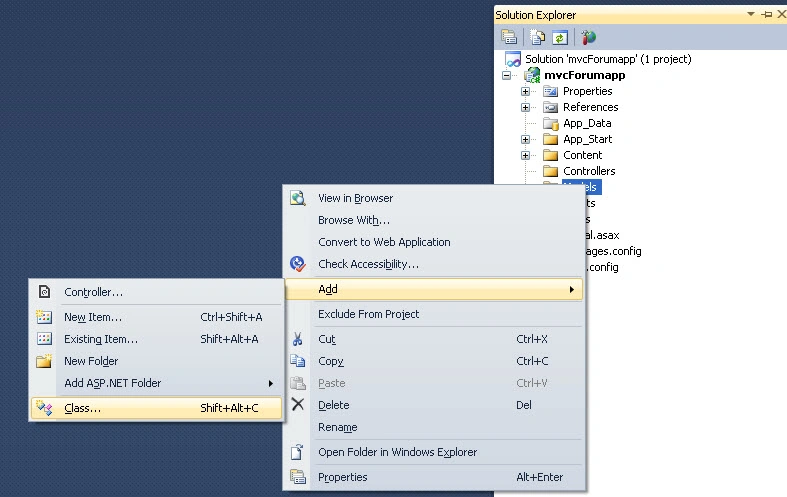
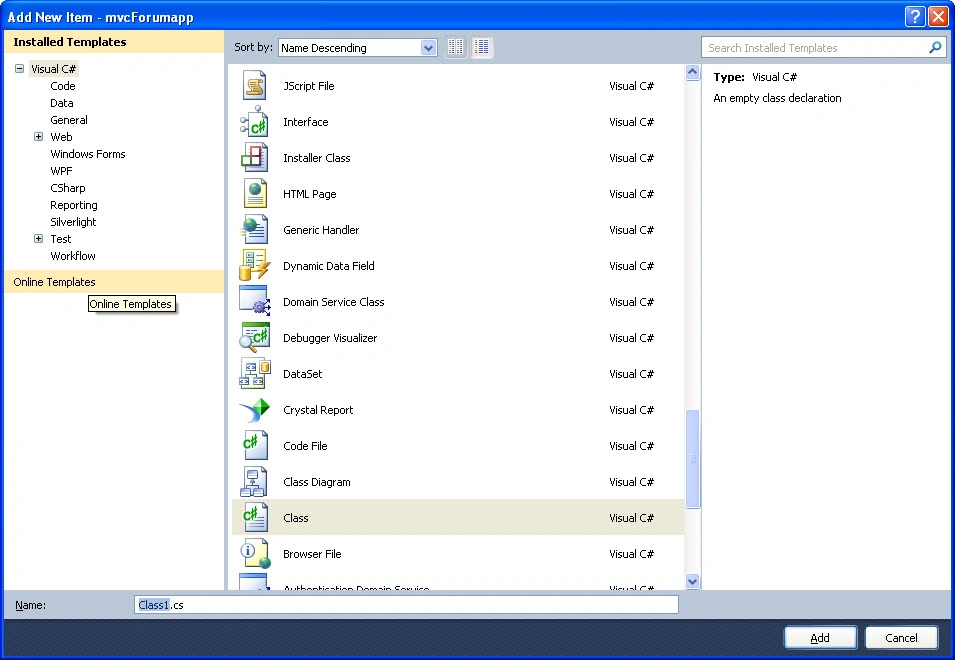
Copy and paste the following code in your class and build the application.
- using System;
- using System.Collections.Generic;
- using System.Linq;
- using System.Web;
- using System.ComponentModel.DataAnnotations;
- using System.ComponentModel.DataAnnotations.Schema;
- using System.Web.Mvc;
- namespace mvcForumapp.Models
- {
- public class userModel
- {
- [Required]
- [DataType(DataType.EmailAddress)]
- [Display(Name = "Email address")]
- [MaxLength(50)]
- [RegularExpression(@"[a-z0-9._%+-]+@[a-z0-9.-]+\.[a-z]{2,4}", ErrorMessage = "Please enter correct email")]
- public string Email { get; set; }
- [Required]
- [DataType(DataType.Password)]
- [Display(Name = "Password")]
- public string password { get; set; }
- }
- public class Register
- {
- [Required(ErrorMessage = "username required")]
- [Display(Name = "Choose username")]
- [StringLength(20, MinimumLength = 4)]
- [Remote("IsUserNameAvailable", "Register", "Username is already taken")]
- public string Username { get; set; }
- [Required(ErrorMessage = "display required")]
- [StringLength(20, MinimumLength = 4)]
- [Remote("IsDisplayAvailable", "Register", "displayname already taken")]
- public string Displayname { get; set; }
- [Required(ErrorMessage = "EmailAddress required")]
- [DataType(DataType.EmailAddress)]
- [Display(Name = "Email address")]
- [MaxLength(50)]
- [RegularExpression(@"[a-z0-9._%+-]+@[a-z0-9.-]+\.[a-z]{2,4}", ErrorMessage = "Please enter correct email")]
- [Remote("IsEmailAvailable", "Register", "EmailAddress is already taken")]
- public string Email { get; set; }
- [Required(ErrorMessage = "password required")]
- [DataType(DataType.Password)]
- [StringLength(20, MinimumLength = 8)]
- [Display(Name = "Password")]
- public string password { get; set; }
- [Required(ErrorMessage = "password required")]
- [DataType(DataType.Password)]
- [Compare("password", ErrorMessage = "password didn't match")]
- [StringLength(20, MinimumLength = 8)]
- public string PasswordConfirm { get; set; }
- }
- }
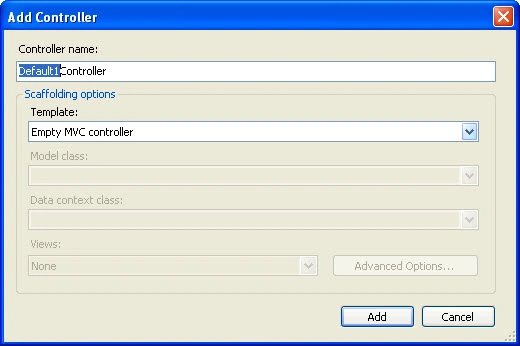
Now let us create a controller and provide the name you need, or since we are initially trying to create and register a user, the name "UserController" is a better naming convention that will make your work easy in MVC otherwise we will encounter problems when we implement or work on large applications.
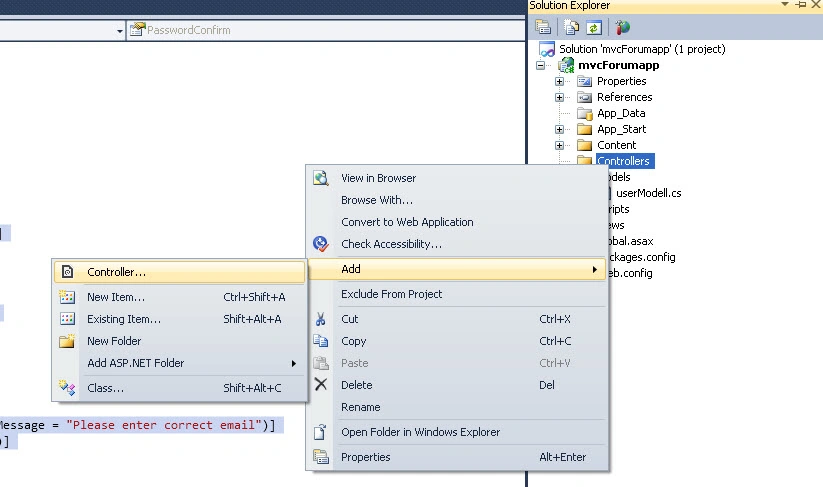
Name it "Register".
First let us work on user registeration. As I said, we are using Entity Framework to add an entity model to our project, from the tables and Stored Procedures that I provided, you can easily add an Entity Model to the application, Entity Framework beginners can check my previous articles explaining how to add a model to the project from here:
Now replace your controller code with the following
- using System;
- using System.Collections.Generic;
- using System.Linq;
- using System.Web;
- using System.Web.Mvc;
- using System.Web.UI;
- namespace mvcForumapp.Controllers
- {
- public class UserController : Controller
- {
- //
- // GET: /User/
- newForumDBEntities db = new newForumDBEntities();
- public ActionResult Index()
- {
- return View();
- }
- [HttpGet]
- public ActionResult Register()
- {
- return View();
- }
- public ActionResult IsUserNameAvailable(string UserName)
- {
- var usrAvailable = db.tblUsers.Where(p => p.UserName == UserName).Select(img => img.UserName).FirstOrDefault();
- if (usrAvailable == null)
- {
- return Json(true, JsonRequestBehavior.AllowGet);
- }
- //string html = "<span style='color:Red;'> Username in use</span>";
- return Json("<span style='color:Red;'> Username in already in use</span>", JsonRequestBehavior.AllowGet);
- }
- [OutputCache(Location = OutputCacheLocation.None, NoStore = true)]
- public JsonResult IsDisplayAvailable(string Displayname)
- {
- var usrAvailable = db.tblUsers.Where(p => p.DisplayName == Displayname).Select(img => img.DisplayName).FirstOrDefault();
- if (usrAvailable == null)
- {
- return Json(true, JsonRequestBehavior.AllowGet);
- }
- //string html = "<span style='color:Red;'> Username in use</span>";
- return Json("<span style='color:Red;'> Display name in already use</span>", JsonRequestBehavior.AllowGet);
- }
- [OutputCache(Location = OutputCacheLocation.None, NoStore = true)]
- public JsonResult IsEmailAvailable(string Email)
- {
- var usrAvailable = db.tblUsers.Where(p => p.EmailID == Email).Select(img => img.EmailID).FirstOrDefault();
- if (usrAvailable == null)
- {
- return Json(true, JsonRequestBehavior.AllowGet);
- }
- //string html = "<span style='color:Red;'> Username in use</span>";
- return Json("<span style='color:Red;'> Emai in already in use</span>", JsonRequestBehavior.AllowGet);
- }
- [HttpPost]
- public ActionResult Register(mvcForumapp.Models.Register user, HttpPostedFileBase file)
- {
- if (ModelState.IsValid)
- {
- if (file == null)
- {
- ModelState.AddModelError("File", "Please Upload Your file");
- }
- else if (file.ContentLength > 0)
- {
- int MaxContentLength = 1024 * 1024 * 3; //3 MB
- string[] AllowedFileExtensions = new string[] { ".jpg", ".gif", ".png", ".pdf" };
- if (!AllowedFileExtensions.Contains(file.FileName.Substring(file.FileName.LastIndexOf('.'))))
- {
- ModelState.AddModelError("File", "Please file of type: " + string.Join(", ", AllowedFileExtensions));
- }
- else if (file.ContentLength > MaxContentLength)
- {
- ModelState.AddModelError("File", "Your file is too large, maximum allowed size is: " + MaxContentLength + " MB");
- }
- else
- {
- using (var db = new newForumDBEntities())
- {
- Byte[] imgByte = null;
- HttpPostedFileBase File = file;
- //Create byte Array with file len
- imgByte = new Byte[File.ContentLength];
- //force the control to load data in array
- File.InputStream.Read(imgByte, 0, File.ContentLength);
- var userdets = db.tblUsers.CreateObject();
- userdets.UserName = user.Username;
- userdets.DateJoined = DateTime.Now;
- userdets.DisplayName = user.Displayname;
- userdets.EmailID = user.Email;
- userdets.Password = user.password;
- userdets.Photo = imgByte;
- //var encrppass = Encrypt(user.password, true);
- //var userdets = db.tblUsers.CreateObject();
- //userdets.EmailID = user.Email;
- //userdets.password = encrppass;
- db.tblUsers.AddObject(userdets);
- db.SaveChanges();
- return RedirectToAction("Main", "Home");
- }
- }
- }
- }
- return View(user);
- }
- }
- }
Now let us create a View for registering inside the controller. There are two action results with the same name "Register" but the functionality is different, one is for HttpGet that just returns a view with controls and the other is for HttpPost to post the data to the database.
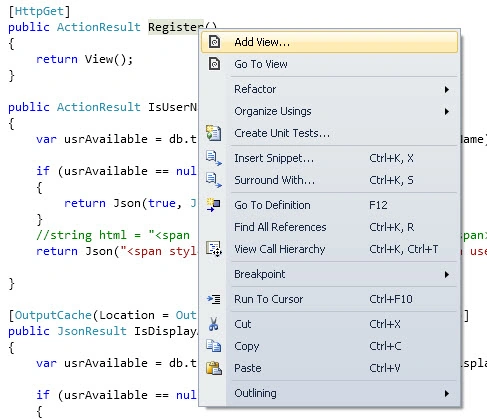
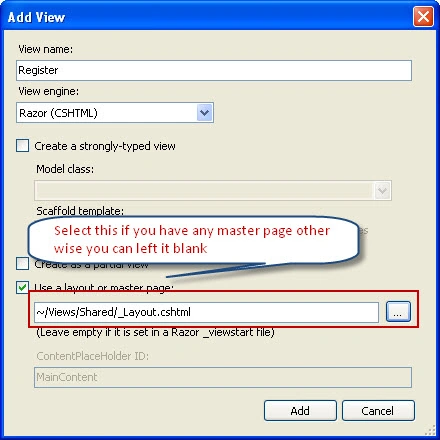
You can also create a strongly-type view by selecting the desired class from the drop-down and select create in the Scaffold template if you would like to have your own design just create an empty view.
Your view initially, if you didn't select a strongly-typed view, will be as follows:
- @{
- ViewBag.Title = "Register";
- Layout = "~/Views/Shared/_Layout.cshtml";
- }
Copy and paste the following:
- @model mvcForumapp.Models.Register
- @{
- ViewBag.Title = "Register";
- Layout = "~/Views/Shared/_Layout.cshtml";
- }
- <script src="../../Scripts/jquery-1.7.1.min.js" type="text/javascript"></script>
- <script src="../../Scripts/jquery.validate.min.js" type="text/javascript"></script>
- <script src="../../Scripts/jquery.validate.unobtrusive.min.js" type="text/javascript"></script>
- <script type="text/jscript">
- //get file size
- function GetFileSize(fileid) {
- try {
- var fileSize = 0;
- //for IE
- if ($.browser.msie) {
- //before making an object of ActiveXObject,
- //please make sure ActiveX is enabled in your IE browser
- var objFSO = new ActiveXObject("Scripting.FileSystemObject"); var filePath = $("#" + fileid)[0].value;
- var objFile = objFSO.getFile(filePath);
- var fileSize = objFile.size; //size in kb
- fileSize = fileSize / 1048576; //size in mb
- }
- //for FF, Safari, Opeara and Others
- else {
- fileSize = $("#" + fileid)[0].files[0].size //size in kb
- fileSize = fileSize / 1048576; //size in mb
- }
- // alert("Uploaded File Size is" + fileSize + "MB");
- return fileSize;
- }
- catch (e) {
- alert("Error is :" + e);
- }
- }
- //get file path from client system
- function getNameFromPath(strFilepath) {
- var objRE = new RegExp(/([^\/\\]+)$/);
- var strName = objRE.exec(strFilepath);
- if (strName == null) {
- return null;
- }
- else {
- return strName[0];
- }
- }
- $("#btnSubmit").live("click", function () {
- if ($('#fileToUpload').val() == "") {
- $("#spanfile").html("Please upload file");
- return false;
- }
- else {
- return checkfile();
- }
- });
- function checkfile() {
- var file = getNameFromPath($("#fileToUpload").val());
- if (file != null) {
- var extension = file.substr((file.lastIndexOf('.') + 1));
- // alert(extension);
- switch (extension) {
- case 'jpg':
- case 'JPG':
- case 'png':
- case 'PNG':
- case 'gif':
- case 'GIF':
- flag = true;
- break;
- default:
- flag = false;
- }
- }
- if (flag == false) {
- $("#spanfile").text("You can upload only jpg,png,gif,pdf extension file");
- return false;
- }
- else {
- var size = GetFileSize('fileToUpload');
- if (size > 3) {
- $("#spanfile").text("You can upload file up to 3 MB");
- return false;
- }
- else {
- $("#spanfile").text("");
- }
- }
- }
- $(function () {
- $("#fileToUpload").change(function () {
- checkfile();
- });
- });
- </script>
- @using (Html.BeginForm("Register", "User", FormMethod.Post, new { enctype = "multipart/form-data" }))
- {
- <br />
- <br />
- <div class="block_wrap left" id="register_form">
- <h2>
- Ready to register?</h2>
- <p class="extra">
- It's free and simple to register for our board! We just need
- a few pieces of information from you, and you'll be ready to
- make your first post in no time!
- <br />
- If you already have an account, you can go directly to the <a
- title="Go to sign in" href="../User/Login">sign in page</a>
- <br />
- </p>
- <div class="generic_bar">
- </div>
- <h3 style="text-align: center;" class="bar">
- Account Information</h3>
- <ul>
- <li class="field required ">
- @Html.LabelFor(m => m.Username)
- @Html.TextBoxFor(m => m.Username, new { maxlength = 50 })
- <span class="input_error">@Html.ValidationMessageFor(m => m.Username)</span>
- </li>
- <li class="field required ">
- @Html.LabelFor(m => m.Displayname)
- @Html.TextBoxFor(m => m.Displayname, new { maxlength = 50 })
- <span class="input_error">@Html.ValidationMessageFor(m => m.Displayname)</span>
- </li>
- <li class="field required ">
- @Html.LabelFor(m => m.Email)
- @Html.TextBoxFor(m => m.Email, new { maxlength = 50 })
- <span class="input_error">@Html.ValidationMessageFor(m => m.Email)</span>
- </li>
- <li class="field required ">
- @Html.LabelFor(m => m.password)
- @Html.PasswordFor(m => m.password, new { maxlength = 50 })
- <span class="input_error">@Html.ValidationMessageFor(m => m.password)</span>
- </li>
- <li class="field required ">
- @Html.LabelFor(m => m.PasswordConfirm)
- @Html.PasswordFor(m => m.PasswordConfirm, new { maxlength = 50 })
- <span class="input_error">@Html.ValidationMessageFor(m => m.PasswordConfirm)</span>
- </li>
- <li class="field required ">
- <label>
- Select Image</label>
- <input type="file" id="fileToUpload" name="file" />
- <span class="input_error" id="spanfile"></span></li>
- </ul>
- <br />
- <hr />
- <div style="float: left; margin-left: 250px;">
- <table>
- <tr>
- <td>
- <input type="submit" class="input_submit" id="btnSubmit" value="Create User" />
- </td>
- <td>
- @Html.ActionLink("Cancel", "Main", new { Controller = "Home" }, new { @class = "input_submit" })
- </td>
- </tr>
- </table>
- @*<input type="submit" value=" Cancel" class="input_submit" />*@
- </div>
- </div>
- <br />
- <div style="float: right; margin-right: 350px;">
- </div>
- }
Changes in "RouteConfig.cs" that is in the "App_Start" folder:
- public static void RegisterRoutes(RouteCollection routes)
- {
- routes.IgnoreRoute("{resource}.axd/{*pathInfo}");
- routes.MapRoute(
- name: "Default",
- url: "{controller}/{action}/{id}",
- defaults: new { controller = "User", action = "Index", id = UrlParameter.Optional }
- );
- }
Now run the application and you will be shown the following:

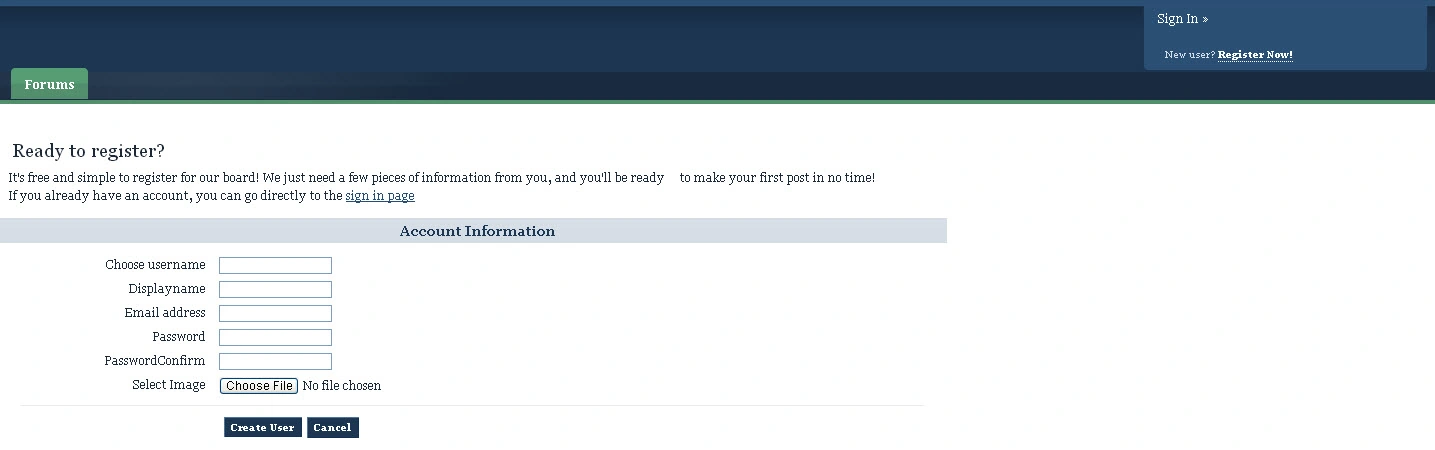
Clicking on "Register" will route to the Register view and "Login" will route to the Login view.
This is how the register view looks:
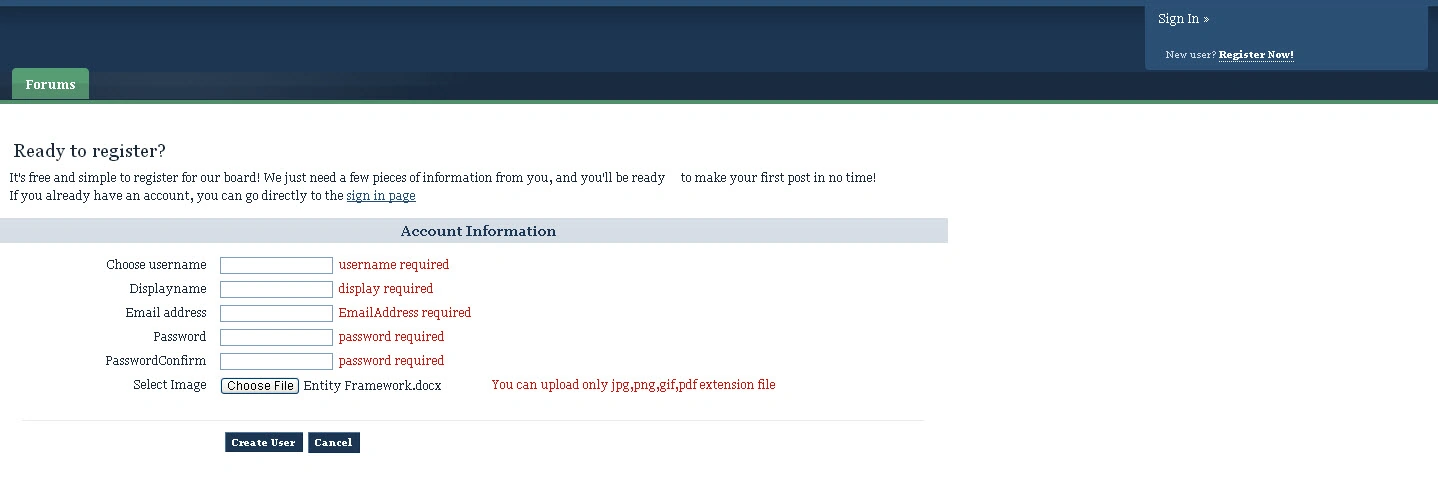
Remote validation:
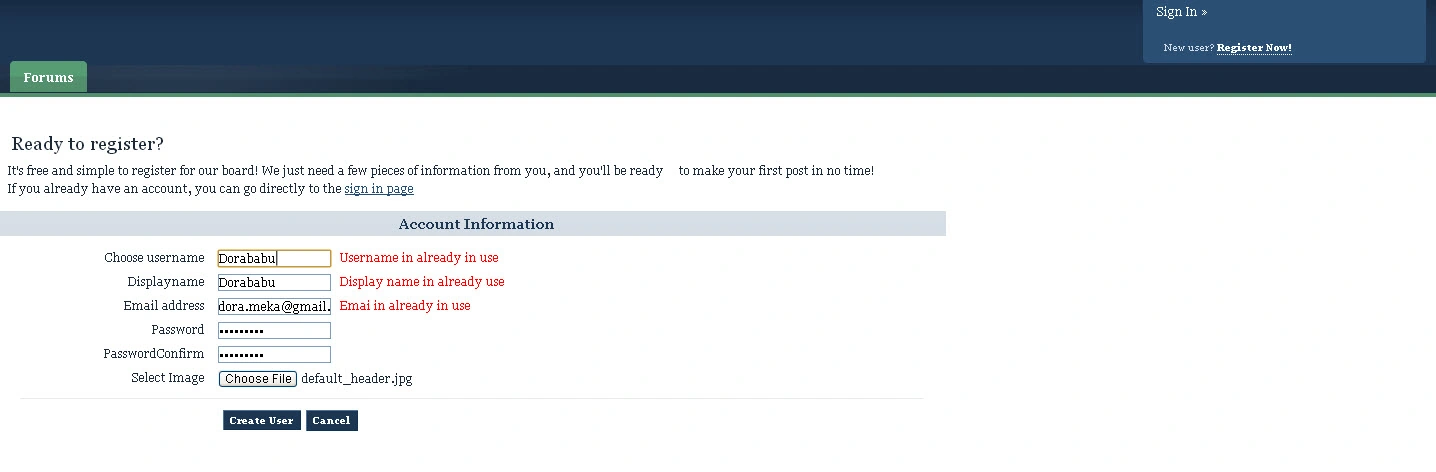
Check here for the implementation of remote validation http://msdn.microsoft.com/en-us/library/gg508808(v=vs.98).aspx
Here I checked whether Username, displayname and email exist, if the do not exist then remote validation fires if not then it will not show an error.
If everything is fine then you are ready to register.
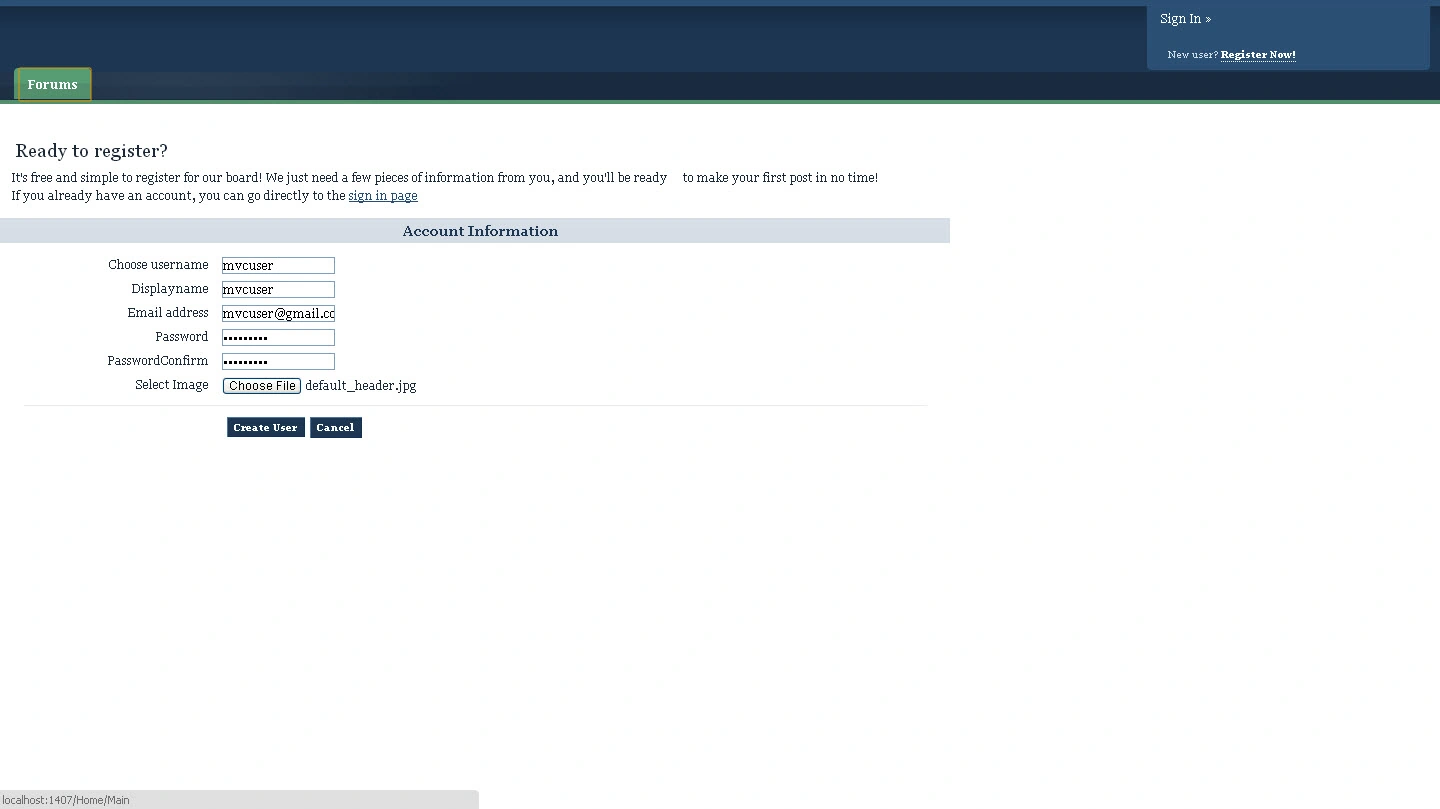
After you are registered, it will route back to the default page.
Now let us work on Login as you already create a Model let us work on creating a controller for Login and required Views.
Follow as we do for Register starting from the controller, first add a controller named "logincontroller" in the "Controller" folder then replace it with the following code:
- using System;
- using System.Collections.Generic;
- using System.Linq;
- using System.Web;
- using System.Web.Mvc;
- namespace mvcForumapp.Controllers
- {
- public class LoginController : Controller
- {
- newForumDBEntities db = new newForumDBEntities();
- [HttpGet]
- public ActionResult Login()
- {
- return View();
- }
- [HttpPost]
- public ActionResult Login(mvcForumapp.Models.userModel user)
- {
- if (ModelState.IsValid)
- {
- if (isValid(user.Email, user.password))
- {
- var user1 = db.tblUsers.FirstOrDefault(u => u.EmailID == user.Email).UserName;
- Session["UserName"] = user1;
- //FormsAuthentication.SetAuthCookie(user.Email, false);
- return RedirectToAction("Index", "Register");
- }
- else
- {
- ModelState.AddModelError("", "Login Data is Incorrect");
- }
- }
- return View(user);
- }
- private bool isValid(string Email, string password)
- {
- //string crypto = Encrypt(password, true);
- bool isvalid = false;
- using (var db = new newForumDBEntities())
- {
- var user = db.tblUsers.FirstOrDefault(u => u.EmailID == Email);
- if (user != null)
- {
- if (user.Password == password)
- {
- isvalid = true;
- }
- }
- }
- return isvalid;
- }
- }
- }
Add Views correspondingly as we did for "Register", after adding the view your login view your run will look as follows:
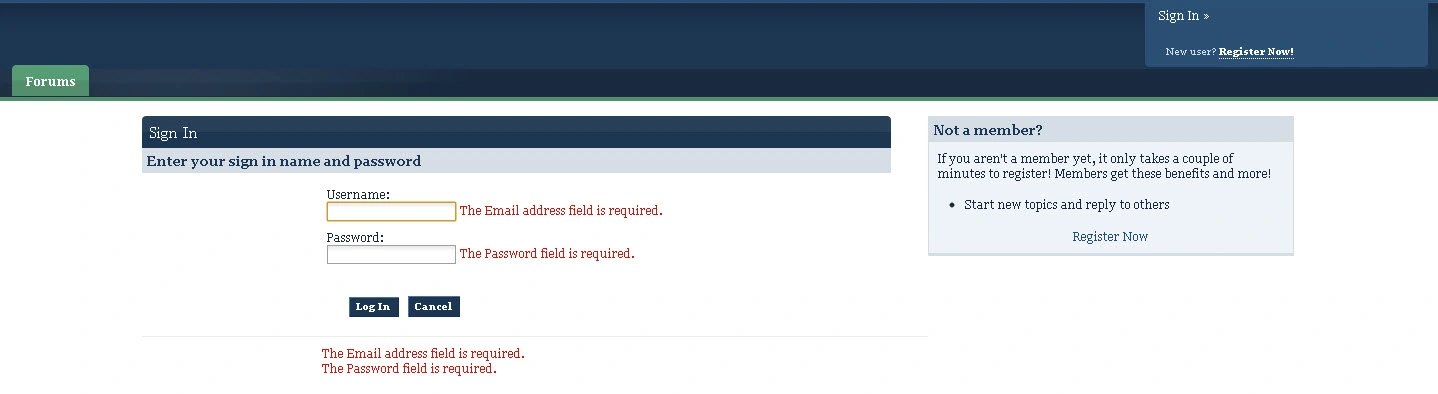
After successful login you will be shown your user name along with your image as follows, before that ensure you implement code for showing the image of the user logging in; we will implement that as follows.
You will see your "_Layout.cshtml" as follows:
- <img alt="" src="@Url.Action("GetPhoto", "User")" height="50" width="50" class="photo" />
This means we are trying to load the image from the "controller(User)" with the method or function name "GetPhoto"; change it as per your controller and method here. For a better understanding I will create a new controller and name it "displayImage" with the function "ShowImage" so my image source will be as follows:
now <img alt="" src="@Url.Action("ShowImage", "displayImage")" height="50" width="50" class="photo" />
Your controller code to display the login user image is as follows:
- using System;
- using System.Collections.Generic;
- using System.Linq;
- using System.Web;
- using System.Web.Mvc;
- namespace mvcForumapp.Controllers
- {
- public class displayImageController : Controller
- {
- //
- // GET: /displayImage/
- newForumDBEntities db = new newForumDBEntities();
- public ActionResult Index()
- {
- return View();
- }
- [HttpGet]
- public ActionResult ShowImage()
- {
- string user = Session["UserName"] as string;
- byte[] photo = null;
- var v = db.tblUsers.Where(p => p.UserName == user).Select(img => img.Photo).FirstOrDefault();
- photo = v;
- return File(photo, "image/jpeg");
- }
- }
- }
Here is what you will see after a successful login:

Now let us create a controller and a view for logout. Create a controller and name it "Logout" and then replace your controller with the following:
- using System;
- using System.Collections.Generic;
- using System.Linq;
- using System.Web;
- using System.Web.Mvc;
- namespace mvcForumapp.Controllers
- {
- public class LogoutController : Controller
- {
- //
- // GET: /Logout/
- public ActionResult Logout()
- {
- Session.Abandon();
- return RedirectToAction("Index", "Register");
- }
- }
- }
Now add a view by right-clicking on the "Logout" action result and select the master page. Your view should be as follows:
- @{
- ViewBag.Title = "Logout";
- Layout = "~/Views/Shared/_Layout.cshtml";
- }
- <h2>Logout</h2>
After successful log-out you will be routed to the main view again.
So far so good. Now let us create Controllers and Views for the rest, i.e posting questions, replies and all. First let us bring all the Questions from the database from each technology.
As we are using Entity Framework each and every Stored Procedure from the database is treated as a model, not only Stored Procedures but also tables.
First let us create a controller for displaying the list of technologies available and the number of topics and replies under each technology, also the last posted question information.
Create a controller and name it "Technology" and replace the code with the following code:
- using System;
- using System.Collections.Generic;
- using System.Linq;
- using System.Web;
- using System.Web.Mvc;
- namespace mvcForumapp.Controllers
- {
- public class TechnologyController : Controller
- {
- //
- // GET: /Technology/
- newForumDBEntities db = new newForumDBEntities();
- public ActionResult Index()
- {
- List<mvcForumapp.selectStats_Result_Result> userview = db.selectStats_Result().ToList();
- return View(userview);
- }
- }
- }
Create an empty View by right-clicking on "Index" and replace the view with the following:
- @model IEnumerable<mvcForumapp.selectStats_Result_Result>
- @{
- ViewBag.Title = "Main";
- Layout = "~/Views/Shared/_Layout.cshtml";
- }
- <div id="secondary_nav">
- <ul class="left" id="breadcrumb">
- <li class="first"><a href="">MVC-Forum Community</a></li>
- </ul>
- </div>
- <div class="clear" id="content">
- <a id="j_content"></a>
- <h2 class="hide">
- Board Index</h2>
- <div class="clearfix" id="board_index">
- <div class="no_sidebar clearfix" id="categories">
- <!-- CATS AND FORUMS -->
- <div class="category_block block_wrap">
- <h3 class="maintitle" id="category_47">
- <a title="View category" href="../Home/Main">Technology related questions</a></h3>
- <div class="table_wrap">
- <table summary="Forums within the category 'GimpTalk'" class="ipb_table">
- <tbody>
- <tr class="header">
- <th class="col_c_icon" scope="col">
- </th>
- <th class="col_c_forum" scope="col">
- Forum
- </th>
- <th class="col_c_stats stats" scope="col">
- Stats
- </th>
- <th class="col_c_post" scope="col">
- Last Post Info
- </th>
- </tr>
- <tr class="row1">
- <td class="altrow">
- </td>
- <td>
- @foreach (var item in Model)
- {
- string techname = item.TechName;
- @Html.ActionLink(techname, "Details", "Home", new { TechID = item.TechnID }, null)
- <br />
- <br />
- @Html.DisplayFor(modelItem => item.TechDesc)
- <br />
- <br />
- }
- </td>
- <td class="altrow stats">
- @foreach (var item in Model)
- {
- @Html.DisplayFor(modelItem => item.Totalposts)
- @Html.Label(" ");
- @Html.Label("Topics")
- <br />
- if (item.ReplyCount != null)
- {
- @Html.DisplayFor(modelItem => item.ReplyCount)
- @Html.Label(" ");
- @Html.Label("Replies")
- <br />
- <br />
- }
- else
- {
- @Html.DisplayFor(modelItem => item.ReplyCount)
- @Html.Label(" ");
- @Html.Label("0 Replies")
- <br />
- <br />
- }
- }
- </td>
- <td>
- @foreach (var item in Model)
- {
- if (item.DatePosted != null)
- {
- DateTime dt = Convert.ToDateTime(item.DatePosted);
- string strDate = dt.ToString("dd MMMM yyyy - hh:mm tt");
- @Html.Label(strDate)
- <br />
- }
- else
- {
- <br />
- }
- if (item.QuestionTitle != null)
- {
- @Html.Label("IN : ");
- @Html.Label(" ");
- string QuestionTitle = item.QuestionTitle;
- @Html.ActionLink(QuestionTitle, "displayIndividual", "Display", new { QuestionID = item.QuestionID }, null)
- <br />
- }
- else
- {
- <br />
- }
- if (item.Username != null)
- {
- @Html.Label("By : ");
- @Html.Label(" ");
- string User = item.Username;
- @Html.ActionLink(User, "Details", "Home", new { Username = item.Username }, null)
- <br />
- <br />
- }
- else
- {
- @Html.ActionLink("Start New Topic", "PostQuestion", "Home", new { TechID = item.TechnID }, null)
- <br />
- <br />
- }
- }
- </td>
- </tr>
- </tbody>
- </table>
- </div>
- </div>
- </div>
- </div>
- </div>
Earlier I set the default routing view as Index from Register, so let us change that so when someone hits, the default view will be shown with the list of questions.
Changes in "RouteConfig.cs" that is in the "App_Start" folder:
- public static void RegisterRoutes(RouteCollection routes)
- {
- routes.IgnoreRoute("{resource}.axd/{*pathInfo}");
- routes.MapRoute(
- name: "Default",
- url: "{controller}/{action}/{id}",
- defaults: new { controller = "Technology", action = "Index", id = UrlParameter.Optional }
- );
- }
This is how your view looks when you run the application:
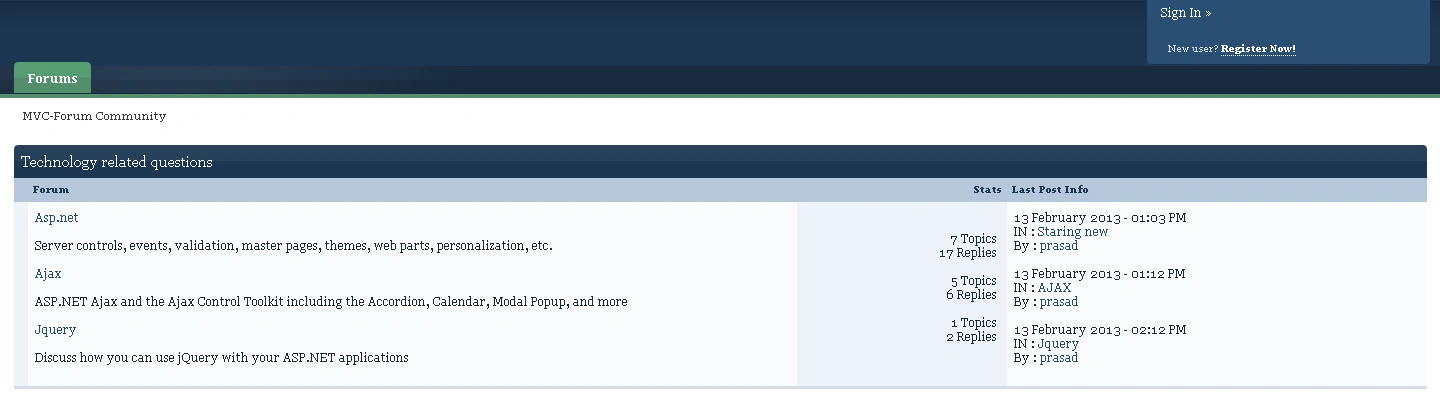
Ok since I have questions in each and every Technology, this was displayed. Add a new technology in the tblTechnology table and run your application, when there are no question in that technology you will have a chance to post new questions in that technology.
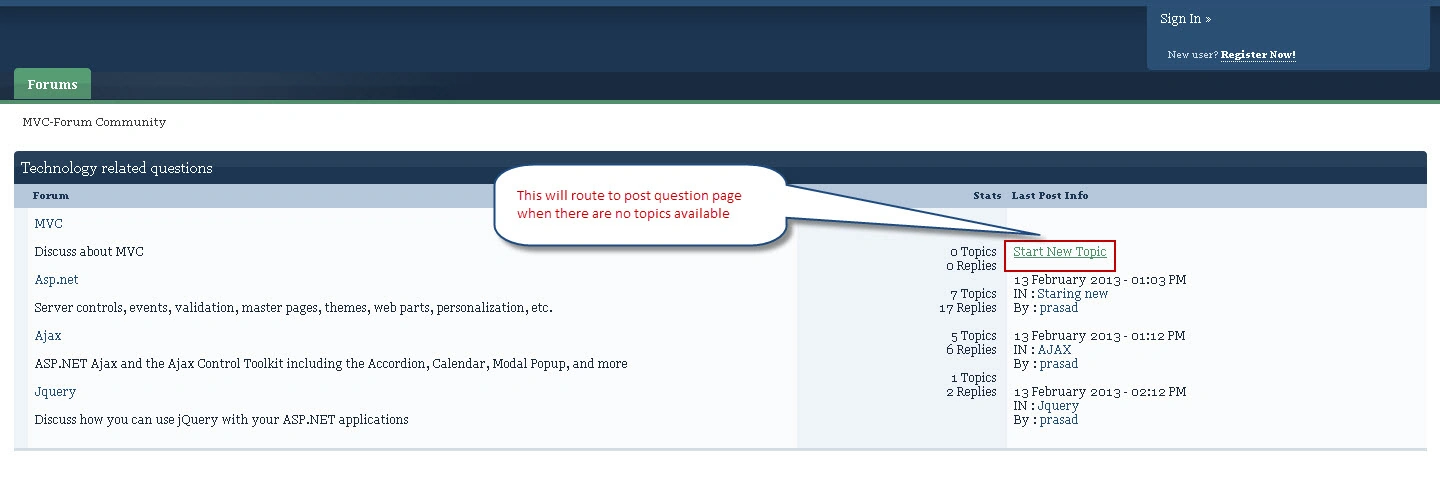
Currently we haven't implemented anything for that; it will show an error page instead. We will see how to post new questions later on. First let me show you how to display all questions available in the selected Technology.
For the existing "Technology" controller I will add a few methods or you can add a new controller if you need to. I am adding the "a" method to the existing controller i.e "Technology" as follows:
- public ActionResult DisplayQuestions()
- {
- int TechID = Convert.ToInt16(Request.QueryString["TechID"].ToString());
- List<mvcForumapp.QuestionList_Result> disp = db.QuestionList(TechID).ToList();
- return View(disp);
- }
Create a view by right-clicking on "DisplayQuestions" and replace it with the following code:
- @model IEnumerable<mvcForumapp.QuestionList_Result>
- @{
- ViewBag.Title = "Details";
- }
- <style type="text/css">
- .disabled
- {
- /* Text and background colour, medium red on light yellow */
- float: right;
- margin-right: 20px;
- background: #999;
- background: -webkit-gradient(linear, 0% 0%, 0% 100%, from(#dadada), to(#f3f3f3));
- border-top: 1px solid #c5c5c5;
- border-right: 1px solid #cecece;
- border-bottom: 1px solid #d9d9d9;
- border-left: 1px solid #cecece;
- color: #8f8f8f;
- box-shadow: none;
- -moz-box-shadow: none;
- -webkit-box-shadow: none;
- cursor: not-allowed;
- text-shadow: 0 -1px 1px #ebebeb;
- }
- .active
- {
- box-shadow: none;
- -moz-box-shadow: none;
- -webkit-box-shadow: none;
- cursor: allowed;
- }
- </style>
- <br />
- <br />
- <div style="float: left; margin-left: 20px;">
- @Html.ActionLink("Back", "Index", "Technology")
- </div>
- <div id='ipbwrapper'>
- <ul class="comRigt">
- <li>
- <br />
- <img alt="Start New Topic" src="http://www.gimptalk.com/public/style_images/master/page_white_add.png" />
- @if (Session["UserName"] != null)
- {
- int techID = Convert.ToInt16(@Request.QueryString["TechID"]);
- if (Model.Count() == 0)
- {
- @Html.ActionLink("Start New Topic", "PostQuestion", "Question", new { @class = "active", onclick = "javascript:return true;", TechID = techID }, null)
- }
- else
- {
- foreach (var item in Model)
- {
- @Html.ActionLink("Start New Topic", "PostQuestion", "Question", new { @class = "active", onclick = "javascript:return true;", TechID = item.TechID }, null)
- break;
- }
- }
- }
- else
- {
- int techID = Convert.ToInt16(@Request.QueryString["TechID"]);
- if (Model.Count() == 0)
- {
- @Html.ActionLink("Start New Topic", "PostQuestion", "Home", new {title = "Please login to post Questions", @class = "disabled", onclick = "javascript:return false;", TechID = techID })
- }
- else
- {
- foreach (var item in Model)
- {
- @Html.ActionLink("Start New Topic", "PostQuestion", "Home", new {title = "Please login to post Questions", TechID = item.TechID, @class = "disabled", onclick = "javascript:return false;" })
- break;
- }
- }
- }
- </li>
- </ul>
- <br />
- @if (Model.Count() != 0)
- {
- <div class="category_block block_wrap">
- <table id="forum_table" summary="Topics In This Forum "GimpTalk News and Updates""
- class="ipb_table topic_list">
- <div class="maintitle">
- <span class="main_forum_title">
- @foreach (var item in Model)
- {
- string strTopic = "A forum where you can post questions regarding " + item.TechName;
- @Html.Label("Topic", strTopic)
- break;
- }
- </span>
- </div>
- <tbody>
- <tr class="header">
- <th class="col_f_icon" scope="col">
- </th>
- <th class="col_f_topic" scope="col">
- Topic
- </th>
- <th class="col_f_starter short" scope="col">
- Started By
- </th>
- <th class="col_f_views stats" scope="col">
- Stats
- </th>
- <th class="col_f_post" scope="col">
- Last Post Info
- </th>
- </tr>
- <tr id="trow_49752" class="row1">
- <td class="short altrow">
- </td>
- <td class="__topic __tid49752" id="anonymous_element_3">
- @foreach (var item in Model)
- {
- <br />
- string QuestionTitle = item.QuestionTitle;
- @Html.ActionLink(QuestionTitle, "displayIndividual", "Display", new { QuestionID = item.QuestionID }, null)
- <br />
- <br />
- }
- </td>
- <td class="short altrow">
- @foreach (var item in Model)
- {
- <br />
- string QuestionTitle = item.UserName;
- @Html.ActionLink(QuestionTitle, "Details", "Home", new { Username = item.UserName }, null)
- <br />
- <br />
- }
- </td>
- <td class="stats">
- <ul>
- <li>
- @foreach (var item in Model)
- {
- @Html.DisplayFor(modelItem => item.ReplyCount)
- @Html.Label(" ");
- @Html.Label("Replies")
- <br />
- @Html.DisplayFor(modelItem => item.viewCount)
- @Html.Label(" ");
- @Html.Label("Views")
- <br />
- <br />
- }
- </li>
- </ul>
- </td>
- <td class="altrow">
- @foreach (var item in Model)
- {
- if (item.date != null)
- {
- DateTime dt = Convert.ToDateTime(item.date);
- string strDate = dt.ToString("dd MMMM yyyy - hh:mm tt");
- @Html.Label(strDate)
- }
- else
- {
- DateTime dt = Convert.ToDateTime(item.DatePosted);
- string strDate = dt.ToString("dd MMMM yyyy - hh:mm tt");
- @Html.Label(strDate)
- }
- <br />
- @Html.Label("By : ")
- @Html.Label(" ")
- if (item.RepliedName != null)
- {
- string User = item.RepliedName;
- @Html.ActionLink(User, "Details", "Home", new { Username = item.RepliedName }, null)
- }
- else
- {
- string User = item.UserName;
- @Html.ActionLink(User, "Details", "Home", new { Username = item.UserName }, null)
- }
- <br />
- <br />
- }
- </td>
- </tr>
- </tbody>
- </table>
- </div>
- }
- else
- {
- <div class="category_block block_wrap">
- <table id="forum_table1" summary="Topics In This Forum "GimpTalk News and Updates""
- class="ipb_table topic_list">
- <div class="maintitle">
- <span style="font-size:larger; margin-left:450px;">No topics available</span>
- </div>
- </table>
- </div>
- }
- @if (Model.Count() != 0)
- {
- <ul class="comRigt">
- <li>
- <br />
- <img alt="Start New Topic" src="http://www.gimptalk.com/public/style_images/master/page_white_add.png" />
- @if (Session["UserName"] != null)
- {
- foreach (var item in Model)
- {
- @Html.ActionLink("Start New Topic", "PostQuestion", "Question", new { @class = "active", onclick = "javascript:return true;", TechID = item.TechID }, null)
- break;
- }
- }
- else
- {
- foreach (var item in Model)
- {
- @Html.ActionLink("Start New Topic", "PostQuestion", "Home", new {title = "Please login to post Questions", TechID = item.TechID, @class = "disabled", onclick = "javascript:return false;" })
- break;
- }
- }
- </li>
- </ul>
- }
- </div>
What will happen is, by selecting a particular technology in the image above will display all the questions related to that technology.
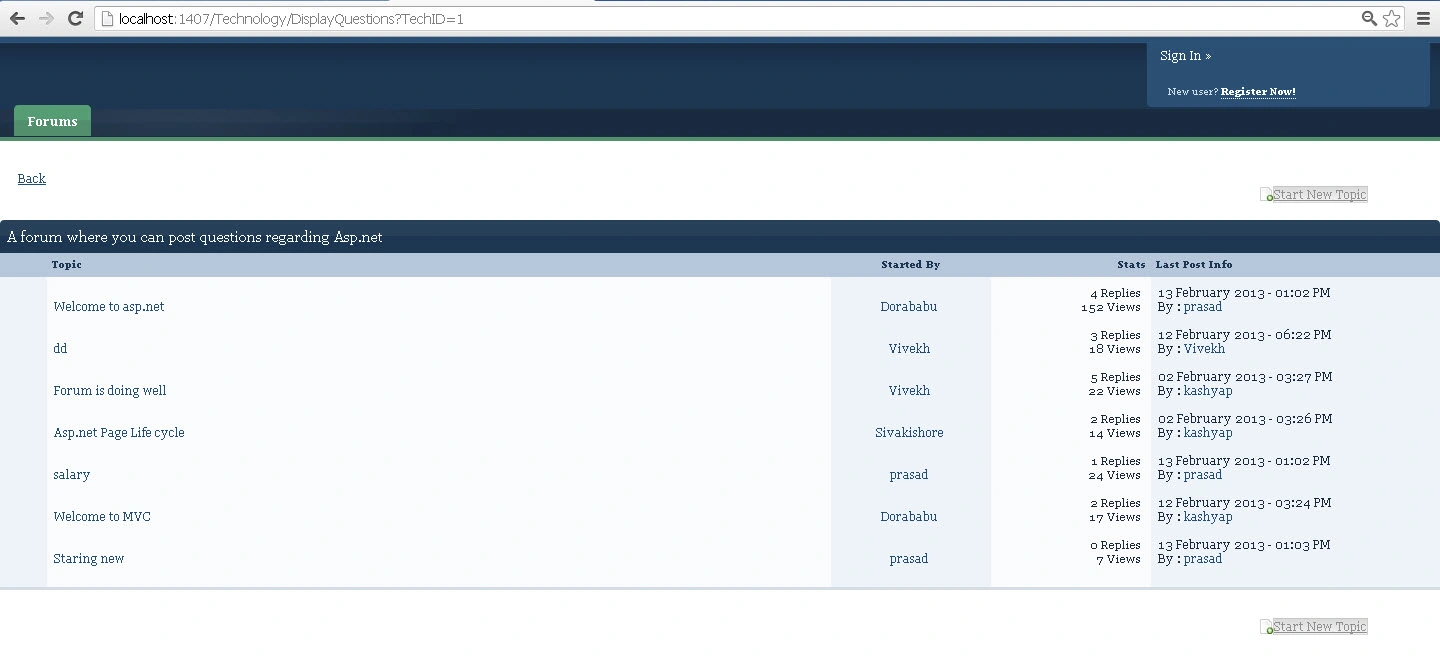
In this you can start a new Topic or post a new question if the user was logged in.
So far so good. Let us create the final step in this i.e creating questions and posting replies, first let us see how to create questions.
Create a class in the model with the name "Questions"; your class should be as follows:
- using System;
- using System.Collections.Generic;
- using System.Linq;
- using System.Web;
- using System.ComponentModel.DataAnnotations;
- namespace mvcForumapp.Models
- {
- public class Questions
- {
- [Required(ErrorMessage = "Title required")]
- [Display(Name = "Enter Title")]
- [StringLength(20, MinimumLength = 4)]
- public string TopicTitle { get; set; }
- [Required(ErrorMessage = "Description required")]
- [Display(Name = "Enter Description")]
- [StringLength(20, MinimumLength = 10)]
- public string TopicDescription { get; set; }
- [Required(ErrorMessage = "Content required")]
- [StringLength(Int32.MaxValue, MinimumLength = 10)]
- public string TopicContent { get; set; }
- }
- }
Create a controller with the name "Question" and replace the code with this:
- public class QuestionController : Controller
- {
- [HttpGet]
- public ActionResult PostQuestion()
- {
- int techID = Convert.ToInt16(Request.QueryString["TechID"].ToString());
- return View();
- }
- }
This is how it is viewed when you route to the "PostQuestion" view:
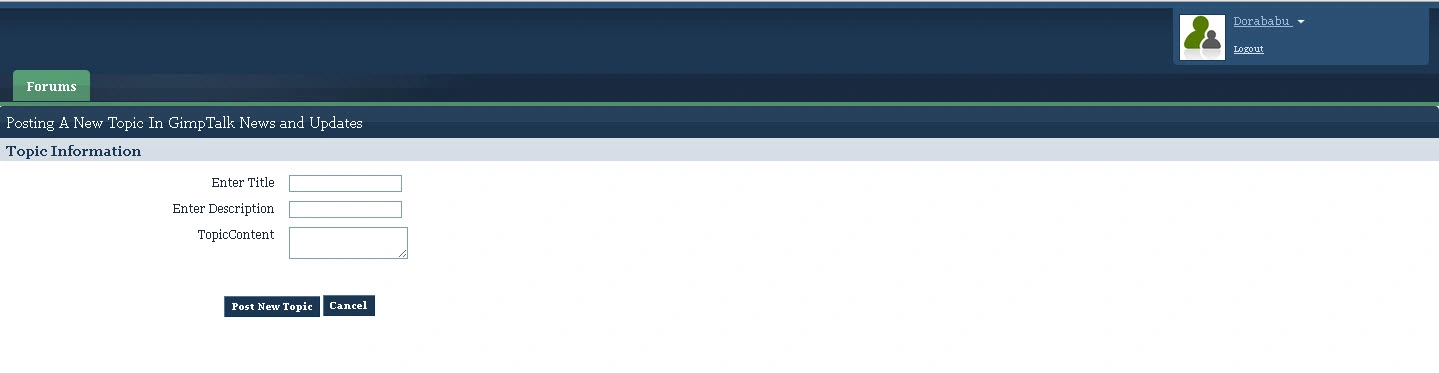
Create another method in the same controller with HttpPost to post the question:
- [HttpPost]
- public ActionResult PostQuestion(mvcForumapp.Models.Questions user)
- {
- int techID = 0;
- if (ModelState.IsValid)
- {
- techID = Convert.ToInt16(Request.QueryString["TechID"].ToString());
- using (var db = new newForumDBEntities())
- {
- var userdets = db.tblQuestions.CreateObject();
- userdets.TechID = Convert.ToInt16(Request.QueryString["TechID"].ToString());
- userdets.QuestionTitle = user.TopicTitle;
- userdets.QuestionDesc = user.TopicContent;
- userdets.DatePosted = DateTime.Now;
- userdets.UserName = Session["UserName"].ToString();
- userdets.viewCount = 0;
- userdets.ReplyCount = 0;
- db.tblQuestions.AddObject(userdets);
- db.SaveChanges();
- return RedirectToAction("DisplayQuestions", "Technology", new { TechID = techID });
- }
- }
- return View(user);
- }
After a successful post you will be routed to the list of questions for that technology.
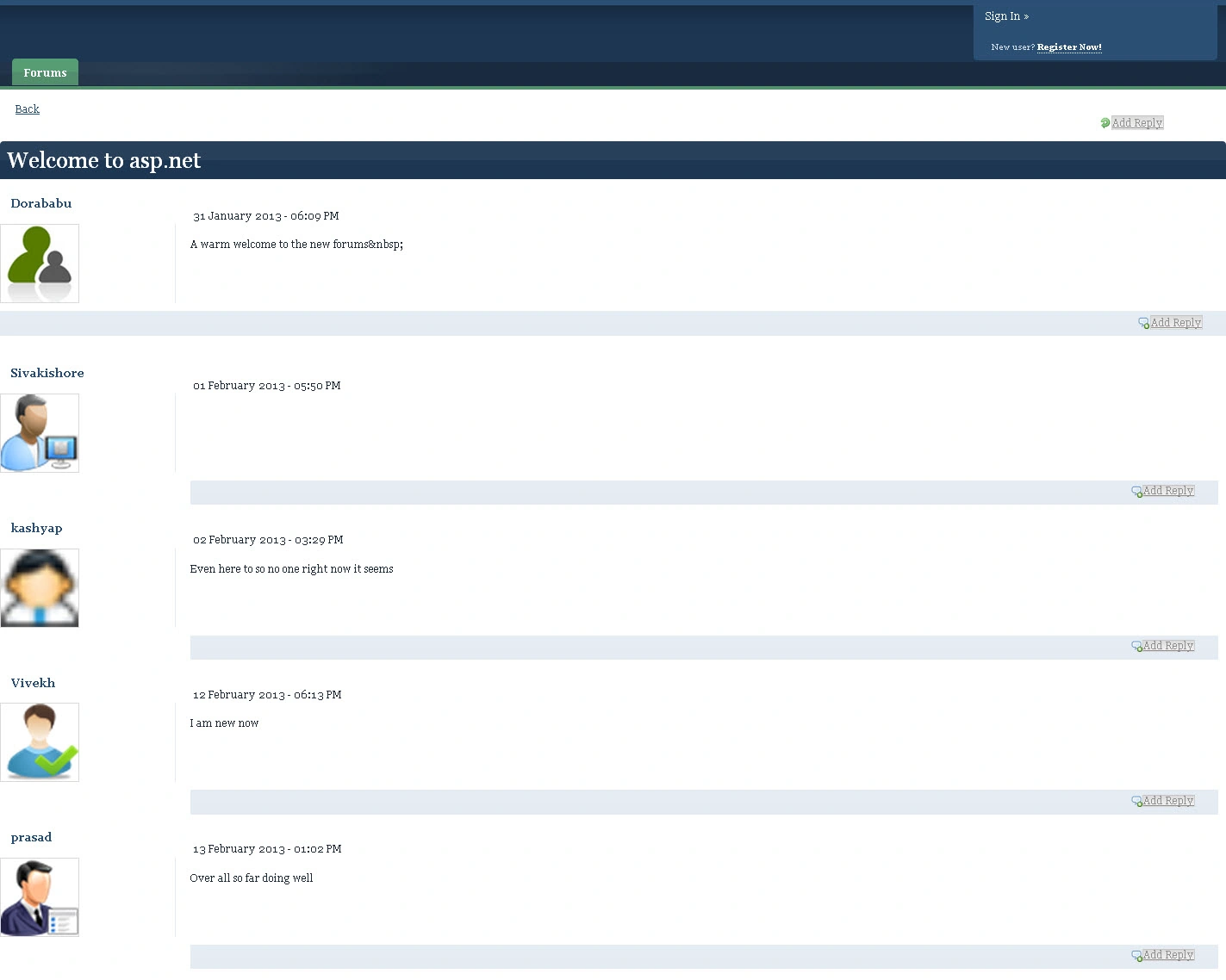
You can do the same for replys by creating a class in "Model" with a name called "Replys" and adding the necessary for that. This is how it is displayed when a post has replys.
For viewing the questions with replies add "View" and "Controller" correspondingly and your code should be as follows in the controller:
- using System;
- using System.Collections.Generic;
- using System.Linq;
- using System.Web;
- using System.Web.Mvc;
- using System.Data.SqlClient;
- using System.Data;
- namespace mvcForumapp.Controllers
- {
- public class Question_AnswerController : Controller
- {
- newForumDBEntities db = new newForumDBEntities();
- int vwcnt = 0;
- [HttpGet]
- public ActionResult displayQuestionwithAnswers()
- {
- var paramQuesID = new SqlParameter("@QuestionID", SqlDbType.Int);
- var paramRepCnt = new SqlParameter("@viewcount", SqlDbType.Int);
- int quesID = Convert.ToInt16(Request.QueryString["QuestionID"].ToString());
- paramQuesID.Value = quesID;
- var viewcount = db.tblQuestions.Where(e1 => e1.QuestionID == quesID).FirstOrDefault();
- vwcnt = viewcount.viewCount;
- if (vwcnt == 0)
- {
- vwcnt++;
- paramRepCnt.Value = vwcnt;
- var v = db.ExecuteStoreCommand("UPDATE tblQuestions SET viewCount = @viewcount WHERE QuestionID = @QuestionID", paramRepCnt, paramQuesID);
- }
- else
- {
- vwcnt = vwcnt + 1;
- paramRepCnt.Value = vwcnt;
- var v = db.ExecuteStoreCommand("UPDATE tblQuestions SET viewCount = @viewcount WHERE QuestionID = @QuestionID", paramRepCnt, paramQuesID);
- }
- List<mvcForumapp.Questionwithreplys_Result> disp = db.Questionwithreplys(quesID).ToList();
- return View(disp);
- }
- [HttpGet]
- public ActionResult GetPhoto()
- {
- //RouteData.Values["QuesID"]
- int quesID = Convert.ToInt16(Request.QueryString["QuestionID"]);
- byte[] photo = null;
- var usrname = (from a in db.tblQuestions
- where a.QuestionID == quesID
- select new { a.UserName });
- var v = db.tblUsers.Where(p => p.UserName == usrname.FirstOrDefault().UserName).Select(img => img.Photo).FirstOrDefault();
- photo = v;
- return File(photo, "image/jpeg");
- }
- [HttpGet]
- public ActionResult ReplyPhoto()
- {
- //RouteData.Values["QuesID"]
- int quesID = Convert.ToInt16(Request.QueryString["QuestionID"]);
- byte[] photo = null;
- var usrname = (from a in db.tblReplies
- where a.ReplyID == quesID
- select new { a.UserName });
- var v = db.tblUsers.Where(p => p.UserName == usrname.FirstOrDefault().UserName).Select(img => img.Photo).FirstOrDefault();
- photo = v;
- return File(photo, "image/jpeg");
- }
- }
- }
View for the corresponding controller:
- @model IEnumerable<mvcForumapp.Questionwithreplys_Result>
- @{
- ViewBag.Title = "Index";
- Layout = "~/Views/Shared/_Layout.cshtml";
- }
- <style type="text/css">
- .disabled
- {
- /* Text and background colour, medium red on light yellow */
- float: right;
- margin-right: 20px;
- background: #999;
- background: -webkit-gradient(linear, 0% 0%, 0% 100%, from(#dadada), to(#f3f3f3));
- border-top: 1px solid #c5c5c5;
- border-right: 1px solid #cecece;
- border-bottom: 1px solid #d9d9d9;
- border-left: 1px solid #cecece;
- color: #8f8f8f;
- box-shadow: none;
- -moz-box-shadow: none;
- -webkit-box-shadow: none;
- cursor: not-allowed;
- text-shadow: 0 -1px 1px #ebebeb;
- }
- .active
- {
- box-shadow: none;
- -moz-box-shadow: none;
- -webkit-box-shadow: none;
- cursor: allowed;
- }
- </style>
- <br />
- <div style="float: left; margin-left: 20px;">
- @foreach (var item in Model)
- {
- @Html.ActionLink("Back", "DisplayQuestions", "Technology", new { TechID = item.TechID }, null)
- break;
- }
- </div>
- <div class="topic_controls">
- <br />
- <ul class="comRigt" runat="server" id="lnkTopic">
- <li>
- <img alt="Add Reply" src="http://www.gimptalk.com/public/style_images/master/arrow_rotate_clockwise.png" />
- @if (Session["UserName"] != null)
- {
- foreach (var item in Model)
- {
- @Html.ActionLink("Add Reply", "PostReply", "Home", new { @class = "active", onclick = "javascript:return true;", QuestionID = item.QuestionID, TechID = item.TechID }, null)
- break;
- }
- }
- else
- {
- foreach (var item in Model)
- {
- @Html.ActionLink("Add Reply", "PostReply", "Home", new { title = "Please login to post replys", TechID = item.QuestionID, @class = "disabled", onclick = "javascript:return false;" })
- break;
- }
- }
- </li>
- </ul>
- <br />
- <h2 class="maintitle">
- <span class="main_topic_title">
- @foreach (var item in Model)
- {
- string strTopic = item.QuestionTitle;
- @Html.Label("Topic", strTopic)
- break;
- }
- </span>
- </h2>
- <br />
- <div class="post_wrap">
- <h3>
- <span class="author vcard">
- @foreach (var item in Model)
- {
- string User = item.quesaskedby;
- @Html.ActionLink(User, "Details", "Home", new { Username = item.quesaskedby }, null)
- break;
- }
- @*<asp:linkbutton id="lnkUsername" runat="server" text='<%#Eval("UserName") %>' font-underline="false"></asp:linkbutton>*@
- </span>
- </h3>
- <div class="authornew">
- <ul>
- <li class="avatar">
- @foreach (var item in Model)
- {
- <img alt="" src="@Url.Action("GetPhoto", "Question_Answer", new { QuestionID = item.QuestionID })" height="100" width="100" class="photo" />
- break;
- }
- </li>
- </ul>
- </div>
- <div class="postbody">
- <p class="postnew">
- @foreach (var item in Model)
- {
- DateTime dt = Convert.ToDateTime(item.DatePosted);
- string strDate = dt.ToString("dd MMMM yyyy - hh:mm tt");
- @Html.Label(strDate)
- break;
- }
- @*<asp:label id="lblDateposted" text='<%#Eval("DatePosted") %>' font-underline="false"
- runat="server" cssclass="edit"></asp:label>*@
- </p>
- <br />
- <br />
- <div class="post entry-content ">
- @*<asp:label id="Label1" text='<%#Eval("QuestionDesc") %>' font-underline="false" runat="server"
- cssclass="edit"></asp:label>*@
- @foreach (var item in Model)
- {
- @Html.Label(item.QuestionDesc)
- break;
- }
- </div>
- </div>
- </div>
- <br />
- <br />
- <br />
- <ul style="background-color: #e4ebf3; text-align: right; background-image: url(http://www.gimptalk.com/public/style_images/master/gradient_bg.png);
- background-repeat: repeat-x; background-position: 40%; font-size: 1em; text-align: right;
- padding: 6px 10px 10px 6px; clear: both;">
- <li>
- <img alt="Add Reply" src="http://www.gimptalk.com/public/style_images/master/comment_add.png" />
- @if (Session["UserName"] != null)
- {
- foreach (var item in Model)
- {
- @Html.ActionLink("Add Reply", "PostReply", "Home", new { @class = "active", onclick = "javascript:return true;", QuestionID = item.QuestionID, TechID = item.TechID }, null)
- break;
- }
- }
- else
- {
- foreach (var item in Model)
- {
- @Html.ActionLink("Add Reply", "PostReply", "Home", new { title = "Please login to post replys", @class = "disabled", onclick = "javascript:return false;", TechID = item.QuestionID })
- break;
- }
- }
- @*<asp:linkbutton id="lnkpostReply" runat="server" onclick="lnkpostReply_Click" text="Reply"></asp:linkbutton>*@
- </li>
- </ul>
- </div>
- <br />
- <br />
- <div>
- @foreach (var item in Model)
- {
- if (item.ReplyUser != null)
- {
- <div class="topic_controls">
- <div class="post_wrap">
- <h3>
- @if (item.ReplyUser != null)
- {
- <span class="author vcard">
- @Html.ActionLink(item.ReplyUser.ToString(), "Details", "Home", new { Username = item.ReplyUser },
- null)</span>
- }
- <br />
- @*<asp:linkbutton id="lnkUsername" runat="server" text='<%#Eval("UserName") %>' font-underline="false"></asp:linkbutton>*@
- </h3>
- <div class="authornew">
- <ul>
- <li class="avatar">
- @if (item.ReplyID != null)
- {
- <img alt="" src="@Url.Action("ReplyPhoto", "Question_Answer", new { QuestionID = item.ReplyID })"
- height="100" width="100" class="photo" />
- }
- <br />
- </li>
- </ul>
- </div>
- <div class="postbody">
- <p class="postnew">
- @if (item.date != null)
- {
- @Html.Label(item.date.Value.ToString("dd MMMM yyyy - hh:mm tt"))
- }
- <br />
- @*<asp:label id="lblDateposted" text='<%#Eval("DatePosted") %>' font-underline="false"
- runat="server" cssclass="edit"></asp:label>*@
- </p>
- <br />
- <br />
- <div class="post
- entry-content ">
- @if (item.ReplyMsg != null)
- {
- @Html.Label(item.ReplyMsg)
- }
- <br />
- </div>
- @if (item.ReplyID != null)
- {
- <ul style="background-color: #e4ebf3; text-align: right; background-image: url(http://www.gimptalk.com/public/style_images/master/gradient_bg.png);
- background-repeat: repeat-x; background-position: 40%; font-size: 1em; text-align: right;
- padding: 6px 10px 10px 6px; clear: both;">
- <li>
- <img alt="Add Reply" src="http://www.gimptalk.com/public/style_images/master/comment_add.png" />
- @*<asp:linkbutton id="lnkpostReply" runat="server" onclick="lnkpostReply_Click" text="Reply"></asp:linkbutton>*@
- @if (Session["UserName"] == null)
- {
- @Html.ActionLink("Add Reply", "PostReply", "Home", new { title = "Please login to post replys", @class = "disabled", onclick = "javascript:return false;", TechID = item.QuestionID })
- }
- else
- {
- @Html.ActionLink("Add Reply", "PostReply", "Home", new { @class = "active", onclick = "javascript:return true;", QuestionID = item.QuestionID, TechID = item.TechID }, null)
- }
- </li>
- </ul>
- }
- </div>
- </div>
- </div>
- }
- }
- </div>
The result is as follows:
That's it; the forums application is over.
Download the code and test it by creating the database with the given tables by adding the entity model to the application.
Check out my sample video for the demo, no audio in that just to show an overview of how the application runs.
If any queries please feel free to ask.
Vivek KumarPosted Mar 11, 2016, 2:17 AM
Nice Share