
Introduction:
In this article we'll see how to specify the format of DateTime values extracted from the ADO.NET DataSet and to verify we will write formatted contents in xml file.
A DataSet has capability to read, write data and schema as XML documents.
- WriteXml writes XML data, and optionally the schema from the DataSet. If there are any DateTime fields in the DataSet it would be according to standard XSD DateTime and Date formats as CCYY-MM-DDThh:mm:ss and CCYY-MM-DD, respectively. This is because the underlying XSD schema of the DataSet maps the DateTime and Date columns of the database to the DateTime and XSD Date data types.
To generate the DataSet to have a customized format of DateTime or Date/Time the solution is to manipulate the data by using GetXml,XmlTextReader and XmlTextWriter.
- GetXML returns the XML representation of the data stored in the DataSet.
- XMLTextReader represents a reader that provides fast, non-cached, forward-only access to XML data.
- XmlTextWriter represents a writer that provides a fast, non-cached, forward-only way of generating streams or files containing XML data.
Solution:
The steps that we would follow:
- Populate the DataSet
- Use method .GetXml() to get the data using XmlTextReader
- Specify the Filename and the Encoding type as Parameters for XmlTextWriter
- Write the data into the .xml file checking for the FieldName which has DataType as Datetime or Date and format it accordingly.
- To check if its writing formatted we'll display it in DataGrid (Drag drop DataGrid for UI).
Code as given below:
Namespaces used:
- System.Xml
- System.Text
- System.IO
SqlConnection mycn;
SqlDataAdapter myda;
DataSet ds;
String strConn;
{
// Put user code to initialize the page here
//Populating the DataSet
strConn="Data Source=localhost;uid=sa;pwd=;Initial Catalog=pubs";
mycn = new SqlConnection(strConn);
myda = new SqlDataAdapter ("Select title_id,title,type,pubdate FROM titles where price>20 ", mycn);
ds= new DataSet ();
myda.Fill (ds,"Table");
//XMLTextReader
//Reads the Xml data generated by DataSet
XmlTextReader XTReader = new XmlTextReader(ds.GetXml
),XmlNodeType.Element,null) ;
//XMLTextWriter
//To write data into xml file
XmlTextWriter XTWriter = new XmlTextWriter(Server.MapPath ("myfile.xml"),Encoding.UTF8) ;
XTWriter.WriteStartDocument();
string fieldName = "" ;
while(XTReader.Read())
{
switch(XTReader.NodeType)
{
//Check for the Node Name
case XmlNodeType.Element:
XTWriter.WriteStartElement(XTReader.Name);
fieldName = XTReader.Name;
break;
//Check for the Node Value
case XmlNodeType.Text:
//If the NodeName is PubDate
if(fieldName.ToLower() == "pubdate")
{
//Change the format of Date
//By default DataSet i.e ds.WriteXml(<filename>) creates *.xml with
//Date as 1991-06-12T00:00:00.0000000-04:00
//In code we will format it to be written as 12 June 1991.
DateTime dt = DateTime.Parse (XTReader.Value.ToString());
//Here the DateTime can be changed to any format as
//MM-dd-yyyy or dd-MM-yyyy or .ToShortDateString() ...
XTWriter.WriteString(dt.ToString("dd MMMM yyyy"));
}
else
XTWriter.WriteString(XTReader.Value);
break;
case XmlNodeType.EndElement:
XTWriter.WriteEndElement();
break;
}
}
XTWriter.Close();
//Display the Data in the DataGrid from the .xml file
DataSet readDs = new DataSet();
readDs.ReadXml(Server.MapPath("myfile.xml"));
DataGrid1.DataSource = readDs ;
DataGrid1.DataBind();
}
Note:To Change format to DateTime XMLConvert Class can also be used.
XTWriter.WriteString(XmlConvert.ToDateTime(XTReader.Value).ToString());
Output of webform shown below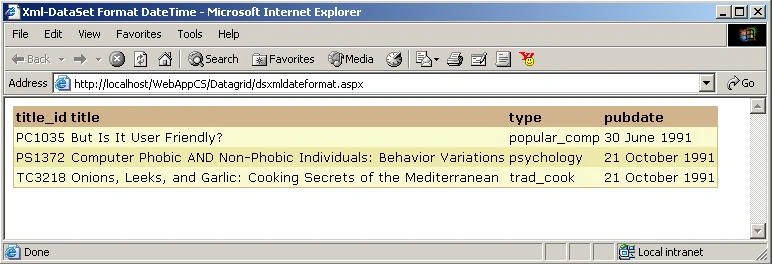
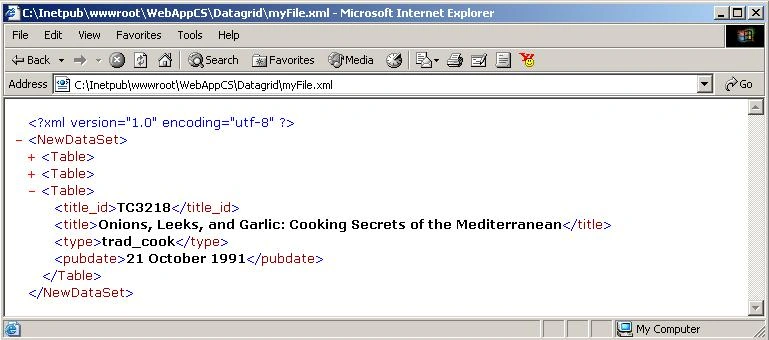
The Xml generated is as follows:
Sudhir SharmaPosted Dec 16, 2015, 4:06 AM
hi