

Are you a C#, C++ developer and you couldn't figure out the JavaScript craziness while writing the Client-Side Applications?

Surprise... Surprise.., Microsoft ASP.NET team has announced the experimental version of Blazor as the first public preview on 6th Feb.
Blazor lets you use all your C# knowledge to apply in client-side development. Blazor replaces JavaScript code with C#. Essentially, it means that rather than writing the Client-side code in Angular, React, Vue using JavaScript and TypeScript, you can use C# and Razor. Does that sound like a dream ?? Continue reading...

History Of Blazor
Last Year, Steve Sanderson (The Creator of Knockout.js) started working on a side project Blazor. After his NDC Demo at OSLO and the positive feedback for Blazor. The ASP.Net team created an Experimental version of Blazor.
Blazor gets its name from the Razor which most ASP.Net MVC developers would be familiar with. Razor is a markup syntax for HTML and C#. Moreover, it runs on the Browser and Hence combines the power of Browser and Razor.
Blazor is a Single page web application (SPA) framework built on .NET that runs in the browser via Web Assembly.
It’s a framework for building client-side applications written in.NET, running under Web Assembly. It offers all the benefits of the rich, modern single-page application (SPA) platform. Additionally, it allows using .Net throughout the code base. It means that we can write the code for the Client, Server in the same technology (.Net). Additionally, the Same classes can be shared by both client and server code. Blazor is based on existing web technologies like HTML and CSS, but you use C# and Razor syntax instead of JavaScript to build composable web UI.
What is Web Assembly?
Web Assembly is a Web Standard to attain native performance on the web. It defines a low-level format allowing the developers to write the code in High-level Languages (C, C++) and compile the code into WebAssembly. The Web Assembly can then be executed by the Browser at nearly the native speed. Web Assembly is supported by all modern Browsers (Firefox, Chrome, Edge, Safari). It is a low-level assembly-like language with a compact binary format that runs with near-native performance.
WebAssembly is designed to complement and run alongside JavaScript. Web Assembly Modules can be invoked from Javascript and vice versa. Use cases of Web assembly include 3D games, Virtual and Augmented Reality, computer vision, image/video editing, and some other domains that demand native performance.
The Importance of Web Assembly.
Running .NET in the browser is made possible by WebAssembly. This is the foundational piece needed to build a .NET runtime that can run in the browser. No plugins or transpilation needed. You run regular .NET assemblies in the browser using a WebAssembly based .NET runtime.
How Blazor works using Web Assembly?
The client application (Client Web Project) is compiled as a .Net assembly. When the Application is requested by the browser, the Browser downloads the required dll as defined in the client Project and runs in a web browser using a WebAssembly based .NET runtime. Only the .NET runtime itself is compiled to WebAssembly. In the future, the Dll would be cached using HTTP Caching to reduce the download cost.
As of now, Blazor runs on Mono, which has the larger size, but there are opportunities for size optimization, including merging and trimming the runtime and application binaries and the future releases would be targetting this optimization.
Shown below is a screenshot of the Blazor Application in the Developer toolbar. You can see that the .Net dll's are being downloaded by the Browser.

Does C# replace Javascript?
Blazor allows replacing the javascript with C#. Strictly, Blazor is not meant to be a replacement for javascript but a Complementary language to Javascript. It is a client-side solution based on HTML and CSS. C# is replacing the js part using web assembly. So nothing has changed on how you access/modify HTML controls. Also, JS and C# code can interact with Each other. There is a facility to interop, meaning we can call the Javascript code from C# code and vice-versa.
Why is blazor helpful to a C# Developer?
Blazor allows the .Net Developer to Utilize existing skills for Client-Side development. It enables the developers to Write fast Single Page Applications build on a Component-based Model based on open web standards. .Net Developers can use languages like C#, F#, and use the familiar standard APIs, tools, and build infrastructure across all .NET platforms.
Sharing Code in Client and Server Side
How many times does it happen that we write Models/Class in the Web API and then create the same Classes in the Javascript/Typescript on the Client-Side Project? This is pretty normal for most of the applications. Blazor helps to share the code by allowing the same Models/Class to be reused in the Client Side as well as the Server side. E.g. We can create a Shared Dll defining the class and then reuse the Class in Client Side and Server-side by adding References to the shared dll.
Features
Blazor is inspired by existing modern single-page app frameworks, like React, Angular, and Vue, but is also a new framework in its own right.
Blazor will support all of the features of a modern single-page app framework,
- A component model for building composable UI
- Routing
- Layouts
- Forms and validation
- Dependency injection
- JavaScript interop
- Live reloading in the browser during development
- Server-side rendering
- Full .NET debugging both in browsers and in the IDE
- Rich IntelliSense and tooling
- Ability to run on older (non-WebAssembly) browsers via asm.js
- Publishing and app size trimming
Is it stable, Can we use it in Production?
Blazor is an experimental project because there are still lots of questions to answer about its viability and appeal. The purposes of this initial experimental phase are to work through any outstanding technical issues, to gauge interest, and to listen to feedback. It's not a committed Product.
Browser Support?
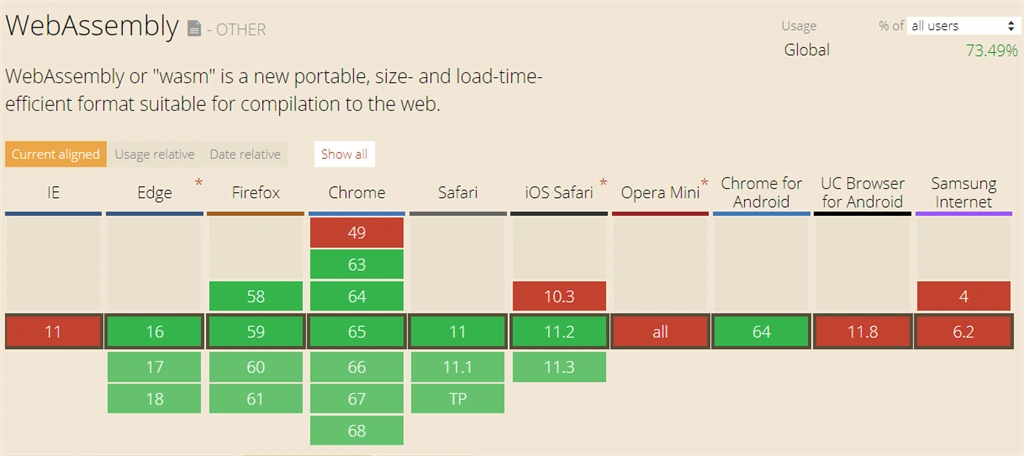
All modern browsers support the WebAssembly. The following images show the browser support for WebAssembly. It's even work in certain Mobile browsers. For IE 11, it has a transpiler. For older browsers that don't support WebAssembly Blazor will fallback to using an asm.js based .NET runtime. Using asm.js is slower and has a larger download size, but is still quite functional.
Any relation to Silverlight/XAML?
If you are familiar with Silverlight, it might seem similar. But hold on, It doesn't bear resemblance with Silverlight. Blazor doesn't require any plugin support in the browser. It doesn't use XAML and is based on HTML and CSS that runs in the browser using open web standards. Additionally, it works on mobile devices and older browsers.
What about Garbage Collection and other .Net features
Since the Blazor loads the.Net runtime. The .NET runtime handles its garbage collection, threading & other concerns.
Javascript Interop with Blazor?
Blazor applications can call into JavaScript through JavaScript interop APIs. Moreover, you can call JS from C# code and vice versa.
You can access the DOM through JavaScript interop from .NET code. However, Blazor is a component-based framework that minimizes the need to access the DOM directly.
Summary
In this article, we looked at a promising experimental product, Blazor. Blazor provides a .NET-based framework for building client-side applications replacing Javascript with the C#, Razor while still using HTML and CSS. In the next article, I will provide a guide to creating a Blazor application and an insight into blazor internals. Give Blazor a try and share feedback to the Asp.Net team.
References
- https://github.com/aspnet/Blazor
- https://blogs.msdn.microsoft.com/webdev/2018/03/22/get-started-building-net-web-apps-in-the-browser-with-blazor/
- https://blogs.msdn.microsoft.com/webdev/?p=11366https://blogs.msdn.microsoft.com/webdev/?p=11366
- http://blog.stevensanderson.com/2018/02/06/blazor-intro/
- https://live.asp.net/
Naresh SinghalPosted May 9, 2018, 6:45 AM
Thank you @Abhinav for sharing very exiting news for new and complementary technology to JavaScript, Yes if it will accepted by developers then it to be the great tech.
sunmbal siddiquiPosted Apr 27, 2018, 6:44 AM
Thank you for Sharing the valuable information for .Net developers. It will definitely be the Best for us. Waiting for next article.
vinay ayinPosted Apr 23, 2018, 11:38 AM
Thanks for sharing and great write up. I also see that you included references which i see very few of them does. Definitely a game changer for the C# developers.
Dinesh KushwahaPosted Apr 20, 2018, 9:54 AM
Thanks for sharing this.
Satyendra PatelPosted Apr 19, 2018, 12:09 PM
Thanks for sharing this. But i have a question.The Question is which one is faster in both of them JavaScript or Blazor.
Ruchi SharavatPosted Apr 18, 2018, 7:37 AM
Thanks alot for sharing this. Can you please help more to clarify me that would it be an efficient alternate to Angular? Also, Can we use this within any existing MVC project as well while working on any new module?
prasad varaPosted Apr 17, 2018, 9:29 PM
Thanks abhinav. Keep going..
Humayun Kabir MamunPosted Apr 17, 2018, 2:09 PM
Thanks Abhinav for sharing this information...
Hiten PandyaPosted Apr 17, 2018, 11:30 AM
Such a superb article.. Thanks for sharing..
Kartik PawarPosted Apr 17, 2018, 10:07 AM
Great article for C# developers... Thank you for sharing...
Hemanth KumarPosted Apr 17, 2018, 8:05 AM
Great piece of information. Thank you Abhinav
Mangesh GPosted Apr 17, 2018, 6:29 AM
Good One Just one suggestion if you have included the framework requirement as well the VS version needed for the development that will be useful
Tridip BhattacharjeePosted Apr 17, 2018, 6:02 AM
Thanks....very good share.
sri vidyaPosted Apr 17, 2018, 5:00 AM
Thanks for knowledge sharing
Raveendra PaiPosted Apr 17, 2018, 4:40 AM
Is this supported on the non-Windows client platform ?
Dharmraj ThakurPosted Apr 17, 2018, 12:54 AM
One of the good article.........