
Problem Statement
Design an online order food delivery application catering to the following use cases:
- User can search different restaurants.
- User can select a restaurant.
- User can see menus.
- Restaurant can change the menu
- User adds item for menu
- User orders the food
- User can track the order in real time.
- User can cancel the order
- User pays for the order
Solution
I have implemented a food delivery application by using different types of design patterns. The below design patterns are involved according to module,
- User can search different restaurants Interpreter Design Pattern
- User sees Menu Iterator Pattern
- Adding food items for order Builder Design Pattern
- Order and Cancellation of food items Command Design Pattern
- Track an Order in Real Time Observer Pattern
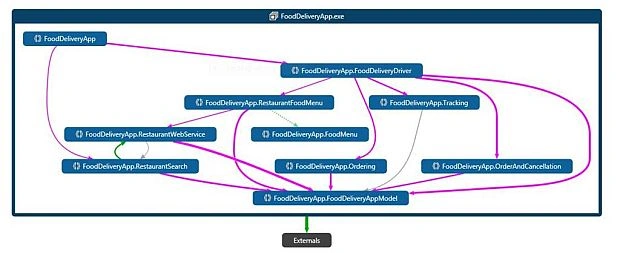
Food Delivery Application Module Dependencies
Module 1 User can search different restaurants- (Interpreter Design Pattern)
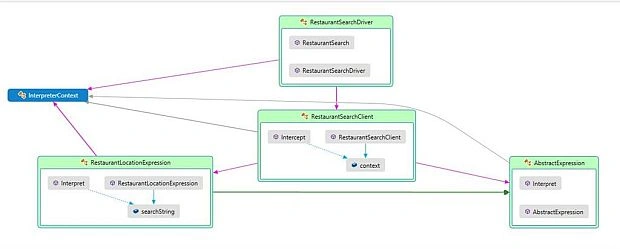
The Interpreter Design Pattern specifies the way to evaluate or interpret expression in a language. It is very good in pattern matching. I have used this design pattern for the searching of different restaurants because the user searches based on location, name of restaurant, food items, PIN, etc. It forms a pattern. So, pattern implementation can be split into three different parts - the class definitions, the parser development and the expression evaluation.
Below is the "Code Map" diagram of the restaurant search based on location using Interpreter Design Pattern,
Module 2 User Sees Menu - Iterator Pattern
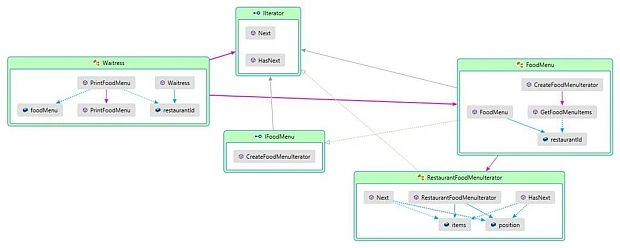
The Iterator Pattern provides a way to access elements of an aggregate object sequentially without exposing the underlying structure of the object. I have used this design pattern for the displaying of food menus based on the restaurant because different food items form a menu and the possibility of multiple traversals can be there and I don't want to expose its internal representation to the outside.
Below is the "Code Map" diagram of User Sees Menu based on restaurant Id or Name using Iterator Design Pattern,
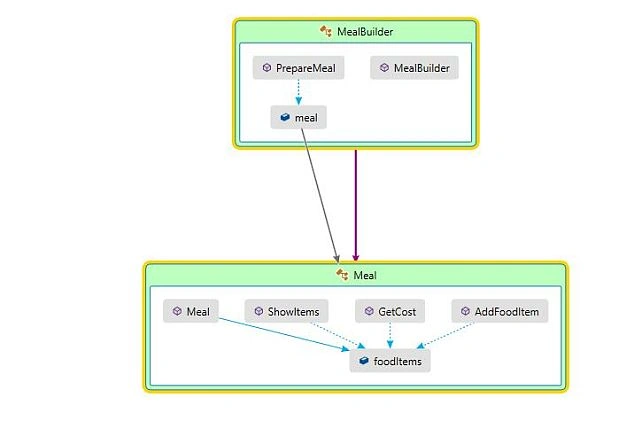
The builder pattern is a creational design pattern used to configure and assemble complex objects. It provides a way to create the same object with different kinds of objects. I have used this design pattern for adding food items because different kinds of food items create one meal.
Below is the "Code Map" diagram of adding food items for ordering using Builder Design Pattern,
Module 4 Order or Cancellation of Food or Meal - Command Design Pattern
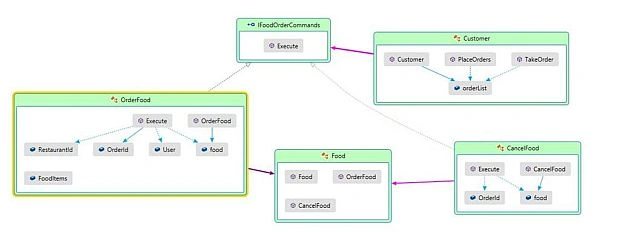
Command design pattern falls under behavioral design pattern. It wraps the request under an object that is called Command. That command object is being passed to invoker object. I have used this design pattern because user can order or cancel food menus for delivery. Two different kinds of requests can be done by the user for food ordering.
Below is the "Code Map" diagram if user orders or cancels a meal after building the meal using Command Design Pattern,
Module 5 Track an Order in Real Time - Observer Design Pattern
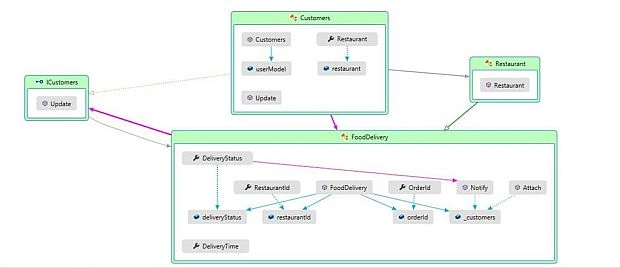
Observer design pattern is used in a situation where an object should be able to notify other objects about state change. I have used this pattern for the development of tracking an order in real time because whenever the food delivery states something like "food is packed for delivery, " "delivery boy is on the way," "It will be there in two minutes," "food delivered" or "food canceled," the user will be notified automatically.
Below is the "Code Map" diagram of Track an Order in Real Time after Ordering Meal using Observer Design Pattern,
Code Implementation
I have attached the zipped code related to whole functionalities implementation. Pasting the whole code here is not possible because it is very large. So, here I will just add the execution entry point driver codes for the basic understanding of code flow of this project.
It is a console application because the main point is to make you understand the design approach for the development of any application.
- using FoodDeliveryApp.FoodDeliveryAppModel;
- using FoodDeliveryApp.OrderAndCancellation;
- using FoodDeliveryApp.Ordering;
- using FoodDeliveryApp.RestaurantFoodMenu;
- using FoodDeliveryApp.RestaurantSearch;
- using FoodDeliveryApp.Tracking;
- using System;
- using System.Collections.Generic;
- using System.Linq;
- using System.Text;
- using System.Threading.Tasks;
- using System.Threading;
- using FoodDeliveryApp.FoodDeliveryDriver;
- namespace FoodDeliveryApp
- {
- class Program
- {
- static void Main(string[] args)
- {
- #region User Searches Restaurant
- //User Searches Restaurant.
- RestaurantSearchDriver restaurantSearchDriver = new RestaurantSearchDriver();
- var restaurantId = restaurantSearchDriver.RestaurantSearch();
- #endregion
- #region User Sees Food Menu
- //User sees Food Menu Items based on the selected Restaurant Id.
- MealMenuIteratorDriver mealMenuIteratorDriver = new MealMenuIteratorDriver();
- var foodMenu = mealMenuIteratorDriver.PrintMealMenu(restaurantId);
- #endregion
- #region User Selects Meal
- //Meal Selector.
- MealSelectorDriver mealSelectorDriver = new MealSelectorDriver();
- var selectedMealItems = mealSelectorDriver.MealSelectionbyUser(foodMenu);
- #endregion
- #region Restaurant Builds Meal
- //Calling Meal Builder
- MealBuilderDriver mealBuilderDriver = new MealBuilderDriver();
- var totalCost = mealBuilderDriver.BuildMealForUser(selectedMealItems);
- #endregion
- #region User Orders Food
- //Order Food
- string orderId = string.Empty;
- UserModel user = null;
- MealOrderDriver mealOrderDriver = new MealOrderDriver();
- var cancel = mealOrderDriver.MealOrderByUser(selectedMealItems, totalCost, restaurantId, out orderId, out user);
- #endregion
- #region User Tracks Order
- //Order Tracking.
- OrderTrackingDriver orderTrackingDriver = new OrderTrackingDriver();
- orderTrackingDriver.OrderTrackingByUser(restaurantId, orderId, user, cancel);
- #endregion
- Console.ReadKey();
- }
- }
- }
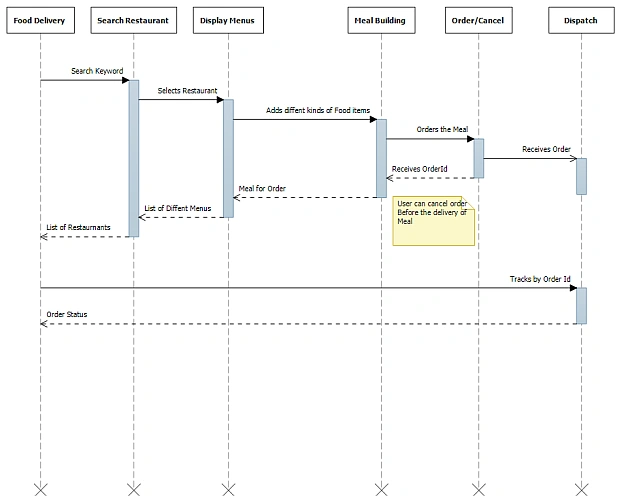
Sequence Diagram based on the flow of application
Conclusion
Analysis before the development of any project is the important part. I have analyzed and divided the project into five different module parts based on functionalities. And then, I have identified different kinds of design patterns which fit on each module based on its functionality and behavior. Design pattern plays a very important role for the quality of code, loose coupling, re-usability, and maintainability. So, always go with design pattern before starting any module development.
Милен ПетровPosted Jun 26, 2020, 4:25 PM
What structural pattern you use?
DavidPosted Sep 27, 2017, 7:56 AM
Just came across this article and job well done. Finally someone used a real life solution to demonstrate something. Makes it easier to relate to the concept.
Fabio Silva LimaPosted Jan 2, 2017, 11:07 AM
Thanks dude, it's working now!
Former memberPosted Jan 2, 2017, 10:35 AM
Pull code from my github repository Url : https://github.com/gmershad/FoodDeliveryApp.git
Former memberPosted Jan 2, 2017, 10:08 AM
Source code could not download.......:(
Fabio Silva LimaPosted Jan 2, 2017, 6:44 AM
Very good! I love design patterns ;) Please advise when zip is working.
Former memberPosted Jan 2, 2017, 5:48 AM
Still link to zip file is not working. Could u please fix it
Manas MohapatraPosted Jan 2, 2017, 4:41 AM
Please upload images properly, it doesn't show up in article..
Maciej EtgensPosted Jan 2, 2017, 2:48 AM
Link to zip file doesn't work and images in article also