
Introduction
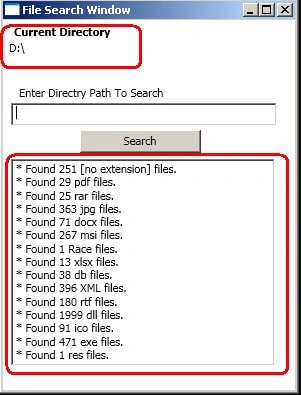
This article uses the classes File and Directory, and regular expression capabilities, to report the number of files of each file type that exist in the specified directory path. The illustration also serves as a "clean-up" utility when the program encounters a file that has the .bak filename extension (i.e., a backup file), the program displays a Message Box asking the user whether that file should be removed, then responds appropriately to the user's input.
Use the following market controls to do the search in a WPF application.

When the user presses the Enter key or clicks the Search Directory button, the program invokes the method "btnSearch_Click" that searches recursively through the directory path that the user provides.
If the user inputs text in the TextBox then the Directory method "Exists" is called to determine whether that text is a valid directory path and name. If not, notify the user of the error.
If the user specifies a valid directory then the directory name is passed as an argument to the private method SearchDirectory. This method locates files that match the regular expression defined.
- // check for user input; default is current directory
- if (this.txtPath.Text != "")
- {
- // verify that user input is valid directory name
- if (Directory.Exists(this.txtPath.Text))
- {
- currentDirectory = this.txtPath.Text;
- // reset input text box and update display
- tbkCurrentDirectory.Text = currentDirectory;
- } // end if
- else
- {
- // show error if user does not specify valid directory
- MessageBox.Show("Invalid Directory", "Error",
- MessageBoxButton.OK, MessageBoxImage.Error);
- }
- }
- // regular expression for extensions matching pattern
- Regex regularExpression = new Regex(@"[a-zA-Z0-9]+\.(?<extension>\w+)");
- // stores regular-expression match result
- Match matchResult;
- // get directories
- directoryList = Directory.GetDirectories(currentDirectory);
- // get list of files in current directory
- fileArray = Directory.GetFiles(currentDirectory);
- // iterate through list of files
- foreach (string myFile in fileArray)
- {
- // remove directory path from file name
- fileName = myFile.Substring(myFile.LastIndexOf(@"\") + 1);
- // obtain result for regular-expression search
- matchResult = regularExpression.Match(fileName);
- // check for match
- if (matchResult.Success)
- fileExtension = matchResult.Result("${extension}");
- else
- fileExtension = "[no extension]";
- // store value from container
- if (found[fileExtension] == null)
- found.Add(fileExtension, "1");
- else
- {
- extensionCount = Int32.Parse(found[fileExtension]) + 1;
- found[fileExtension] = extensionCount.ToString();
- }
- // search for backup( .bak ) files
- if (fileExtension == "bak")
- {
- // prompt user to delete ( .bak ) file
- MessageBoxResult result = MessageBox.Show("Found backup file " + fileName + ". Delete?", "Delete Backup", MessageBoxButton.YesNo, MessageBoxImage.Question);
- // delete file if user clicked 'yes'
- if (result == MessageBoxResult.Yes)
- {
- File.Delete(myFile);
- extensionCount = Int32.Parse(found["bak"]) - 1;
- found["bak"] = extensionCount.ToString();
- }// end if
- }
- }
- // recursive call to search files in subdirectory
- foreach (string myDirectory in directoryList)
- SearchDirectory(myDirectory);
- NameValueCollection found = new NameValueCollection();
- // store value from container
- if (found[fileExtension] == null)
- found.Add(fileExtension, "1");
- else
- {
- extensionCount = Int32.Parse(found[fileExtension]) + 1;
- found[fileExtension] = extensionCount.ToString();
- }
The following code determines whether fileExtension equals "bak", in other words whether the file is a backup file. If so then prompt the user to indicate whether the file should be removed; if the user clicks "Yes" then delete the file and decrement the value for the "bak" file type in "found".
- if (fileExtension == "bak")
- {
- // prompt user to delete ( .bak ) file
- MessageBoxResult result = MessageBox.Show("Found backup file " + fileName + ". Delete?", "Delete Backup", MessageBoxButton.YesNo, MessageBoxImage.Question);
- // delete file if user clicked 'yes'
- if (result == MessageBoxResult.Yes)
- {
- File.Delete(myFile);
- extensionCount = Int32.Parse(found["bak"]) - 1;
- found["bak"] = extensionCount.ToString();
- } // end if
- }
- }
- // recursive call to search files in subdirectory
- foreach (string myDirectory in directoryList)
- SearchDirectory(myDirectory);
Summary
In the preceding example we learned how to use regular expressions to find directories and determine file type.
Richard AndersenPosted Jul 9, 2022, 8:57 AM
I think the title is misleading, this is about finding FILES and not DIRECTORIES, using Regex.
Santhakumar MunuswamyPosted Jul 8, 2015, 3:49 PM
Nice article. Thanks for sharing
Former memberPosted Nov 18, 2014, 7:57 AM
ok, i need to find the source codes, if available will reload again
Gerasimos AlexiouPosted Nov 18, 2014, 7:14 AM
Can you reupload file cause is not available?