

In this article I describe the PHP FileSystem functions move_uploaded_file, parse_ini_file, pathinfo and pclose. To learn about other FileSystem functions, go to:
- FileSystem Function in PHP: PART 1
- FileSystem Function in PHP: PART 2
- FileSystem Function in PHP: PART 3
- FileSystem Function in PHP: PART 4
- FileSystem Function in PHP: PART 5
- FileSystem Function in PHP: PART 6
- FileSystem Function in PHP: PART 7
- FileSystem Function in PHP: PART 8
- FileSystem Function in PHP: PART 9
- FileSystem Function in PHP: PART 10
- FileSystem Function in PHP: PART 11
- FileSystem Function in PHP: PART 12
- FileSystem Function in PHP: PART 13
- FileSystem Function in PHP: PART 14
PHP move_uploaded_file() Function
The PHP FileSystem move_uploaded_file moves an uploaded file to a new location and it returns true on success or if the filename is not a valid uploaded file, then no action will occur and move_uploaded_file will return false.
Syntax
| move_uploaded_file(file,newLocation) |
Parameter in move_uploaded_file function
The parameters of the function are:
| Parameter | Description |
| file | It specifies the file to move. |
| newLocation | It specifies the new location of the file. |
Example
An example of the function is:
<?php
$file = "C:\wamp\www\test.txt";
if(move_uploaded_file($file,"E:\sharad"))
{
echo ("$file is moved in new location");
}
else
{
echo ("$file is not uploaded via HTTP POST");
}
?>
Output

PHP parse_ini_file() function
The PHP FileSystem parse_ini_file function parses a configuration file and returns a setting in it in an array.
Syntax
| parse_ini_file(file,processSections) |
Parameter in parse_ini_file function
The parameters of the function are:
| Parameter | Description |
| file | It specifies the ini file to check. |
| processSections | It is an optional parameter and if it is set to TRUE then parse_ini_file returns a multidimensional array with section names and settings included. |
Example
An example of the function is,
suppose I first I create an ini file. The ini file looks like:
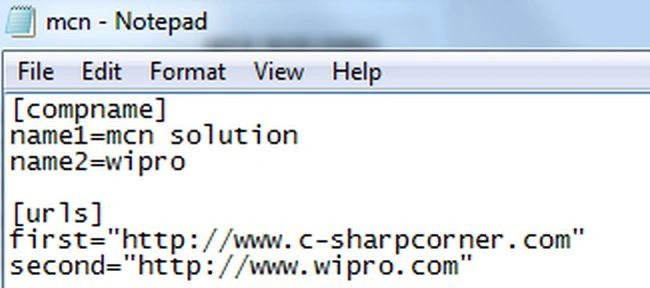
Then write the code for it:
<?php
echo "<pre>";
print_r(parse_ini_file("mcn.ini"));
?>
Output
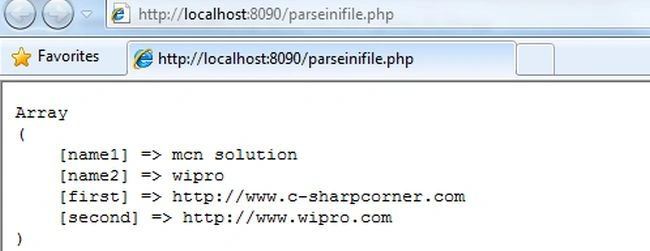
PHP pathinfo() Function
The PHP FileSystem pathinfo function returns information about a file path and also the following elements are returned; dirname, basename, and extension.
Syntax
| pathinfo(path,options) |
Parameters of the pathinfo function
The parameters of the function are:
| Parameter | Description |
| path | It specifies the path to check. |
| options | It specifies which array element to return and the possible values are:
|
Example
An example of the function is:
<?php
echo "<pre>";
print_r(pathinfo("test.txt"));
?>
Output
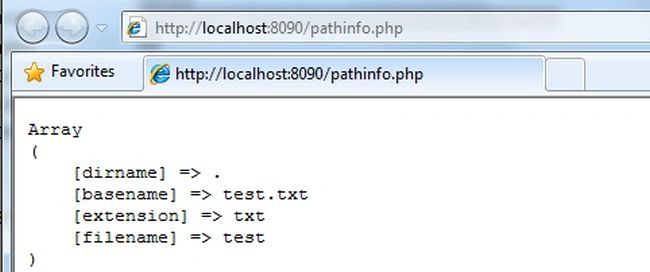
PHP pclose() Function
The PHP FileSystem pclose function closes a process file pointer and it returns the termination status of the process that was run or false on failure.
Syntax
| pclose(pipe) |
Parameter in pclose function
The parameter of the function is:
| Parameter | Description |
| pipe | It specifies the pipe opened by popen. |
Example
An example of the function is:
<?php
$file=popen('/bin/ls','r');
pclose($file);
?>
Join the conversation! Your thoughts help the community grow.