

Introduction
In this article, we will learn how to create a custom file size pipe that is used to Convert a file size into bytes to human-readable format.
Prerequisites
- Basic Knowledge of Angular 2 or higher
- Visual Studio Code
- Node and NPM installed
- Bootstrap
Create an Angular Project
Create an Angular project by using the following command.
Create an Angular project by using the following command.
ng new angapp
Now install Bootstrap by using the following command,
npm install bootstrap --save
Now open the styles.css file and add the Bootstrap file reference. To add a reference in the styles.css file, add this line.
@import '~bootstrap/dist/css/bootstrap.min.css';
Create Custom Pipe
Now create a custom pipe by using the following command,
ng generate pipe filesize
Now open filesize.pipe.ts file and add following code.
import { Pipe, PipeTransform } from '@angular/core';

@Pipe({ name: 'fileSize' })
export class FileSizePipe implements PipeTransform {
  transform(bytes: number): string {
    if (isNaN(bytes) || bytes === 0) return '0 Bytes';

    const sizes = ['Bytes', 'KB', 'MB', 'GB', 'TB'];
    const i = Math.floor(Math.log(bytes) / Math.log(1024));
    return `${parseFloat((bytes / Math.pow(1024, i)).toFixed(2))} ${sizes[i]}`;
  }
}
Now import this pipe into the app module.Add following code in app.module.ts.
import { NgModule } from '@angular/core';
import { BrowserModule } from '@angular/platform-browser';
import { FormsModule } from '@angular/forms';
import { HttpClientModule } from '@angular/common/http';
import { AppRoutingModule } from './app-routing.module';
import { AppComponent } from './app.component';
import { FileSizePipe } from './filesize.pipe';
import { SearchlistComponent } from './searchlist/searchlist.component';
@NgModule({
  declarations: [
    AppComponent,FileSizePipe,SearchlistComponent
  ],
  imports: [
    BrowserModule,
    AppRoutingModule,
    FormsModule,
    HttpClientModule
  ],
  providers: [],
  bootstrap: [AppComponent]
})
export class AppModule { }
Now create a new component by using the following command.
ng g c searchlist
Now open searchlist.component.html file and add the following code.
<p>{{ 1024898 | fileSize }}
Now open app.component.html file and add the following code.
<div class="container" style="margin-top:10px;margin-bottom: 24px;">
  <div class="col-sm-12 btn btn-info">
    How to create Custom File Size Pipe in Angular
  </div>
</div>
<app-searchlist></app-searchlist>
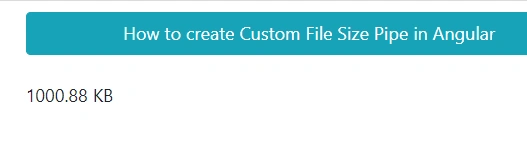
Now run the application using npm start and check the result.
Summary
In this article, we learned how to create a custom file size pipe which use to Converts a file size into bytes to human-readable format.
Join the conversation! Your thoughts help the community grow.