

Introduction
In this article, I will explain how to call ASP.NET web API in your Angular project step by step. You need to enable CORS in your web API and fetch data from web API. It is easy to call API in Angular.
Step 1
- CREATE TABLE [dbo].[Employee](
- [Employee_Id] [int] IDENTITY(1,1) NOT NULL,
- [First_Name] [nvarchar](50) NULL,
- [Last_Name] [nvarchar](50) NULL,
- [Salary] [money] NULL,
- [Joing_Date] [nvarchar](50) NULL,
- [Department] [nvarchar](50) NULL,
- CONSTRAINT [PK_Employee] PRIMARY KEY CLUSTERED
- (
- [Employee_Id] ASC
- )WITH (PAD_INDEX = OFF, STATISTICS_NORECOMPUTE = OFF, IGNORE_DUP_KEY = OFF, ALLOW_ROW_LOCKS = ON, ALLOW_PAGE_LOCKS = ON) ON [PRIMARY]
- ) ON [PRIMARY]
- GO
Step 2
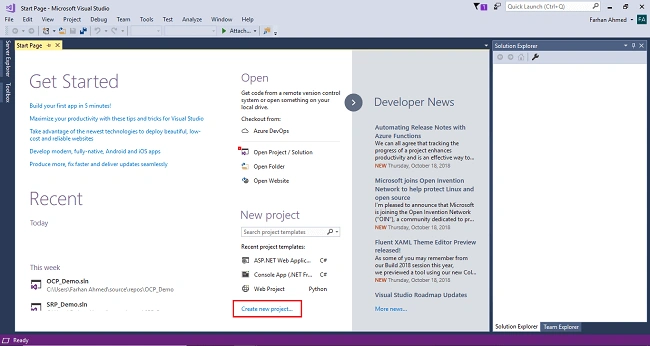
After clicking on New Project, one window will appear. Select Web from the left panel, choose ASP.NET Web Application, give a meaningful name to your project, and then click on OK as shown in the below screenshot.
Screenshot for creating new project 2
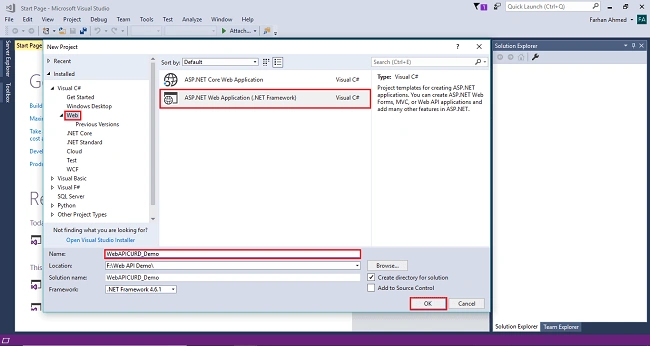
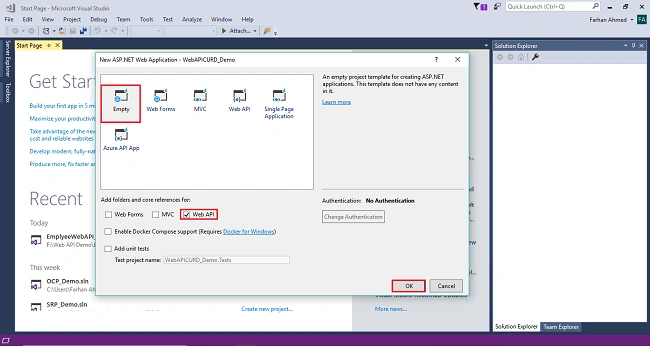
After clicking on OK one more window will appear; choose empty, check on empty Web API checkbox then click on OK as shown in the below screenshot.
Screenshot for creating new project 3
After clicking OK, the project will be created with the name of WebAPICRUD_Demo.
Step 3
Screenshot for adding entity framework 1
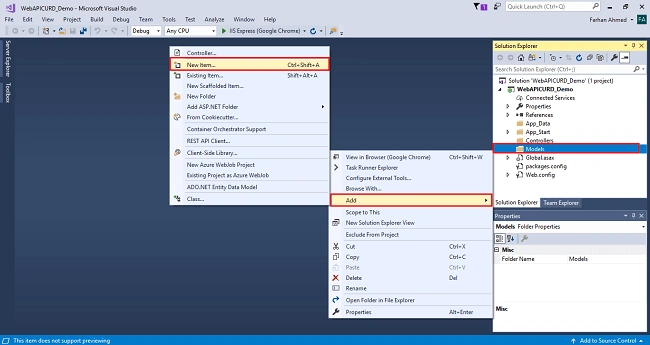
After clicking on a New item, you will get a window; from there, select Data from the left panel and choose ADO.NET Entity Data Model, give it the name MyModel (this name is not mandatory you can give any name) and click on Add.
Screenshot for adding entity framework 2
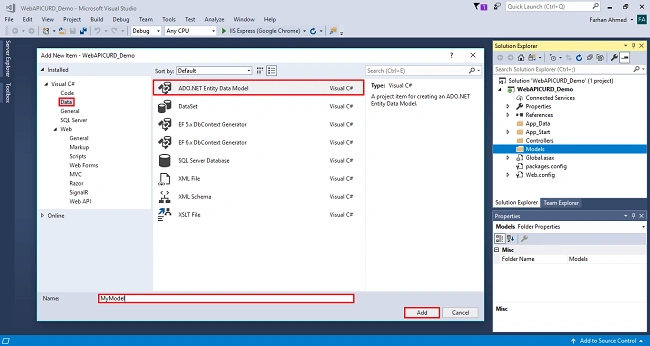
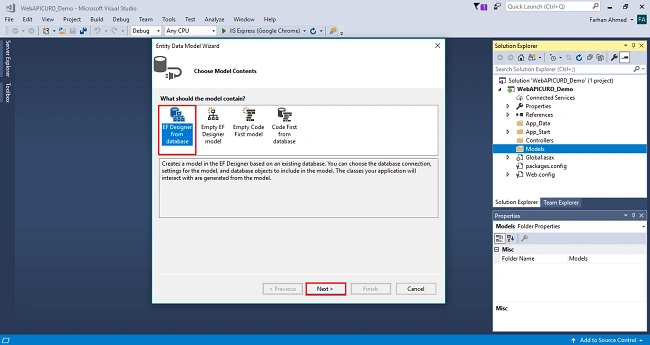
After you click on "Add a window", the wizard will open, choose EF Designer from the database and click Next.
Screenshot for adding entity framework 3
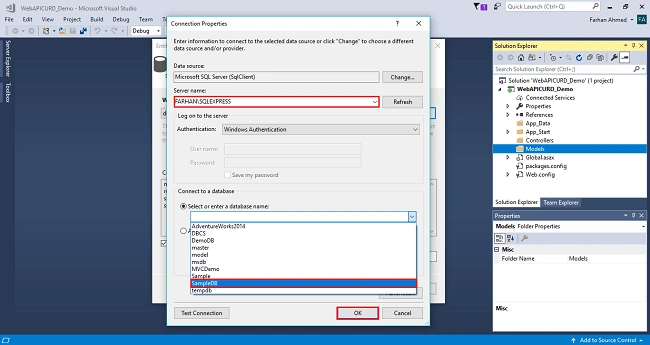
After clicking on Next a window will appear. Choose New Connection. Another window will appear, add your server name if it is local then enter a dot (.). Choose your database and click on OK.
Screenshot for adding entity framework 4
The connection will be added. If you wish to save connect as you want. You can change the name of your connection below. It will save connection in web config then click on Next.
Screenshot for adding entity framework 5
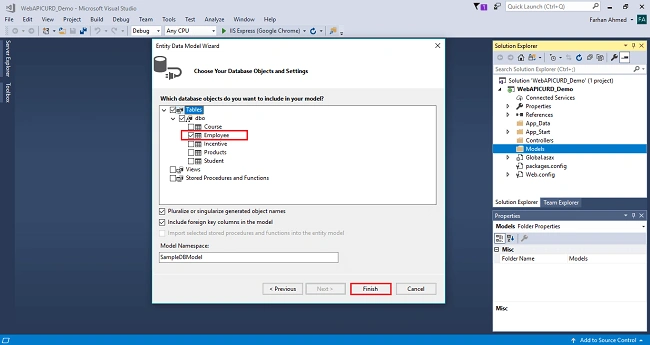
After clicking on NEXT another window will appear to choose database table name as shown in the below screenshot then click on Finish.
Entity framework will be added and the respective class gets generated under the Models folder.
Screenshot for adding entity framework 6
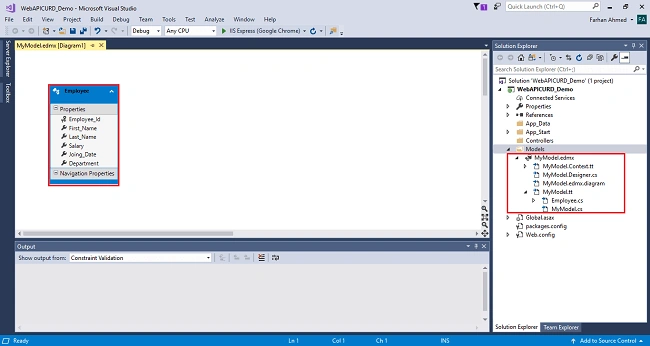
Following class will be added,
- namespace WebAPICURD_Demo.Models
- {
- using System;
- using System.Collections.Generic;
- public partial class Employee
- {
- public int Employee_Id { get; set; }
- public string First_Name { get; set; }
- public string Last_Name { get; set; }
- public Nullable<decimal> Salary { get; set; }
- public string Joing_Date { get; set; }
- public string Department { get; set; }
- }
- }
Step 4
Screenshot 1
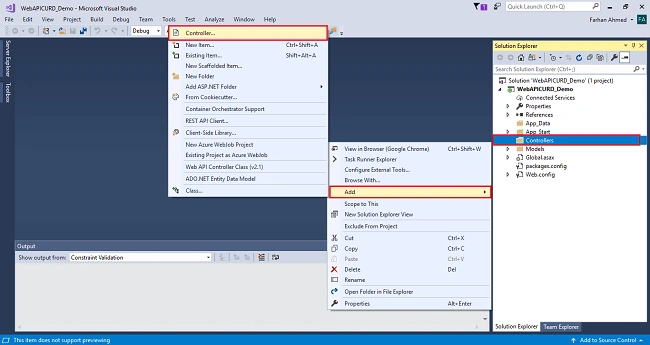
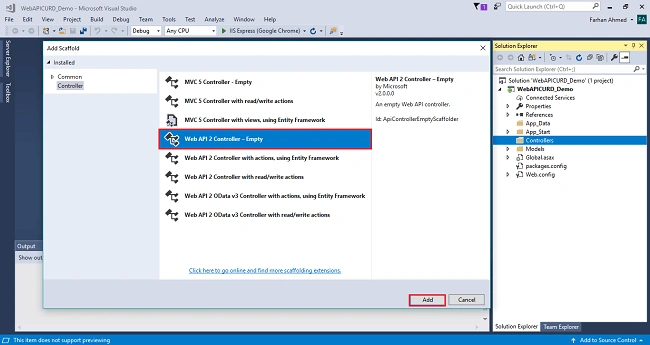
After clicking on the controller a window will appear to choose Web API 2 Controller-Empty, click on Add.
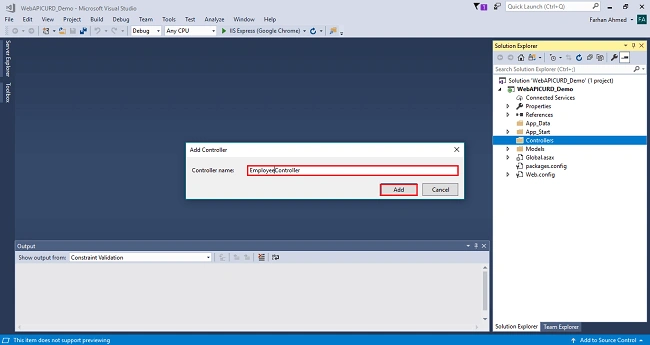
After clicking on Add, another window will appear with DefaultController. Change the name to EmployeeController then click on Add. EmployeeController will be added under Controllers folder. Remember don’t change the Controller suffix for all controllers, change only highlight, and instead of Default just change Home as shown in the below screenshot.
Complete code for controller
- using System;
- using System.Collections.Generic;
- using System.Linq;
- using System.Net;
- using System.Net.Http;
- using System.Web.Http;
- using WebAPICURD_Demo.Models;
- namespace WebAPICURD_Demo.Controllers
- {
- public class EmployeeController : ApiController
- {
- private EmployeeEntities _db;
- public EmployeeController()
- {
- _db =new EmployeeEntities();
- }
- public IEnumerable<Employee> GetEmployees()
- {
- return _db.Employees.ToList();
- }
- }
- }
Step 5
- Install-Package Microsoft.AspNet.WebApi.Cors
This command installs the latest package and updates all dependencies, including the core Web API libraries.
Step 6
Add namespace
- using System.Web.Http.Cors;
Add the following line of code,
- EnableCorsAttribute cors = new EnableCorsAttribute("*","*","*");
- config.EnableCors(cors);
Complete WebApiConfig.cs file code
- using System;
- using System.Collections.Generic;
- using System.Linq;
- using System.Web.Http;
- using System.Web.Http.Cors;
- namespace WebAPICURD_Demo
- {
- public static class WebApiConfig
- {
- public static void Register(HttpConfiguration config)
- {
- // Web API configuration and services
- // Web API routes
- config.MapHttpAttributeRoutes();
- config.Routes.MapHttpRoute(
- name: "DefaultApi",
- routeTemplate: "api/{controller}/{id}",
- defaults: new { id = RouteParameter.Optional }
- );
- EnableCorsAttribute cors = new EnableCorsAttribute("*","*","*");
- config.EnableCors(cors);
- }
- }
- }
Step 6
- ng new MyDemo
Compile your project
- cd MyDemo
Open your project in the browser,
- ng serve --open
Step 7
- npm install bootstrap –save
- @import 'node_modules/bootstrap/dist/css/bootstrap.min.css';
Step 8
- ng g c employee-list
Step 9
- import { BrowserModule } from '@angular/platform-browser';
- import { NgModule } from '@angular/core';
- import {HttpClientModule, HttpClient} from '@angular/common/http';
- import { AppComponent } from './app.component';
- import { from } from 'rxjs';
- import { EmployeeListComponent } from './employee-list/employee-list.component';
- @NgModule({
- declarations: [
- AppComponent,
- EmployeeListComponent
- ],
- imports: [
- BrowserModule,
- HttpClientModule
- ],
- providers: [],
- bootstrap: [AppComponent]
- })
- export class AppModule { }
Step 10
- import { HttpClientModule, HttpClient } from '@angular/common/http';
- import { Component, OnInit } from '@angular/core';
- @Component({
- selector: 'app-employee-list',
- templateUrl: './employee-list.component.html',
- styleUrls: ['./employee-list.component.css']
- })
- export class EmployeeListComponent implements OnInit {
- constructor(private httpService: HttpClient) { }
- employees: string[];
- ngOnInit() {
- this.httpService.get('http://localhost:52202/api/employee').subscribe(
- data => {
- this.employees = data as string [];
- }
- );
- }
- }
Step 11
- <div class="container py-5">
- <h3 class="text-center text-uppercase">List of Employees</h3>
- <table class="table table-bordered table-striped">
- <thead>
- <tr class="text-center text-uppercase">
- <th>Employee ID</th>
- <th>First Name</th>
- <th>Last Name</th>
- <th>Salary</th>
- <th>Joining Date</th>
- <th>Department</th>
- </tr>
- </thead>
- <tbody>
- <tr *ngFor="let emp of employees">
- <td>{{emp.Employee_Id}}</td>
- <td>{{emp.First_Name}}</td>
- <td>{{emp.Last_Name}}</td>
- <td>{{emp.Salary}}</td>
- <td>{{emp.Joing_Date}}</td>
- <td>{{emp.Department}}</td>
- </tr>
- </tbody>
- </table>
- </div>
Step 12
- <app-employee-list></app-employee-list>
Step 13
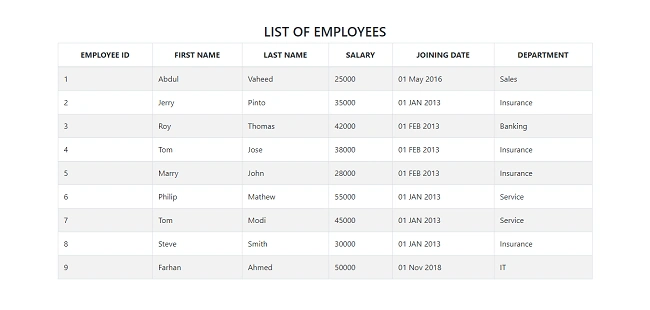
Output
Guilherme FortesPosted Oct 19, 2023, 6:49 AM
Can anyone help me with angular
Deepali DubalPosted Aug 17, 2020, 1:51 AM
Below error i am facing such as "CS0246 The type or namespace name 'EmployeeEntities' could not be found (are you missing a using directive or an assembly reference?) WebAPICRUD_Demo"
Harish MechPosted Jul 23, 2020, 6:54 AM
Cros package is not installing in my visual studio please help
Mordechay TalPosted Mar 19, 2020, 10:16 AM
Why you wrote: this.employees = data as string []; and not just handling json object?
Siddharth Ashok PatroPosted Dec 9, 2019, 2:09 PM
Return _db.Employees.ToList(); What is the Employees coming from ?
Rahul MPosted Oct 25, 2019, 9:26 AM
Exactly what is this "EmployeeEntities _db"?
anu jaPosted Oct 18, 2019, 1:59 AM
On Employee controller it is showing error on EmployeeEntities. how to clear error
Aigerim IskakovaPosted Sep 25, 2019, 7:38 AM
Farhan Ahmed, can you please explain me what does this part of code is doing ngOnInit() { this.httpService.get('http://localhost:52202/api/employee').subscribe( data => { this.employees = data as string[]; } ); I have errors in reading http://localhost:52202/api/employee
kiranmai tPosted Jul 26, 2019, 7:34 AM
Can you pls explain how routing will be done with this?
kiranmai tPosted Jul 26, 2019, 7:33 AM
How the routing and dataflow will done ? we written code in both VS CODE and VS, the how to run the application ?
Anu RadhaPosted Mar 21, 2019, 10:39 PM
ON Employee controller it is showing error on EmployeeEntities. the type or namespace EmployeeEntities could not be found
Akhilesh TripathiPosted Jan 18, 2019, 5:41 AM
Well written article.
Hamid KhanPosted Nov 27, 2018, 1:37 AM
Nice Explanation...…..