

Read part one of this article from the following link.
Introduction
Android is one of the most popular operating systems for mobiles. In this article, I will show you how to detect a face with the help of Microsoft Face API.
Requirements
- Android Studio
- Little knowledge of XML and Java
- Android Emulator (or) Android mobile
- Stable internet connection
Step 1
Go to the activity_main.xml file and click the text button. This XML file contains the designing code for the Android app. In activity_main.xml, copy and paste the below code.
Activity_main.xml code
- <LinearLayout xmlns:android="http://schemas.android.com/apk/res/android"
- xmlns:tools="http://schemas.android.com/tools" android:layout_width="match_parent"
- android:layout_height="match_parent" android:paddingLeft="@dimen/activity_horizontal_margin"
- android:paddingRight="@dimen/activity_horizontal_margin"
- android:paddingTop="@dimen/activity_vertical_margin"
- android:paddingBottom="@dimen/activity_vertical_margin"
- android:orientation="vertical"
- tools:context=".ui.MainActivity">
- <LinearLayout
- android:layout_width="match_parent"
- android:layout_height="0dp"
- android:layout_weight="1"
- android:orientation="horizontal"
- android:layout_marginBottom="@dimen/view_margin" >
- <ScrollView
- android:layout_width="0dp"
- android:layout_weight="1"
- android:layout_height="match_parent" >
- <TextView
- android:layout_width="match_parent"
- android:layout_height="wrap_content"
- android:layout_gravity="center_vertical"
- android:gravity="center_vertical"
- android:text="@string/detection_description" />
- </ScrollView>
- <Button
- android:layout_width="0dp"
- android:layout_height="wrap_content"
- android:layout_gravity="center"
- android:text="@string/detection"
- android:layout_weight="1"
- android:layout_marginLeft="@dimen/view_margin"
- android:layout_marginStart="@dimen/view_margin"
- android:onClick="detection"
- style="@style/ButtonStyle" />
- </LinearLayout>
- </LinearLayout>
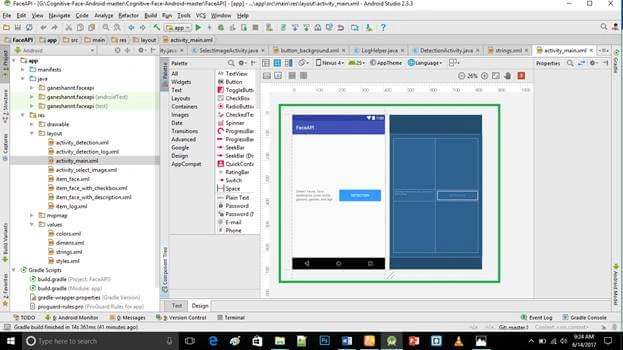
Create a new activity_detection.xml file (File ⇒ New ⇒Activity⇒Empty_activity).
Go to activity_detection.xml, and click the text button. This XML file contains the designing code for Android app. In activity_detection.xml, copy and paste the below code.
activity_detection.xml code
- <RelativeLayout xmlns:android="http://schemas.android.com/apk/res/android"
- xmlns:tools="http://schemas.android.com/tools" android:layout_width="match_parent"
- android:layout_height="match_parent" android:paddingLeft="@dimen/activity_horizontal_margin"
- android:paddingRight="@dimen/activity_horizontal_margin"
- android:paddingTop="@dimen/activity_vertical_margin"
- android:paddingBottom="@dimen/activity_vertical_margin"
- tools:context="ganeshannt.faceapi.ui.DetectionActivity">
- <LinearLayout
- android:layout_width="match_parent"
- android:layout_height="match_parent"
- android:layout_alignParentTop="true"
- android:layout_marginBottom="@dimen/view_margin"
- android:baselineAligned="false"
- android:orientation="vertical" >
- <RelativeLayout
- android:layout_width="match_parent"
- android:layout_height="0dp"
- android:layout_weight="1"
- android:layout_marginBottom="@dimen/view_margin">
- <RelativeLayout
- android:id="@+id/image_control"
- android:layout_width="100dp"
- android:layout_height="match_parent"
- android:layout_marginRight="@dimen/view_margin"
- android:layout_marginEnd="@dimen/view_margin" >
- <TextView
- android:layout_width="wrap_content"
- android:layout_height="wrap_content"
- android:layout_alignParentTop="true"
- android:layout_alignParentLeft="true"
- android:layout_alignParentStart="true"
- android:text="@string/image" />
- <Button
- android:id="@+id/select_image"
- android:layout_width="match_parent"
- android:layout_height="wrap_content"
- android:layout_centerVertical="true"
- android:layout_alignParentLeft="true"
- android:layout_alignParentStart="true"
- android:text="@string/select_image"
- android:onClick="selectImage"
- style="@style/ButtonStyle" />
- </RelativeLayout>
- <ImageView
- android:id="@id/image"
- android:layout_width="match_parent"
- android:layout_height="match_parent"
- android:layout_toRightOf="@id/image_control"
- android:layout_toEndOf="@id/image_control"
- android:background="#E0E0E0"
- android:contentDescription="@string/detection" />
- </RelativeLayout>
- <TextView
- android:layout_width="wrap_content"
- android:layout_height="wrap_content"
- android:text="@string/result" />
- <ListView
- android:id="@+id/list_detected_faces"
- android:layout_width="match_parent"
- android:layout_height="0dp"
- android:layout_weight="1"
- android:background="#E0E0E0"
- android:verticalSpacing="@dimen/view_margin" />
- </LinearLayout>
- <TextView
- android:id="@+id/info"
- android:layout_width="wrap_content"
- android:layout_height="wrap_content"
- android:layout_centerHorizontal="true"
- android:layout_above="@+id/button_bar"
- android:layout_gravity="center" />
- <LinearLayout
- android:id="@+id/button_bar"
- android:layout_width="match_parent"
- android:layout_height="wrap_content"
- android:layout_alignParentBottom="true"
- android:orientation="horizontal" >
- <Button
- android:id="@+id/detect"
- android:layout_width="0dp"
- android:layout_height="match_parent"
- android:layout_weight="1"
- android:layout_marginRight="@dimen/view_margin"
- android:layout_marginEnd="@dimen/view_margin"
- android:text="@string/detect"
- android:onClick="detect"
- style="@style/ButtonStyle" />
- <Button
- android:id="@+id/view_log"
- android:layout_width="0dp"
- android:layout_height="match_parent"
- android:layout_weight="1"
- android:text="@string/view_log"
- android:background="@drawable/button_background"
- android:onClick="viewLog"
- style="@style/ButtonStyle" />
- </LinearLayout>
- </RelativeLayout>
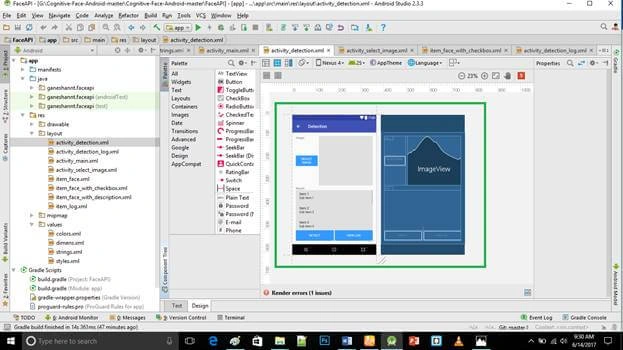
Create new activity_select_image.xml file (File ⇒ New ⇒Activity⇒Empty_activity).
Go to activity_select_image.xml and click the text bottom. In activity_select_image.xml, copy and paste the below code.
activity_select_image.xml code
- <LinearLayout xmlns:android="http://schemas.android.com/apk/res/android"
- xmlns:tools="http://schemas.android.com/tools"
- android:layout_width="match_parent"
- android:layout_height="match_parent"
- android:paddingLeft="@dimen/activity_horizontal_margin"
- android:paddingRight="@dimen/activity_horizontal_margin"
- android:paddingTop="@dimen/activity_vertical_margin"
- android:paddingBottom="@dimen/activity_vertical_margin"
- android:baselineAligned="false"
- android:orientation="vertical"
- tools:context="ganeshannt.faceapi.ui.SelectImageActivity">
- <RelativeLayout android:layout_width="match_parent"
- android:layout_height="match_parent"
- android:layout_weight="2">
- <Button
- android:id="@+id/button_take_a_photo"
- android:layout_width="match_parent"
- android:layout_height="wrap_content"
- android:text="@string/take_photo"
- android:layout_centerHorizontal="true"
- android:layout_alignParentBottom="true"
- android:onClick="takePhoto"
- style="@style/ButtonStyle" />
- <TextView
- android:id="@id/info"
- android:layout_width="wrap_content"
- android:layout_height="wrap_content"
- android:layout_centerHorizontal="true"
- android:layout_above="@id/button_take_a_photo"
- android:layout_gravity="center" />
- </RelativeLayout>
- <RelativeLayout android:layout_width="match_parent"
- android:layout_height="match_parent"
- android:layout_weight="1">
- <Button
- android:id="@+id/button_select_a_photo_in_album"
- android:layout_width="match_parent"
- android:layout_height="wrap_content"
- android:text="@string/select_image_in_album"
- android:layout_centerHorizontal="true"
- android:layout_centerVertical="true"
- android:onClick="selectImageInAlbum"
- style="@style/ButtonStyle" />
- </RelativeLayout>
- </LinearLayout>
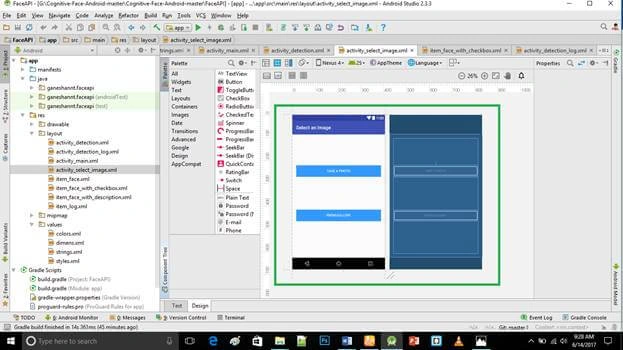
Create a new item_face_with_description.xml file (File ⇒ New ⇒Activity⇒Empty_activity).
Go to item_face_with_description.xml, then click the text bottom. In item_face_with_description.xml, copy and paste the below code.
item_face_with_description.xml code
- <LinearLayout xmlns:android="http://schemas.android.com/apk/res/android"
- android:orientation="horizontal"
- android:layout_width="match_parent"
- android:layout_height="wrap_content">
- <ImageView
- android:id="@+id/face_thumbnail"
- android:layout_width="80dp"
- android:layout_height="80dp" />
- <TextView
- android:layout_width="wrap_content"
- android:layout_height="wrap_content"
- android:layout_gravity="center_vertical"
- android:layout_marginLeft="@dimen/view_margin"
- android:layout_marginStart="@dimen/view_margin"
- android:id="@+id/text_detected_face" />
- </LinearLayout>
- package ganeshannt.faceapi.ui;
- import android.app.AlertDialog;
- import android.content.Intent;
- import android.os.Bundle;
- import android.support.v7.app.AppCompatActivity;
- import android.view.View;
- import ganeshannt.faceapi.R;
- public class MainActivity extends AppCompatActivity {
- @Override
- protected void onCreate(Bundle savedInstanceState) {
- super.onCreate(savedInstanceState);
- setContentView(R.layout.activity_main);
- if (getString(R.string.subscription_key).startsWith("Please")) {
- new AlertDialog.Builder(this)
- .setTitle(getString(R.string.add_subscription_key_tip_title))
- .setMessage(getString(R.string.add_subscription_key_tip))
- .setCancelable(false)
- .show();
- }
- }
- public void detection(View view) {
- Intent intent = new Intent(this, DetectionActivity.class);
- startActivity(intent);
- }
- }
Step 6
Create three (name : helper , log , ui) Android package folders (java->>new->>folder->>package folder).
Step 7
In the helper folder, create a file (class name: embeddedgridview,Imagehelper,storagehelper ) (File ⇒ New ⇒Java class).
In EmbeddedGridView.java, copy and paste the below code. Do not replace your package name otherwise app will not run.
EmbeddedGridView.java code
- package ganeshannt.faceapi.helper;
- import android.content.Context;
- import android.util.AttributeSet;
- import android.widget.GridView;
- public class EmbeddedGridView extends GridView {
- public EmbeddedGridView(Context context, AttributeSet attrs) {
- super(context, attrs);
- }
- @Override
- protected void onMeasure(int widthMeasureSpec, int heightMeasureSpec) {
- int newHeightMeasureSpec =
- MeasureSpec.makeMeasureSpec(MEASURED_SIZE_MASK, MeasureSpec.AT_MOST);
- super.onMeasure(widthMeasureSpec, newHeightMeasureSpec);
- getLayoutParams().height = getMeasuredHeight();
- }
- }
- package ganeshannt.faceapi.helper;
- import android.content.ContentResolver;
- import android.database.Cursor;
- import android.graphics.Bitmap;
- import android.graphics.BitmapFactory;
- import android.graphics.Canvas;
- import android.graphics.Color;
- import android.graphics.Matrix;
- import android.graphics.Paint;
- import android.graphics.Rect;
- import android.media.ExifInterface;
- import android.net.Uri;
- import android.provider.MediaStore;
- import com.microsoft.projectoxford.face.contract.Face;
- import com.microsoft.projectoxford.face.contract.FaceRectangle;
- import java.io.IOException;
- import java.io.InputStream;
- /**
- * Defined several functions to load, draw, save, resize, and rotate images.
- */
- public class ImageHelper {
- // The maximum side length of the image to detect, to keep the size of image less than 4MB.
- // Resize the image if its side length is larger than the maximum.
- private static final int IMAGE_MAX_SIDE_LENGTH = 1280;
- // Ratio to scale a detected face rectangle, the face rectangle scaled up looks more natural.
- private static final double FACE_RECT_SCALE_RATIO = 1.3;
- // Decode image from imageUri, and resize according to the expectedMaxImageSideLength
- // If expectedMaxImageSideLength is
- // (1) less than or equal to 0,
- // (2) more than the actual max size length of the bitmap
- // then return the original bitmap
- // Else, return the scaled bitmap
- public static Bitmap loadSizeLimitedBitmapFromUri(
- Uri imageUri,
- ContentResolver contentResolver) {
- try {
- // Load the image into InputStream.
- InputStream imageInputStream = contentResolver.openInputStream(imageUri);
- // For saving memory, only decode the image meta and get the side length.
- BitmapFactory.Options options = new BitmapFactory.Options();
- options.inJustDecodeBounds = true;
- Rect outPadding = new Rect();
- BitmapFactory.decodeStream(imageInputStream, outPadding, options);
- // Calculate shrink rate when loading the image into memory.
- int maxSideLength =
- options.outWidth > options.outHeight ? options.outWidth: options.outHeight;
- options.inSampleSize = 1;
- options.inSampleSize = calculateSampleSize(maxSideLength, IMAGE_MAX_SIDE_LENGTH);
- options.inJustDecodeBounds = false;
- if (imageInputStream != null) {
- imageInputStream.close();
- }
- // Load the bitmap and resize it to the expected size length
- imageInputStream = contentResolver.openInputStream(imageUri);
- Bitmap bitmap = BitmapFactory.decodeStream(imageInputStream, outPadding, options);
- maxSideLength = bitmap.getWidth() > bitmap.getHeight()
- ? bitmap.getWidth(): bitmap.getHeight();
- double ratio = IMAGE_MAX_SIDE_LENGTH / (double) maxSideLength;
- if (ratio < 1) {
- bitmap = Bitmap.createScaledBitmap(
- bitmap,
- (int)(bitmap.getWidth() * ratio),
- (int)(bitmap.getHeight() * ratio),
- false);
- }
- return rotateBitmap(bitmap, getImageRotationAngle(imageUri, contentResolver));
- } catch (Exception e) {
- return null;
- }
- }
- // Draw detected face rectangles in the original image. And return the image drawn.
- // If drawLandmarks is set to be true, draw the five main landmarks of each face.
- public static Bitmap drawFaceRectanglesOnBitmap(
- Bitmap originalBitmap, Face[] faces, boolean drawLandmarks) {
- Bitmap bitmap = originalBitmap.copy(Bitmap.Config.ARGB_8888, true);
- Canvas canvas = new Canvas(bitmap);
- Paint paint = new Paint();
- paint.setAntiAlias(true);
- paint.setStyle(Paint.Style.STROKE);
- paint.setColor(Color.GREEN);
- int stokeWidth = Math.max(originalBitmap.getWidth(), originalBitmap.getHeight()) / 100;
- if (stokeWidth == 0) {
- stokeWidth = 1;
- }
- paint.setStrokeWidth(stokeWidth);
- if (faces != null) {
- for (Face face : faces) {
- FaceRectangle faceRectangle =
- calculateFaceRectangle(bitmap, face.faceRectangle, FACE_RECT_SCALE_RATIO);
- canvas.drawRect(
- faceRectangle.left,
- faceRectangle.top,
- faceRectangle.left + faceRectangle.width,
- faceRectangle.top + faceRectangle.height,
- paint);
- if (drawLandmarks) {
- int radius = face.faceRectangle.width / 30;
- if (radius == 0) {
- radius = 1;
- }
- paint.setStyle(Paint.Style.FILL);
- paint.setStrokeWidth(radius);
- canvas.drawCircle(
- (float) face.faceLandmarks.pupilLeft.x,
- (float) face.faceLandmarks.pupilLeft.y,
- radius,
- paint);
- canvas.drawCircle(
- (float) face.faceLandmarks.pupilRight.x,
- (float) face.faceLandmarks.pupilRight.y,
- radius,
- paint);
- canvas.drawCircle(
- (float) face.faceLandmarks.noseTip.x,
- (float) face.faceLandmarks.noseTip.y,
- radius,
- paint);
- canvas.drawCircle(
- (float) face.faceLandmarks.mouthLeft.x,
- (float) face.faceLandmarks.mouthLeft.y,
- radius,
- paint);
- canvas.drawCircle(
- (float) face.faceLandmarks.mouthRight.x,
- (float) face.faceLandmarks.mouthRight.y,
- radius,
- paint);
- paint.setStyle(Paint.Style.STROKE);
- paint.setStrokeWidth(stokeWidth);
- }
- }
- }
- return bitmap;
- }
- // Highlight the selected face thumbnail in face list.
- public static Bitmap highlightSelectedFaceThumbnail(Bitmap originalBitmap) {
- Bitmap bitmap = originalBitmap.copy(Bitmap.Config.ARGB_8888, true);
- Canvas canvas = new Canvas(bitmap);
- Paint paint = new Paint();
- paint.setAntiAlias(true);
- paint.setStyle(Paint.Style.STROKE);
- paint.setColor(Color.parseColor("#3399FF"));
- int stokeWidth = Math.max(originalBitmap.getWidth(), originalBitmap.getHeight()) / 10;
- if (stokeWidth == 0) {
- stokeWidth = 1;
- }
- bitmap.getWidth();
- paint.setStrokeWidth(stokeWidth);
- canvas.drawRect(
- 0,
- 0,
- bitmap.getWidth(),
- bitmap.getHeight(),
- paint);
- return bitmap;
- }
- // Crop the face thumbnail out from the original image.
- // For better view for human, face rectangles are resized to the rate faceRectEnlargeRatio.
- public static Bitmap generateFaceThumbnail(
- Bitmap originalBitmap,
- FaceRectangle faceRectangle) throws IOException {
- FaceRectangle faceRect =
- calculateFaceRectangle(originalBitmap, faceRectangle, FACE_RECT_SCALE_RATIO);
- return Bitmap.createBitmap(
- originalBitmap, faceRect.left, faceRect.top, faceRect.width, faceRect.height);
- }
- // Return the number of times for the image to shrink when loading it into memory.
- // The SampleSize can only be a final value based on powers of 2.
- private static int calculateSampleSize(int maxSideLength, int expectedMaxImageSideLength) {
- int inSampleSize = 1;
- while (maxSideLength > 2 * expectedMaxImageSideLength) {
- maxSideLength /= 2;
- inSampleSize *= 2;
- }
- return inSampleSize;
- }
- // Get the rotation angle of the image taken.
- private static int getImageRotationAngle(
- Uri imageUri, ContentResolver contentResolver) throws IOException {
- int angle = 0;
- Cursor cursor = contentResolver.query(imageUri,
- new String[] { MediaStore.Images.ImageColumns.ORIENTATION }, null, null, null);
- if (cursor != null) {
- if (cursor.getCount() == 1) {
- cursor.moveToFirst();
- angle = cursor.getInt(0);
- }
- cursor.close();
- } else {
- ExifInterface exif = new ExifInterface(imageUri.getPath());
- int orientation = exif.getAttributeInt(
- ExifInterface.TAG_ORIENTATION, ExifInterface.ORIENTATION_NORMAL);
- switch (orientation) {
- case ExifInterface.ORIENTATION_ROTATE_270:
- angle = 270;
- break;
- case ExifInterface.ORIENTATION_ROTATE_180:
- angle = 180;
- break;
- case ExifInterface.ORIENTATION_ROTATE_90:
- angle = 90;
- break;
- default:
- break;
- }
- }
- return angle;
- }
- // Rotate the original bitmap according to the given orientation angle
- private static Bitmap rotateBitmap(Bitmap bitmap, int angle) {
- // If the rotate angle is 0, then return the original image, else return the rotated image
- if (angle != 0) {
- Matrix matrix = new Matrix();
- matrix.postRotate(angle);
- return Bitmap.createBitmap(
- bitmap, 0, 0, bitmap.getWidth(), bitmap.getHeight(), matrix, true);
- } else {
- return bitmap;
- }
- }
- // Resize face rectangle, for better view for human
- // To make the rectangle larger, faceRectEnlargeRatio should be larger than 1, recommend 1.3
- private static FaceRectangle calculateFaceRectangle(
- Bitmap bitmap, FaceRectangle faceRectangle, double faceRectEnlargeRatio) {
- // Get the resized side length of the face rectangle
- double sideLength = faceRectangle.width * faceRectEnlargeRatio;
- sideLength = Math.min(sideLength, bitmap.getWidth());
- sideLength = Math.min(sideLength, bitmap.getHeight());
- // Make the left edge to left more.
- double left = faceRectangle.left
- - faceRectangle.width * (faceRectEnlargeRatio - 1.0) * 0.5;
- left = Math.max(left, 0.0);
- left = Math.min(left, bitmap.getWidth() - sideLength);
- // Make the top edge to top more.
- double top = faceRectangle.top
- - faceRectangle.height * (faceRectEnlargeRatio - 1.0) * 0.5;
- top = Math.max(top, 0.0);
- top = Math.min(top, bitmap.getHeight() - sideLength);
- // Shift the top edge to top more, for better view for human
- double shiftTop = faceRectEnlargeRatio - 1.0;
- shiftTop = Math.max(shiftTop, 0.0);
- shiftTop = Math.min(shiftTop, 1.0);
- top -= 0.15 * shiftTop * faceRectangle.height;
- top = Math.max(top, 0.0);
- // Set the result.
- FaceRectangle result = new FaceRectangle();
- result.left = (int)left;
- result.top = (int)top;
- result.width = (int)sideLength;
- result.height = (int)sideLength;
- return result;
- }
- }
- package ganeshannt.faceapi.helper;
- import android.content.Context;
- import android.content.SharedPreferences;
- import java.util.HashSet;
- import java.util.List;
- import java.util.Set;
- /**
- * Defined several functions to manage local storage.
- */
- public class StorageHelper {
- public static Set<String> getAllPersonGroupIds(Context context) {
- SharedPreferences personGroupIdSet =
- context.getSharedPreferences("PersonGroupIdSet", Context.MODE_PRIVATE);
- return personGroupIdSet.getStringSet("PersonGroupIdSet", new HashSet<String>());
- }
- public static String getPersonGroupName(String personGroupId, Context context) {
- SharedPreferences personGroupIdNameMap =
- context.getSharedPreferences("PersonGroupIdNameMap", Context.MODE_PRIVATE);
- return personGroupIdNameMap.getString(personGroupId, "");
- }
- public static void setPersonGroupName(String personGroupIdToAdd, String personGroupName, Context context) {
- SharedPreferences personGroupIdNameMap =
- context.getSharedPreferences("PersonGroupIdNameMap", Context.MODE_PRIVATE);
- SharedPreferences.Editor personGroupIdNameMapEditor = personGroupIdNameMap.edit();
- personGroupIdNameMapEditor.putString(personGroupIdToAdd, personGroupName);
- personGroupIdNameMapEditor.commit();
- Set<String> personGroupIds = getAllPersonGroupIds(context);
- Set<String> newPersonGroupIds = new HashSet<>();
- for (String personGroupId: personGroupIds) {
- newPersonGroupIds.add(personGroupId);
- }
- newPersonGroupIds.add(personGroupIdToAdd);
- SharedPreferences personGroupIdSet =
- context.getSharedPreferences("PersonGroupIdSet", Context.MODE_PRIVATE);
- SharedPreferences.Editor personGroupIdSetEditor = personGroupIdSet.edit();
- personGroupIdSetEditor.putStringSet("PersonGroupIdSet", newPersonGroupIds);
- personGroupIdSetEditor.commit();
- }
- public static void deletePersonGroups(List<String> personGroupIdsToDelete, Context context) {
- SharedPreferences personGroupIdNameMap =
- context.getSharedPreferences("PersonGroupIdNameMap", Context.MODE_PRIVATE);
- SharedPreferences.Editor personGroupIdNameMapEditor = personGroupIdNameMap.edit();
- for (String personGroupId: personGroupIdsToDelete) {
- personGroupIdNameMapEditor.remove(personGroupId);
- }
- personGroupIdNameMapEditor.commit();
- Set<String> personGroupIds = getAllPersonGroupIds(context);
- Set<String> newPersonGroupIds = new HashSet<>();
- for (String personGroupId: personGroupIds) {
- if (!personGroupIdsToDelete.contains(personGroupId)) {
- newPersonGroupIds.add(personGroupId);
- }
- }
- SharedPreferences personGroupIdSet =
- context.getSharedPreferences("PersonGroupIdSet", Context.MODE_PRIVATE);
- SharedPreferences.Editor personGroupIdSetEditor = personGroupIdSet.edit();
- personGroupIdSetEditor.putStringSet("PersonGroupIdSet", newPersonGroupIds);
- personGroupIdSetEditor.commit();
- }
- public static Set<String> getAllPersonIds(String personGroupId, Context context) {
- SharedPreferences personIdSet =
- context.getSharedPreferences(personGroupId + "PersonIdSet", Context.MODE_PRIVATE);
- return personIdSet.getStringSet("PersonIdSet", new HashSet<String>());
- }
- public static String getPersonName(String personId, String personGroupId, Context context) {
- SharedPreferences personIdNameMap =
- context.getSharedPreferences(personGroupId + "PersonIdNameMap", Context.MODE_PRIVATE);
- return personIdNameMap.getString(personId, "");
- }
- public static void setPersonName(String personIdToAdd, String personName, String personGroupId, Context context) {
- SharedPreferences personIdNameMap =
- context.getSharedPreferences(personGroupId + "PersonIdNameMap", Context.MODE_PRIVATE);
- SharedPreferences.Editor personIdNameMapEditor = personIdNameMap.edit();
- personIdNameMapEditor.putString(personIdToAdd, personName);
- personIdNameMapEditor.commit();
- Set<String> personIds = getAllPersonIds(personGroupId, context);
- Set<String> newPersonIds = new HashSet<>();
- for (String personId: personIds) {
- newPersonIds.add(personId);
- }
- newPersonIds.add(personIdToAdd);
- SharedPreferences personIdSet =
- context.getSharedPreferences(personGroupId + "PersonIdSet", Context.MODE_PRIVATE);
- SharedPreferences.Editor personIdSetEditor = personIdSet.edit();
- personIdSetEditor.putStringSet("PersonIdSet", newPersonIds);
- personIdSetEditor.commit();
- }
- public static void deletePersons(List<String> personIdsToDelete, String personGroupId, Context context) {
- SharedPreferences personIdNameMap =
- context.getSharedPreferences(personGroupId + "PersonIdNameMap", Context.MODE_PRIVATE);
- SharedPreferences.Editor personIdNameMapEditor = personIdNameMap.edit();
- for (String personId: personIdsToDelete) {
- personIdNameMapEditor.remove(personId);
- }
- personIdNameMapEditor.commit();
- Set<String> personIds = getAllPersonIds(personGroupId, context);
- Set<String> newPersonIds = new HashSet<>();
- for (String personId: personIds) {
- if (!personIdsToDelete.contains(personId)) {
- newPersonIds.add(personId);
- }
- }
- SharedPreferences personIdSet =
- context.getSharedPreferences(personGroupId + "PersonIdSet", Context.MODE_PRIVATE);
- SharedPreferences.Editor personIdSetEditor = personIdSet.edit();
- personIdSetEditor.putStringSet("PersonIdSet", newPersonIds);
- personIdSetEditor.commit();
- }
- public static Set<String> getAllFaceIds(String personId, Context context) {
- SharedPreferences faceIdSet =
- context.getSharedPreferences(personId + "FaceIdSet", Context.MODE_PRIVATE);
- return faceIdSet.getStringSet("FaceIdSet", new HashSet<String>());
- }
- public static String getFaceUri(String faceId, Context context) {
- SharedPreferences faceIdUriMap =
- context.getSharedPreferences("FaceIdUriMap", Context.MODE_PRIVATE);
- return faceIdUriMap.getString(faceId, "");
- }
- public static void setFaceUri(String faceIdToAdd, String faceUri, String personId, Context context) {
- SharedPreferences faceIdUriMap =
- context.getSharedPreferences("FaceIdUriMap", Context.MODE_PRIVATE);
- SharedPreferences.Editor faceIdUriMapEditor = faceIdUriMap.edit();
- faceIdUriMapEditor.putString(faceIdToAdd, faceUri);
- faceIdUriMapEditor.commit();
- Set<String> faceIds = getAllFaceIds(personId, context);
- Set<String> newFaceIds = new HashSet<>();
- for (String faceId: faceIds) {
- newFaceIds.add(faceId);
- }
- newFaceIds.add(faceIdToAdd);
- SharedPreferences faceIdSet =
- context.getSharedPreferences(personId + "FaceIdSet", Context.MODE_PRIVATE);
- SharedPreferences.Editor faceIdSetEditor = faceIdSet.edit();
- faceIdSetEditor.putStringSet("FaceIdSet", newFaceIds);
- faceIdSetEditor.commit();
- }
- public static void deleteFaces(List<String> faceIdsToDelete, String personId, Context context) {
- Set<String> faceIds = getAllFaceIds(personId, context);
- Set<String> newFaceIds = new HashSet<>();
- for (String faceId: faceIds) {
- if (!faceIdsToDelete.contains(faceId)) {
- newFaceIds.add(faceId);
- }
- }
- SharedPreferences faceIdSet =
- context.getSharedPreferences(personId + "FaceIdSet", Context.MODE_PRIVATE);
- SharedPreferences.Editor faceIdSetEditor = faceIdSet.edit();
- faceIdSetEditor.putStringSet("FaceIdSet", newFaceIds);
- faceIdSetEditor.commit();
- }
- }
Step 8
In log folder, create file(class name:DetectionLogActivity ) (File ⇒ New ⇒Java class).
In DetectionLogActivity.java, copy and paste the below code. Do not replace your package name otherwise, the app will not run.
DetectionLogActivity.java code
- package ganeshannt.faceapi.log;
- import android.content.Context;
- import android.os.Bundle;
- import android.support.v7.app.AppCompatActivity;
- import android.view.LayoutInflater;
- import android.view.View;
- import android.view.ViewGroup;
- import android.widget.BaseAdapter;
- import android.widget.ListView;
- import android.widget.TextView;
- import ganeshannt.faceapi.R;
- import ganeshannt.faceapi.helper.LogHelper;
- import java.util.List;
- public class DetectionLogActivity extends AppCompatActivity {
- @Override
- protected void onCreate(Bundle savedInstanceState) {
- super.onCreate(savedInstanceState);
- setContentView(R.layout.activity_detection_log);
- LogAdapter logAdapter = new LogAdapter();
- ListView listView = (ListView) findViewById(R.id.log);
- listView.setAdapter(logAdapter);
- }
- // The adapter of the ListView which contains the detection log.
- private class LogAdapter extends BaseAdapter {
- // The detection log.
- List<String> log;
- LogAdapter() {
- log = LogHelper.getDetectionLog();
- }
- @Override
- public boolean isEnabled(int position) {
- return false;
- }
- @Override
- public int getCount() {
- return log.size();
- }
- @Override
- public Object getItem(int position) {
- return log.get(position);
- }
- @Override
- public long getItemId(int position) {
- return position;
- }
- @Override
- public View getView(final int position, View convertView, ViewGroup parent) {
- if (convertView == null) {
- LayoutInflater layoutInflater =
- (LayoutInflater)getSystemService(Context.LAYOUT_INFLATER_SERVICE);
- convertView = layoutInflater.inflate(R.layout.item_log, parent, false);
- }
- convertView.setId(position);
- ((TextView)convertView.findViewById(R.id.log)).setText(log.get(position));
- return convertView;
- }
- }
- }
Step 9
In ui folder, create file (class name:DetectionActivity,Select-Image_Activity,MainActivity ) (File ⇒ New ⇒Java class).
In DetectionActivity.java, copy and paste the below code. Do not replace your package name otherwise, the app will not run.
DetectionActivity.java code
- package ganeshannt.faceapi.ui;
- import android.app.ProgressDialog;
- import android.content.Context;
- import android.content.Intent;
- import android.graphics.Bitmap;
- import android.net.Uri;
- import android.os.AsyncTask;
- import android.os.Bundle;
- import android.support.annotation.NonNull;
- import android.support.v7.app.AppCompatActivity;
- import android.text.TextUtils;
- import android.view.LayoutInflater;
- import android.view.View;
- import android.view.ViewGroup;
- import android.widget.BaseAdapter;
- import android.widget.Button;
- import android.widget.ImageView;
- import android.widget.ListView;
- import android.widget.TextView;
- import com.microsoft.projectoxford.face.FaceServiceClient;
- import com.microsoft.projectoxford.face.contract.Accessory;
- import com.microsoft.projectoxford.face.contract.Blur;
- import com.microsoft.projectoxford.face.contract.Emotion;
- import com.microsoft.projectoxford.face.contract.Exposure;
- import com.microsoft.projectoxford.face.contract.Face;
- import com.microsoft.projectoxford.face.contract.FacialHair;
- import com.microsoft.projectoxford.face.contract.Hair;
- import com.microsoft.projectoxford.face.contract.HeadPose;
- import com.microsoft.projectoxford.face.contract.Makeup;
- import com.microsoft.projectoxford.face.contract.Noise;
- import com.microsoft.projectoxford.face.contract.Occlusion;
- import ganeshannt.faceapi.R;
- import ganeshannt.faceapi.helper.ImageHelper;
- import ganeshannt.faceapi.helper.LogHelper;
- import ganeshannt.faceapi.helper.SampleApp;
- import ganeshannt.faceapi.log.DetectionLogActivity;
- import java.io.ByteArrayInputStream;
- import java.io.ByteArrayOutputStream;
- import java.io.IOException;
- import java.io.InputStream;
- import java.text.DecimalFormat;
- import java.util.ArrayList;
- import java.util.Arrays;
- import java.util.List;
- public class DetectionActivity extends AppCompatActivity {
- // Background task of face detection.
- private class DetectionTask extends AsyncTask<InputStream, String, Face[]> {
- private boolean mSucceed = true;
- @Override
- protected Face[] doInBackground(InputStream... params) {
- // Get an instance of face service client to detect faces in image.
- FaceServiceClient faceServiceClient = SampleApp.getFaceServiceClient();
- try {
- publishProgress("Detecting...");
- // Start detection.
- return faceServiceClient.detect(
- params[0], /* Input stream of image to detect */
- true, /* Whether to return face ID */
- true, /* Whether to return face landmarks */
- /* Which face attributes to analyze, currently we support:
- age,gender,headPose,smile,facialHair */
- new FaceServiceClient.FaceAttributeType[] {
- FaceServiceClient.FaceAttributeType.Age,
- FaceServiceClient.FaceAttributeType.Gender,
- FaceServiceClient.FaceAttributeType.Smile,
- FaceServiceClient.FaceAttributeType.Glasses,
- FaceServiceClient.FaceAttributeType.FacialHair,
- FaceServiceClient.FaceAttributeType.Emotion,
- FaceServiceClient.FaceAttributeType.HeadPose,
- FaceServiceClient.FaceAttributeType.Accessories,
- FaceServiceClient.FaceAttributeType.Blur,
- FaceServiceClient.FaceAttributeType.Exposure,
- FaceServiceClient.FaceAttributeType.Hair,
- FaceServiceClient.FaceAttributeType.Makeup,
- FaceServiceClient.FaceAttributeType.Noise,
- FaceServiceClient.FaceAttributeType.Occlusion
- });
- } catch (Exception e) {
- mSucceed = false;
- publishProgress(e.getMessage());
- addLog(e.getMessage());
- return null;
- }
- }
- @Override
- protected void onPreExecute() {
- mProgressDialog.show();
- addLog("Request: Detecting in image " + mImageUri);
- }
- @Override
- protected void onProgressUpdate(String... progress) {
- mProgressDialog.setMessage(progress[0]);
- setInfo(progress[0]);
- }
- @Override
- protected void onPostExecute(Face[] result) {
- if (mSucceed) {
- addLog("Response: Success. Detected " + (result == null ? 0 : result.length)
- + " face(s) in " + mImageUri);
- }
- // Show the result on screen when detection is done.
- setUiAfterDetection(result, mSucceed);
- }
- }
- // Flag to indicate which task is to be performed.
- private static final int REQUEST_SELECT_IMAGE = 0;
- // The URI of the image selected to detect.
- private Uri mImageUri;
- // The image selected to detect.
- private Bitmap mBitmap;
- // Progress dialog popped up when communicating with server.
- ProgressDialog mProgressDialog;
- // When the activity is created, set all the member variables to initial state.
- @Override
- protected void onCreate(Bundle savedInstanceState) {
- super.onCreate(savedInstanceState);
- setContentView(R.layout.activity_detection);
- mProgressDialog = new ProgressDialog(this);
- mProgressDialog.setTitle(getString(R.string.progress_dialog_title));
- // Disable button "detect" as the image to detect is not selected.
- setDetectButtonEnabledStatus(false);
- LogHelper.clearDetectionLog();
- }
- // Save the activity state when it's going to stop.
- @Override
- protected void onSaveInstanceState(Bundle outState) {
- super.onSaveInstanceState(outState);
- outState.putParcelable("ImageUri", mImageUri);
- }
- // Recover the saved state when the activity is recreated.
- @Override
- protected void onRestoreInstanceState(@NonNull Bundle savedInstanceState) {
- super.onRestoreInstanceState(savedInstanceState);
- mImageUri = savedInstanceState.getParcelable("ImageUri");
- if (mImageUri != null) {
- mBitmap = ImageHelper.loadSizeLimitedBitmapFromUri(
- mImageUri, getContentResolver());
- }
- }
- // Called when image selection is done.
- @Override
- protected void onActivityResult(int requestCode, int resultCode, Intent data) {
- switch (requestCode) {
- case REQUEST_SELECT_IMAGE:
- if (resultCode == RESULT_OK) {
- // If image is selected successfully, set the image URI and bitmap.
- mImageUri = data.getData();
- mBitmap = ImageHelper.loadSizeLimitedBitmapFromUri(
- mImageUri, getContentResolver());
- if (mBitmap != null) {
- // Show the image on screen.
- ImageView imageView = (ImageView) findViewById(R.id.image);
- imageView.setImageBitmap(mBitmap);
- // Add detection log.
- addLog("Image: " + mImageUri + " resized to " + mBitmap.getWidth()
- + "x" + mBitmap.getHeight());
- }
- // Clear the detection result.
- FaceListAdapter faceListAdapter = new FaceListAdapter(null);
- ListView listView = (ListView) findViewById(R.id.list_detected_faces);
- listView.setAdapter(faceListAdapter);
- // Clear the information panel.
- setInfo("");
- // Enable button "detect" as the image is selected and not detected.
- setDetectButtonEnabledStatus(true);
- }
- break;
- default:
- break;
- }
- }
- // Called when the "Select Image" button is clicked.
- public void selectImage(View view) {
- Intent intent = new Intent(this, SelectImageActivity.class);
- startActivityForResult(intent, REQUEST_SELECT_IMAGE);
- }
- // Called when the "Detect" button is clicked.
- public void detect(View view) {
- // Put the image into an input stream for detection.
- ByteArrayOutputStream output = new ByteArrayOutputStream();
- mBitmap.compress(Bitmap.CompressFormat.JPEG, 100, output);
- ByteArrayInputStream inputStream = new ByteArrayInputStream(output.toByteArray());
- // Start a background task to detect faces in the image.
- new DetectionTask().execute(inputStream);
- // Prevent button click during detecting.
- setAllButtonsEnabledStatus(false);
- }
- // View the log of service calls.
- public void viewLog(View view) {
- Intent intent = new Intent(this, DetectionLogActivity.class);
- startActivity(intent);
- }
- // Show the result on screen when detection is done.
- private void setUiAfterDetection(Face[] result, boolean succeed) {
- // Detection is done, hide the progress dialog.
- mProgressDialog.dismiss();
- // Enable all the buttons.
- setAllButtonsEnabledStatus(true);
- // Disable button "detect" as the image has already been detected.
- setDetectButtonEnabledStatus(false);
- if (succeed) {
- // The information about the detection result.
- String detectionResult;
- if (result != null) {
- detectionResult = result.length + " face"
- + (result.length != 1 ? "s" : "") + " detected";
- // Show the detected faces on original image.
- ImageView imageView = (ImageView) findViewById(R.id.image);
- imageView.setImageBitmap(ImageHelper.drawFaceRectanglesOnBitmap(
- mBitmap, result, true));
- // Set the adapter of the ListView which contains the details of the detected faces.
- FaceListAdapter faceListAdapter = new FaceListAdapter(result);
- // Show the detailed list of detected faces.
- ListView listView = (ListView) findViewById(R.id.list_detected_faces);
- listView.setAdapter(faceListAdapter);
- } else {
- detectionResult = "0 face detected";
- }
- setInfo(detectionResult);
- }
- mImageUri = null;
- mBitmap = null;
- }
- // Set whether the buttons are enabled.
- private void setDetectButtonEnabledStatus(boolean isEnabled) {
- Button detectButton = (Button) findViewById(R.id.detect);
- detectButton.setEnabled(isEnabled);
- }
- // Set whether the buttons are enabled.
- private void setAllButtonsEnabledStatus(boolean isEnabled) {
- Button selectImageButton = (Button) findViewById(R.id.select_image);
- selectImageButton.setEnabled(isEnabled);
- Button detectButton = (Button) findViewById(R.id.detect);
- detectButton.setEnabled(isEnabled);
- Button ViewLogButton = (Button) findViewById(R.id.view_log);
- ViewLogButton.setEnabled(isEnabled);
- }
- // Set the information panel on screen.
- private void setInfo(String info) {
- TextView textView = (TextView) findViewById(R.id.info);
- textView.setText(info);
- }
- // Add a log item.
- private void addLog(String log) {
- LogHelper.addDetectionLog(log);
- }
- // The adapter of the GridView which contains the details of the detected faces.
- private class FaceListAdapter extends BaseAdapter {
- // The detected faces.
- List<Face> faces;
- // The thumbnails of detected faces.
- List<Bitmap> faceThumbnails;
- // Initialize with detection result.
- FaceListAdapter(Face[] detectionResult) {
- faces = new ArrayList<>();
- faceThumbnails = new ArrayList<>();
- if (detectionResult != null) {
- faces = Arrays.asList(detectionResult);
- for (Face face : faces) {
- try {
- // Crop face thumbnail with five main landmarks drawn from original image.
- faceThumbnails.add(ImageHelper.generateFaceThumbnail(
- mBitmap, face.faceRectangle));
- } catch (IOException e) {
- // Show the exception when generating face thumbnail fails.
- setInfo(e.getMessage());
- }
- }
- }
- }
- @Override
- public boolean isEnabled(int position) {
- return false;
- }
- @Override
- public int getCount() {
- return faces.size();
- }
- @Override
- public Object getItem(int position) {
- return faces.get(position);
- }
- @Override
- public long getItemId(int position) {
- return position;
- }
- @Override
- public View getView(final int position, View convertView, ViewGroup parent) {
- if (convertView == null) {
- LayoutInflater layoutInflater =
- (LayoutInflater) getSystemService(Context.LAYOUT_INFLATER_SERVICE);
- convertView = layoutInflater.inflate(R.layout.item_face_with_description, parent, false);
- }
- convertView.setId(position);
- // Show the face thumbnail.
- ((ImageView) convertView.findViewById(R.id.face_thumbnail)).setImageBitmap(
- faceThumbnails.get(position));
- // Show the face details.
- DecimalFormat formatter = new DecimalFormat("#0.0");
- String face_description = String.format("Age: %s Gender: %s\nHair: %s FacialHair: %s\nMakeup: %s %s\nForeheadOccluded: %s Blur: %s\nEyeOccluded: %s %s\n" +
- "MouthOccluded: %s Noise: %s\nGlassesType: %s\nHeadPose: %s\nAccessories: %s",
- faces.get(position).faceAttributes.age,
- faces.get(position).faceAttributes.gender,
- getHair(faces.get(position).faceAttributes.hair),
- getFacialHair(faces.get(position).faceAttributes.facialHair),
- getMakeup((faces.get(position)).faceAttributes.makeup),
- getEmotion(faces.get(position).faceAttributes.emotion),
- faces.get(position).faceAttributes.occlusion.foreheadOccluded,
- faces.get(position).faceAttributes.blur.blurLevel,
- faces.get(position).faceAttributes.occlusion.eyeOccluded,
- faces.get(position).faceAttributes.exposure.exposureLevel,
- faces.get(position).faceAttributes.occlusion.mouthOccluded,
- faces.get(position).faceAttributes.noise.noiseLevel,
- faces.get(position).faceAttributes.glasses,
- getHeadPose(faces.get(position).faceAttributes.headPose),
- getAccessories(faces.get(position).faceAttributes.accessories)
- );
- ((TextView) convertView.findViewById(R.id.text_detected_face)).setText(face_description);
- return convertView;
- }
- private String getHair(Hair hair) {
- if (hair.hairColor.length == 0)
- {
- if (hair.invisible)
- return "Invisible";
- else
- return "Bald";
- }
- else
- {
- int maxConfidenceIndex = 0;
- double maxConfidence = 0.0;
- for (int i = 0; i < hair.hairColor.length; ++i)
- {
- if (hair.hairColor[i].confidence > maxConfidence)
- {
- maxConfidence = hair.hairColor[i].confidence;
- maxConfidenceIndex = i;
- }
- }
- return hair.hairColor[maxConfidenceIndex].color.toString();
- }
- }
- private String getMakeup(Makeup makeup) {
- return (makeup.eyeMakeup || makeup.lipMakeup) ? "Yes" : "No" ;
- }
- private String getAccessories(Accessory[] accessories) {
- if (accessories.length == 0)
- {
- return "NoAccessories";
- }
- else
- {
- String[] accessoriesList = new String[accessories.length];
- for (int i = 0; i < accessories.length; ++i)
- {
- accessoriesList[i] = accessories[i].type.toString();
- }
- return TextUtils.join(",", accessoriesList);
- }
- }
- private String getFacialHair(FacialHair facialHair) {
- return (facialHair.moustache + facialHair.beard + facialHair.sideburns > 0) ? "Yes" : "No";
- }
- private String getEmotion(Emotion emotion)
- {
- String emotionType = "";
- double emotionValue = 0.0;
- if (emotion.anger > emotionValue)
- {
- emotionValue = emotion.anger;
- emotionType = "Anger";
- }
- if (emotion.contempt > emotionValue)
- {
- emotionValue = emotion.contempt;
- emotionType = "Contempt";
- }
- if (emotion.disgust > emotionValue)
- {
- emotionValue = emotion.disgust;
- emotionType = "Disgust";
- }
- if (emotion.fear > emotionValue)
- {
- emotionValue = emotion.fear;
- emotionType = "Fear";
- }
- if (emotion.happiness > emotionValue)
- {
- emotionValue = emotion.happiness;
- emotionType = "Happiness";
- }
- if (emotion.neutral > emotionValue)
- {
- emotionValue = emotion.neutral;
- emotionType = "Neutral";
- }
- if (emotion.sadness > emotionValue)
- {
- emotionValue = emotion.sadness;
- emotionType = "Sadness";
- }
- if (emotion.surprise > emotionValue)
- {
- emotionValue = emotion.surprise;
- emotionType = "Surprise";
- }
- return String.format("%s: %f", emotionType, emotionValue);
- }
- private String getHeadPose(HeadPose headPose)
- {
- return String.format("Pitch: %s, Roll: %s, Yaw: %s", headPose.pitch, headPose.roll, headPose.yaw);
- }
- }
- }
- package ganeshannt.faceapi.ui;
- import android.content.Intent;
- import android.net.Uri;
- import android.os.Bundle;
- import android.os.Environment;
- import android.provider.MediaStore;
- import android.support.annotation.NonNull;
- import android.support.v7.app.AppCompatActivity;
- import android.view.View;
- import android.widget.TextView;
- import java.io.File;
- import java.io.IOException;
- import ganeshannt.faceapi.R;
- // The activity for the user to select a image and to detect faces in the image.
- public class SelectImageActivity extends AppCompatActivity {
- // Flag to indicate the request of the next task to be performed
- private static final int REQUEST_TAKE_PHOTO = 0;
- private static final int REQUEST_SELECT_IMAGE_IN_ALBUM = 1;
- // The URI of photo taken with camera
- private Uri mUriPhotoTaken;
- // When the activity is created, set all the member variables to initial state.
- @Override
- protected void onCreate(Bundle savedInstanceState) {
- super.onCreate(savedInstanceState);
- setContentView(R.layout.activity_select_image);
- }
- // Save the activity state when it's going to stop.
- @Override
- protected void onSaveInstanceState(Bundle outState) {
- super.onSaveInstanceState(outState);
- outState.putParcelable("ImageUri", mUriPhotoTaken);
- }
- // Recover the saved state when the activity is recreated.
- @Override
- protected void onRestoreInstanceState(@NonNull Bundle savedInstanceState) {
- super.onRestoreInstanceState(savedInstanceState);
- mUriPhotoTaken = savedInstanceState.getParcelable("ImageUri");
- }
- // Deal with the result of selection of the photos and faces.
- @Override
- protected void onActivityResult(int requestCode, int resultCode, Intent data) {
- switch (requestCode)
- {
- case REQUEST_TAKE_PHOTO:
- case REQUEST_SELECT_IMAGE_IN_ALBUM:
- if (resultCode == RESULT_OK) {
- Uri imageUri;
- if (data == null || data.getData() == null) {
- imageUri = mUriPhotoTaken;
- } else {
- imageUri = data.getData();
- }
- Intent intent = new Intent();
- intent.setData(imageUri);
- setResult(RESULT_OK, intent);
- finish();
- }
- break;
- default:
- break;
- }
- }
- // When the button of "Take a Photo with Camera" is pressed.
- public void takePhoto(View view) {
- Intent intent = new Intent(MediaStore.ACTION_IMAGE_CAPTURE);
- if(intent.resolveActivity(getPackageManager()) != null) {
- // Save the photo taken to a temporary file.
- File storageDir = getExternalFilesDir(Environment.DIRECTORY_PICTURES);
- try {
- File file = File.createTempFile("IMG_", ".jpg", storageDir);
- mUriPhotoTaken = Uri.fromFile(file);
- intent.putExtra(MediaStore.EXTRA_OUTPUT, mUriPhotoTaken);
- startActivityForResult(intent, REQUEST_TAKE_PHOTO);
- } catch (IOException e) {
- setInfo(e.getMessage());
- }
- }
- }
- // When the button of "Select a Photo in Album" is pressed.
- public void selectImageInAlbum(View view) {
- Intent intent = new Intent(Intent.ACTION_GET_CONTENT);
- intent.setType("image/*");
- if (intent.resolveActivity(getPackageManager()) != null) {
- startActivityForResult(intent, REQUEST_SELECT_IMAGE_IN_ALBUM);
- }
- }
- // Set the information panel on screen.
- private void setInfo(String info) {
- TextView textView = (TextView) findViewById(R.id.info);
- textView.setText(info);
- }
- }
- package ganeshannt.faceapi.ui;
- import android.app.AlertDialog;
- import android.content.Intent;
- import android.os.Bundle;
- import android.support.v7.app.AppCompatActivity;
- import android.view.View;
- import ganeshannt.faceapi.R;
- public class MainActivity extends AppCompatActivity {
- @Override
- protected void onCreate(Bundle savedInstanceState) {
- super.onCreate(savedInstanceState);
- setContentView(R.layout.activity_main);
- if (getString(R.string.subscription_key).startsWith("Please")) {
- new AlertDialog.Builder(this)
- .setTitle(getString(R.string.add_subscription_key_tip_title))
- .setMessage(getString(R.string.add_subscription_key_tip))
- .setCancelable(false)
- .show();
- }
- }
- public void detection(View view) {
- Intent intent = new Intent(this, DetectionActivity.class);
- startActivity(intent);
- }
- }
Step 10
Click the "Make Project" option and run.
Deliverables
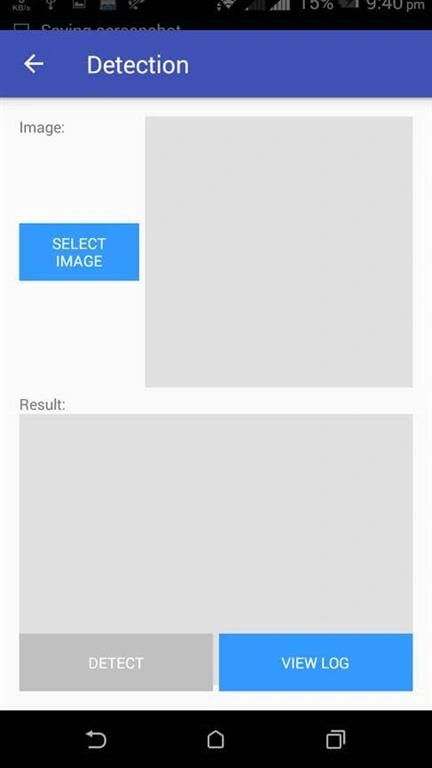
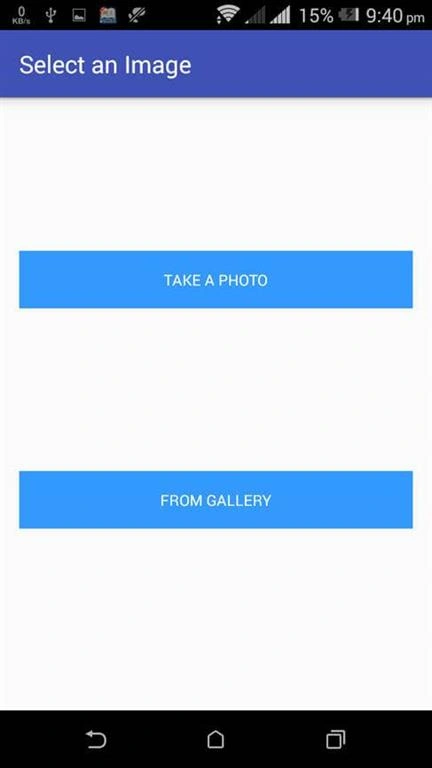
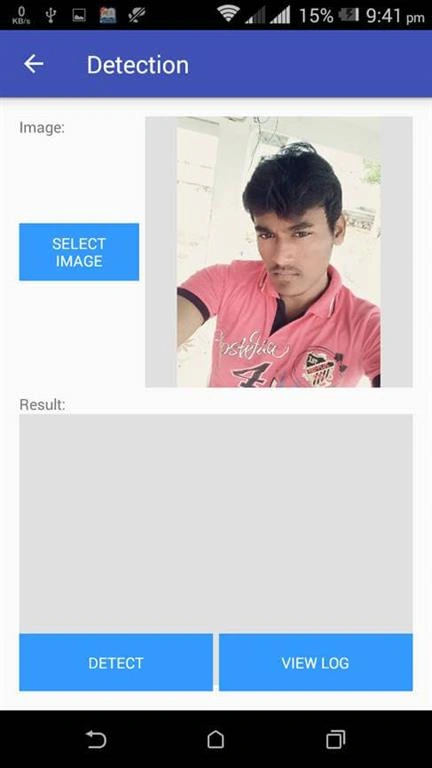
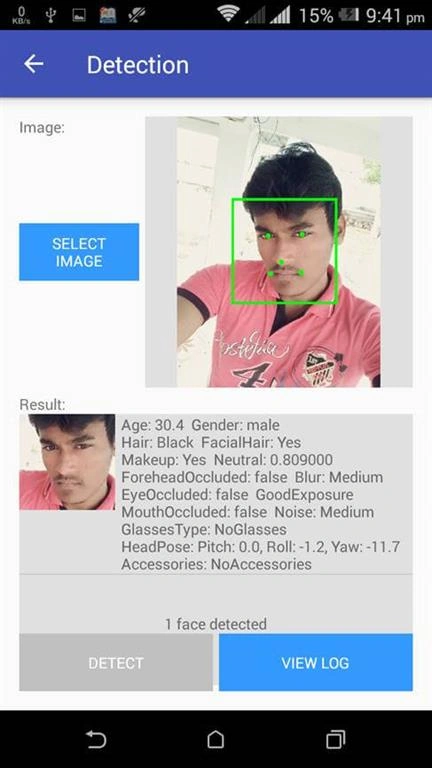
Here, we have successfully detected the face using Face API in the Android app.
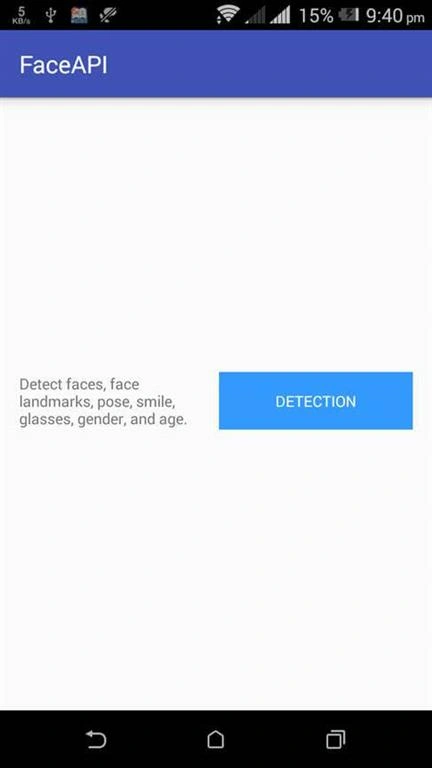
 Don’t forget to like and follow me. If you have any doubts, just comment below.
Matthew chikPosted Jul 28, 2021, 1:31 AM
I used the app running below android 11. It worked but not working in android 11.
Gururaj PujarPosted Sep 11, 2019, 4:25 AM
Hi are there any apis to change the color of hairs and skin tone ?
vijay kumarPosted Apr 10, 2018, 5:01 AM
Hi i developed this application in this application where you developed Sample App class and LogHelper class, but you used in this application.