

Introduction
While I was searching on the internet about comments, I found out about this feature. This feature helps us to know the comments without opening Visual Studio. In modern life, we aren't able to spend more time preparing a project document. Instead of preparing the document, we can use these comment for quick reference.
Exporting comments
Step 1
I have created a sample project with a comment on the top of every method that is available in the class (Refer to the below code).
Program.cs
- using System;
- using System.Collections.Generic;
- using System.Linq;
- using System.Text;
- using Operstion;
- namespace ConsoleApplication {
- class Program {
- static void Main(string[] args) {
- Operation();
- }
- /// <summary>
- /// method to perform operation
- /// </summary>
- public static void Operation() {
- Operstion.Operation op = new Operstion.Operation();
- Console.WriteLine("select the operation");
- Console.WriteLine("\n 1. Additon");
- Console.WriteLine("\n 2. Subtraction");
- Console.WriteLine("\n 3. Division");
- Console.WriteLine("\n 4. Multiplication");
- int operationtype = int.Parse(Console.ReadLine().ToString());
- Console.WriteLine("Enter the value A: ");
- int a = int.Parse(Console.ReadLine().ToString());
- Console.WriteLine("Enter the value B: ");
- int b = int.Parse(Console.ReadLine().ToString());
- int c = 0;
- switch (operationtype) {
- case 1:
- DisplayResult(op.Addition(a, b));
- break;
- case 2:
- DisplayResult(op.Subtraction(a, b));
- break;
- case 3:
- DisplayResult(op.Division(a, b));
- break;
- case 4:
- DisplayResult(op.Multiplication(a, b));
- break;
- }
- }
- /// <summary>
- /// Method to display the result from the user selected operation
- /// </summary>
- /// <param name="result"></param>
- public static void DisplayResult(int result) {
- Console.WriteLine("Result of A and B is :" + result);
- Console.ReadKey();
- }
- }
- }
Operastion.Operation.cs
- using System;
- using System.Collections.Generic;
- using System.Linq;
- using System.Text;
- namespace Operstion {
- public class Operation {
- /// <summary>
- /// Method to perform addition
- /// </summary>
- /// <param name="a"></param>
- /// <param name="b"></param>
- /// <returns></returns>
- public int Addition(int a, int b) {
- return a + b;
- }
- /// <summary>
- /// Method to perform subtraction
- /// </summary>
- /// <param name="a"></param>
- /// <param name="b"></param>
- /// <returns></returns>
- public int Subtraction(int a, int b) {
- return a - b;
- }
- /// <summary>
- /// method to perform division
- /// </summary>
- /// <param name="a"></param>
- /// <param name="b"></param>
- /// <returns></returns>
- public int Division(int a, int b) {
- return a / b;
- }
- /// <summary>
- /// method to perform multiplication
- /// </summary>
- /// <param name="a"></param>
- /// <param name="b"></param>
- /// <returns></returns>
- public int Multiplication(int a, int b) {
- return a * b;
- }
- }
- }
Step 2
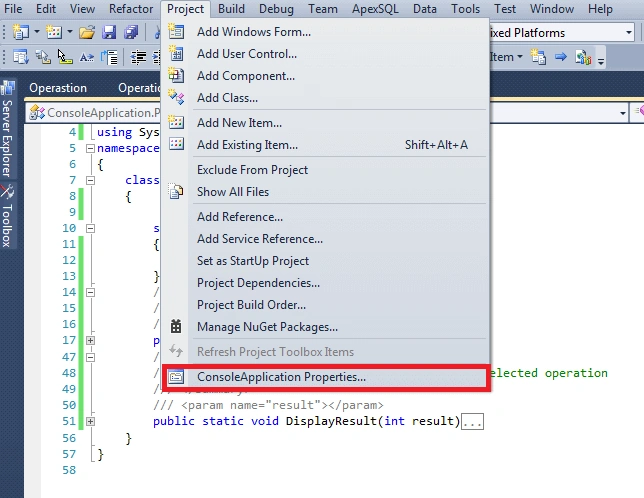
Now go to project -> ConsoleApplication properties…. and select (Name of the project like below).
Step 3
Now consoleApplication properties will display like the below image. In that, select Build option and then select XML documentation file checkbox and specify the XML file location.
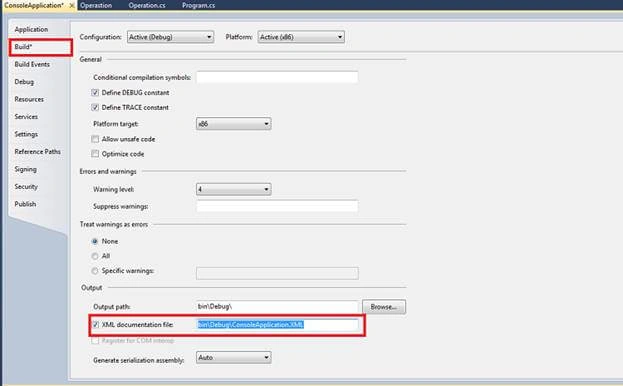
The comments which we have specified in the project have been converted into XML and will generate into XML files on the specified XML path.
In my project, there are two projects - one is a console application project and another one is an operation class project. While building the project, the XML will be generated. (I have also modified the project option for the operation class to generate XML file. We need to enable XML document option for the project that needs comments XML).
Step 4
Now, build the console application and the go the path that is specified to generate the XML file. We will be able to find two XML files with the project name.
When we open these files, we are able to find the comments in the project.
ConsoleApplication.XML
- <?xml version="1.0"?>
- <doc>
- <assembly>
- <name>ConsoleApplication</name>
- </assembly>
- <members>
- <member name="M:ConsoleApplication.Program.Operation">
- <summary> method to perform operation </summary>
- </member>
- <member name="M:ConsoleApplication.Program.DisplayResult(System.Int32)">
- <summary> Method to display the result from the user selected operation </summary>
- <param name="result">
- </param>
- </member>
- </members>
- </doc>
Operstiond.xml
- <?xml version="1.0"?>
- <doc>
- <assembly>
- <name>Operstiond</name>
- </assembly>
- <members>
- <member name="M:Operstion.Operation.Addition(System.Int32,System.Int32)">
- <summary> Method to perform addition </summary>
- <param name="a">
- </param>
- <param name="b">
- </param>
- <returns></returns>
- </member>
- <member name="M:Operstion.Operation.Subtraction(System.Int32,System.Int32)">
- <summary> Method to perform subtraction </summary>
- <param name="a">
- </param>
- <param name="b">
- </param>
- <returns></returns>
- </member>
- <member name="M:Operstion.Operation.Division(System.Int32,System.Int32)">
- <summary> method to perform division </summary>
- <param name="a">
- </param>
- <param name="b">
- </param>
- <returns></returns>
- </member>
- <member name="M:Operstion.Operation.Multiplication(System.Int32,System.Int32)">
- <summary> method to perform multiplication </summary>
- <param name="a">
- </param>
- <param name="b">
- </param>
- <returns></returns>
- </member>
- </members>
- </doc>
The above screenshot shows the comments which we have given in the project have been extracted in the XML with the tags.
Conclusion
Thus, Visual Studio makes us generate given comments as document and makes the developer's work much easier. Also, there are so many tools available in the market to generate comments as a document.
Hadshana KamalanathanPosted Jul 19, 2018, 5:10 AM
Thanks for sharing
Viknaraj ManogararajahPosted Jul 14, 2018, 10:54 PM
Nice Article, Thank you for sharing.........
Packiaraj SanthiyaguPosted Jul 14, 2018, 1:14 PM
nice one, thanks for sharing
Vignesh ManiPosted Jul 14, 2018, 8:02 AM
Thank u for sharing...
Ravishankar NPosted Jul 12, 2018, 12:41 AM
Nice article
Nigel FernandesPosted Jul 10, 2018, 8:23 PM
Hey that's good to know, may be useful