

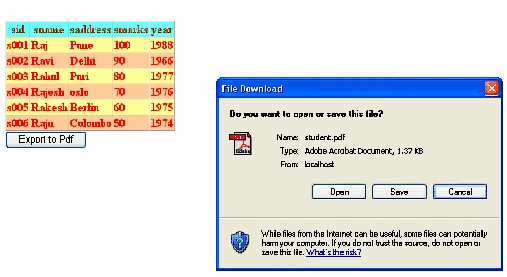
In this article we will know how to export gridview data to pdf format. For that we need itextsharp.dll file. Get it from
Table structure

First add the itextsharp.dll file into the application as click solution explorer- Right click on your application file-Add reference-On browse tab search the itextsharp.dll file from your computer-Click ok-Finish. Then you will notice that a Bin folder will be created where you will find itextsharp.dll file present inside that folder.
- <%@ Page Language="VB" AutoEventWireup="false" CodeFile="Default.aspx.vb" Inherits="_Default" %>
- <!DOCTYPE html PUBLIC "-//W3C//DTD XHTML 1.0 Transitional//EN" "http://www.w3.org/TR/xhtml1/DTD/xhtml1-transitional.dtd">
- <html xmlns="http://www.w3.org/1999/xhtml">
- <head runat="server">
- <title>Untitled Page</title>
- </head>
- <body>
- <form id="form1" runat="server">
- <div>
- </div>
- <asp:GridView ID="GridView1" runat="server" BackColor="#FFFF99"
- Font-Bold="True" ForeColor="Red">
- <HeaderStyle BackColor="#66FFFF" Font-Bold="True" ForeColor="#CC3300" />
- <AlternatingRowStyle BackColor="#FFCC99" />
- </asp:GridView>
- <asp:Button ID="Button1" runat="server" Text="Export to Pdf" />
- </form>
- </body>
- </html>
- Imports System.Data
- Imports System.Data.SqlClient
- Imports iTextSharp.text.pdf
- Imports iTextSharp.text.html
- Imports iTextSharp.text.html.simpleparser
- Imports System.IO
- Imports iTextSharp.text
- Partial Class _Default
- Inherits System.Web.UI.Page
- Dim strConnString As String = System.Configuration.ConfigurationManager.ConnectionStrings.Item("ConnectionString").ToString()
- Dim con As New SqlConnection(strConnString)
- Dim str As String
- Dim com As SqlCommand
- Dim sqlda As SqlDataAdapter
- Dim ds As DataSet
- Protected Sub Page_Load(ByVal sender As Object, ByVal e As System.EventArgs) Handles Me.Load
- con.Open()
- str = "select * from student"
- com = New SqlCommand(Str, con)
- Dim reader As SqlDataReader
- reader = com.ExecuteReader()
- GridView1.DataSource = reader
- GridView1.DataBind()
- con.Close()
- End Sub
- Protected Sub Button1_Click(ByVal sender As Object, ByVal e As System.EventArgs) Handles Button1.Click
- Response.Clear()
- Response.Buffer = True
- Response.ContentType = "application/pdf"
- Response.AddHeader("content-disposition", "attachment;filename=student.pdf")
- Response.Cache.SetCacheability(HttpCacheability.NoCache)
- Dim StringWriter1 As New StringWriter()
- Dim HtmlTextWriter1 As New HtmlTextWriter(StringWriter1)
- GridView1.RenderControl(HtmlTextWriter1)
- Dim StringReader1 As New StringReader(StringWriter1.ToString())
- Dim newDocument As New Document(PageSize.A4, 7.0F, 7.0F, 7.0F, 7.0F)
- Dim HTMLWorker1 As New HTMLWorker(newDocument)
- PdfWriter.GetInstance(newDocument, Response.OutputStream)
- newDocument.Open()
- HTMLWorker1.Parse(StringReader1)
- newDocument.Close()
- Response.Write(newDocument)
- Response.End()
- End Sub
- Public Overrides Sub VerifyRenderingInServerForm(ByVal control As Control
- End Sub
- End Class
Join the conversation! Your thoughts help the community grow.