

Introduction
Azure Cosmos DB emulator is an exciting tool for getting started with Cosmos Db. This allows us to play with Cosmos DB without even having an Azure Subscription. That means you can write Cosmos DB code in your .net application and view your data on emulator.
System Requirements
You cannot run emulator on Window 7, 8. Below are the software and hardware requirements
- Software requirements
- Windows Server 2012 R2, Windows Server 2016, or Windows 10
- Windows Server 2012 R2, Windows Server 2016, or Windows 10
- Minimum Hardware requirements
- 2 GB RAM
- 10 GB available hard disk space
Download Cosmos DB Emulator
You can download emulator from Microsoft Download Center
Running Cosmos DB Emulator
- Extract setup and run emulator exe.
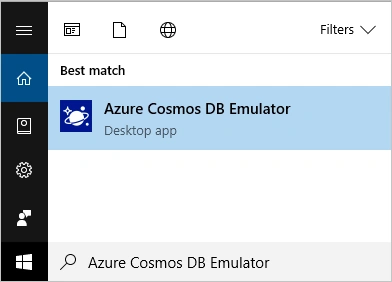
- Once you completed the setup, type Azure Cosmos DB Emulator in Start menu.
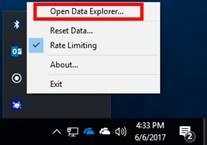
- You can see emulator icon in Windows Trey area (Right Bottom Corner)
Data Explorer
- To view data explorer, right click Emulator icon in Windows Trey area.
- Click on Open Data Explorer option
- You can now see the website opened with URL as https://localhost:8081/_explorer/index.html
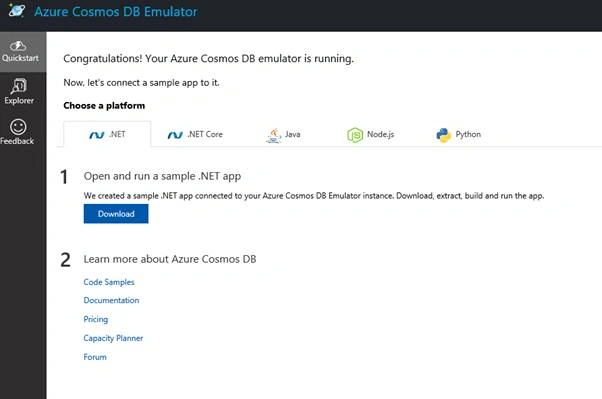
- You can see three options,
- Quick Start: Helps you to download sample projects
- Explorer: Helps you to view Cosmos DB data store by applications
- Feedback
Downloading Sample Project
You can download following sample project from Quick Start menu
- .Net
- .Net Core
- Java
- js
- Python
Let’s download a sample project for .Net and open it in Visual Studio.
Exploring .Net Sample Project
It is a simple To DO List web application written using MVC and Cosmos DB
Let’s view web.config file. You can find two main settings registered in web.config required for Cosmos DB connectivity.
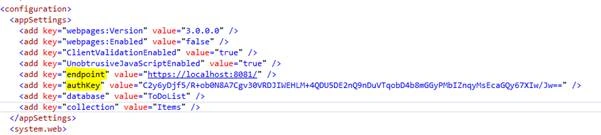
- Endpoint
Endpoint is always set to https://localhost:8081/ as Cosmos DB is available at port 8081. - AuthKey
This work as Primary Key is Cosmos DB environment
In Production Environment you need to replace values of these two settings with actual values.
You can explore DocumentDbRepository.cs file to observe CRUD operation code.
Running Sample Project
- Click Run to run the application
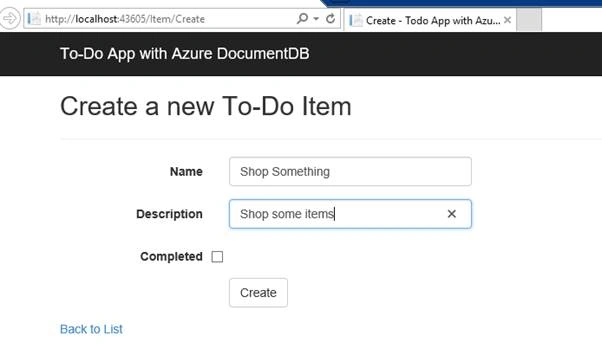
- Click on Create New Item, Add details and click on Create Button
View Cosmos DB Data
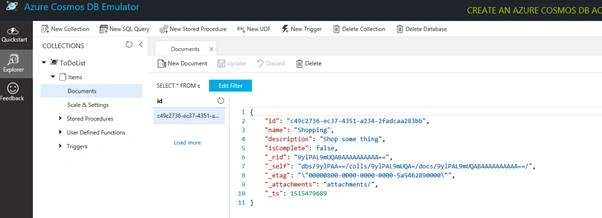
To view Cosmos DB data:
- Open Data Explorer
- Click on Explorer menu
- You can observe data under ToDoList database
Reference
- https://docs.microsoft.com/en-us/azure/cosmos-db/local-emulator
Join the conversation! Your thoughts help the community grow.