

Hello every one. Today, I will show you how to bind the combo box in WPF MVVM. Before starting with this, you have to be clear with the concept of INotifyPropertyChanged and ICommand interface, which was explained in my previous articles, whose links are .
Now, for binding the combo box in WPF MVVM, I will explain two methods -- one is using simple binding and another is using item template. First, we take simple binding, so create one WPF Application and put the combo box in it.
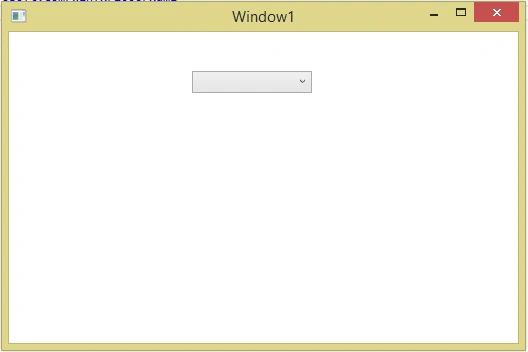
XAML Code
- <Window x:Class="MVVM_Combobox. MainWindow"
- xmlns="http://schemas.microsoft.com/winfx/2006/xaml/presentation"
- xmlns:x="http://schemas.microsoft.com/winfx/2006/xaml"
- Title="Window1" Height="350" Width="525" >
- <StackPanel Orientation="Vertical">
- <ComboBox HorizontalAlignment="Left"
- Margin="183,39,0,0"
- VerticalAlignment="Top"
- Width="120" />
- </StackPanel>
- </Window>
Code - Person.cs
- public class Person
- {
- private int _id;
- public int Id
- {
- get { return _id; }
- set { _id = value; }
- }
- private string _name;
- public string Name
- {
- get { return _name; }
- set { _name = value; }
- }
- }
- private ObservableCollection<Person> _persons;
- public ObservableCollection<Person> Persons
- {
- get { return _persons; }
- set { _persons = value; }
- }
- private Person _sperson;
- public Person SPerson
- {
- get { return _sperson; }
- set { _sperson = value; }
- }
ID=1,Name=”Nirav”
ID=2,Name=”Kapil”
ID=3,Name=”Arvind”
ID=4,Name=”Rajan”
Code
- public ViewModel()
- {
- Persons = new ObservableCollection<Person>()
- {
- new Person(){ Id=1, Name="Nirav"}
- ,new Person(){Id=2,Name="Kapil"}
- ,new Person(){Id=3 , Name="Arvind"}
- ,new Person(){Id=4 , Name="Rajan"}
- };
- }
- xmlns:viewmodel="clr-namespace:MVVM_Combobox.ViewModel"
- <Window.Resources>
- <viewmodel:ViewModel x:Key="vm"></viewmodel:ViewModel>
- </Window.Resources>
- ItemsSource="{Binding Path=Persons}"
- SelectedItem="{Binding Path=SPerson}"
- DisplayMemberPath="Name"
Full Code
- <Window x:Class="MVVM_Combobox.MainWindow"
- xmlns="http://schemas.microsoft.com/winfx/2006/xaml/presentation"
- xmlns:x="http://schemas.microsoft.com/winfx/2006/xaml"
- xmlns:viewmodel="clr-namespace:MVVM_Combobox.ViewModel"
- Title="MainWindow" Height="350" Width="525">
- <Window.Resources>
- <viewmodel:ViewModel x:Key="vm"></viewmodel:ViewModel>
- </Window.Resources>
- <StackPanel Orientation="Vertical" DataContext="{Binding Source={StaticResource vm}}">
- <ComboBox HorizontalAlignment="Left"
- Margin="183,39,0,0"
- VerticalAlignment="Top"
- Width="120"
- ItemsSource="{Binding Path=Persons}"
- SelectedItem="{Binding Path=SPerson}"
- DisplayMemberPath="Name"/>
- </StackPanel>
- </Window>
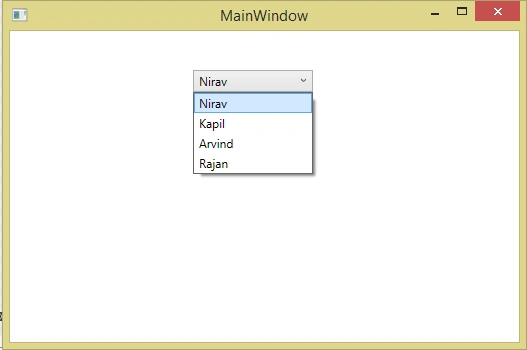
Combo box binding using Item template
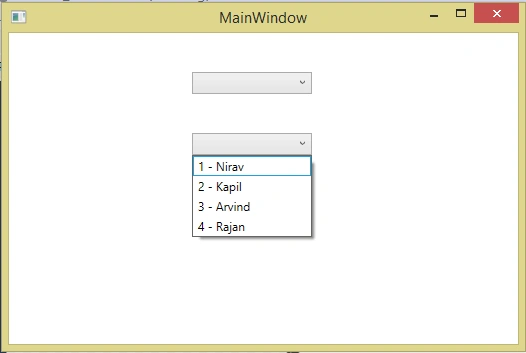
Now, add another combo box in the Window with its item source and the selected item property.
- <ComboBox ItemsSource="{Binding Path=Persons}"
- SelectedItem="{Binding Path=SPerson}"
- Width="120"
- HorizontalAlignment="Left"
- Margin="183,39,0,0"
- VerticalAlignment="Top" >
- </ComboBox>
- <ComboBox ItemsSource="{Binding Path=Persons}"
- SelectedItem="{Binding Path=SPerson}"
- Width="120"
- HorizontalAlignment="Left"
- Margin="183,39,0,0"
- VerticalAlignment="Top" >
- <ComboBox.ItemTemplate>
- <DataTemplate>
- <StackPanel Orientation="Horizontal">
- <TextBlock Text="{Binding Path=Id}"/>
- <TextBlock Text=" - "/>
- <TextBlock Text="{Binding Path=Name}"/>
- </StackPanel>
- </DataTemplate>
- </ComboBox.ItemTemplate>
- </ComboBox>
- <Window x:Class="MVVM_Combobox.MainWindow"
- xmlns="http://schemas.microsoft.com/winfx/2006/xaml/presentation"
- xmlns:x="http://schemas.microsoft.com/winfx/2006/xaml"
- xmlns:viewmodel="clr-namespace:MVVM_Combobox.ViewModel"
- Title="MainWindow" Height="350" Width="525">
- <Window.Resources>
- <viewmodel:ViewModel x:Key="vm"></viewmodel:ViewModel>
- </Window.Resources>
- <StackPanel Orientation="Vertical" DataContext="{Binding Source={StaticResource vm}}">
- <ComboBox HorizontalAlignment="Left"
- Margin="183,39,0,0"
- VerticalAlignment="Top"
- Width="120"
- ItemsSource="{Binding Path=Persons}"
- SelectedItem="{Binding Path=SPerson}"
- DisplayMemberPath="Name"/>
- <ComboBox ItemsSource="{Binding Path=Persons}"
- SelectedItem="{Binding Path=SPerson}"
- Width="120"
- HorizontalAlignment="Left"
- Margin="183,39,0,0"
- VerticalAlignment="Top" >
- <ComboBox.ItemTemplate>
- <DataTemplate>
- <StackPanel Orientation="Horizontal">
- <TextBlock Text="{Binding Path=Id}"/>
- <TextBlock Text=" - "/>
- <TextBlock Text="{Binding Path=Name}"/>
- </StackPanel>
- </DataTemplate>
- </ComboBox.ItemTemplate>
- </ComboBox>
- </StackPanel>
- </Window>
Mazhar AliPosted May 16, 2020, 9:00 AM
Hi sir i have question
Ritesh RajPosted Nov 30, 2019, 3:36 PM
hi @Nirav Daraniya i tried your second combobox as i needed to bind two values from my Combobox but i am not getting the values displayed can you please help me !!!!! i am really struggling in this issue. I tried this but i am not getting the values please refer this code for reference. https://stackoverflow.com/questions/58574522/not-able-to-display-the-the-values-in-combobox-from-the-bound-observable-collect
Akash JackPosted Aug 6, 2019, 12:49 AM
How do I display a default value to the combo box in this case?
Ramjee SanthanamPosted May 15, 2019, 1:50 AM
I used the code like but the data is not binding. Can anyone help me?
Bhavesh JadavPosted Apr 6, 2019, 2:39 AM
Thank you so much Nirav Daraniya, It's helpfull to me.
Monica PachecoPosted Aug 27, 2018, 4:59 PM
Thank you so much the tutorial is really useful. But i have one question, how i can have multiples binding in the <StackPanel Orientation="Vertical" DataContext="{Binding Source={StaticResource vm}}"> . I have two buttons that doesn't work when i use the tag like that.
Richard RolstonPosted Nov 8, 2017, 9:27 PM
Thanks! This was helpful.
Prasanna MuraliPosted Oct 9, 2016, 10:10 AM
Nice post..