
Introduction
- ArrayList<String> groupItem = new ArrayList<String>();
- ArrayList<Object> childItem = new ArrayList<Object>();
- public void setGroupData()
- {
- groupItem.add("Android Version");
- groupItem.add("Iphone Version");
- }
- public void setChildItem() {
- ArrayList<String> child = new ArrayList<String>();
- child.add("CupCake");
- child.add("Donut");
- child.add("Eclair");
- child.add("Froyo");
- childItem.add(child);
- child = new ArrayList<String>();
- child.add("Iphone OS 1.X");
- child.add("Iphone OS 2.X");
- child.add("Iphone OS 3.X");
- child.add("Iphone OS 4.X");
- childItem.add(child);
- }
Step 1
Create an XML file Activitymain.xml and write this:
Step 2
- <CheckedTextView xmlns:android="http://schemas.android.com/apk/res/android" xmlns:tools="http://schemas.android.com/tools"
- android:id="@+id/textView1"
- android:layout_width="wrap_content"
- android:layout_height="60dp" android:layout_marginLeft="5dp"
- android:gravity="center_vertical"
- android:textColor="#45454545"
- android:padding="10dp"
- android:textSize="14sp"
- android:textStyle="bold" />
- <LinearLayout xmlns:android="http://schemas.android.com/apk/res/android"
- xmlns:tools="http://schemas.android.com/tools"
- android:layout_width="match_parent"
- android:layout_height="40dp"
- android:background="@android:color/black"
- android:clickable="true"
- android:orientation="vertical"
- android:paddingLeft="40dp"
- tools:context=".MainActivity" >
- <LinearLayout
- android:layout_width="match_parent"
- android:layout_height="39dp"
- android:gravity="center_vertical" >
- <TextView
- android:id="@+id/textView1"
- android:layout_width="wrap_content"
- android:layout_height="wrap_content"
- android:layout_marginLeft="5dp"
- android:textColor="#FFFFFF"
- android:textSize="14sp"
- android:textStyle="bold" />
- </LinearLayout>
- <View
- android:layout_width="match_parent"
- android:layout_height="1dp"
- android:background="@android:color/white" />
- </LinearLayout>
Step 3
Create a Java class MainActivity.java and write this:
- import android.app.ExpandableListActivity;
- import android.content.Context;
- import android.os.Bundle;
- import android.view.LayoutInflater;
- import android.widget.ExpandableListView;
- import android.widget.ExpandableListView.OnChildClickListener;
- import java.util.ArrayList;
- public class MainActivity extends ExpandableListActivity implements
- OnChildClickListener {
- @Override
- public void onCreate(Bundle savedInstanceState) {
- super.onCreate(savedInstanceState);
- ExpandableListView expandbleLis = getExpandableListView();
- expandbleLis.setDividerHeight(2);
- expandbleLis.setGroupIndicator(null);
- expandbleLis.setClickable(true);
- setGroupData();
- setChildGroupData();
- NewAdapter mNewAdapter = new NewAdapter(groupItem, childItem);
- mNewAdapter
- .setInflater(
- (LayoutInflater) getSystemService(Context.LAYOUT_INFLATER_SERVICE),
- this);
- getExpandableListView().setAdapter(mNewAdapter);
- expandbleLis.setOnChildClickListener(this);
- }
- public void setGroupData() {
- groupItem.add("Android Versions");
- groupItem.add("Iphone versions");
- }
- ArrayList<String> groupItem = new ArrayList<String>();
- ArrayList<Object> childItem = new ArrayList<Object>();
- public void setChildGroupData() {
- /**
- * Add Data For TecthNology
- */
- ArrayList<String> child = new ArrayList<String>();
- child.add("Cupcake");
- child.add("Donut");
- child.add("Eclairs");
- child.add("Froyo");
- childItem.add(child);
- /**
- * Add Data For Mobile
- */
- child = new ArrayList<String>();
- child.add("Iphone OS 1.x");
- child.add("Iphone OS 2.x");
- child.add("Iphone OS 3.x");
- child.add("Iphone OS 4.x");
- childItem.add(child);
- }
- }
Step 4
Create a Java class and write this:
- import android.app.Activity;
- import android.view.LayoutInflater;
- import android.view.View;
- import android.view.View.OnClickListener;
- import android.view.ViewGroup;
- import android.widget.BaseExpandableListAdapter;
- import android.widget.CheckedTextView;
- import android.widget.TextView;
- import android.widget.Toast;
- import java.util.ArrayList;
- @SuppressWarnings("unchecked")
- public class Adapter extends BaseExpandableListAdapter {
- public ArrayList<String> groupItem, tempChild;
- public ArrayList<Object> Childtem = new ArrayList<Object>();
- public LayoutInflater minflater;
- public Activity activity;
- public Adapter(ArrayList<String> grList, ArrayList<Object> childItem) {
- groupItem = grList;
- this.Childtem = childItem;
- }
- public void setInflater(LayoutInflater mInflater, Activity act) {
- this.minflater = mInflater;
- activity = act;
- }
- @Override
- public Object getChild(int groupPosition, int childPosition) {
- return null;
- }
- @Override
- public long getChildId(int groupPosition, int childPosition) {
- return 0;
- }
- @Override
- public View getChildView(int groupPosition, final int childPosition,
- boolean isLastChild, View convertView, ViewGroup parent) {
- tempChild = (ArrayList<String>) Childtem.get(groupPosition);
- TextView text = null;
- if (convertView == null) {
- convertView = minflater.inflate(R.layout.newxml, null);
- }
- text = (TextView) convertView.findViewById(R.id.textView1);
- text.setText(tempChild.get(childPosition));
- convertView.setOnClickListener(new OnClickListener() {
- @Override
- public void onClick(View v) {
- Toast.makeText(activity, tempChild.get(childPosition),
- Toast.LENGTH_SHORT).show();
- }
- });
- return convertView;
- }
- @Override
- public int getChildrenCount(int groupPosition) {
- return ((ArrayList<String>) Childtem.get(groupPosition)).size();
- }
- @Override
- public Object getGroup(int groupPosition) {
- return null;
- }
- @Override
- public int getGroupCount() {
- return groupItem.size();
- }
- @Override
- public void onGroupCollapsed(int groupPosition) {
- super.onGroupCollapsed(groupPosition);
- }
- @Override
- public void onGroupExpanded(int groupPosition) {
- super.onGroupExpanded(groupPosition);
- }
- @Override
- public long getGroupId(int groupPosition) {
- return 0;
- }
- @Override
- public View getGroupView(int groupPosition, boolean isExpanded,
- View convertView, ViewGroup parent) {
- if (convertView == null) {
- convertView = minflater.inflate(R.layout.activity_main, null);
- }
- ((CheckedTextView) convertView).setText(groupItem.get(groupPosition));
- ((CheckedTextView) convertView).setChecked(isExpanded);
- return convertView;
- }
- @Override
- public boolean hasStableIds() {
- return false;
- }
- @Override
- public boolean isChildSelectable(int groupPosition, int childPosition) {
- return false;
- }
- }
Step 5
Output Screen
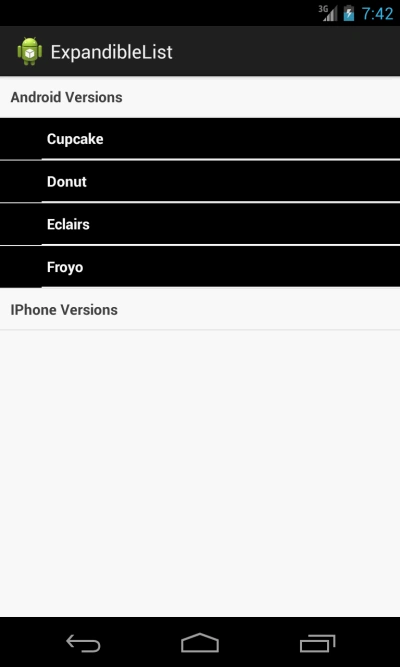
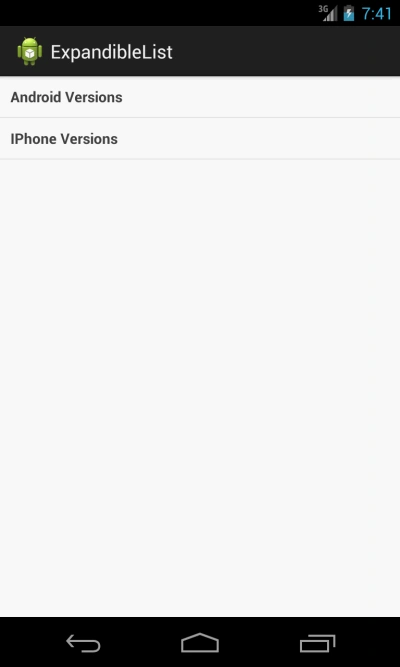 When you click on Android version it gives a list like this:
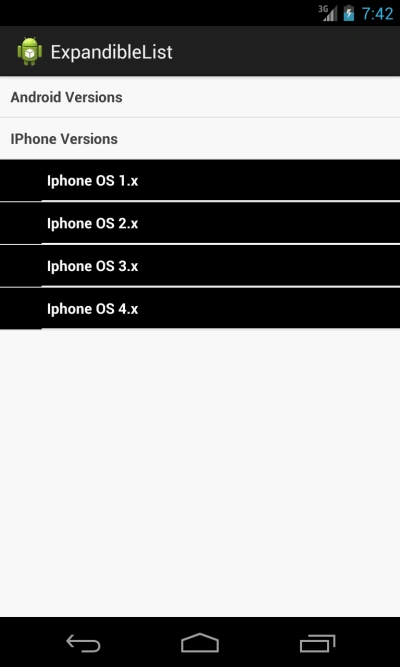
When you click on iPhone Version:
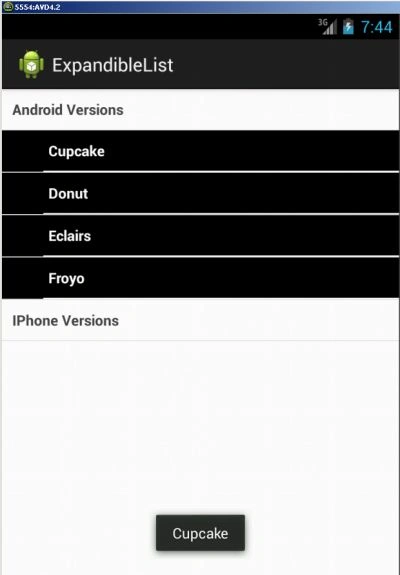
When you click on any version of Android:
When you click on any version of iPhone:
Juan Carlos MorellóPosted Apr 9, 2015, 7:29 AM
Thanks for the code and the explanation, but i have a question. If I have to add another level to the expandible list, what I should add to the code? (for example; Android Versions>Donut>test)