

First Option for expanding/collapsing HTML table row
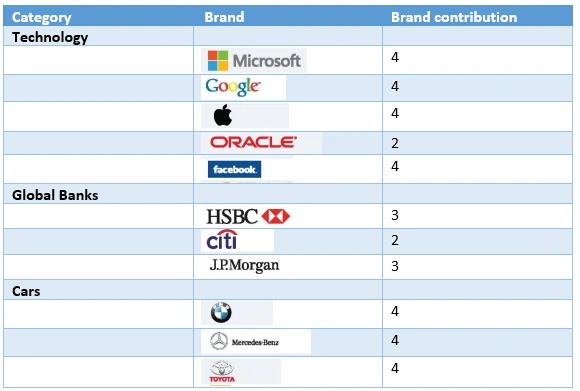
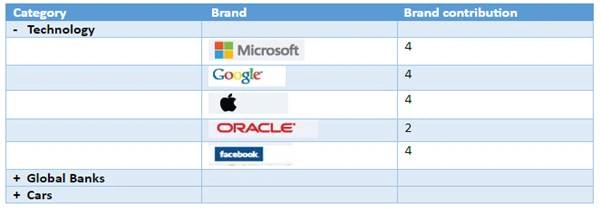
A common UI will have an HTML table of data rows. When we click on "Expand", it shows a detailed breakdown of "child" rows below the "parent" row. In a parent row, click on the “+” sign; it expands the child row with detailed information. At the same time, the parent sign toggles to “- “.
Once we click on “- “sign, then it will collapse child rows with parent sign “+”.
The requirements are,
- Put a class of "parent" on each parent row (tr).
- Give each parent row (tr) an attribute ”data-toggle="toggle"”.
- Give each child row cover under <tbody> a class=hideTr.
Below is the sample of the table structure.
- <table>
- <tr data-toggle="toggle">
- <td >
- <p id="Technology" >
- <b>
- <span class="plusminusTechnology">+</span>
- <span lang="EN-IN">Technology </span>
- </b>
- </p>
- </td>
- <td ></td>
- <td ></td>
- </tr>
- <tbody class="hideTr">
- <tr >
- <td "></td>
- <td >
- <img height="28" src="clip_image001.png" v:shapes="Picture_x0020_5" width="106" />
- </td>
- <td
- <span lang="EN-IN">4</span>
- </td>
- <td
- </td>
- </tr>
- </tbody>
- </table>
Script Code
- <script src="https://ajax.googleapis.com/ajax/libs/jquery/1.11.2/jquery.min.js"></script>
- <script type="text/javascript">
- $(document).ready(function () {
- debugger;
- $('.hideTr').slideUp(600);
- $('[data-toggle="toggle"]').click(function () {
- if ($(this).parents().next(".hideTr").is(':visible')) {
- $(this).parents().next('.hideTr').slideUp(600);
- $(".plusminus" + $(this).children().children().attr("id")).text('+');
- $(this).css('background-color', 'white');
- }
- else {
- $(this).parents().next('.hideTr').slideDown(600);
- $(".plusminus" + $(this).children().children().attr("id")).text('- ');
- $(this).css('background-color', '#c1eaff ');
- }
- });
- });
- </script>

Second option
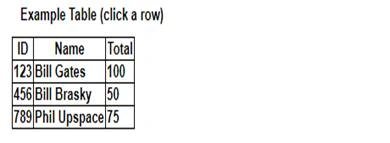
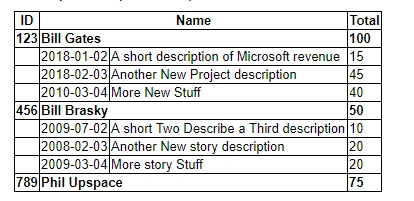
A common UI which will have an HTML table of record rows, in which when we click on "Expand", it shows a detailed breakdown of "child" rows below the "parent" row.
The requirements are:
- Add a class of "parent" on each parent row (tr).
- Give each parent row (tr) an id.
- Give each child row a class of "child-ID" where ID is the id of the parent tr that it belongs to.
- <table id="detail_table" class="detail">
- <thead>
- <tr>
- <th>ID</th>
- <th colspan="2">Name</th>
- <th>Total</th>
- </tr>
- </thead>
- <tbody>
- <tr class="parent" id="row123" title="Click to expand/collapse" style="cursor: pointer;">
- <td>123</td>
- <td colspan="2">Bill Gates</td>
- <td>100</td>
- </tr>
- <tr class="child-row123" style="display: table-row;">
- <td> </td>
- <td>2018-01-02</td>
- <td>A short description of Microsoft revenue </td>
- <td>15</td>
- </tr>
- <tr class="child-row123" style="display: table-row;">
- <td> </td>
- <td>2018-02-03</td>
- <td>Another New Project description</td>
- <td>45</td>
- </tr>
- <tr class="child-row123" style="display: table-row;">
- <td> </td>
- <td>2010-03-04</td>
- <td>More New Stuff</td>
- <td>40</td>
- </tr>
- <tr class="parent" id="row456" title="Click to expand/collapse" style="cursor: pointer;">
- <td>456</td>
- <td colspan="2">Bill Brasky</td>
- <td>50</td>
- </tr>
- <tr class="child-row456" style="display: none;">
- <td> </td>
- <td>2009-07-02</td>
- <td>A short Two Describe a Third description</td>
- <td>10</td>
- </tr>
- <tr class="child-row456" style="display: none;">
- <td> </td>
- <td>2008-02-03</td>
- <td>Another New story description</td>
- <td>20</td>
- </tr>
- <tr class="child-row456" style="display: none;">
- <td> </td>
- <td>2009-03-04</td>
- <td>More story Stuff</td>
- <td>20</td>
- </tr>
- <tr class="parent" id="row789" title="Click to expand/collapse" style="cursor: pointer;">
- <td>789</td>
- <td colspan="2">Phil Upspace</td>
- <td>75</td>
- </tr>
- <tr class="child-row789" style="display: none;">
- <td> </td>
- <td>2008-01-02</td>
- <td>A short New Games description</td>
- <td>33</td>
- </tr>
- <tr class="child-row789" style="display: none;">
- <td> </td>
- <td>20011-04-03</td>
- <td>Another Games description</td>
- <td>22</td>
- </tr>
- <tr class="child-row789" style="display: none;">
- <td> </td>
- <td>20011-04-04</td>
- <td>More Games Stuff</td>
- <td>20</td>
- </tr>
- </tbody>
- </table>
Script Code
- <script src="https://ajax.googleapis.com/ajax/libs/jquery/1.11.2/jquery.min.js"></script>
- <script type="text/javascript">
- $(document).ready(function () {
- $('tr.parent')
- .css("cursor", "pointer")
- .attr("title", "Click to expand/collapse")
- .click(function () {
- $(this).siblings('.child-' + this.id).toggle();
- });
- $('tr[@class^=child-]').hide().children('td');
- });
- </script>
satya bhaskarPosted Jun 27, 2022, 3:08 AM
Please share the complete code for reference to emailId: [email protected]
Venkat SaiPosted Jun 29, 2021, 2:21 PM
Hi Sagar do u have code for Button of expand and collapse please.
Bhavesh iRTMPosted May 21, 2021, 4:42 AM
Please share complete code on [email protected]
Naseem AhmedPosted Dec 31, 2020, 6:03 AM
Pls send source code on my mail - [email protected]
Peter NguyenPosted Aug 18, 2019, 3:17 AM
Hi Sagar! I want to use font awesome icon to change your signs (+/-). Can you permit and fix me? Thank you very much.
vinoth mPosted Aug 15, 2019, 4:26 AM
Hi sagar, i need same kind of Expand/Collapse Table Rows With jQuery. country is first level of record, on clicking '+' sign in country it should show up states(multtiple records) , on clicking '+' sign in stateit should show up town, pincode, papulation, mayor name in single row. , all data should from DB, row count may change for each country or state or state.. need in table format. thanks in advance
Josh RojasPosted May 31, 2019, 8:47 AM
Good day. I hate asking the same question as asked already but how do you make the table start in collapse mode when the page is loaded? Otherwise, this solution is perfect. Thank you.
Masato IndouPosted May 20, 2019, 11:30 PM
Hi there, any chance there is a full source code for this? would be very useful in getting this to work with my stuff :)
raef daoodPosted May 2, 2019, 5:55 AM
The file is sended ?
raef daoodPosted May 2, 2019, 5:34 AM
My email [email protected]
raef daoodPosted May 2, 2019, 5:22 AM
Can you put full source code to download ?