

Introduction
In this article, we are going to explore how to execute python scripts from Power BI. There are multiple in-built visualizations available in Power BI but sometimes you want to use advanced visualization to work on the requirement. We will explore this.
Python Script in Power BI Desktop
We can execute the python scripts on the Power BI desktop. We will now explore step by step process to execute a python script.
Step 1 - Install Python
In order to run the python script on the desktop, we have to first install python on the local machine. In order to execute the python script from Power BI, we need the below python packages and they should be installed.
Python Packges
- Pandas
- Matplotlib
We can use the pip command to install python packages.
Step 2 - Enable Python Scripting in Power BI Desktop
From the power BI desktop, Go to File -> Options & Settings -> Options -> Python Scripting
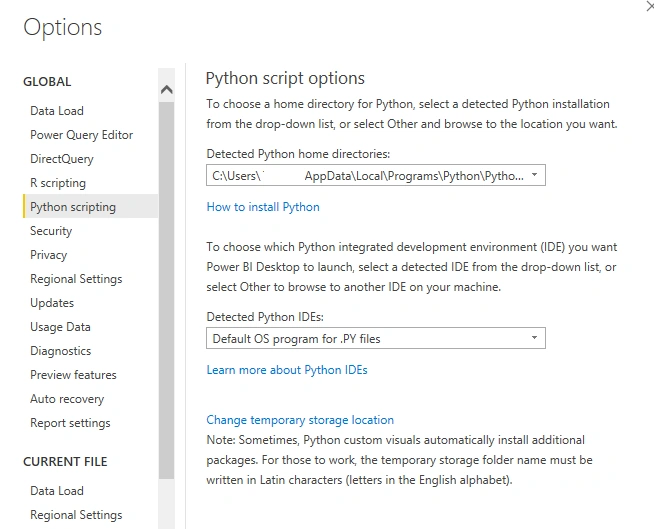
Once, we specify and enable python in power bi desktop, we can execute the python script from Power BI.
Step 3 - Prepare a python script to execute it from Power BI
# importing pandas package
import pandas as pd

# making data frame from csv file
data = pd.read_csv("emp.csv")

# generating one row
row1 = data.sample(n = 1)
Now the python script is ready. But before we execute the python script, there are few limitations to execute python scripts in Power BI.Limitations for python script in Power BI is as below :
- We can only use pandas data frame to execute python scripts from Power BI
- We can only execute python script from Power BI which runs more than 30 minutes
- We can't get user input while executing the python script in Power BI
Step 4 - Execute Python Script from Power BI
Now, the python script is ready so we can use it to execute it from Power BI.
Go to the Home page of the Power BI desktop, select Get Data -> Other -> Python Script -> Connect.
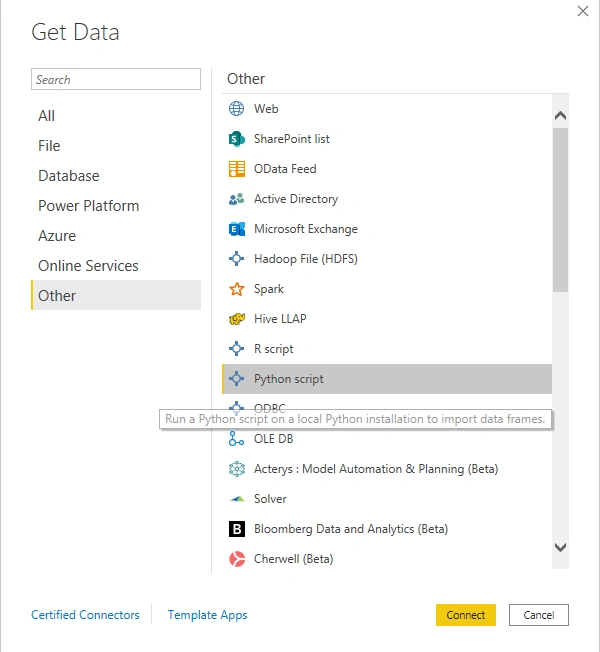
The installed python version which is mentioned in the Power BI desktop will be used as a python engine to execute the python script.
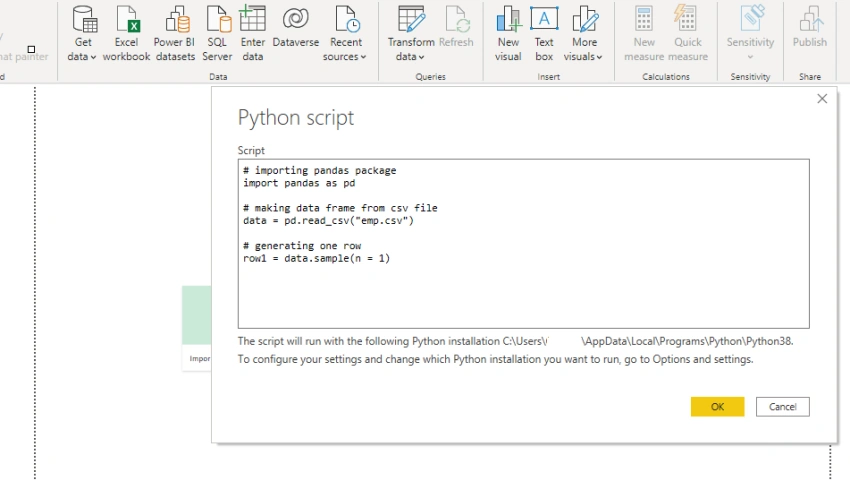
After you select OK and python script will execute in the Power BI Desktop.
Other ways to Use Python in Power BI
Using Power BI Query Editor
- We can also use Power BI query editor to execute python scripts from Power BI. We can perform data cleansing with the integration of Power BI Query editor using Python.
- Once you import the data, you can go to the Power BI Query Editor and select the Transform Data
- In the transform tab of Power BI Query editor, you can post and execute the python script.
Using External IDEs
- We can also external python IDE in power Bi to execute python script from Power BI.
- Once we enable and link external IDEs, we can work on the external IDE in power BI and execute the python scripts.
Conclusion
So, in this article, we explored how to execute the python script from Power BI. We also explored the multiple ways to configure and execute python scripts from Power BI.
Steve CrossPosted Jan 8, 2023, 2:57 PM
Why Power BI works with Python and R script and not C#? C# is an open source language and it's Microsoft's language of choice
Koshila SenadhiraPosted Dec 1, 2022, 11:17 AM
Interesting Article!