

Are you utilizing SQL Server? Are deployments still handled manually by certain teams or DBAs? Is there no intention to incorporate CI/CD tools due to project or budget limitations? Nonetheless, there's an opportunity to deploy multiple SQL scripts.
Introduction
In database management, executing SQL scripts is a routine task. However, when dealing with multiple SQL files, the process can become tedious and time-consuming. SQL Server provides various methods to execute SQL scripts, one of which involves using batch scripts. In this article, we will delve into how to execute multiple SQL files in SQL Server using a batch script efficiently.
Understanding Batch Scripting
Batch scripting is a powerful tool for automating tasks in Windows environments. It allows users to execute a series of commands or scripts in a sequential manner. These scripts are saved with a .bat extension and can be run by simply double-clicking them or through the command line.
Pre-requisite for Batch File
- This script deploys all the .sql files present in a directory or sub-directories in an order.
- NO SPACE in .sql file name.
- NO SPACE in sub-directories.
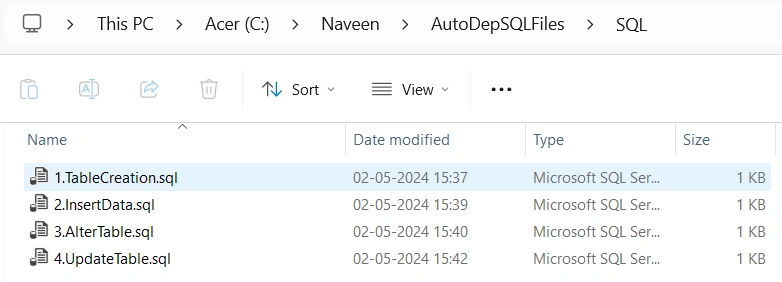
- To execute .sql in order, add a numeric sequence as follows:
createtable.sql
insertdata.sql
execstoredproc....etc. - Specify the SERVERNAME, which is mandatory.
- DATABASENAME is optional (Commented-out). In case enabling add (-d%dbname%) after -E at line like (SQLCMD -S%SERVERNAME% -E -d%dbname% -b -i%%G >> :: :: %logfilepath%).
- Specify the SCRIPTLOCATION, which is mandatory.
- The execution log will be captured on the same SCRIPTLOCATION for successful execution and failure.
Steps to Follow
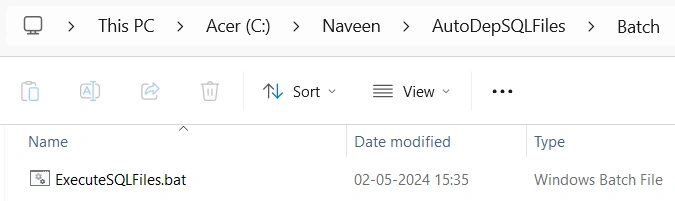
- Copy the below batch script and save it as "ExecuteSQLFiles.bat".
- Update SERVERNAME, SCRIPTLOCATION, and LOGLOCATION accordingly for your needs.
:: Pre-requisites to follow :: This script deploys all the .sql files present in a directory or sub-directories in an order. :: NO SPACE in .sql file name. :: NO SPACE in sub-directories. :: To execute .sql in order add numeric sequence as follows: 1.createtable.sql, :: 2.insertdata.sql, 3.execstoredproc....etc. :: Specify the SERVERNAME which is mandatory :: DATABASENAME is optional (Commented-out). In case enabling add (-d%dbname%) after -E at line like :: (SQLCMD -S%SERVERNAME% -E -d%dbname% -b -i%%G >> :: :: %logfilepath%). :: Specify the SCRIPTLOCATION which is mandatory. :: The execution log will be captured on the same SCRIPTLOCATION for successful execution and failure. @echo off setlocal enabledelayedexpansion set SERVERNAME=LAPTOP-AOVLBDQ4 ::set DATABASENAME=MyWork set SCRIPTLOCATION=C:\Naveen\AutoDepSQLFiles\SQL\ set LOGLOCATION=C:\Naveen\AutoDepSQLFiles\Logs\ set hr=%time:~0,2% if "%hr:~0,1%" equ " " set hr=0%hr:~1,1% set logfilepath= %LOGLOCATION%\ExecutionLog_%date:~-4,4%%date:~-10,2%%date:~-7,2%_%hr%%time:~3,2%%time:~6,2%.log set cmd='dir %SCRIPTLOCATION%\*.sql /b/s' FOR /f %%G IN (%cmd%) DO ( echo ******PROCESSING %%G FILE****** echo ******PROCESSING %%G FILE****** >> %logfilepath% SQLCMD -S%SERVERNAME% -E -b -i%%G >> %logfilepath% IF !ERRORLEVEL! NEQ 0 GOTO :OnError ) GOTO :Success :OnError echo ERROR ERROR ERROR echo One\more script(s) failed to execute, terminating bath. echo Check output.log file for more details EXIT /b :Success echo ALL the scripts deployed successfully!! EXIT /b - Copy the below SQL scripts into separate files in respective folders.
--File Name 1.TableCreation.sql USE MyWork GO CREATE TABLE dbo.Employee (Id INT IDENTITY(1,1), Emp_Name VARCHAR(100)) --File Name 2.InsertData.sql USE MyWork GO INSERT dbo.Employee SELECT 'Naveen' UNION SELECT 'Kumar' --File Name 3.AlterTable.sql USE MyWork GO ALTER TABLE dbo.Employee ADD Email VARCHAR(200) --File Name 4.UpdateTable.sql USE MyWork GO UPDATE dbo.Employee SET Email = '[email protected]' WHERE Emp_Name = 'Naveen' UPDATE dbo.Employee SET Email = '[email protected]' WHERE Emp_Name = 'Kumar' - Execute the bat file, and upon successful completion, a log file will be generated in the Log directory.
- All SQL scripts within the folder will have been executed.
- If there are any failures, refer to the execution log for details
Folder Structure
Batch File
SQL Files
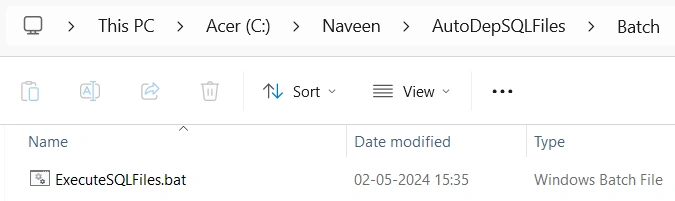
Log File
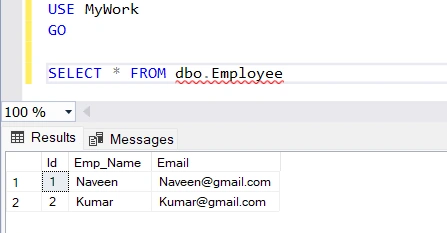
Verify The Deployment
As a part of this process, we initiated by creating an Employee table with Id and Emp_Name columns in the first file. Subsequently, we inserted two rows in the second file, followed by altering a table to include an Email column in the third script. Finally, in the fourth script, we updated the employee records to include email addresses.
Conclusion
Batch scripting provides a convenient way to execute multiple SQL files in SQL Server. By automating the execution process, batch scripts help streamline database management tasks, improve efficiency, and ensure consistency in deployment processes. By following the steps outlined in this article, users can easily create and execute batch scripts to handle their SQL execution needs effectively.
Join the conversation! Your thoughts help the community grow.