

Introduction
In this article, we will learn how to export an Excel file using the EPPlus plugin in MVC.NET. The EPPlus plugin is open-source and easy to use.
EPPlus allows the users to set cell ranges, borders, charts, pictures, shapes, comments, tables, protection, data validation, conditional formatting, formula calculation, and cell style such as alignment, cell color, font color, font style, font-size, etc.
We have to follow some simple steps for exporting an Excel in MVC.NET.
Step 1. Install the EPPlus Plugin
First of all, we need to install the EPPlus plugin from NuGet Package Manager by just following the below points.
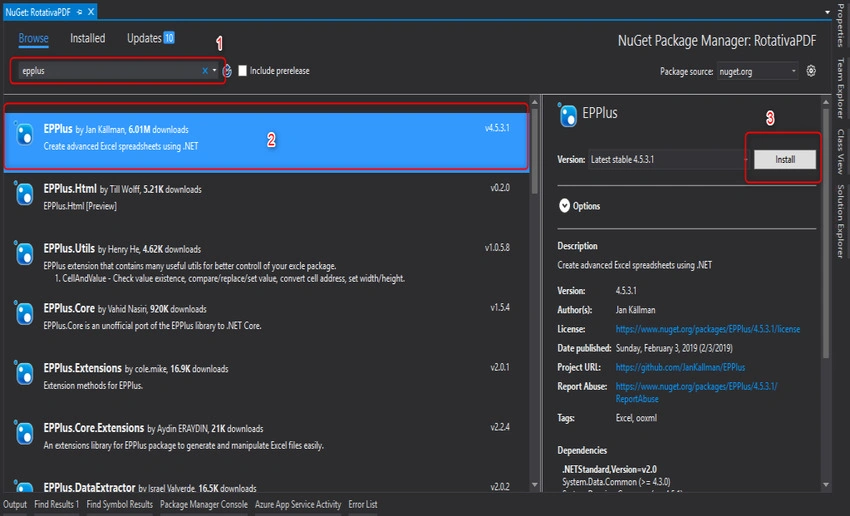
Step 2. Create a method for Excel export
Add these three namespaces at the top of the controller.
using OfficeOpenXml;
using System.IO;
using RotativaPDF.Models;
using System.Data;
using OfficeOpenXml.Table;
Then, we need to write the logic for the Excel export method.
public ActionResult ExcelExport()
{
    empEntities context = new empEntities();
    List<emp_table> FileData = context.emp_table.ToList();
    try
    {
        DataTable Dt = new DataTable();
        Dt.Columns.Add("ID", typeof(string));
        Dt.Columns.Add("Name", typeof(string));
        Dt.Columns.Add("Age", typeof(string));
        Dt.Columns.Add("Contat", typeof(string));
        foreach (var data in FileData)
        {
            DataRow row = Dt.NewRow();
            row[0] = data.id;
            row[1] = data.name;
            row[2] = data.age;
            row[3] = data.contact;
            Dt.Rows.Add(row);
        }
        var memoryStream = new MemoryStream();
        using (var excelPackage = new ExcelPackage(memoryStream))
        {
            var worksheet = excelPackage.Workbook.Worksheets.Add("Sheet1");
            worksheet.Cells["A1"].LoadFromDataTable(Dt, true, TableStyles.None);
            worksheet.Cells["A1:AN1"].Style.Font.Bold = true;
            worksheet.DefaultRowHeight = 18;
            worksheet.Column(2).Style.HorizontalAlignment = OfficeOpenXml.Style.ExcelHorizontalAlignment.Left;
            worksheet.Column(6).Style.HorizontalAlignment =
Call the ExcelExport method for creating an Excel file and call the "Download" method for downloading the file.
In the lines given below, we are creating an instance of ExcelPackage.
using (var excelPackage = new ExcelPackage(memoryStream))
We converted the list into the data table, loaded this data table into a worksheet, and gave some properties, like font style, alignment, row height, column width, etc.
var worksheet = excelPackage.Workbook.Worksheets.Add("Sheet1");
worksheet.Cells["A1"].LoadFromDataTable(Dt, true, TableStyles.None);
worksheet.Cells["A1:AN1"].Style.Font.Bold = true;
worksheet.DefaultRowHeight = 18;
worksheet.Column(2).Style.HorizontalAlignment = OfficeOpenXml.Style.ExcelHorizontalAlignment.Left;
worksheet.Column(6).Style.HorizontalAlignment = OfficeOpenXml.Style.ExcelHorizontalAlignment.Center;
worksheet.Column(7).Style.HorizontalAlignment = OfficeOpenXml.Style.ExcelHorizontalAlignment.Center;
worksheet.DefaultColWidth = 20;
worksheet.Column(2).AutoFit();
Using this line, we stored the worksheet bytes into sessions for downloading from other methods.
Session["DownloadExcel_FileManager"] = excelPackage.GetAsByteArray();
Then, we called the Download() method for downloading the Excel file.
Step 3. Call from View
We are writing this code from the View side so as to display a button for exporting the Excel sheet. On the click of it, it calls the ExcelExport method. If this method gets called without an error, then we can call the Download method in the success part of the AJAX call, for downloading the Excel File.
<button onclick="DownloadExcel()" class="btn btn-success" style="margin-top:20px;">Excel Export</button>
<script>
    function DownloadExcel() {
        $.ajax({
            type: "POST",
            url: "/Excel/ExcelExport",
            cache: false,
            success: function (data) {
                window.location = '/Excel/Download';
            },
            error: function (data) {
                Materialize.toast("Something went wrong.", 3000, 'rounded');
            }
        });
    }
</script>
Output

Zeynep BARANPosted Dec 7, 2021, 8:36 AM
Greetings, I wrote the codes exactly as you said, but when I run the code, it gives an error as upload excel file. Actually I am uploading an excel file with xlsx extension? What is the reason why it sees it as null directly?
Edeline FricaPosted Nov 26, 2020, 12:56 PM
Y si quiero exportar a formato opent document .ods en vez de excel, es el mismo procedimiento o hay alguna variante?
Vinodh SangaralingamPosted Nov 23, 2020, 5:14 AM
Thanks Kaushik.
Raman P.Posted Mar 27, 2020, 1:51 AM
How to set column as datetime only and if i entered string how to set datetime only error message
Alexis MontasPosted Feb 18, 2020, 12:35 PM
I can make column "A" support a default format, example date?
Rinka SaiPosted Feb 2, 2020, 10:17 PM
Can i create excel with formula ?
Geho Da FirenzePosted Nov 1, 2019, 1:50 PM
"empEntities","emp_table","Session","JsonRequestBehavior doesnt exist in current context" why is that??
Chandana HTPosted Oct 24, 2019, 4:50 AM
Hi,how can i add border for cell
Lâm TrungPosted Jul 23, 2019, 11:56 PM
Hi , how can i add title for each sheet
Kevin BrackPosted Mar 16, 2019, 2:46 PM
Thanks for this superb post. Also helpful ZetExcel.com
Talaviya BhavdipPosted Mar 5, 2019, 12:07 AM
Nice explanation Kaushik Dudhat